




So, you want to advertise on Google? Smart move. At its core, it’s about setting up a Google Ads account, picking the right kind of campaign for your business—like Search or Shopping—then telling Google who you want to reach and how much you’re willing to spend.
It all runs on a pay-per-click model, so you only stump up the cash when someone actually interacts with your ad. This gives you a direct line to UK customers who are actively looking for what you sell.
How Do I Advertise on Google: Your First Steps in Google Advertising
For UK small businesses and ecommerce brands, figuring out how to advertise on Google can feel like a massive task. But honestly, it’s more straightforward than you might think. This isn’t about interrupting people’s day; it’s about being the answer they’re already searching for.
The whole system is built around the pay-per-click (PPC) model. You don’t pay for your ad just to be seen; you only pay when a potential customer actually clicks on it. This simple fact makes it an incredibly efficient way to spend your marketing budget because you’re paying for genuine interest.
Before you spend a single pound, though, you need a few things sorted: a decent website that’s easy for customers to use, clear goals for what you want your ads to achieve, and a really good idea of who your ideal customer is.
Understanding the Landscape
Imagine trying to sell your products in a market where one company practically owns the entire place. In the UK, that’s Google, which commands a staggering 93.69% of the search engine market share.
This dominance is exactly why it works so well. You’re putting your business right where nearly every single potential customer is looking. It’s no wonder so many marketing pros pour a huge chunk of their budget into Google Ads—it’s simply where the customers are.
Key Campaign Types for UK Businesses (How Do I Advertise on Google)
Google gives you a few different campaign types to play with, and each one is built for a different job. Getting your head around these is the first real step to building a winning strategy. To make it a bit easier, here’s a quick rundown of the main options.
Google Ads Campaign Types at a Glance
This table breaks down the most common campaign types and what they’re best used for, helping you match the right tool to your business goals.
| Campaign Type | Best For | Where Ads Appear |
|---|---|---|
| Search | Capturing immediate demand from people actively looking for your products or services. Think emergency plumbers or specific software. | Top of Google search results pages as text ads. |
| Shopping | Ecommerce brands that want to showcase products with images, prices, and reviews directly in search results. | The ‘Shopping’ tab and visual product carousels in search results. |
| Display | Building brand awareness and reaching a wider audience across the web, before they’re actively searching. | Millions of websites, apps, and YouTube in the form of banners, images, and video ads. |
| Performance Max | An all-in-one, AI-driven campaign that targets customers across every Google channel to maximise conversions. | Search, Display, YouTube, Discover, Gmail, and Maps – all from a single campaign. |
Choosing the right campaign from the start is critical. They all serve a different purpose, and picking the wrong one is like trying to use a screwdriver to hammer in a nail.
Here’s a look at the main players you’ll be working with:
- Search Campaigns: These are the classic text ads you see at the top of Google. They’re perfect for grabbing customers with high intent—people who are typing in exactly what they need, right now.
- Shopping Campaigns: Absolutely essential for ecommerce. These are the visual product listings with images and prices. If you sell products online, you need to be here.
- Display Campaigns: Think of these as digital billboards. They are image and video ads that show up across a huge network of websites, apps, and on YouTube, great for getting your brand name out there.
- Performance Max: This is Google’s newest, all-in-one campaign that uses AI to run your ads across every channel. It finds the best way to hit your conversion goals, taking a lot of the guesswork out of it.
The right choice completely depends on your goals. A local electrician will live on Search ads to get urgent calls, whereas an online fashion boutique will rely heavily on Shopping campaigns to drive sales. For a more detailed look, check out our complete guide on how to advertise through Google.
How Do I Advertise on Google: Building Your First Google Ads Campaign
Right, it’s time to roll up our sleeves and move from theory to action. Getting your first Google Ads campaign off the ground isn’t about being a technical whizz; it’s about being methodical and applying some good old-fashioned common sense. We’ll walk through the essentials together.
To make this feel real, let’s use a running example: a small, London-based craft gin distillery looking to boost its online sales.
First up, you’ll need to set up your Google Ads account. This bit is quite straightforward – you’ll just need to plug in your business info and payment details. Once you’re in, the dashboard can look a bit intimidating, but don’t panic. We’ll focus only on what you need to get launched.
Defining Your Campaign Objective
Before you click a single button, you need to be crystal clear on what you want this campaign to actually do. Google cleverly structures its campaign setup around specific business goals, which forces you to think about the end result from the get-go. Honestly, this is the most important first step.
For our craft gin distillery, the main goal is to sell more gin directly from their website. Simple. So, they would choose “Sales” as their campaign objective.
Other common goals you might see are:
- Leads: Perfect for service-based businesses – think marketing agencies or local plumbers – who want people to fill out a contact form or pick up the phone.
- Website Traffic: A solid choice if your immediate goal is just to get more eyeballs on your content or a shiny new product page.
- Brand Awareness and Reach: This is all about getting your name out there. It aims to show your ads to as many relevant people as possible, often used for new brand launches.
Picking the right objective gives Google’s algorithm a massive hint about what you’re trying to achieve, which in turn influences the bidding strategies and features it’ll suggest later on.
Key Takeaway: Your campaign objective isn’t just a setting to tick off. It’s the very foundation of your strategy. By aligning it with a real business outcome, like “increase online orders by 15%,” you ensure you’re not just spending money, but investing it wisely.
Setting Your Sights on the Right Audience (How Do I Advertise on Google)
Now, let’s tell Google where and who your customers are. One of the best things about advertising on Google is just how specific you can get with your targeting, which is an absolute game-changer for UK businesses.
Our London gin distillery could start by targeting the entire UK. But they could also get clever and run a separate, smaller campaign just for London postcodes, pushing a special “local delivery” offer. This kind of control stops you from burning through your budget on clicks from places you can’t even deliver to.
Beyond geography, you can also layer on audience segments. This lets you show ads to people based on what they’re interested in and their online habits. For the gin brand, targeting users interested in “Cocktails & Recipes” or “Food & Dining” would be a no-brainer. This layered approach means your ads are not only seen in the right place but by the right people. Getting the fundamentals of how Google Ads work is crucial here.
Finding the Right Keywords
For any Search campaign, keywords are the absolute backbone. These are the words and phrases people are typing into Google that will trigger your ad. Your job is to climb inside your customer’s head and figure out what they’re searching for.
The best place to start is Google’s own Keyword Planner, which you’ll find inside your Ads account. Our gin distillery wouldn’t just bid on “gin.” It’s far too broad and would cost a fortune. Instead, they’d use the planner to unearth more specific, valuable terms.
Here’s a glimpse of what their keyword list might look like:
- High-Intent Keywords: These are the golden phrases that show someone has their wallet out.
- buy craft gin online UK
- London dry gin delivery
- rhubarb gin for sale
- Research-Based Keywords: These are used by people who are still browsing and gathering information.
- best gin for a negroni
- how is artisan gin made
- gin tasting sets UK
Having a mix like this allows you to catch customers at different points in their journey.
Crafting Ad Copy That Converts (How Do I Advertise on Google)
Finally, the ad itself. You’ve got very limited space, so every single word has to earn its place. The aim is to be relevant, compelling, and incredibly clear about what you’re offering.
A solid ad has three main parts:
- Headlines: Keep them short, punchy, and make sure they include your main keywords.
- Descriptions: This is where you can add more detail about your product and what makes you special (your USPs).
- Call to Action (CTA): Literally tell the user what you want them to do next.
Let’s quickly knock up an ad for our gin distillery, targeting the keyword “buy craft gin online UK”:
| Ad Component | Example Text |
|---|---|
| Headline 1 | Buy Craft Gin Online UK |
| Headline 2 | Award-Winning London Distillery |
| Headline 3 | Free Delivery On All Orders |
| Description 1 | Discover unique, small-batch gins handcrafted in the heart of London. From classic dry to vibrant fruit flavours. |
| Description 2 | Order today for fast, free UK delivery direct from our distillery. Perfect for gifts or your next G&T. |
This ad works. Why? Because it directly mirrors what the user searched for, shouts about key benefits (award-winning, free delivery), and leaves no doubt about what they’ll get. By following this structured process—objective, targeting, keywords, and creative—you’ll have built a solid foundation for a killer first campaign.
How Do I Advertise on Google: Choosing the Right Campaign Type for Your Business
Okay, so you’ve got your account set up. Now for the big question: which type of campaign is actually going to make you money? This is where a lot of businesses go wrong. They just pick one and hope for the best, but that’s like using a sledgehammer to hang a picture frame.
Getting a solid return on your investment means matching the right campaign type to your specific business goal. For UK SMEs and ecommerce brands, there are a few heavy hitters you absolutely need to get your head around. Think of them as different tools in your marketing toolbox, each designed for a specific job.
This simple decision tree helps visualise that first, crucial choice you’ll need to make.
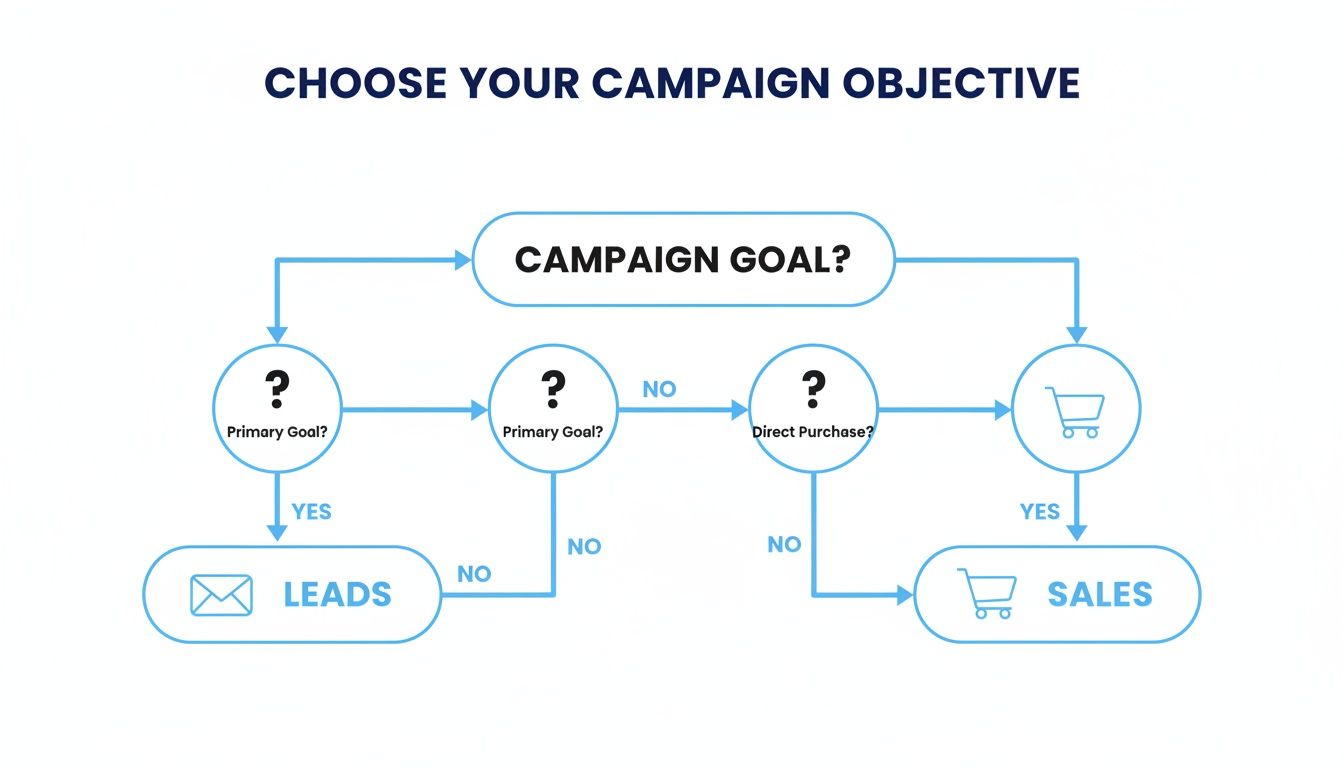
Ultimately, what you’re trying to achieve boils down to one of two things: generating leads for a service or driving sales for a product. This single decision is what points you in the right direction.
Search Campaigns: The Bedrock of Lead Generation
Search campaigns are your frontline soldiers. These are the simple text ads that pop up right at the top of Google when someone is actively looking for what you do. They are incredibly powerful because they capture intent at its absolute peak.
Picture this: a homeowner in Manchester has a burst pipe at 2 AM. They aren’t browsing; they’re frantically Googling “emergency plumber Manchester.” A well-placed Search ad puts your business right there in their moment of need. It’s why Search is the undisputed king for service businesses, from solicitors to electricians. You’re providing the direct answer to their urgent question.
In the UK, where Google basically has a monopoly on search, the conversion rates for search ads consistently blow other ad types out of the water. Nothing beats it for lead generation.
Shopping Campaigns: An Ecommerce Essential (How Do I Advertise on Google)
If you’re selling physical products online, Shopping campaigns are non-negotiable. Full stop. These are the product listings you see in the search results, complete with an image, price, and your brand name. For an online fashion boutique or someone selling artisanal dog treats, they are your digital shop window.
Getting started does require a bit more legwork. You’ll need to set up a Google Merchant Centre account and upload a product feed. This is basically just a spreadsheet with all your product info—titles, prices, images, stock levels, and so on.
Don’t let the technical side put you off, because getting this right is critical. A clean, optimised feed is the difference between your products showing up for the right searches or not showing up at all. It directly impacts your return on ad spend.
Pro Tip: Keep your product feed meticulously updated. Nothing irritates a potential customer more than clicking an ad for a product that’s out of stock or has the wrong price. Regular, automated updates are your best friend here.
Performance Max: The AI-Powered Growth Engine
Then you have Performance Max (PMax), Google’s AI-driven powerhouse. Think of it as an “all-in-one” campaign. You give it your business goals, a budget, and your creative assets (text, images, videos), and its machine learning finds customers for you across all of Google’s channels—Search, Display, YouTube, Gmail, the lot.
Google’s AI does the heavy lifting, figuring out the best channel and audience mix to get you the most conversions for your budget.
So, when should you unleash PMax? It’s perfect for businesses looking to scale aggressively or for those who already have a decent amount of conversion data for the algorithm to learn from. For example, that online fashion boutique with steady sales from Shopping could use PMax to find completely new audiences and drive growth across the entire Google network.
Recent AI-driven campaigns have shown they can deliver a serious uplift in conversions, making them a powerful tool for ambitious businesses. You can dig into more of the data behind this and other Google Ads statistics to see the bigger picture. It all comes down to understanding your immediate goals and matching them to the unique strengths of each campaign type.
How Do I Advertise on Google: Managing Your Budget and Tracking Performance
Getting your campaign live is a great start, but the real magic happens in how you manage your money from here on out. Without a smart budget strategy and a solid way to track what’s working, you might as well be throwing your cash into a black hole. Let’s make sure every pound you spend is pulling its weight.
It all begins with picking a bidding strategy that actually fits where your business is right now. Google throws a lot of automated options at you, but they’re definitely not all the same. Knowing the difference is what separates the campaigns that fly from the ones that flop.
Choosing Your Bidding Strategy
Your bidding strategy is basically you telling Google how to spend your budget to get what you want. Two of the most common automated strategies you’ll come across are ‘Maximise Clicks’ and ‘Target CPA’ (Cost Per Acquisition).
-
Maximise Clicks: Just like it sounds, this strategy aims to get as many clicks as it can within your daily budget. It’s a fantastic starting point for a brand-new campaign when you have zero performance data. The goal here is simple: drive traffic to your site and start learning which keywords and ads are actually getting people to click.
-
Target CPA: This one’s a bit more advanced and is laser-focused on conversions. You set a maximum price you’re happy to pay for a specific action—like a sale or a form submission. Google’s AI then gets to work, adjusting your bids in real-time to try and hit that target cost. This is the one you switch to once you’ve got a decent, steady flow of conversions coming in.
Think of a new ecommerce store. They might kick things off with ‘Maximise Clicks’ for a couple of weeks just to get a feel for which products people are interested in. Once they’ve clocked at least 15-30 conversions in a month, they can confidently switch to ‘Target CPA’ and tell Google to focus only on driving profitable sales. You can get into the nitty-gritty of this in our guide on how much Google Ads should cost and how to set a smart budget.
Installing Your Google Tag for Conversion Tracking (How Do I Advertise on Google)
If there’s only one thing you remember from this guide, make it this: without conversion tracking, you are flying completely blind. You have to know what happens after someone clicks your ad. Did they buy? Did they sign up? It’s the only way to know if your ad spend is actually making you money.
To do this, you’ll need to install the Google Tag on your website. This is just a little snippet of code that links your site to your Google Ads account, letting it see what people do once they arrive.
Setting it up is much less intimidating than it sounds. Inside your Google Ads account, head over to ‘Goals’ > ‘Conversions’ and create a new conversion action. Google will hand you the code and clear instructions on where to put it. For most modern website platforms like Shopify or WordPress, there are simple plugins or integrations that make it a quick copy-and-paste job.
Key Takeaway: Don’t spend a single penny on Google Ads until your conversion tracking is properly set up and tested. It’s what allows you to make decisions based on real data—ramping up what works and killing what doesn’t. It’s the difference between guessing and knowing.
Making Sense of Your Dashboard Metrics
Once your campaigns are running and tracking is live, your Google Ads dashboard will start lighting up with data. It can look overwhelming at first, so don’t try to analyse everything at once. Just focus on a few core metrics that tell the most important parts of the story.
| Metric | What It Measures | Why It Matters for a UK SME |
|---|---|---|
| Impressions | How many times your ad was shown on a search results page. | Gives you a sense of your overall visibility and how much reach you’re getting. |
| Clicks | The number of times people actually clicked on your ad. | Shows that your ad was interesting enough to grab someone’s attention. |
| Click-Through Rate (CTR) | The percentage of impressions that resulted in a click (Clicks ÷ Impressions). | A crucial sign of how relevant your ad is. A high CTR (aim for above 3-5% on Search) means you’re on the right track. |
| Cost Per Click (CPC) | The average amount you paid for each click on your ad. | Helps you understand the true cost of getting a visitor to your site and keeps your budget in check. |
| Conversions | The number of times a user completed a desired action (e.g., a purchase). | This is the ultimate measure of success. It’s the “so what?” behind all your clicks and impressions. |
| Conversion Rate | The percentage of clicks that resulted in a conversion (Conversions ÷ Clicks). | Shows how good your landing page is at turning traffic into actual customers. |
| Cost Per Acquisition (CPA) | How much you spent on average to get one conversion (Total Cost ÷ Conversions). | This is your bottom-line profitability metric. Is the cost to acquire a customer sustainable for your business? |
By checking in on these key numbers regularly, you’ll quickly learn to spot trends, identify your star performers, and see which areas need a bit of work. This ongoing cycle of measuring, analysing, and tweaking is the real secret to long-term success with Google Ads.
How Do I Advertise on Google: Optimising Your Campaigns for Better ROI
Getting your Google Ads campaigns live is a great first step, but it’s really just the starting line. The real magic—and the difference between a campaign that just ticks over and one that genuinely drives profit—is in consistent, data-led optimisation.
This isn’t a ‘set it and forget it’ channel. Think of your campaigns like a garden; they need regular attention. You have to prune what isn’t working, feed what is, and constantly test new approaches to see what will flourish. This ongoing process is what separates the stalled campaigns from the truly successful ones.
Mining the Search Terms Report for Gold
One of the most powerful, and often overlooked, tools you have is the Search Terms Report. This little gem shows you the exact search queries people typed into Google right before your ad appeared. It’s a direct window into your customer’s mind.
Your job is to regularly scan this report for two things: irrelevant searches draining your budget and new, high-intent keywords you hadn’t thought of.
For instance, if you sell premium “wooden chess sets” but your ads are showing for “free online chess game,” you’re just throwing money away. By adding “free” and “online” to your negative keywords list, you immediately stop your ads from showing for those searches. That saved budget can now go towards clicks that actually matter.
Key Insight: The Search Terms Report is your secret weapon for budget efficiency. Spending just 15 minutes a week adding new negative keywords can drastically cut down on wasted ad spend and improve your overall return on investment.
The Art of A/B Testing Your Ad Copy (How Do I Advertise on Google)
Never assume your first ad is your best. You absolutely have to test different versions of your headlines and descriptions to see what resonates with your audience. This is crucial for improving your Click-Through Rate (CTR).
A higher CTR doesn’t just bring more traffic; it’s a signal to Google that your ad is highly relevant, which can seriously boost your Quality Score and lower your costs.
It’s simple to get started. Create a duplicate of an existing ad and change just one element. Maybe try a headline that highlights a different benefit or a more urgent call to action.
- Version A (Original): “Handcrafted Leather Boots – Free UK Delivery”
- Version B (Test): “Durable Leather Boots – Shop The New Season”
Let them both run until you have a decent amount of data (a few hundred impressions each is a good start). Then, simply pause the ad with the lower CTR and create a new challenger to run against your winner. This constant cycle of improvement is the core of smart optimisation. To get more technical, our guide to Google Ads smart bidding strategies explains how this testing feeds into the algorithm.
Improving Your Quality Score to Lower Costs
Quality Score is Google’s rating, out of 10, of how good your keywords, ads, and landing pages are. It has a massive impact on your ad rank and how much you pay per click. Simply put, a higher Quality Score means lower costs and better ad positions.
Think of it from Google’s perspective: they want to give users the best possible results. If your ad and landing page perfectly match what someone is searching for, Google rewards you for it.
Three core components influence your score:
- Expected Click-Through Rate: How likely Google thinks your ad is to be clicked.
- Ad Relevance: How closely your ad copy matches the user’s search query.
- Landing Page Experience: How relevant, useful, and easy-to-navigate your landing page is.
Improving this score often comes down to creating tightly-themed ad groups where your keywords, ad copy, and landing page are all perfectly aligned. For UK businesses, this approach really pays off. SMEs represent 65% of PPC users and typically achieve a 200% revenue return—that’s £2 earned for every £1 spent. These efforts are especially important when you consider that a massive 85.3% of Google Ads clicks for ecommerce come from Shopping ads.
Making Your Ads Stand Out with Extensions (How Do I Advertise on Google)
Finally, don’t forget ad extensions. These are the extra snippets of information that expand your ad, making it bigger, more eye-catching, and more useful. They don’t cost anything extra to add and can significantly improve your ad’s performance by giving customers more reasons to click your ad over a competitor’s.
At a minimum, you should consider adding these:
- Sitelinks: Add extra links to specific pages on your site, like ‘About Us’, ‘Contact’, or ‘New Arrivals’.
- Callouts: Highlight key selling points, such as “Free Delivery,” “24/7 Customer Support,” or “Made in the UK.”
- Structured Snippets: Showcase specific aspects of your products, like listing the ‘Types’ of gin you sell or the ‘Brands’ you stock.
Using extensions makes you take up more real estate on the search results page, drawing more attention and giving users helpful shortcuts. It’s a no-brainer.
Your Google Ads Questions, Answered
Getting started with a new platform like Google Ads always throws up a few questions. Even with the basics covered, there are always those nagging “what if” scenarios rattling around.
We get it. We’ve heard them all from UK business owners just like you. Here are the answers to the most common questions we’re asked, designed to give you the clarity and confidence to move forward.
Is There a Minimum Spend on Google Ads?
This is the big one, and the answer is refreshingly simple: no, there is no minimum spend.
You are in the driver’s seat. You can set a daily budget of £5, or you can set it to £5,000. It’s entirely down to your budget and your business goals.
This flexibility is a huge win for small businesses. It lets you dip your toe in the water, see what works, and prove the concept without a scary financial commitment. Your focus shouldn’t be on some imaginary minimum figure, but on finding a budget that’s sustainable for you and big enough to actually gather some useful data.
How Long Does It Take to See Results? (How Do I Advertise on Google)
While a bit of patience is needed, you won’t be left waiting for months on end. For a well-put-together Search campaign targeting people ready to buy, you can start seeing traffic—and even initial sales or leads—within the first 24-48 hours after your ads go live.
However, seeing consistent, optimised results and a healthy return on your investment is a slightly longer game.
- First 1-2 Weeks: The initial data starts trickling in. Clicks and impressions will give you your first clues.
- Next 2-4 Weeks: This is Google’s “learning phase.” The algorithm is busy testing the waters, figuring out which bids, audiences, and ads perform best. Don’t make any drastic changes here!
- After 1-3 Months: Now we’re talking. You should have enough solid conversion data to make smart calls on where to push your budget and what to pull back on.
A dose of realism: Don’t write off Google Ads based on your first week’s performance. You need to give it at least a full month to let the data build up and show you the true picture.
Can I Just Target My Local Area?
Absolutely. In fact, for most local UK businesses, this is precisely how you should be using Google Ads.
Whether you’re a cafe in Bristol, a solicitor in Leeds, or a dog groomer in Glasgow, location targeting ensures your budget is only spent on showing ads to people who can actually become your customers.
You can get incredibly precise with it:
- City or County: Target everyone in Manchester or just within West Yorkshire.
- Radius Targeting: Draw a circle on the map around your shop and target everyone within a 10-mile radius.
- Postcode Targeting: For hyper-local services, you can even target specific postcodes.
This level of control is one of the most powerful features of Google Ads for SMEs. It stops you from wasting money on clicks from people halfway across the country who were never going to buy from you anyway.
Ready to stop wondering and start winning with Google Ads? The expert team at PPC Geeks can build and manage a data-driven campaign that delivers real results for your UK business. Get your free, no-obligation PPC audit today.


