
How Do You Advertise on Google: A Practical Guide for UK SMEs

How Do You Advertise on Google: A Practical Guide for UK SMEs — So, you’re wondering how to advertise on Google? At its heart, the process is straightforward: you open a Google Ads account, decide on a campaign goal, set a daily budget, and pick the keywords your customers are actually searching for. It’s a system built on pay-per-click (PPC), which simply means you only pay when someone is interested enough to click on your ad.
How Do You Advertise on Google: Your Starting Point for Google Ads in the UK
Think of the Google Ads platform as your mission control. It’s where you can reach potential customers at the precise moment they’re looking for what you offer. For UK businesses, getting to grips with this isn’t just a nice-to-have; it’s a vital part of growing in today’s market.
Google Ads works because of one powerful principle: user intent. Unlike a social media ad that pops up while you’re scrolling through cat videos, search ads appear when someone is actively looking for a solution. This is the secret sauce that makes it so incredibly effective for generating high-quality leads and sales. If you want to get into the nitty-gritty, have a look at our guide that explains what PPC advertising is in more detail.
This model is especially potent here in the UK, where Google’s search engine dominance is absolute. The platform commands a massive 90% share of online searches, making it the front door to the internet for almost everyone you want to sell to.
The Scale of the UK Opportunity
That sheer volume of searches translates into a huge advertising ecosystem. Google brings in an estimated £20 billion in revenue from UK ad spend, with a whopping £15 billion of that coming from search ads alone. By tapping into this, you’re connecting with people who have already raised their hand and said, “I’m looking for this.”
This is exactly why getting your strategy right from day one is so important. Your first big decision is choosing the right campaign type for your business goals. Each one is built for a specific purpose, whether that’s making the phone ring or driving online sales.
Key Takeaway: The real power of Google Ads is connecting your business with customers who are already looking for you. Choosing the right campaign type is your first critical step to making sure every penny of your budget works as hard as it can.
Choosing Your First Google Ads Campaign (How Do You Advertise on Google)
To help you get started, we’ve put together a simple table breaking down the most common campaign types and where they fit best for UK SMEs. Consider this your starting roadmap—it’ll help you pinpoint the best path for what you want to achieve.
Choosing Your First Google Ads Campaign
| Campaign Type | Best For | Example Use Case |
|---|---|---|
| Search Campaigns | Generating leads, website traffic, and sales from active searchers. | A Bristol-based plumber bidding on “emergency plumber Bristol” to get immediate phone calls. |
| Shopping Campaigns | E-commerce businesses wanting to showcase products directly in search. | A UK online shoe retailer displaying specific trainers with images and prices. |
| Display Campaigns | Building brand awareness and reaching broad audiences visually. | A new London coffee shop showing image ads to users on local news websites. |
| Video Campaigns | Telling a brand story and engaging users on YouTube. | A fitness brand running a 30-second ad before workout-related YouTube videos. |
| Performance Max | Reaching customers across all of Google’s channels with one campaign. | An SME wanting maximum reach and conversions with simplified, AI-driven management. |
This gives you a clear idea of where to begin. The key is to match the campaign’s strengths to your business’s immediate needs.
How Do You Advertise on Google: Navigating Your Google Ads Account Setup
Right, you’ve got the basics down. Now it’s time to get your hands dirty and actually build your Google Ads account. This is your first proper step into the platform, and the choices you make here will echo through your campaigns from day one. Don’t worry, I’ll walk you through it.
First things first, head over to the Google Ads website and sign in with your Google account. Straight away, it’ll ask you for your main advertising goal. This isn’t just a box-ticking exercise; what you choose tells Google what you’re trying to achieve, and it tailors its recommendations based on your answer.
Choosing Your Initial Goal
Google gives you a few options to get started. Think of these as signposts for the platform, pointing it towards your business objectives.
- Get more calls: Perfect for service-based businesses – think plumbers, electricians, or consultants. If your phone ringing is what makes you money, this is for you.
- Get more website sales or sign-ups: This is the bread and butter for e-commerce shops or any business wanting people to take action online, like filling out a quote form.
- Get more visits to your physical location: A no-brainer for brick-and-mortar shops, restaurants, or local clinics trying to get more people through the door.
- Get more views and engagement on YouTube: This one’s geared towards building brand awareness and connecting with your audience through video.
For most businesses just starting out, ‘Get more website sales or sign-ups’ is the most practical and measurable choice. It immediately sets you on the path to tracking actions that directly impact your bottom line.
The Crucial Smart Mode vs Expert Mode Decision (How Do You Advertise on Google)
Shortly after you pick a goal, Google will present you with what is, without a doubt, the most important decision you’ll make during the entire setup process: choosing between Smart Mode and Expert Mode.
Smart Mode is Google’s heavily simplified, automated version. It’s designed to feel easy for complete beginners, but that simplicity comes at a massive cost. It strips away almost all your control over bidding, targeting, and reporting. You’re essentially letting Google’s algorithm drive your car, but it often takes a very expensive and inefficient route.
I cannot stress this enough: always, always select Expert Mode. The name is intimidating, but you don’t need to be an expert to use it. It simply means you’re unlocking all the controls and features you need to run a proper, effective campaign.
Switching to Expert Mode gives you full access to everything – all campaign types, detailed reporting, and the granular control necessary to implement the strategies we’ll cover later. Look for the small link at the bottom of the screen during setup to make the switch. It’s easy to miss, so keep an eye out for it and make sure you click it.
Core Account and Billing Configuration
Once you’re safely in Expert Mode, it’s time to sort out your business and billing information. It’s pretty straightforward, but you need to get it right.
- Business Information: Double-check that your business name, address, and contact details are spot on. Google uses this information for advertiser verification, which is a mandatory step to prove you’re a legitimate business.
- Payment Setup: You’ll need to link a payment method. In the UK, this is typically a credit/debit card or a bank account. You can choose between automatic payments (where Google charges you after you’ve accrued costs) or manual payments (where you top up your account beforehand). Most businesses find automatic payments more convenient to start with.
- Location and Currency: Make absolutely sure your country is set to the United Kingdom and your currency is Pounds Sterling (£). You cannot change this later, so get it right the first time.
With your billing sorted, your account is officially live. But hold on, you’re not ready to build a campaign just yet. There are a couple of final, non-negotiable steps. The first is business verification, where Google might ask for some documents to confirm your identity.
The second, and most vital, is linking your Google Analytics account. This connection is the only real way to see what people do on your website after clicking an ad, giving you the data you need to prove your marketing is actually working. If you want a more detailed breakdown of this whole process, have a look at our guide on navigating Google Ads on your own.
How Do You Advertise on Google: Finding Keywords and Audiences in the UK Market
If your budget is the fuel, then your keywords and audiences are the engine that drives your whole campaign. Getting this part right isn’t just important; it’s non-negotiable. This is where you move from just spending money to making smart investments that actually deliver a return.
Forget guesswork. Your real job here is to get inside the head of your ideal UK customer and figure out exactly what they’re typing into that search bar when they need what you sell.
You’re looking for high-intent keywords – phrases that practically scream “I’m ready to buy!” These are often what we call long-tail keywords, which are more specific search terms. Think “emergency plumber in south Manchester” rather than just “plumber.” The search volume is lower, sure, but the person searching is infinitely more likely to convert.
Mastering Keyword Match Types
When you add a keyword to your campaign, you also have to tell Google how strictly it should stick to that term. This is done using match types, and getting your head around them is absolutely crucial for protecting your budget.
- Broad Match: This gives Google the most leash. If your keyword is women’s hats, your ad might pop up for “buy ladies scarves.” It’s a tool for discovery, but it can burn through your budget on irrelevant clicks if you’re not watching it like a hawk.
- Phrase Match: This is the happy medium and a great place to start. Your ad shows for searches that include the meaning of your keyword. For “women’s hats,” you could appear for “hats for women on sale.” It balances reach with control pretty well.
- Exact Match: The tightest control. Your ad only shows for searches with the exact same meaning as your keyword. For [women’s hats], it would trigger for “hats for women.” This gives you maximum control but can seriously limit your reach if you’re not careful.
Let’s say you’re a new e-commerce store selling artisan coffee in the UK. A solid starting strategy would be to use phrase match for terms like “fresh roasted coffee beans UK” and exact match for high-intent terms like [buy single origin coffee online]. You get a good mix of visibility and relevance.
A powerful, and often overlooked, strategy is building a negative keyword list from day one. These are terms you don’t want your ads to show for. The coffee retailer, for instance, should add negatives like “free,” “jobs,” and “pictures” to avoid wasting money on clicks from people not looking to buy.
Digging for Gold with Keyword Research (How Do You Advertise on Google)
So, where do you actually find these golden keywords? Your first port of call should always be Google’s own Keyword Planner. It’s a free tool inside your Google Ads account that helps you discover new keywords and get a feel for search volumes and costs.
While there are plenty of brilliant options out there, including some of the best free keyword research tools we’ve reviewed, you really need to master Google’s own platform first. It gives you the data straight from the source.
The planner shows you keyword ideas, average monthly searches, and typical cost-per-click, letting you make informed decisions before you spend a single penny.
Moving Beyond Keywords to Target Audiences
Keywords target what people search for. Audience targeting is all about who is doing the searching. This is where you can get really clever, layering extra intelligence onto your campaigns to find your perfect customer with pinpoint accuracy.
Think of it like adding filters. You can zero in on people based on:
- Demographics: Target by age, gender, parental status, or even household income. Incredibly useful if your product has a clear demographic.
- Affinity Audiences: Reach people based on their long-term interests and passions, like “Foodies” or “Travel Buffs.” Great for building brand awareness.
- In-Market Audiences: This is a game-changer. You can target people Google knows are actively researching products or services like yours right now.
- Remarketing: This lets you get your ads back in front of people who have already visited your website. It’s one of the most effective ways to nudge warm leads over the finish line.
Imagine a luxury hotel in the Cotswolds. They could target an “In-Market for Hotels & Accommodations” audience, layer on a high household income demographic, and then run a separate remarketing campaign showing a special offer to people who looked at their booking page but didn’t complete it. It’s this multi-layered approach that ensures their ad spend is working as hard as possible.
How Do You Advertise on Google: Managing Your Budget and Bidding Strategy
Right, let’s get down to the brass tacks. How much should you actually spend on Google Ads, and how do you spend that budget wisely? For most UK SMEs, these are the questions that keep them up at night. Get it right, and you’ve got a profitable new channel. Get it wrong, and it’s a costly experiment.
First things first, let’s clear something up. A tiny daily budget of £5 a day just won’t cut it. It might feel like a cautious way to dip your toe in the water, but it almost always fails. Why? Because you’re not giving Google’s algorithm enough data to learn what works. Without enough clicks, you can’t make smart decisions, and the whole system just stalls.
Think of it like trying to find the best route from London to Manchester with only enough petrol to get you to the M1. You just won’t get far enough to discover the most efficient motorways.
Setting a Realistic Starting Budget
So, what’s a realistic number? For most businesses dipping their toes in, you need a daily budget that allows for at least 10-20 clicks. This gives you a baseline of data to start seeing what’s happening and make some meaningful tweaks.
Of course, the cost of those clicks – your Cost Per Click (CPC) – varies massively. In the UK, you might see CPCs from £0.50 to £3.50 for standard industries, but this can rocket to £5.00–£15.00 in super-competitive sectors like finance or law.
This means a practical monthly budget for a small UK business often lands somewhere between £750 and £7,500. This is the sort of investment needed to get real visibility and aim for a healthy Return On Ad Spend (ROAS) of at least 4:1—that’s getting £4 back for every £1 you put in. For a deeper look at budgeting, you can find detailed breakdowns of how much Google Ads can cost UK businesses to help set the right expectations.
To give you a better feel for what to expect, here’s a rough guide based on our experience with UK SMEs.
UK Google Ads Budget and Performance Benchmarks (How Do You Advertise on Google)
This table breaks down typical monthly budgets and key performance indicators based on how competitive your market is. It’s a solid starting point for figuring out where your business fits.
| Industry Competitiveness | Recommended Monthly Budget | Average CPC Range | Target ROAS |
|---|---|---|---|
| Low (e.g., Niche local services) | £750 – £1,500 | £0.50 – £1.50 | 3:1 – 5:1 |
| Medium (e.g., E-commerce, B2B) | £1,500 – £4,000 | £1.50 – £3.50 | 4:1 – 6:1 |
| High (e.g., Legal, Finance) | £4,000 – £7,500+ | £3.50 – £15.00+ | 5:1 – 8:1 |
Remember, these are just benchmarks. Your actual results will depend on your specific strategy, creative, and how well you optimise your campaigns. But it gives you a much more realistic picture than just plucking a number out of thin air.
Demystifying Google’s Automated Bidding Strategies
Once you’ve got a budget, you need to tell Google how to spend it. This is where your bidding strategy comes in. While you can bid manually and have total control, most advertisers these days lean on Google’s automated, AI-driven options for good reason.
These strategies use machine learning to tweak your bids in real-time, all based on the goals you set for your campaign. Picking the right one is absolutely essential for getting the most out of every pound.
- Maximise Clicks: The name says it all. The goal is simple: get as many clicks as you can within your daily budget. It’s a decent choice when your main aim is to drive a flood of traffic to your site, maybe to build brand awareness or grow a remarketing list.
- Maximise Conversions: With this one, Google’s AI will hunt for the most conversions (like sales or form fills) it can find for your budget. You absolutely must have solid conversion tracking set up for this to work. No guessing!
- Target CPA (Cost Per Acquisition): This is where you get more specific. You tell Google the maximum you’re willing to pay for a single conversion. For example, if you know a new lead is worth £50 to your business, you set your Target CPA at £50, and Google’s algorithm will try its best to hit that average.
- Target ROAS (Return On Ad Spend): An e-commerce favourite. Here, you set a target return for every pound spent. A target ROAS of 400% tells Google you want to generate £4 in revenue for every £1 of ad spend.
Pro Tip: Don’t jump straight into a restrictive strategy like Target CPA or Target ROAS with a brand-new campaign. Kick things off with Maximise Clicks or Maximise Conversions to gather data for the first 30-60 days. Once your campaign has a good history of conversions under its belt, then you can switch to a more specific, target-based strategy.
Getting your head around these options is a massive step forward. We explore all of this in much more detail in our complete guide to using Google Ads Smart Bidding, which will help you nail down the perfect automated strategy for your goals. Because managing your budget isn’t just about setting a number; it’s about deploying it with an intelligent, goal-driven bidding strategy.
How Do You Advertise on Google: Writing Ads That Actually Get Clicks (and How to Track the Results)
Your ad is the single most important piece of digital real estate you own. Think about it: all the keyword research, budgeting, and audience targeting in the world is pointless if the words you use don’t grab someone’s attention and earn that all-important click. This is your one shot to convince a potential customer that you have the answer they’re looking for.
Crafting ad copy is part art, part science. It’s about blending persuasive language with a sharp understanding of what your audience needs, right at that moment. Your ad isn’t just a block of text; it’s the start of a conversation with a future customer.
These days, the conversation starts with Responsive Search Ads (RSAs). Instead of painstakingly writing one static ad, you give Google a whole menu of headlines and descriptions. Its AI then becomes your tireless assistant, mixing and matching these components to find the perfect combination for every single search. For a UK SME, this is a massive advantage—it automates the A/B testing that used to take us months of manual graft.
Cooking Up an Irresistible Responsive Search Ad
To make RSAs work their magic, you need to provide top-notch ingredients. Think of it like cooking: the better the raw materials, the better the final dish. Your goal is to give Google’s algorithm a rich palette of compelling messages to play with.
Let’s imagine a UK-based artisan bakery wanting to get their sourdough in front of more people. Here’s a practical breakdown:
- Headlines (you get up to 15): The key is variety. Don’t just say the same thing 15 different ways.
- Keyword Focus: “Artisan Sourdough Delivery UK”
- Benefit-Driven: “Fresh Bread Delivered To Your Door”
- Unique Selling Point (USP): “Organic, Locally Milled Flour”
- Call to Action (CTA): “Order Your Loaf Today”
- Social Proof: “Voted Best Bakery in Sussex”
- Descriptions (you get up to 4): This is where you expand on the promise you made in the headline.
- “Experience the taste of real bread. Our organic sourdough is hand-baked daily and delivered fresh across the UK. Order now for next-day delivery.”
- “From classic white bloomers to seeded wholemeal, find your perfect loaf. We use only the finest British ingredients for an unforgettable flavour.”
By providing this mix, you’re empowering Google to build the highest-performing ad for every context, which can seriously boost your click-through rate (CTR).
Our Pro Tip: The power of RSAs is in the variety. Create distinct messages covering benefits, features, questions, and clear calls to action. Give the algorithm different angles to test so it can find that winning combination.
You Absolutely MUST Track Conversions (How Do You Advertise on Google)
Now, if you take only one thing away from this entire guide, let it be this: without conversion tracking, you are flying blind. You’re just throwing money at Google and hoping for the best. It’s the digital equivalent of running a shop with no till.
Conversion tracking is simply the mechanism that connects a click on your ad to a valuable action on your website. That action is whatever you decide is a win for your business.
So, what can you actually track?
- Form Submissions: Essential for lead generation. Know exactly which ads and keywords are bringing in the enquiries.
- Phone Calls: Track calls made directly from your ads or by someone clicking a number on your website after arriving from an ad.
- E-commerce Sales: The lifeblood of online stores. Tie revenue directly back to your ad spend and know what’s really working.
- PDF Downloads: A brilliant way for B2B businesses to measure interest in things like whitepapers or brochures.
- Newsletter Sign-ups: See how effectively your ads are building your marketing list for the long term.
Setting this up involves placing a small bit of code, known as a tag, on your website. We usually handle this through Google Tag Manager, but you can also add the Google Ads tag directly. Once it’s installed, it reports back to your Google Ads account every time a conversion happens.
This data is the fuel for Google’s automated bidding strategies. Without it, strategies like ‘Maximise Conversions’ are completely useless because the algorithm has no idea what success looks like. Getting this right is the fundamental difference between advertising on Google as a calculated investment versus a very costly gamble.
How Do You Advertise on Google: A Practical Approach to Campaign Optimisation
Right, you’ve launched your campaign. Pat on the back, but don’t put your feet up just yet. The real work starts now.
Anyone can switch a campaign on; the real wins in Google Ads come from what you do next. It’s not about a “set it and forget it” mentality. Success is all about getting into a consistent rhythm of reviewing, tweaking, and refining. This continuous loop is what separates the profitable accounts from the ones that quietly leak money.
This doesn’t mean you need to be glued to your screen 24/7. Not at all. A structured approach, breaking your tasks into weekly and monthly checks, makes optimisation totally manageable and, more importantly, effective. This rhythm stops you from making knee-jerk reactions to daily blips and instead forces you to make decisions based on solid data.
Your Weekly Optimisation Checklist
Think of your weekly check-in as a quick health check. It’s about spotting immediate opportunities and plugging any leaks before they turn into major problems.
Here’s what you should be looking at every week:
- Dive into the Search Terms Report: Honestly, this is your goldmine. It shows you the exact search queries people typed that triggered your ads. You’re looking for two things: irrelevant searches to add as negative keywords (so you stop paying for useless clicks) and new, high-potential keywords you might have missed.
- Check Your Ad Performance: Are any of your Responsive Search Ads being flagged as ‘Poor’ or ‘Average’? If they are, it’s time for a refresh. Swap out the worst-performing headlines and descriptions with some fresh ideas. The aim here is to constantly test new messaging to nudge that click-through rate (CTR) upwards.
- Scan Keyword Performance: Take a quick look at your top-spending keywords. Are any of them bleeding cash with a low Quality Score or a sky-high cost per conversion? Don’t be afraid to pause keywords that are clearly underperforming. There’s no room for sentimentality when your budget is on the line.
Key Insight: Consistent, small adjustments really do compound over time. Making a weekly habit of adding just a handful of negative keywords can easily save you hundreds, if not thousands, of pounds in wasted ad spend over a year.
This decision tree gives you a simple visual for the ad writing feedback loop you should be following.
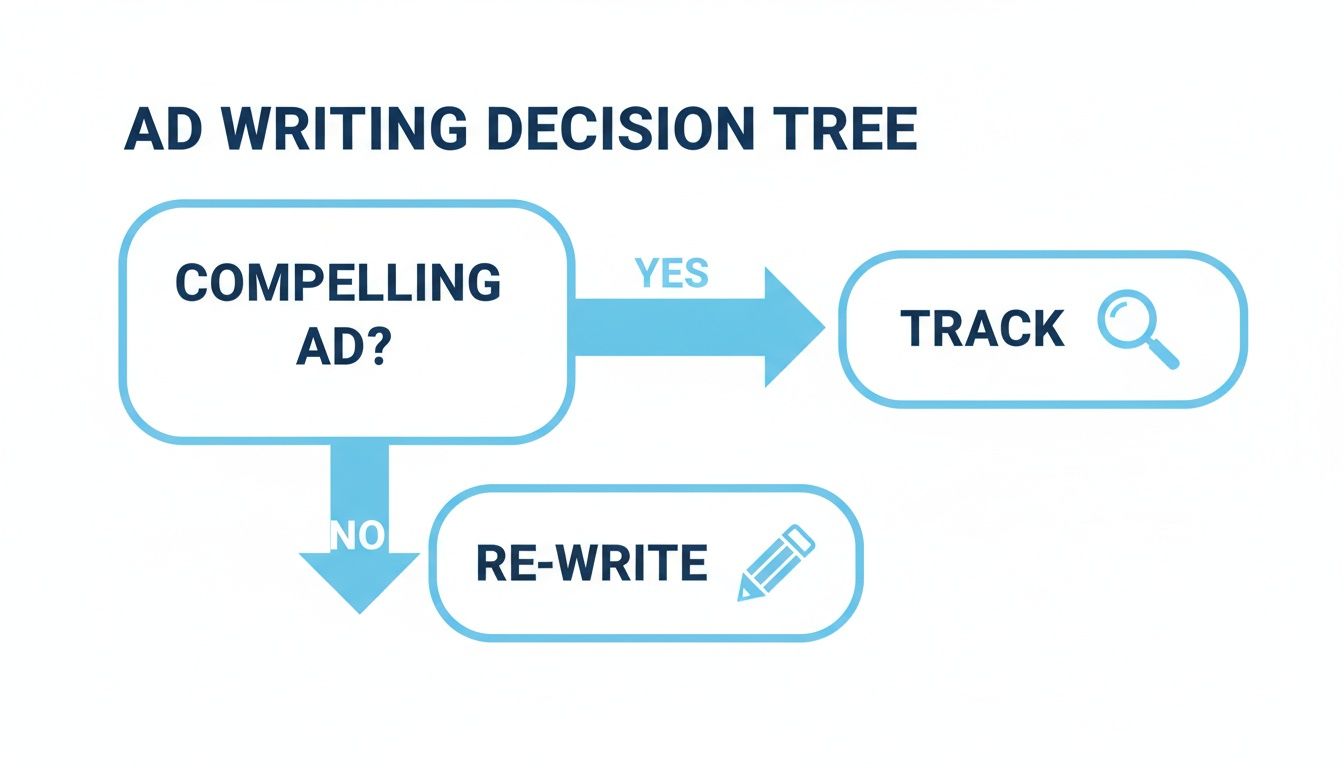
It’s a straightforward process: if an ad is working, great – track it. If it’s not, get back to the drawing board and refine that copy.
Your Monthly Strategic Review (How Do You Advertise on Google)
Your monthly review is where you take a step back and look at the bigger picture. This is your chance to make more strategic shifts based on a decent amount of performance data, not just a few days’ worth.
Every 30 days, dig into these key areas:
- Budget Allocation: Are some campaigns consistently knocking it out of the park while others are lagging? It might be time to pull budget from the underperformers and double down on your winners. Feed the stallions, starve the ponies.
- Bidding Strategy Performance: How’s your chosen bidding strategy holding up? If you’re using something like Target CPA, is it actually hitting its goals? If you’ve gathered enough conversion data, now could be the moment to adjust your targets or even test out a completely different strategy.
- Device and Location Performance: Get into your reports and see how performance varies across mobile, desktop, and tablet. It’s common to find that mobile clicks are cheaper but convert less often, which would call for a bid adjustment to make your spend more efficient. The same goes for locations – are you getting all your leads from London but spending half your budget in Manchester? Time to adjust.
Your Google Advertising Questions Answered
Diving into Google Ads for the first time? It’s completely normal to have a few questions buzzing around. As a UK business owner, getting a handle on the basics from the get-go will give you the confidence you need to manage your campaigns and, just as importantly, set realistic expectations for your investment.
How Long Until I See Results? (How Do You Advertise on Google)
Look, you can get traffic hitting your site within hours of launching a campaign. That part’s fast. But don’t mistake clicks for instant profit.
In my experience, it takes a good 30-90 days to really see what’s working. That’s the sweet spot for gathering enough performance data to start making smart optimisations and seeing consistent, meaningful results. Think of your first month as a critical testing and learning phase, not a race to the finish line.
Can I Get By on a Really Small Budget? (How Do You Advertise on Google)
Technically, yes, you could start with just £5 a day. But I’ll be honest with you – it’s almost never effective. A budget that small starves your campaign of clicks and, crucially, data. Google’s algorithm can’t learn, and you can’t make informed decisions. It’s like trying to judge a restaurant based on a single crumb.
I always tell new clients to start with a minimum of £20-£25 per day. That’s a much more realistic starting point for gathering useful data in most UK markets and giving your campaigns a fighting chance.
What Exactly Is a Quality Score?
Think of Quality Score as Google’s report card for your ads. It’s a simple 1-10 rating that judges the overall relevance of your campaign.
Google looks at a few things: your expected click-through rate (CTR), how compelling your ad copy is, and the experience people have on your landing page. Why does this matter so much? A higher Quality Score can directly lead to lower ad prices and better ad positions. It’s one of the most direct ways to improve your return on investment.
Ready to stop guessing and start getting real results from your Google Ads? The team at PPC Geeks can build a data-driven strategy to increase your traffic, leads, and sales. Get your free, in-depth PPC audit today.
Author

Search Blog
Free PPC Audit
Subscribe to our Newsletter

The Voices of Our Success: Your Words, Our Pride
Don't just take our word for it. With over 100+ five-star reviews, we let our work-and our satisfied clients-speak for us.

"We have been working with PPC Geeks for around 6 months and have found Mark and the team to be very impressive. Having worked with a few companies in this and similar sectors, I rate PPC Geeks as the strongest I have come across. They have taken time to understand our business, our market and competitors and supported us to devise a strategy to generate business. I value the expertise Mark and his team provide and trust them to make the best recommendations for the long-term."
~ Just Go, Alasdair Anderson
