




How Much Google Ads Cost in the UK: Key Insights & Tips — On average, you can expect to pay between £0.66 and £1.32 per click for Google Ads in the UK, but honestly, that’s just a ballpark figure to get started. What you’ll actually spend is a different story, shaped by your specific industry, the keywords you target, and just how fierce the competition is. For most small businesses dipping their toes in, a daily budget of around £25 to £50 is a sensible starting point.
A Snapshot of Google Ads Costs in the UK
Trying to figure out Google Ads pricing can feel a bit like trying to value a house—there’s no one-size-fits-all price tag. Instead, the cost is determined by its “location” (how competitive your keywords are) and the “demand” from other buyers (your fellow advertisers). The good news is, there are predictable patterns behind it all, and this guide is here to lift the lid on that initial investment.
Your final spend comes down to a handful of key factors. Think of these as the levers you can pull to steer your budget and get the most out of every pound.
The Core Cost Variables
Imagine these as the main dials on your advertising control panel. Each one has a direct impact on what you pay for a click and, ultimately, whether your campaign sinks or swims.
- Industry Competition: It’s simple supply and demand. A click for a “solicitor in Manchester” is going to cost a whole lot more than one for “handmade birthday cards” because the potential payoff from that one client is astronomically higher.
- Ad Quality Score: This is Google’s way of rewarding good behaviour. Create relevant, high-quality ads and landing pages, and Google will thank you with lower costs and better ad positions. It’s all about creating a great experience for the user.
- Targeting Precision: The more you zero in on your ideal audience—down to their location, the device they’re using, and the time of day—the more control you have over your spending. Spray and pray is expensive; precision is profitable.
The real secret to Google Ads isn’t just about throwing more money at it than the next person. It’s about being smarter. A well-tuned campaign with a brilliant Quality Score can easily nab a top spot for less than a competitor with deep pockets and a sloppy strategy.
Typical Starting Costs for Google Ads in the UK
To give you a clearer picture, here’s a quick rundown of what a UK business might expect when they’re just getting started with Google Ads.
| Metric | Typical UK Range | Recommended Small Business Start |
|---|---|---|
| Average Cost Per Click (CPC) | £0.66 – £1.32 | £0.80 – £1.50 |
| Daily Budget | £10 – £100+ | £25 – £50 |
| Monthly Spend | £300 – £3,000+ | £750 – £1,500 |
While these figures provide a solid baseline, remember they can swing dramatically. In super competitive sectors, UK businesses could be paying anywhere from £5 to over £50 per click. This is why that £25 to £50 daily starting budget is such a practical benchmark—it gives you enough data to learn without breaking the bank.
As we go on, you’ll learn exactly how to get a grip on each of these variables. If you want to get into the nitty-gritty of how the pricing really works, check out our deep dive into Google Ads cost per click.
How Much Google Ads Cost in the UK: Understanding The Google Ads Auction System
To really get a grip on how much Google Ads cost, you first need to understand the engine driving the whole thing: the Google Ads auction. It’s a common myth that the top ad spot simply goes to the highest bidder. The reality is a lot more interesting – it works more like an auction where the prize doesn’t just go to the person with the deepest pockets.
Instead of only looking at how much you’re willing to pay, Google uses a formula called Ad Rank to figure out where (and if) your ad shows up. Think of Ad Rank as your total score in the auction. A higher score means a better position, which naturally leads to more eyes on your business and more clicks.
This system is fantastic news for small businesses because it levels the playing field. You don’t need a monster budget to go toe-to-toe with the big names in your industry; you just need to be smarter with your strategy.
The Two Pillars of Ad Rank
Your Ad Rank boils down to two main components. Getting both of these right is the secret to winning better ad placements without blowing your budget.
- Maximum Bid: This is simply the most you’re prepared to pay for a single click on your ad. It’s a vital piece of the puzzle, but it’s only half the story.
- Quality Score: This is Google’s rating, from 1 to 10, of how relevant and high-quality your ads, keywords, and landing pages are. A high score is Google’s way of saying you’re giving searchers a great experience.
A high Quality Score is like having a powerful discount coupon. It lets you achieve a better Ad Rank than a competitor who’s bidding more than you, meaning you can snag a top ad spot for a lower actual cost per click.
The infographic below gives a great visual of how your budget and these key performance factors all play together.
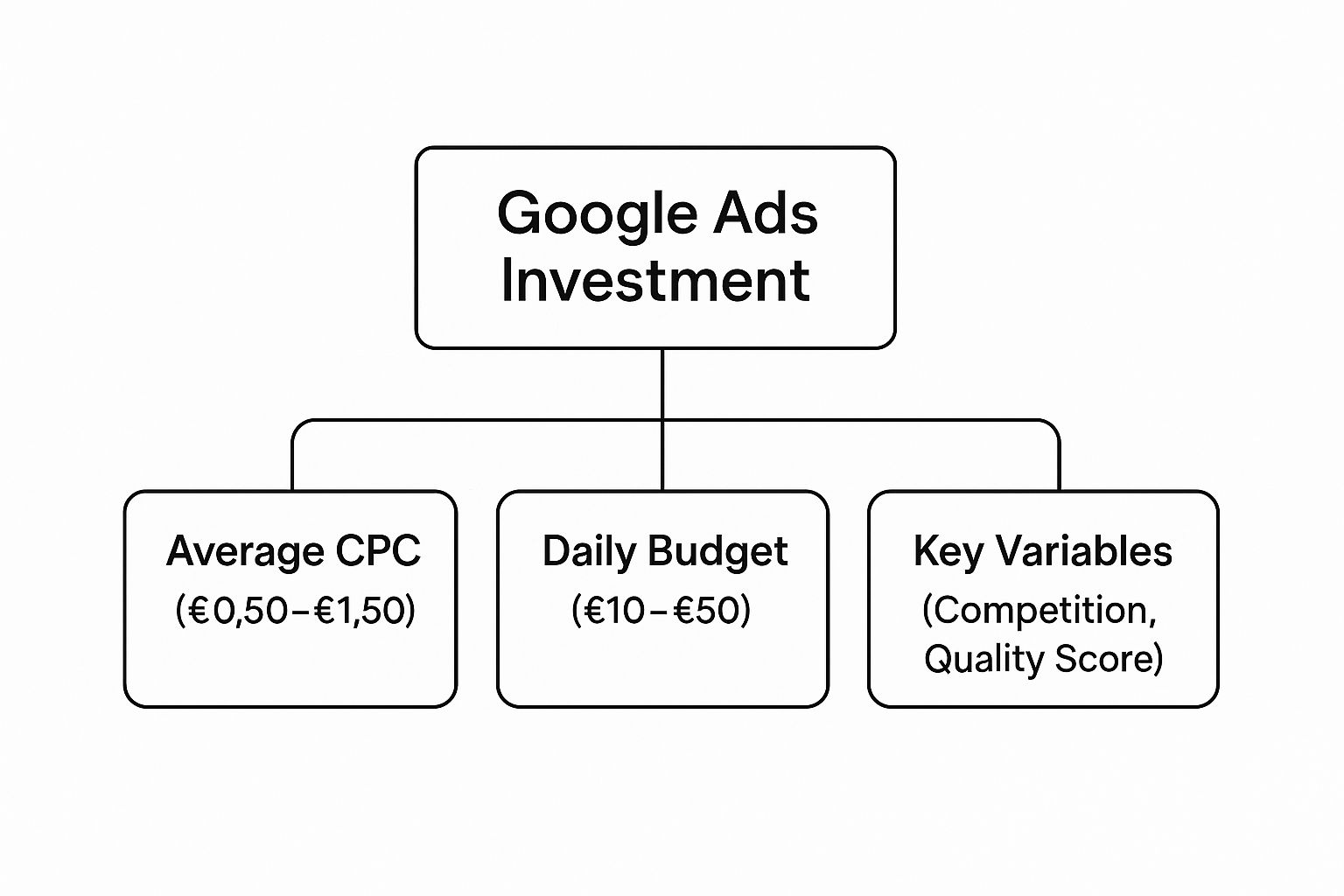
As you can see, while your budget is the starting line, factors like competition and your Quality Score are what really determine how efficiently that money gets spent. Improving your Quality Score is hands-down one of the best ways to lower your ad costs and boost your return.
So, how does Google work out the price you actually pay? The formula is surprisingly straightforward: it’s the Ad Rank of the advertiser right below you, divided by your Quality Score, plus one penny. This means a super-relevant ad with a fantastic landing page (i.e., a high Quality Score) will pay much less for a click than a low-quality ad, even if that competitor is bidding more. To get deeper into the nuts and bolts, check out our guide on how Google Ads work. Understanding this transforms you from just a spender into a savvy strategist who can make every pound count.
The Key Factors That Determine Your Ad Spend
Ever wondered why one business might pay just pennies for a click, while another shells out several pounds for the exact same keyword? It’s not random. The answer lies in a handful of key variables that directly control your ad spend.
Getting a handle on these is the first step to actively managing your Google Ads costs and, more importantly, boosting your return. Think of them as the dials on a mixing desk; each one adjusts the final sound of your campaign’s cost and performance. The biggest dial, without a doubt, is industry competition.
The Impact of Industry and Keyword Choice (How Much Google Ads Cost in the UK)
How competitive your industry is has a massive effect on your costs. It’s simple supply and demand.
For example, a click for a keyword like “divorce lawyer in London” is incredibly valuable. Why? Because a single new client could be worth thousands of pounds in fees. This high potential return drives up the competition, with dozens of law firms willing to bid aggressively and push the cost per click sky-high.
On the flip side, a click for “handmade bookmarks” will cost significantly less. While it’s a perfectly valid business, the lifetime value of a customer is much lower. This means less competition and, you guessed it, cheaper clicks.
Your choice of keywords within that industry also plays a huge role.
- Broad Keywords: Targeting a general term like “shoes” is not only expensive but attracts a wide, often low-intent, audience just browsing.
- Long-Tail Keywords: Targeting a super-specific phrase like “women’s waterproof trail running shoes size 6” is much cheaper. It also attracts highly motivated buyers who know exactly what they want, often leading to much better conversion rates.
Key Takeaway: Your budget isn’t just a number to be spent; it’s a strategic tool. By focusing on less competitive, high-intent long-tail keywords, you can often achieve a far better return on investment than by just throwing money at the most popular terms in your industry.
Refining Your Spend with Smart Targeting
Beyond what you’re advertising, who you’re advertising to and when are critical cost factors. Google Ads gives you some seriously powerful tools to zero in on your ideal customer, which is crucial for cutting out wasted spend on irrelevant clicks.
This screenshot from the Google Ads homepage really highlights the platform’s focus on connecting businesses with the right customers at precisely the right moment.

The entire interface is built to help you manage these targeting settings, ensuring every penny of your budget is spent effectively.
Here are the main targeting levers you can pull:
- Geographic Targeting: Do you only serve customers in Manchester? If so, there’s absolutely no point paying for clicks from someone browsing in Brighton. You can target specific countries, cities, or even individual postcodes.
- Ad Scheduling: If your business is only open during standard office hours, you can schedule your ads to run exclusively from 9 am to 5 pm, Monday to Friday. This stops you from burning through your budget on clicks in the middle of the night.
- Device Targeting: You might discover that customers browsing on mobile devices convert at a much higher rate than those on desktops. If that’s the case, you can adjust your bids to prioritise mobile users.
This level of control is essential, especially as advertising costs keep creeping up. Recent data shows a clear trend of CPC inflation in the UK, with yearly increases averaging around 11.75% for valuable keywords as competition intensifies. You can dive deeper into this and learn more about UK Google Ads management costs.
By strategically using these targeting options, you can make sure your budget is only spent on reaching your most valuable potential customers, helping to offset these rising costs and stay ahead of the game.
Average Google Ads Costs by UK Industry
Knowing the general cost of running Google Ads is a decent starting point, but the real picture only sharpens when you zoom in on your specific industry. The price you’ll pay for a click isn’t pulled out of thin air; it’s a direct reflection of how competitive your market is and what a new customer is actually worth to your business.
Ever wondered why a click for a law firm costs an arm and a leg compared to one for a local florist? It all boils down to the lifetime value of a customer. Landing just one new case could be worth thousands of pounds to a solicitor, which means they can justify a much higher bid in the ad auction. This fierce competition for valuable keywords inevitably pushes up the average Cost Per Click (CPC) for everyone in that industry.
Benchmarking Your Sector’s Spend
To give you a practical benchmark for your own budget, let’s break down what different UK industries can typically expect to pay. Seeing where you fit in helps set realistic expectations for how much Google Ads cost before you spend a single penny. The differences are massive, which shows why a one-size-fits-all budget is rarely a good idea.
The real trick isn’t just knowing the average CPC for your industry, but understanding why it is what it is. High-value services create intense competition and higher costs, but they also come with the potential for a much bigger return from a single conversion.
Below is a table that lays out the typical CPC ranges for some of the most common sectors advertising here in the UK. Use this as a rough guide to get a feel for your initial ad spend.
Average Cost Per Click Across Popular UK Industries (How Much Google Ads Cost in the UK)
| Industry Sector | Average CPC Range (£) |
|---|---|
| Legal Services & Solicitors | £6.00 – £9.50+ |
| Home & Home Improvement | £5.50 – £8.00 |
| Dentists & Dental Services | £5.00 – £8.50 |
| Business Services (B2B) | £4.00 – £6.00 |
| Health & Fitness | £3.50 – £5.50 |
| Retail & Ecommerce | £1.50 – £4.00 |
| Travel & Hospitality | £1.00 – £2.50 |
These numbers make it clear that businesses in areas like legal services and home improvement need to be ready for a much bigger investment per click. On the flip side, ecommerce and travel often enjoy lower CPCs but usually need a much higher volume of clicks to hit their sales targets. This kind of data lets you build a smarter, more informed budget right from the start.
How Much Google Ads Cost in the UK: How to Set a Realistic Google Ads Budget
Alright, let’s move from the ‘what’ to the ‘how’. Knowing all the theory is great, but the real magic happens when you start controlling your Google Ads spend. Setting a smart, sustainable budget isn’t about plucking a number from thin air; it’s a calculated investment designed to bring in a measurable return.
There are really two ways to go about this. If you’re brand new to the platform, you’ll start with what I call a ‘data-gathering’ budget. But if you’ve got some campaign history under your belt, you can jump straight to a much more precise ‘performance-based’ budget.
The Newcomer’s Data-Gathering Budget
When you’re just starting out, your main goal isn’t to hit a home run and rake in huge profits on day one. It’s to collect data. You need to find out which keywords actually convert, which ads people click on, and what your real-world cost per click (CPC) is going to be.
Think of it like market research. You’re spending a little to understand the lay of the land before you commit to a bigger investment. A modest initial budget lets you gather this vital intelligence without taking a massive financial risk. This whole phase is about learning and setting a baseline for your business.
Building a Performance-Based Budget (How Much Google Ads Cost in the UK)
Once you have that data, you can build a budget that works backwards from your business goals. This is where you flip the script and turn your ad spend from an ‘expense’ into a predictable way to drive growth. The secret is figuring out your maximum acceptable Cost Per Acquisition (CPA).
Here’s a simple, step-by-step way to work it out:
- Determine Customer Lifetime Value (LTV): First, how much is a new customer actually worth to you? Look at how much revenue an average customer brings in over their entire relationship with your business. Let’s say it’s £500.
- Identify Your Profit Margin: Now, what’s your profit margin on that LTV? If your margin is 30%, your total profit per customer is a neat £150.
- Set Your Target CPA: Finally, decide how much of that profit you’re willing to reinvest to get another customer. If you’re happy to put half of it back into advertising, your target CPA is £75.
This £75 is your new magic number. It tells you exactly how much you can afford to spend to win a new customer while staying profitable. This data-driven approach puts you in complete control of your campaign’s finances. For more detailed number-crunching, you can use a dedicated AdWords budget calculator to help dial things in.
Your budget shouldn’t be a straitjacket; it should be a strategic tool. Once you know your target CPA, you can scale your spending with confidence, knowing that every pound you invest is directly contributing to profitable growth.
For many UK businesses, monthly spend can be anything from a few hundred pounds to well over £10,000. The key is making sure that investment delivers. To stay competitive, you should generally be aiming for click-through rates between 4% and 6% and conversion rates of 3% to 5%. Knowing these industry benchmarks helps you set a budget that’s not just realistic, but truly effective.
Beyond the Click: Maximising Your ROI

The real cost of a Google Ads campaign isn’t just what you pay when someone clicks. It’s a common trap for businesses to get laser-focused on their daily budget, completely ignoring the other investments that ultimately decide if a campaign sinks or swims. These so-called “hidden” costs are every bit as important to factor into your thinking.
Take the big decision: do you manage the account yourself, or bring in an expert? Going the DIY route saves on management fees, sure, but it will cost you something just as precious—your time. Getting Google Ads right means constant learning, monitoring, and tweaking.
On the other hand, partnering with a PPC agency gives you instant expertise but comes with a fee. In the UK, this could be anything from a few hundred pounds a month to over £1,000, or a percentage of your ad spend, usually around 15-20%. There’s no single right answer here; it all comes down to weighing the value of your time against the cost of professional management.
Strategies for Smarter Spending (How Much Google Ads Cost in the UK)
Whichever path you choose, the end goal is always the same: maximise your Return on Investment (ROI). It’s about making every single pound of your ad spend work as hard as it possibly can. Proactive management is what turns a simple budget into a proper growth engine for your business.
Here are a few powerful ways to get your costs under control:
- Improve Your Quality Score: As we’ve mentioned, Google rewards a higher Quality Score with lower CPCs and better ad positions. Honestly, it’s the most effective lever you can pull to reduce your spend.
- Master Negative Keywords: Get ruthless with your negative keyword list. Adding terms that are irrelevant to your business stops you from haemorrhaging cash on clicks from people who were never going to buy from you anyway.
- A/B Test Everything: Always be testing. Pit different versions of your ad copy and landing pages against each other. Even small uplifts in your click-through and conversion rates can have a massive knock-on effect on your overall profitability.
At the end of the day, understanding how much Google Ads cost is less about the figure you put in and more about the results you get out. Effective management, sharp targeting, and relentless optimisation are what transform an advertising expense into a reliable source of profit and new customers.
Of course, none of this works without a solid technical foundation. If you need a hand with the setup, our guide on Google Ads conversion tracking walks you through the essential steps to get everything tracking correctly from the start.
A Few Final Answers
When it comes to Google Ads pricing, a few questions pop up time and time again. Let’s tackle some of the most common queries we hear from business owners, clearing up any final doubts you might have.
Is There A Minimum Spend On Google Ads?
Technically, no. There’s no official minimum spend that Google forces on you. You could set a daily budget of just £1 if you really wanted to.
But let’s be realistic. To get any meaningful data back, most UK businesses find a daily budget of at least £25 to £50 is a much better starting line. This gives you enough firepower to actually test your keywords and see what works without breaking the bank.
Can You Do Google Ads For Free?
Not in the long run, but you can get a head start. While you can’t run paid campaigns indefinitely for free, Google often dangles a pretty tempting carrot for new accounts.
You’ll often see offers like, “Spend £400, get £400 in ad credit.” It’s a brilliant way to effectively double your initial testing budget. Always keep an eye out for these promotions when you’re setting up your first account – it’s free money, after all.
How Long Does It Take To See Results?
You’ll see traffic almost instantly. The moment your campaign goes live, the clicks can start rolling in. But traffic and profitable results are two very different things.
For a proper, positive return on your investment (ROI), you need to be patient. We always tell clients to allow at least three months to gather enough data. This is the period where you move from just getting clicks to making informed, strategic decisions that lead to consistent profits.
Don’t mistake a flurry of initial clicks for long-term success. The first few weeks are purely for data collection. Real, sustainable results are born from patient analysis and continuous tweaking over the first 90 days.
This initial phase is absolutely crucial. It’s when you’ll figure out your true cost per acquisition and start making the smart adjustments that drive your costs down and your profits up.
Ready to stop guessing and start getting real results from your Google Ads budget? The experts at PPC Geeks create data-driven strategies to increase traffic and sales while eliminating wasted spend. Get a free, in-depth audit of your account today.


