




How to Sell on Instagram: A Practical Guide – Right, before you can even think about making your first sale on Instagram, you need to lay the proper groundwork. It all starts with setting up your profile to look and act like a legitimate business. This means switching to a Business account, connecting it to Facebook to unlock all the selling tools, and making sure your profile—from your bio to your photos—screams professionalism.
Think of it this way: your Instagram profile is your digital shopfront. People make snap judgements. If it looks messy or untrustworthy, they’ll just keep scrolling. A polished, cohesive profile, on the other hand, builds the confidence someone needs to actually pull out their wallet. Getting this initial setup right isn’t just a suggestion; it’s essential if you’re serious about selling.
How to Sell on Instagram: Building a Shop That Earns Trust
Let’s dive into the practical steps. These aren’t just boxes to tick; they’re the foundations of a successful Instagram selling strategy.
First Things First: Switch to a Business Account
Your very first move is to convert your personal profile into an Instagram Business account. It’s a simple flick of a switch in your settings, but it’s the key that unlocks everything you need for selling—analytics, ads, and most importantly, Instagram Shopping.
Just head to your profile settings, find ‘Account’, and tap ‘Switch to Professional Account’. Instagram will ask you to pick a category for your business, like ‘Clothing Brand’ or ‘Health/Beauty’. It’s a small detail, but it adds a layer of credibility and helps the algorithm understand who you are.
Connect Your Facebook Business Page (How to Sell on Instagram)
With your Business account ready, the next non-negotiable step is linking it to a Facebook Business Page. Instagram’s entire commerce system runs on Facebook’s backend, so this connection is mandatory if you want an Instagram Shop and access to tools like Commerce Manager.
This link ties all your business assets together, making everything from catalogue management to running ads across both platforms much smoother. I like to think of it as setting up the plumbing for your social selling operation—it’s all happening behind the scenes, but it’s absolutely vital for everything to work.
Expert Tip: Don’t skip this. An Instagram Business account linked to a Facebook Page is the technical prerequisite for all of Instagram’s powerful selling features. This duo is what gives you access to product catalogues, shoppable tags, and advanced advertising.
Write a Bio That Actually Sells
Your Instagram bio is your elevator pitch, but you only have 150 characters to get it right. A weak or vague bio is a huge missed opportunity and will absolutely cost you sales.
A killer bio needs to nail these four things:
- What you do: Be crystal clear. “Handcrafted leather goods from Bristol” works a thousand times better than something generic like “Creating beautiful things.”
- A bit of personality: Let your brand’s voice shine through. Are you fun and playful, chic and luxurious, or earthy and eco-conscious?
- A clear call-to-action (CTA): Tell people exactly what to do next. “Shop our new collection” or “Tap the link to order” are direct and effective.
- Your link: This is the most valuable real estate on your profile. You can point it directly to your shop or use a tool like Linktree if you need to share multiple destinations.
Create a Consistent, Recognisable Look (How to Sell on Instagram)
Instagram is all about visuals. What separates the pros from the amateurs is a consistent aesthetic. Your visual theme is your brand’s signature; it’s what makes your posts instantly recognisable as someone scrolls their feed. When people know your content just by its look and feel, you’re building brand recognition and trust.
To do this, you need to define a cohesive style. This means sticking to a consistent colour palette, using the same one or two filters, and maintaining a uniform photography style. For instance, if you sell minimalist home decor, your photos should probably be bright and airy with neutral tones. If you’re a vintage clothing shop, a warmer, more nostalgic vibe might work better. This visual harmony makes your grid look curated and professional, encouraging people to stick around, browse, and eventually, buy.
How to Sell on Instagram: Turning Your Profile into a Storefront
Now that your profile looks the part, it’s time to transform it from a simple gallery into a fully functional shop. This is where Instagram Shopping comes in—the feature that lets you tag products directly in your posts and Stories. It’s a game-changer because it closes the gap between someone seeing a product they love and actually buying it, making the whole process incredibly smooth.
Before you jump in, you’ll need to make sure your business ticks a few boxes. Instagram is quite particular. Your business has to be in a supported country, sell physical goods, and stick to their merchant agreement and commerce policies. It’s worth double-checking these first to avoid any hiccups later.
Once you’ve confirmed you’re eligible, the next move is to connect a product catalogue. Think of this as the digital backbone of your shop—a detailed list of everything you sell, complete with photos, prices, descriptions, and purchase links. This catalogue is what powers everything.
Getting Your Product Catalogue Connected
You’ve got a couple of ways to get this done, and the best route really depends on your current setup and how tech-savvy you feel.
One of the slickest ways is to sync directly with an e-commerce platform. If you’re already using something like Shopify, BigCommerce, or WooCommerce, you’re in luck. These platforms have built-in integrations that do the heavy lifting for you, automatically syncing your products with your Facebook Business Manager. Change a price on your website? It updates on Instagram. Simple.
Alternatively, if you’re not on one of those platforms, you can build your catalogue by hand in Facebook’s Commerce Manager. This means adding each product one by one—uploading images, writing descriptions, the lot. It’s more manual work, for sure, but it gives you total control over every detail.
Choosing Your Catalogue Integration Method (How to Sell on Instagram)
Deciding how to connect your catalogue is a key first step. This table breaks down the main options to help you figure out what’s best for your business.
| Method | Best For | Key Advantages | Potential Challenges |
|---|---|---|---|
| E-commerce Platform Sync | Businesses already using Shopify, BigCommerce, etc. | Automatic updates; seamless inventory management; saves significant time. | Relies on the platform’s integration; less manual control over specific data points. |
| Manual in Commerce Manager | Businesses without an integrated e-commerce site or those wanting full control. | Complete customisation of product listings; no third-party reliance. | Time-consuming; requires manual updates for price or stock changes; higher risk of human error. |
Ultimately, if you have an integrated platform, using the sync feature is almost always the smarter choice for efficiency and accuracy.
Whichever path you take, a clean and well-structured product feed is non-negotiable for success. If you want to really get into the weeds on this, our guide on mastering your shopping feed for e-commerce success is packed with detailed strategies.
This infographic breaks down the essential profile optimisations you should have in place before you even touch your catalogue.
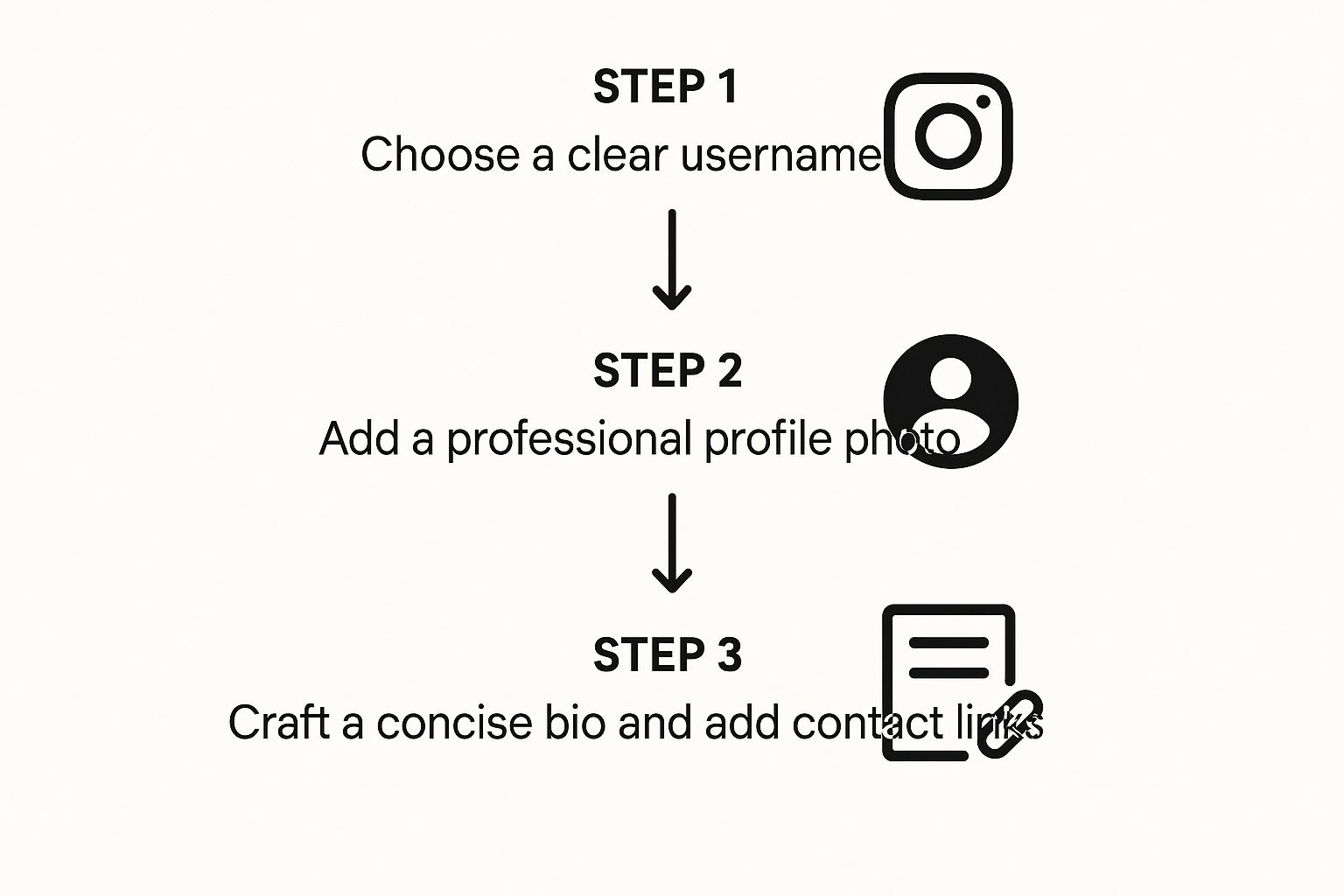
As you can see, getting these fundamentals right ensures your profile comes across as professional and trustworthy from the get-go.
Submitting Your Account for Review
With your catalogue connected, the next step is to get Instagram’s official approval. Head over to your professional dashboard inside the app, tap ‘Set Up Instagram Shopping’, and just follow the on-screen instructions. Instagram will then take a look at your account and products to make sure everything lines up with their policies.
This review process usually takes a few days, though it can sometimes drag on a bit longer, so be patient. You’ll get a notification once you’re approved. From there, you just need to pop into your settings and flick the switch to turn on the ‘Shopping’ feature.
Key Takeaway: The account review isn’t just a formality. Instagram fiercely protects its user experience, so they manually check that every business is legitimate and every product is compliant. Make sure your website and product listings are polished before you hit submit.
Start Tagging Products in Your Content (How to Sell on Instagram)
Now for the fun part! Once you’re approved, you can start making your content shoppable. This means adding product tags to your feed posts, Reels, and Stories.
When you create a new post or Reel, you’ll now see an option to ‘Tag Products’. Tap on the product in your photo or video, search for it in your catalogue, and place the tag. For Stories, you can use the dedicated ‘Product’ sticker. This creates a direct, clickable link that takes users straight to the product page without ever leaving the app.
You can add up to five product tags in a single image post, and for carousels, you can go up to 20. This is brilliant for showing off a collection or styling a complete outfit in one post, making it incredibly simple for people to shop what they see. This seamless experience is what turns casual scrollers into active customers.
How to Sell on Instagram: Creating Content That Actually Converts

Alright, your Instagram Shop is officially open for business. Now for the hard part: creating content that actually gets people to buy. Likes are lovely, but sales pay the bills, right? This is where you need to shift your thinking from just posting pretty pictures to creating strategic assets that walk your followers from discovery right through to checkout.
What I mean is, every single post, Reel, and Story needs a clear purpose. You’re not just a content creator anymore; you’re a digital shopkeeper. Your goal is to make your products look so appealing and necessary that tapping that ‘View product’ tag is the only logical next step for your followers.
Mastering the Art of Shoppable Posts
Shoppable posts are your bread and butter on Instagram. They look just like your regular posts but have that little shopping bag icon in the corner, signalling that the items you’re showing are ready to be bought. The real trick is to make them feel organic and inspirational, not like a pushy sales ad.
My advice? Focus on high-quality, lifestyle-focused imagery. Forget the sterile product shot on a plain white background. Instead, show your product being used in a real-world setting. If you sell handcrafted coffee mugs, post a shot of someone enjoying their morning coffee in a cosy, sun-drenched kitchen. This helps people instantly imagine the product in their own lives.
Carousel posts are absolute gold here. Use the first slide for a stunning lifestyle shot, then use the following slides for detailed close-ups, different angles, or even a quick video clip. You can tag up to 20 products in a single carousel, which is perfect for showing off an entire collection or a head-to-toe outfit.
Using Reels to Demonstrate and Inspire (How to Sell on Instagram)
Instagram Reels aren’t just for dancing anymore—they’re a serious sales tool. Their short, snappy video format is ideal for showing off your product’s value in a way that’s genuinely engaging. Think of them as mini-commercials that people actually want to watch.
Here are a few Reel ideas that I’ve seen work wonders:
- Product Demos: Show your product doing what it does best. If you sell a powerful stain remover, nothing beats a compelling before-and-after video.
- How-To Guides: For a fashion brand, a Reel showing three different ways to style one scarf adds immediate value and helps viewers see its versatility.
- Behind-the-Scenes: A quick clip of your team packing an order or handcrafting a product creates a powerful human connection and adds a layer of authenticity that people love.
Don’t forget to jump on trending audio and use relevant hashtags. It’s the best way to get your products in front of people who don’t follow you… yet.
The Power of Authentic Social Proof
Honestly, nothing sells a product better than seeing other real people using and loving it. This is where user-generated content (UGC) becomes your secret weapon. UGC is any content—photos, videos, reviews—created by your actual customers, and it builds trust in a way that polished brand content just can’t.
When a potential customer sees someone just like them enjoying your product, it dissolves their hesitation. It’s the digital equivalent of a glowing recommendation from a trusted friend.
Make it a habit to actively encourage your customers to share their purchases. You could run a monthly contest for the best photo featuring your product or simply reshare customer posts to your Stories and feed (always with credit, of course!). To really get your head around its impact, you can learn more about the power of user-generated content in advertising in our detailed guide.
Engaging with Interactive Story Features (How to Sell on Instagram)
Instagram Stories are a goldmine for engagement and sales. They’re temporary, which creates a natural sense of urgency, and their informal vibe allows for more direct, personal chats with your audience.
Get creative with these interactive stickers:
- The Poll Sticker: Ask your audience to vote on the next colour for a new product launch.
- The Quiz Sticker: Test their knowledge about your brand’s history or your industry.
- The Question Sticker: Host a quick Q&A session about an upcoming collection.
Every tap and response is a small interaction that strengthens the bond between you and your followers. So when you do post a product, you’re not just some faceless brand; you’re a familiar voice they’ve already connected with. Instagram shopping in the UK is a massive opportunity, with 81% of online stores already using the platform. This mirrors global trends where 87% of users take action after seeing a product, with clothing leading the way in the UK as the most purchased category.
How to Sell on Instagram: Reaching New Customers with Instagram Ads
Fantastic organic content is your foundation, but if you’re serious about scaling up, you can’t just hope the algorithm notices you. To really find new customers ready to buy, you need a smart advertising strategy. This is where Instagram Ads come in, turning your slow-burn sales efforts into a targeted, high-growth engine.
Think of it this way: organic posts nurture the community you already have. Ads, on the other hand, are your introduction to thousands of potential new fans and customers, letting you step outside your follower bubble and put your products right where they need to be.
Setting Up Your First Ad Campaign
Dipping your toes into Instagram advertising doesn’t need to be overwhelming. You’ve got two main routes to go down, each offering a different level of control. Your choice really just depends on your goals and how hands-on you want to be.
The quickest way to start is by boosting a post straight from the Instagram app. You’ve no doubt seen that little blue ‘Boost Post’ button lurking under your best content. It’s incredibly straightforward: you pick a post, choose a simple goal (like more website clicks), define a basic audience, set a budget, and you’re off.
Boosting is great for giving your top-performing posts an extra little push. But for real, sophisticated selling, you need to get familiar with Meta Ads Manager. This is the full-blown command centre for all your Facebook and Instagram ads. It unlocks far more granular targeting, creative controls, and in-depth performance data. For anyone serious about selling on Instagram, learning your way around Ads Manager is non-negotiable. We’ve got a detailed guide that walks you through exactly how to set up Instagram ads.
Defining Your Campaign Objectives (How to Sell on Instagram)
Before you even think about spending a penny, you must be crystal clear about what you want your ad to actually do. When you create a campaign in Ads Manager, the very first thing it asks for is your objective. This choice is crucial—it tells the algorithm what result you’re chasing so it can find the people most likely to take that specific action.
For an e-commerce brand, common objectives include:
- Traffic: Your main goal is simply to get people to a specific destination, like a product page or your Instagram Shop.
- Engagement: You’re after more likes, comments, and shares, which is brilliant for building social proof and buzz.
- Conversions: This is the big one for making sales. You’re telling the algorithm to find people who will perform a specific action, like ‘Add to Cart’ or ‘Purchase’, which is tracked using the Meta Pixel on your website.
Honestly, for direct sales, the Conversions objective is almost always the one you want. It laser-focuses your budget on finding actual buyers, not just window shoppers.
Pro Tip: Always start with a specific, measurable goal. “Get more sales” is far too vague. A much better objective is: “Achieve 50 sales of our new trainers with a return on ad spend of at least 3:1 within the next two weeks.”
Targeting Your Ideal Customer
Here’s where the real magic happens. Instagram’s targeting capabilities are ridiculously powerful. You can build incredibly precise audiences based on demographics, interests, and behaviours—going way beyond just age and location. Think about targeting people based on their interests (e.g., “sustainable fashion” or “home fitness”), the other brands they follow, and even their past online shopping habits.
This precision is a huge advantage, especially in the UK, where there are roughly 33.5 million people you can potentially reach with ads. For retail, the return can be massive. The fashion and apparel sector, for example, has seen an average ad ROI of 468%, which just shows how well visual-driven ads perform on the platform.
And don’t forget about retargeting. This is your secret weapon. You can create custom audiences of people who’ve already had a touchpoint with your brand, such as:
- Users who have visited your website.
- People who have liked or commented on your Instagram posts.
- Shoppers who added an item to their cart but got distracted before buying.
These “warm” audiences are pure gold. They already know who you are, which means they are far more likely to convert when they see your ad pop up in their feed again.
How to Sell on Instagram:Turning Followers into Loyal Customers

Making that first sale feels fantastic, but the journey doesn’t end there. The real magic happens when you turn a one-time buyer into a repeat customer—and eventually, a genuine advocate for your brand. This is where you graduate from simply selling products to building a community that trusts you and chooses you every single time.
This shift in focus, from chasing new customers to nurturing the ones you have, is the bedrock of sustainable, long-term success. A loyal customer base is your most valuable asset, hands down. It provides consistent revenue and generates powerful word-of-mouth marketing that money just can’t buy.
Master Your Customer Service Game
On Instagram, your comment section and Direct Messages (DMs) are your virtual shop floor. How you handle these interactions can make or break a customer relationship. A prompt, personal, and genuinely helpful response shows you care and builds a huge amount of trust.
Think about it. When someone asks a question about sizing in your comments, they’re basically holding their wallet open. A quick and friendly reply not only helps them make a purchase but also shows every other person reading that you’re an attentive, reliable brand. On the flip side, ignoring DMs or leaving comments unanswered is the digital equivalent of an empty, unattended shop.
My Personal Tip: Try to respond to all genuine comments and DMs within a few hours. Use the person’s name and ditch the robotic, copy-paste answers. A little bit of human connection goes an incredibly long way in making someone feel valued.
Connect on a Human Level with Interactive Content (How to Sell on Instagram)
Static posts are your bread and butter, but interactive features are where you really start forging connections. Hosting regular, engaging events can transform your profile from a simple product catalogue into a vibrant community hub. It pulls back the curtain, shows off the real people behind the brand, and gives your audience a reason to keep tuning in.
Here are a couple of powerful formats to try:
- Live Shopping Events: These are brilliant for launching new products. You can demonstrate items in real-time, answer questions as they flood in, and create a buzz with live-only offers. It’s like having your own personal shopping channel, right on your profile.
- Q&A Sessions: Use the “Questions” sticker in your Stories to host an “Ask Me Anything.” This could be about your products, your brand’s story, or even a peek into your design process. It’s a fantastic way to build transparency and trust.
These interactive moments make your brand feel accessible and human, which is absolutely crucial for building lasting loyalty.
Partner with Authentic UK Micro-Influencers
Working with influencers can be a powerful way to get authentic endorsements, but you don’t need a massive budget. In fact, micro-influencers—creators with between 10,000 and 100,000 followers—often deliver far better results. Their audiences tend to be more engaged and deeply trust their recommendations.
The key is to find UK-based creators whose style and values genuinely align with your brand. A partnership with a local Manchester-based fashion blogger, for instance, will feel far more authentic to a UK audience than a collaboration with a generic, international account. That authenticity is what drives real sales.
Create a Cycle of User-Generated Content (How to Sell on Instagram)
Your happiest customers are your best marketers. When someone loves your product enough to post about it, you’ve struck marketing gold. This user-generated content (UGC) is the ultimate form of social proof, showing potential buyers that real people are out there enjoying what you sell.
Actively encourage your customers to share their purchases. You can kickstart this by:
- Creating a branded hashtag and promoting it everywhere—in your bio, on your packaging, and in your posts.
- Running a monthly competition for the best customer photo, offering a small prize like a gift card as a thank you.
- Regularly resharing customer content to your Stories and feed. Always ask for permission first and give them a proper shout-out!
This strategy doesn’t just give you a steady stream of authentic content; it makes your customers feel seen and appreciated, strengthening their bond with your brand. This virtuous cycle of purchase, share, and reshare is how you build a thriving community and increase the long-term value of each customer. You can learn more about how to calculate and improve https://ppcgeeks.co.uk/ppc/what-is-customer-lifetime-value/ in our in-depth article.
Got Questions About Selling on Instagram? We’ve Got Answers
Jumping into social commerce always throws up a few questions. Even with a solid plan, you’re bound to hit some practical hurdles and wonder about the specifics. I’ve put together this section to tackle the most common queries we hear from business owners just like you.
Think of this as your quick-reference guide for those niggling “what if” scenarios. We’ll cover everything from fees and payment processing to keeping your inventory in check, giving you the clarity you need to start selling confidently.
Do I Actually Need a Website to Sell on Instagram?
This is probably the number one question I get asked, and the answer isn’t a simple yes or no. Technically, you don’t need a massive e-commerce website to get your products listed on Instagram. But—and it’s a big but—I highly recommend having one.
Most UK businesses we work with sync their product catalogue directly from an existing Shopify, BigCommerce, or WooCommerce store. It just makes life so much easier. This setup automates your inventory and gives you a central command centre for your entire operation.
While Instagram’s own checkout feature lets people buy without leaving the app, a dedicated website builds credibility and gives you another vital sales channel. More importantly, it gives you full control over the customer journey and your valuable data. So, while it’s not strictly mandatory, it’s what sets the amateurs apart from the pros.
What Are the Fees for Selling on Instagram? (How to Sell on Instagram)
Getting a handle on the costs is obviously crucial for setting your prices. When a sale happens through Instagram, Meta (the parent company) takes a small cut in the form of a transaction fee. This covers things like payment processing, security, and using their checkout technology.
The standard selling fee is usually a small percentage of the total transaction. A common structure, for example, is a 5% fee per shipment. It’s always a good idea to double-check the latest rates inside your Commerce Manager, as these figures can and do change.
Key Takeaway: This fee is taken directly from your payout, so you never have to handle it manually. Just be sure to build this cost into your pricing from the start to protect your profit margins on every sale.
How Do I Stop My Inventory from Becoming a Mess?
Worrying about overselling is completely normal, but thankfully, there’s a straightforward solution. The secret to keeping your stock levels accurate is using an e-commerce platform that integrates seamlessly with Instagram Shopping.
Here’s how it works:
- Automatic Syncing: When you connect your Shopify or WooCommerce store, your inventory levels are automatically synchronised. A product sells on your website? The stock count updates on Instagram almost instantly. The same thing happens in reverse.
- One Place to Manage Everything: This integration means you only have one dashboard to worry about for stock management. You won’t be stuck manually updating numbers every time a sale comes through, which is a massive time-saver and prevents frustrating mistakes.
Honestly, trying to manage inventory manually would be a logistical nightmare. Using an integrated platform is the only sane way to sell across different channels. It keeps things running smoothly for you and ensures your customers don’t end up ordering something that’s already gone.
At PPC Geeks, we live and breathe paid social advertising. We build targeted ad campaigns that generate real sales on platforms like Instagram. If you’re ready to grow your social selling and see a proper return on your ad spend, have a chat with our team of UK-based experts today. Learn more about our services at https://ppcgeeks.co.uk/.


