




Mastering Google Shopping Ads for Ecommerce: Ever thought about setting up a digital shop window right where your customers are looking? That’s exactly what Google Shopping Ads do. They go way beyond simple text, putting your product’s image, price, and brand front and centre in the search results. For any e-commerce business, these visual ads are a complete game-changer, pulling in high-quality traffic that’s ready to buy.
Mastering Google Shopping Ads for Ecommerce: How Google Shopping Ads Drive Sales
Unlike traditional text ads where you’re just bidding on keywords, Google Shopping Ads work a bit more like a clever personal shopper. The whole system runs on your product feed – a detailed file you set up in Google Merchant Center. When someone searches for “women’s waterproof running trainers,” Google doesn’t just scan for keywords; it digs into product feeds to find items that perfectly match that description.
This smart process is what allows Google to pop up that rich, informative carousel of options right at the top of the search results page.
Here’s a look at what Google Shopping Ads actually look like when they appear in search results.
This visual-first approach instantly gives shoppers all the key details—image, brand, price—before they even have to click. The result? You get far more qualified leads landing on your site.
The Power of Purchase Intent
The real magic of Google Shopping Ads is how they connect with people who are showing clear signs they want to buy something. Someone searching for a specific product model is miles further down the sales funnel than someone just browsing for general info. By showing up at that exact moment, your ads grab their attention when it counts the most.
The system is built to catch customers not when they’re just researching, but when they’re ready to pull out their wallets. This laser focus on high-intent searches is precisely why Shopping ads are so brilliant at driving sales and delivering a solid return on investment.
This direct line to motivated buyers is why these ads have come to dominate the e-commerce advertising scene. The numbers don’t lie. In the UK, Google Shopping Ads swallow up around 76.4% of all retail search ad spend. On top of that, they generate a staggering 85.3% of all clicks on Google Ads or Shopping campaigns, proving just how much shoppers prefer this format.
Let’s break down how they stack up against the old-school text ads.
Shopping Ads vs Traditional Text Ads (Mastering Google Shopping Ads for Ecommerce)
Here’s a quick comparison to see the key differences at a glance.
| Feature | Google Shopping Ads | Traditional Text Ads |
|---|---|---|
| Format | Highly visual with image, title, price, and brand. | Text-only with headlines and descriptions. |
| Placement | Top of SERP in a carousel or on the Shopping tab. | Primarily in the main search results listings. |
| Trigger | Product data from your feed matches a search query. | Bidding on specific keywords. |
| User Intent | Caters to users with high purchase intent. | Targets a broader range of intent, from research to purchase. |
As you can see, they serve different purposes but Shopping Ads have a clear edge when it comes to capturing ready-to-buy customers.
This level of engagement really shows a clear consumer preference for visual, info-packed ads. But getting it right requires a smart strategy. For brands wanting to truly make an impact, understanding how an e-commerce PPC agency can supercharge your UK sales is a vital next step. By getting your product feed and campaigns dialled in, you can start turning that powerful search intent into real revenue.
Mastering Google Shopping Ads for Ecommerce: Building Your Campaign Foundation
Before you can even think about launching your first Google Shopping ads, you need to build the engine that makes them go. This isn’t just one platform; it’s a critical partnership between two distinct Google services that have to work together perfectly.
Getting this foundation right from the very beginning is often the difference between a campaign that sings and one that just limps along.
Everything starts with your digital warehouse, the Google Merchant Center (GMC). Think of it as the master inventory list for everything you sell online. It’s the central hub where you upload, store, and manage all the nitty-gritty details about your products – from prices and stock levels to images and descriptions.
But don’t mistake it for a simple catalogue. The Merchant Center is where Google gets to know your products inside and out. A well-organised, accurate GMC account is the absolute bedrock of every successful Shopping campaign.
The Two Essential Accounts
To get Shopping ads up and running, you need both of these accounts set up and correctly linked:
- Google Merchant Center: This is your product database. Its one and only job is to hold and organise your product feed, making sure all your information is accurate and plays by Google’s rules.
- Google Ads: This is your command centre for marketing. It’s where you’ll build the actual campaigns, set your budgets, decide on bidding strategies, and manage how much you’re willing to pay for a click.
Put simply, the Merchant Center provides the what (your products), while Google Ads handles the how (getting those products in front of the right people).
A Vital Partnership (Mastering Google Shopping Ads for Ecommerce)
The relationship between these two platforms is direct and completely co-dependent. Your Google Ads account pulls all the product information it needs straight from your Merchant Center. If you don’t link a GMC account, your Shopping campaign literally has no product data to show and simply won’t run.
Imagine trying to run a physical shop where the marketing team has no idea what’s in the warehouse. They could design beautiful flyers, but they wouldn’t know which products to feature, or even if they’re in stock. That’s exactly why the link between Google Ads and Merchant Center is so crucial.
Any change you make in your Merchant Center—like updating a price, swapping an image, or marking an item as out of stock—is automatically pushed through to your live ads. This keeps the information shoppers see completely up to date, which is essential for building trust and stops you from wasting money on ads for unavailable products. This automated sync is the magic that makes the whole system so efficient.
A poorly configured Merchant Center feed, riddled with errors or missing data, will directly torpedo your ad performance. Google might disapprove your products altogether or, worse, show your ads for irrelevant searches, leading to terrible click-through rates and a rock-bottom return on your ad spend.
On the flip side, a clean, detailed, and fully optimised feed is the high-octane fuel your Google Ads campaigns need to thrive. Nailing this foundation from day one is your first and most important step towards making a profit with Google Shopping.
Mastering Google Shopping Ads for Ecommerce: Setting Up Your First Google Shopping Campaign
Right, you’ve got your foundational accounts sorted. Now it’s time to connect the dots and get your first campaign out there. Think of this part as setting up your digital warehouse (Merchant Center), connecting it to your marketing department (Google Ads), and then writing the rules of engagement for your first live Google Shopping ads.
We’ll walk through this step-by-step, starting with getting your Google Merchant Center fully kitted out. It’s a logical process that takes you from raw product data to a live, customer-facing ad.
Configure Your Google Merchant Center
Before you can even think about linking accounts, your Merchant Center needs to be 100% operational. This isn’t just about dumping a product feed in there; you need to complete a few crucial business verification steps. This is all about building trust with Google and, ultimately, with your customers.
First up, you have to claim and verify your website URL. It’s a simple but vital step that proves to Google you’re the legitimate owner of the e-commerce shop you want to advertise. After that, you’ll need to sort out your tax and delivery settings.
Getting your delivery information right is especially important. You need to set up rules that perfectly mirror your real-world delivery costs and options for customers across the UK. Google uses this info to show the correct delivery price in your Shopping ads, and trust me, that’s a massive factor in whether someone decides to buy from you.
This infographic gives you a great visual breakdown of how to structure your product feed, which is really the heart of your entire Merchant Center setup.
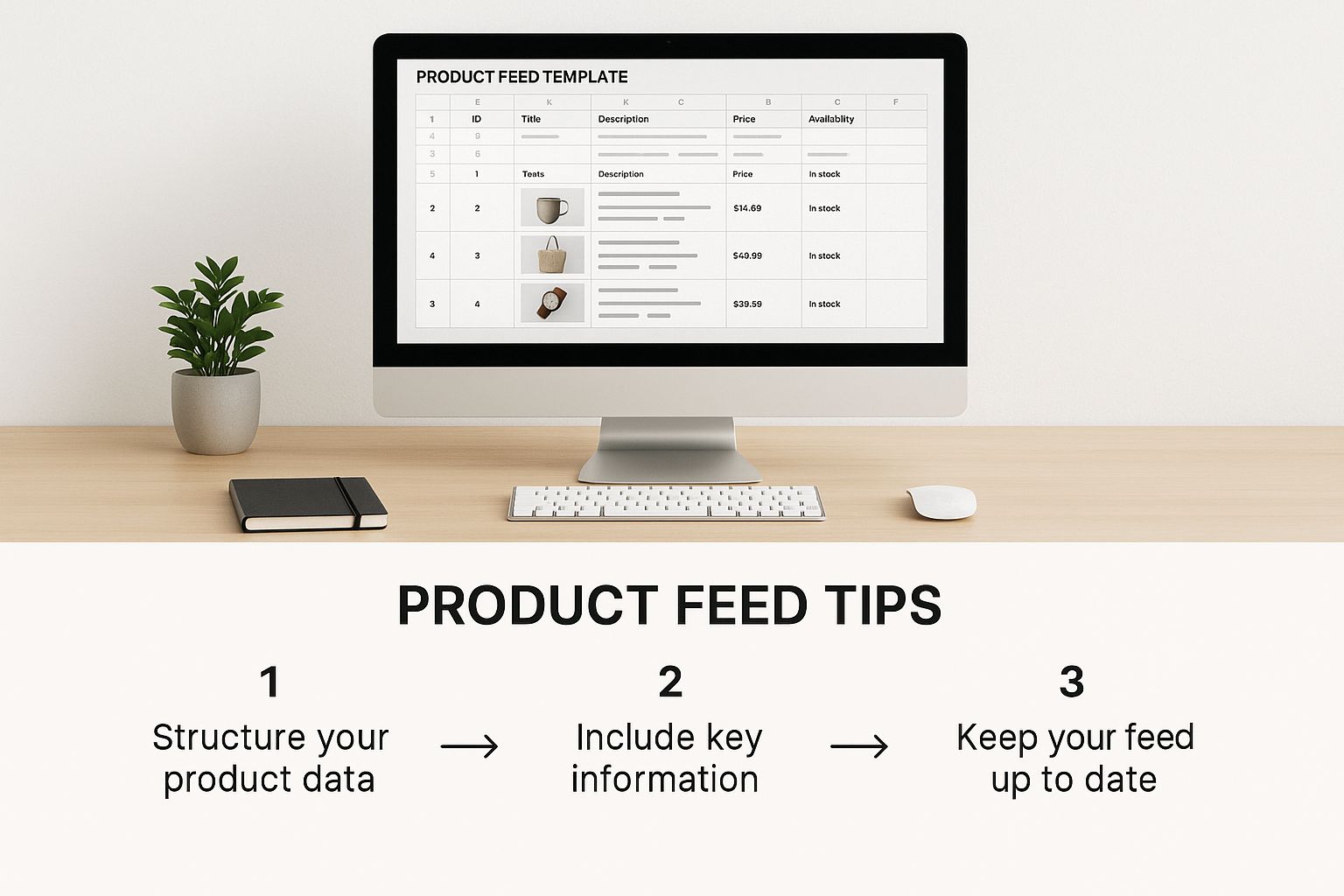
As the image shows, a well-organised product feed with accurate, detailed information is the absolute foundation for getting your ads in front of the right people.
Link Merchant Center to Google Ads (Mastering Google Shopping Ads for Ecommerce)
With your Merchant Center good to go, the next job is to build that data pipeline over to your Google Ads account. This connection is what allows your campaigns to pull product information straight from your feed, ensuring your ads are always showing the latest prices and stock levels.
Linking the two is a doddle, and you kick it off from your Merchant Center dashboard.
- In Merchant Center, head to the “Settings” menu and find “Linked accounts.”
- You’ll spot an option for Google Ads. If you’re logged in with the same email for both, your Google Ads account ID should pop up automatically.
- Just send the link request from Merchant Center.
- Finally, hop over to your Google Ads account to approve it.
And that’s it. Google Ads now has full access to your product inventory, all ready and waiting to be advertised.
Create Your Shopping Campaign in Google Ads
Now for the final piece of the puzzle: building the actual campaign inside Google Ads. This is where you set your budget, decide on a bidding strategy, and pick your targeting. It might sound daunting, but the initial setup is all about a few core settings.
Think of this stage as giving Google its marching orders. You’re telling it how much money it can spend, what your main objective is, and which products it should focus on. Getting these initial settings right is crucial for a successful start.
When you create a new campaign, Google will ask for a campaign goal. For any e-commerce business, this is almost always going to be “Sales.” Next, you’ll choose “Shopping” as the campaign type. From there, you just select the Merchant Center account you’ve just linked and confirm you’re selling products in the UK.
If you want a really deep dive into the nitty-gritty of this process, you can check out our detailed guide on how to set up Google Shopping, which breaks down every single screen and setting.
Lastly, you’ll need to set your starting budget and bidding strategy. For a brand-new campaign, a simple “Maximise clicks” bid strategy is a solid starting point. It helps gather performance data quickly so you can see what’s working. Set a daily budget you’re comfortable with, and you’re ready to launch.
Your first Google Shopping ads are now all set to go live and start reaching potential customers.
Mastering Google Shopping Ads for Ecommerce: Optimising Your Product Feed for Peak Performance
Think of your product feed as the single most powerful lever you can pull to control your Google Shopping ads. It’s much more than just a spreadsheet of your inventory; it’s your direct line of communication with Google’s algorithm. It’s the script you hand over, telling Google exactly how to show your products to people who are ready to buy. A weak, anaemic feed leads to dismal performance, but a rich, detailed one can completely transform your results.
This is where you stop just listing products and start strategically marketing them. Mastering your feed is all about crafting compelling product titles that perfectly match what your customers are searching for. It’s about writing descriptions that don’t just list features, but actually sell the benefits. Every single piece of data you provide is a signal to Google, helping it pair your items with the most relevant, high-intent searches out there.
The Anatomy of a Winning Product Title
The product title is, without a doubt, the most critical piece of real estate in your entire feed. It’s the very first thing a shopper sees, and it carries enormous weight with Google’s matching algorithm. A lazy title like “Blue T-Shirt” is a massive missed opportunity. A great title is descriptive, structured, and packed with the exact keywords your customers are typing into the search bar.
A winning formula often follows a logical structure that anticipates what the user is looking for. For a piece of clothing, that might look like this:
Brand + Gender + Product Type + Key Attributes (Colour, Size, Material)
So, instead of a vague “Running Trainers,” a much more powerful title would be: “Nike Women’s Air Zoom Pegasus 40 Waterproof Running Trainers in Black Size 6.” See the difference? This title instantly answers multiple potential searches, dramatically boosting its chances of appearing for specific, long-tail queries that signal someone is ready to buy.
Why High-Quality Images Are Non-Negotiable (Mastering Google Shopping Ads for Ecommerce)
In the visual arena of Google Shopping, your product images do all the heavy lifting. A blurry, poorly lit, or cluttered photo will be scrolled past in a heartbeat, no matter how fantastic your product or competitive your price is. Professional, high-quality images aren’t a luxury; they’re an absolute necessity.
Your main image should always feature the product on a clean, white background, showing it off clearly without any distractions. Steer clear of images with watermarks, promotional text, or logos – Google will often disapprove these. By providing multiple high-resolution images from different angles, you let shoppers get a proper look at what they’re buying, which builds trust and sends your click-through rate soaring.
Your product feed is the engine, but your product data is the fuel. The higher the quality of that fuel, the faster and more efficiently your engine will run. Every attribute you optimise is another signal telling Google exactly who to show your ad to.
This level of detail is crucial, especially as UK retailers are pouring significant chunks of their budgets into this format. In fact, UK businesses now allocate roughly 80% of their paid search funds to Google Shopping ads, all thanks to their strong performance. With an average click-through rate of 0.86% and a cost per click hovering around £0.52, getting your feed right is essential to making sure every penny of your ad spend works as hard as possible.
Mastering Your Product Attributes
Beyond just titles and images, your feed is full of other attributes that are vital for optimisation. Getting these details right not only prevents frustrating and costly disapprovals but also massively improves the relevance of your ads. You can find a complete checklist in our detailed guide to Google Shopping feed optimisation, but let’s cover the absolute essentials.
Here’s a closer look at the key attributes and the best practices for getting them right.
Key Product Feed Attributes for Optimisation
The table below breaks down the most critical product feed attributes, explaining their purpose and providing a best-practice example for each.
| Attribute | Purpose | Best-Practice Example |
|---|---|---|
| Description | Provides detailed information to help Google and users understand the product. Use keywords naturally and highlight key features and benefits. | “Experience unparalleled comfort with our 100% organic cotton crew neck jumper. Perfect for layering, it features a relaxed fit and ribbed cuffs. Machine washable.” |
| GTIN | A globally unique product identifier (like an EAN or UPC). This is crucial for Google to identify your exact product and is mandatory for most new branded items. | 5012345678900 |
| Availability | Tells Google if the item is in stock. Must match the availability on your website to avoid disapprovals. | in stock |
| Price | The price of the item. Must exactly match the price shown on your product landing page, including VAT. | 24.99 GBP |
By meticulously managing every single element in your feed, you’re essentially becoming fluent in Google’s language. This ensures your ads don’t just get approved, but are served to the most qualified audience possible, giving you the best chance to turn those clicks into loyal customers.
Mastering Google Shopping Ads for Ecommerce: Advanced Bidding and Campaign Structures

Right, so you’ve got your product feed polished up and your first campaigns are out in the wild, pulling in data. Now it’s time to level up. This is where we move past the basics and start squeezing every last drop of value from your ad spend. It’s what separates the pros from the amateurs when it comes to managing Google Shopping ads for serious profit.
This means graduating from simple manual bidding to smarter, automated strategies. It also means getting surgical with your campaign structures to gain pinpoint control over your budget and performance. This is how you stop just running ads and start strategically driving your e-commerce growth.
Mastering Automated Bidding Strategies
Manual bidding gives you all the control, which sounds great, but it’s a massive time sink. More importantly, it can’t possibly react to the thousands of real-time auction signals that Google’s AI can. Automated, or “Smart” Bidding, strategies use machine learning to optimise for conversions or conversion value in every single auction – a feat no human could ever replicate.
The rise of AI-driven PPC has been a game-changer for ad efficiency. UK advertisers who have embraced these tools have seen some fantastic results, with cost per acquisition often dropping by 20-25% and conversion rates jumping by as much as 33%.
One of the most powerful smart bidding strategies for any e-commerce store is Target ROAS (Return On Ad Spend). You simply tell Google the target return you want for every pound you spend, and its algorithm gets to work, automatically adjusting your bids to hit that goal. For example, setting a Target ROAS of 500% means you’re aiming to get £5 in revenue for every £1 spent on ads.
For this to work its magic, you need a decent stream of conversion data – Google suggests having at least 15 conversions in the last 30 days. If you’re a business focused squarely on profitability, this is the tool for you.
The Rise of Performance Max Campaigns (Mastering Google Shopping Ads for Ecommerce)
Performance Max (PMax) is the next evolution in automation. It’s not just a Shopping campaign; it’s an all-in-one powerhouse that takes your product feed and other creative assets and runs ads across all of Google’s channels. We’re talking YouTube, Display, Search, Discover, and Gmail, all from one campaign.
Think of it as handing Google the keys to your entire advertising inventory. You provide the destination (your goals), the fuel (your budget), and the vehicle (your creative assets), and its AI goes out and finds customers wherever they happen to be. For businesses looking to expand their reach and unearth new audiences, PMax can be an absolute goldmine for driving extra sales.
Strategic Campaign Segmentation for Control
While automated campaigns are incredibly powerful, true mastery comes from how you structure them. Instead of chucking all your products into one massive campaign, you can gain far more control by splitting them into separate campaigns based on your business goals.
This segmentation gives you direct control over budgets and bidding strategies for different groups of products.
- Segment by Brand: A no-brainer if you sell products from multiple brands. Splitting them into their own campaigns lets you push more budget towards your best-sellers or most profitable lines.
- Segment by Product Category: Not all products are created equal. A campaign for “running shoes” is going to perform very differently from one for “t-shirts.” Separating them lets you set unique ROAS targets and budgets that reflect their individual performance.
- Segment by Profit Margin: This is a truly pro-level technique. By using custom labels in your product feed to tag items as high-margin or low-margin, you can create separate campaigns for each. This allows you to bid much more aggressively on the products that actually make you the most money.
By combining these advanced bidding strategies with a well-thought-out campaign structure, you really elevate your entire approach to Google Shopping ads. This level of organisation gives you the clarity and control you need to make data-driven decisions that directly boost your bottom line. For more hands-on advice, you can discover more tips and tricks for Google Shopping success in our dedicated guide.
Mastering Google Shopping Ads for Ecommerce: Measuring Performance to Drive Growth
Launching your Google Shopping ads is just the start. The real magic, and the path to proper growth, comes from digging into what’s working, what’s not, and most importantly, why. If you can’t measure it, you can’t improve it. It’s time to put on your analyst hat, ignore the vanity stats, and focus on the data that actually moves the needle for your e-commerce business.
Jumping into the Google Ads dashboard can feel like a lot to take in at first, but honestly, success really boils down to keeping a close eye on a few key performance indicators (KPIs). Think of these metrics as the pulse of your campaigns—they tell you the story of your customer’s journey from that first click all the way to a sale.
The KPIs That Really Matter
If you want to make smart, data-driven decisions, you need to know which numbers to watch. For any e-commerce brand running Google Shopping, these are the non-negotiables:
- Return On Ad Spend (ROAS): This is the big one—the ultimate test of profitability. It tells you exactly how much money you’re making for every pound you put into your ads. A 500% ROAS means you’re getting £5 back for every £1 spent. Simple as that.
- Conversion Rate: This metric shows you what percentage of people who click your ad actually end up buying something. A healthy conversion rate is a great sign that your landing pages, product, and price are all hitting the sweet spot.
- Cost Per Acquisition (CPA): This is what it costs you, on average, to get one sale. The golden rule is to keep your CPA well below your product’s profit margin. Get this right, and you’re in the money.
Keep these three KPIs on your radar, and you’ll always have a crystal-clear picture of your campaign’s financial health.
The Foundation of All Measurement: Accurate Conversion Tracking
Here’s the thing: none of those metrics mean a thing if your data is dodgy. The single most critical part of measuring performance is setting up your conversion tracking flawlessly. This is the bit of tech that tells Google Ads when a real sale has happened on your website. Without it, you’re flying completely blind, making decisions based on pure guesswork.
Imagine running a shop where the till doesn’t record every sale. You’d have no real idea of your daily takings or which products were flying off the shelves. That’s exactly what running Google Shopping ads without proper conversion tracking is like—you’re just throwing money out there with no reliable way to see what’s coming back.
When your tracking is spot-on, you can trust that your ROAS and CPA figures are a true reflection of real-world sales. This data is what fuels Google’s Smart Bidding algorithms, allowing them to optimise for genuine profitability. It transforms your campaigns from a cost into a powerful engine for growth. Make data your guide, and you can confidently tweak budgets, sharpen your bidding strategies, and build sustainable success.
Frequently Asked Questions (Mastering Google Shopping Ads for Ecommerce)
Even with a solid strategy, a few questions always seem to pop up when you’re in the trenches with Google Shopping ads. Let’s tackle some of the most common ones I hear, with clear answers to help you handle those everyday challenges.
How Long Until My Google Shopping Ads Show Results?
I know you’re keen to see results, but patience is a virtue here. While your ads can technically go live within hours, you need to budget for a learning phase. This usually takes around 2-4 weeks, as Google’s algorithm gets to grips with your products and figures out who your best customers are.
During this initial period, it’s best to resist the urge to make any big, sweeping changes. Let the system do its thing. Once this learning phase is over, you’ll start to see much more stable and, hopefully, improving performance. Think of it as Google doing its homework before it can start aceing the test for you.
Are Google Shopping Ads Possible Without A Website? (Mastering Google Shopping Ads for Ecommerce)
In a word, no. A fully functional e-commerce website isn’t just a ‘nice to have’; it’s non-negotiable. The whole point of a Shopping ad is to entice an interested buyer and send them straight to your product page to make a purchase. Your ad is the shiny shop window, but your website is the actual shop where the transaction happens.
You might have heard of Local Inventory Ads, which are designed to drive footfall to a physical store. But even these still need a product feed and an online presence so Google can check your stock and business details. There’s no getting around it – you need a website.
What Causes Most Product Disapprovals in Merchant Center?
Nine times out of ten, product disapprovals boil down to one simple thing: the data in your product feed doesn’t match what’s on your website. The most common offenders are discrepancies in price and availability. Getting these two to line up perfectly is absolutely critical.
A few other usual suspects often cause headaches:
- Incorrect Product Identifiers: Missing or dodgy GTINs will get you a swift disapproval, especially for new, branded items.
- Poor-Quality Images: Google has strict rules. Images with watermarks, flashy promotional text, or cluttered backgrounds are a no-go.
- Policy Violations: This one’s a biggie. Trying to advertise prohibited products or making claims you can’t back up will get your ads shut down fast.
The best habit you can get into is regularly checking your Merchant Center for errors. It’s the simplest way to keep your Google Shopping ads ticking over smoothly.
Feeling a bit snowed under by feed management and campaign optimisation? The team at PPC Geeks lives and breathes this stuff. We offer a free, in-depth audit that shows you exactly where you can improve performance and drive more sales. Take the guesswork out of Google Shopping and see what a specialist can do. Visit us at https://ppcgeeks.co.uk/ today.


