




So, what’s the real cost of Google PPC in the UK? That’s the million-dollar question, isn’t it? The honest answer is: it depends. For most small to medium-sized businesses, you’re typically looking at a monthly budget anywhere from £500 to over £100,000. The final figure hinges entirely on your industry, how ambitious your goals are, and just how fierce the competition is.
Your Quick Guide to UK Google PPC Costs
Asking “how much does Google PPC cost?” is a bit like asking “how much is a car?” The answer could be a few thousand quid for a reliable run-around or six figures for a supercar. It all comes down to the model, the features, and how you intend to drive it. Your Google Ads spend works in exactly the same way—it’s shaped by your unique business situation.
Think of your Google Ads campaign as a custom-built engine for your marketing. Every component, from the keywords you target to the bids you place, impacts the overall cost and performance. Getting a handle on how these parts work together is the first step to building a powerful, cost-effective machine that actually drives results.
Typical Monthly PPC Spend in the UK
The total monthly spend on Google PPC campaigns can swing wildly from one business to another. As we look at 2025, budgets for UK businesses tend to fall into three main brackets.
Campaigns on the lower end of the scale usually spend between £500 and £2,000. Mid-range campaigns are typically investing from £2,000 up to £10,000. And for those in highly competitive sectors, it’s not unusual to see budgets blast past the £10,000 mark, with some big players allocating upwards of £30,000 a month just to stay in the game. You can get a more granular view from this PPC cost analysis.
Key Takeaway: Your budget isn’t a rigid expense; it’s a flexible investment. Winning at Google Ads is about smart management and strategic decisions, not just about who has the deepest pockets.
To give you a clearer idea of what this looks like in practice, here’s a quick look at how different business goals can shape your starting budget:
- Local Lead Generation: A local plumber or electrician aiming to be the go-to choice in their town might start with a budget of £500 – £1,500 per month.
- E-commerce Sales: An online shop selling niche products could set aside £2,000 – £7,000 per month to fuel traffic and sales through Shopping and Search ads.
- National Brand Awareness: A larger company launching a new product line might invest £10,000+ per month to make a big splash and get seen across the UK.
Typical UK Google PPC Monthly Spend by Business Goal
To make this even simpler, we’ve put together a table that outlines some common budget ranges based on different business goals. It’s a handy reference point if you’re just starting out and trying to figure out where you fit in.
| Business Profile | Typical Monthly Budget (UK) | Primary Goal |
|---|---|---|
| Local Service Business (e.g., plumber, electrician) | £500 – £1,500 | Dominate a specific geographic area for local leads. |
| Small E-commerce Store | £1,500 – £5,000 | Drive targeted traffic and online sales. |
| Growing National Brand | £5,000 – £10,000 | Increase market share and brand visibility. |
| Highly Competitive Sector (e.g., finance, legal) | £10,000+ | Achieve widespread brand awareness and lead generation. |
Of course, these are just starting points. Your actual spend will come down to your specific strategy and how aggressively you want to pursue your goals. By the end of this guide, you’ll have a much stronger grasp on how to control your spend and squeeze every last drop of value from your investment.
Getting to Grips with What Drives Your Ad Spend
To figure out “how much does Google PPC cost,” you first need to understand what you’re actually paying for. It’s not as simple as setting a budget and hoping for the best. The whole system really boils down to two key things that dictate your spend: your Cost Per Click (CPC) and your Quality Score.
Picture the Google Ads platform as a fast-paced auction. But hold on—it’s not your typical auction where the person with the deepest pockets always wins. Google has built a smarter system that rewards the most relevant and helpful ads. This means the advertiser who gives the best answer to someone’s search query often gets a top ad spot for a lower price.
The Ad Auction, Demystified
Every single time someone hits ‘search’ on Google, a lightning-fast auction kicks off behind the scenes. To decide which ads to show and in what order, Google uses a metric called Ad Rank.
Now, your Ad Rank isn’t just about how much you’re willing to pay per click. It’s calculated using a simple but incredibly powerful formula:
Ad Rank = Your Maximum CPC Bid x Your Quality Score
This little formula is the secret to managing your Google PPC cost. It proves you don’t always need the biggest budget to come out on top; you just need a smarter strategy. A high Quality Score can actually help you leapfrog competitors who are bidding more than you, all while driving your own costs down.
It’s true: an advertiser with a fantastic Quality Score can nab a better ad position than a competitor, even if that competitor has a higher bid. This is how Google makes sure users see the most useful ads, not just the ones from the biggest spenders.
In 2025, the average Cost Per Click (CPC) for Google Ads in the UK tends to hover between £0.66 and £1.32. But that’s just a starting point. For fiercely competitive keywords in sectors like finance or law, it’s not uncommon for UK businesses to see CPCs skyrocket past £50 a click.
Why Quality Score is Your Secret Weapon
So, what is this all-important Quality Score? Think of it as Google’s rating of your ads, keywords, and landing page, on a scale of 1 to 10. The higher your score, the more Google sees your ad as a great match for what people are looking for.
It’s a bit like a shop’s window display. A creative, relevant, and eye-catching display (a high Quality Score) will naturally pull more people inside (click your ad). The huge department store next door might have more cash to splash on fancy lights, but your well-thought-out window can still win over more customers.
Google looks at three main things to work out your Quality Score:
- Expected Click-Through Rate (CTR): Based on past performance, how likely is someone to click on your ad when it appears?
- Ad Relevance: Does your ad copy actually match the keyword someone searched for? This is where tightly themed ad groups become essential.
- Landing Page Experience: After the click, does your landing page follow through on the ad’s promise? Is it relevant, easy to use, and trustworthy?
Nailing these three areas sends a clear signal to Google that you’re providing real value. In return, the system rewards you with a better Ad Rank and, crucially, a discount on your cost per click. If you’re serious about getting your costs down for the long haul, focusing on your Quality Score is the smartest move you can make. You can learn more about the nuts and bolts in our comprehensive guide to Google Ads cost per click.
How Industry And Competition Drive Up PPC Costs
Ever wondered why a click for a “personal injury solicitor” costs an absolute fortune, while one for “handmade dog collars” is pocket change in comparison? The single biggest factor shaping your Google PPC cost isn’t something you control directly – it’s your industry.
Not all clicks are created equal. Getting your head around this simple fact is the first step to setting a realistic and effective budget.
At the heart of it all is a simple concept: commercial intent. Think about it. The potential lifetime value of a single client for a law firm could easily run into the tens of thousands of pounds. On the flip side, the profit from one dog collar is, well, a lot less. Advertisers are always willing to pay more for clicks that have a much higher potential return.
This dynamic creates a fiercely competitive auction for keywords linked to high-value customers. When more businesses are bidding aggressively for the same slice of the audience, the price for every single click naturally shoots up.
High Stakes And High Bids
Here in the UK, some sectors are notorious for their eye-watering PPC costs. These are usually the industries where landing just one new customer can justify a hefty advertising spend.
- Legal Services: Keywords like “divorce lawyer” or “medical negligence claims” often have some of the highest CPCs going. Why? Because a single successful case can be incredibly lucrative.
- Financial Services: The battle for clicks on searches like mortgages, insurance, or investment advice is intense. Financial products often lock in long-term customer value, making each lead extremely valuable.
- Home Services: Think about high-ticket jobs like loft conversions or new boiler installations. These services attract fierce bidding wars between local tradespeople and national companies alike.
Key Insight: Your industry’s market dynamics really set the baseline for what you’ll pay. If you’re in a high-value sector, you have to be prepared for higher CPCs and plan your budget accordingly. Understanding why PPC is so expensive in certain niches is the first step toward building a smarter, more resilient strategy.
This chart really drives home just how massive the cost difference can be between industries.
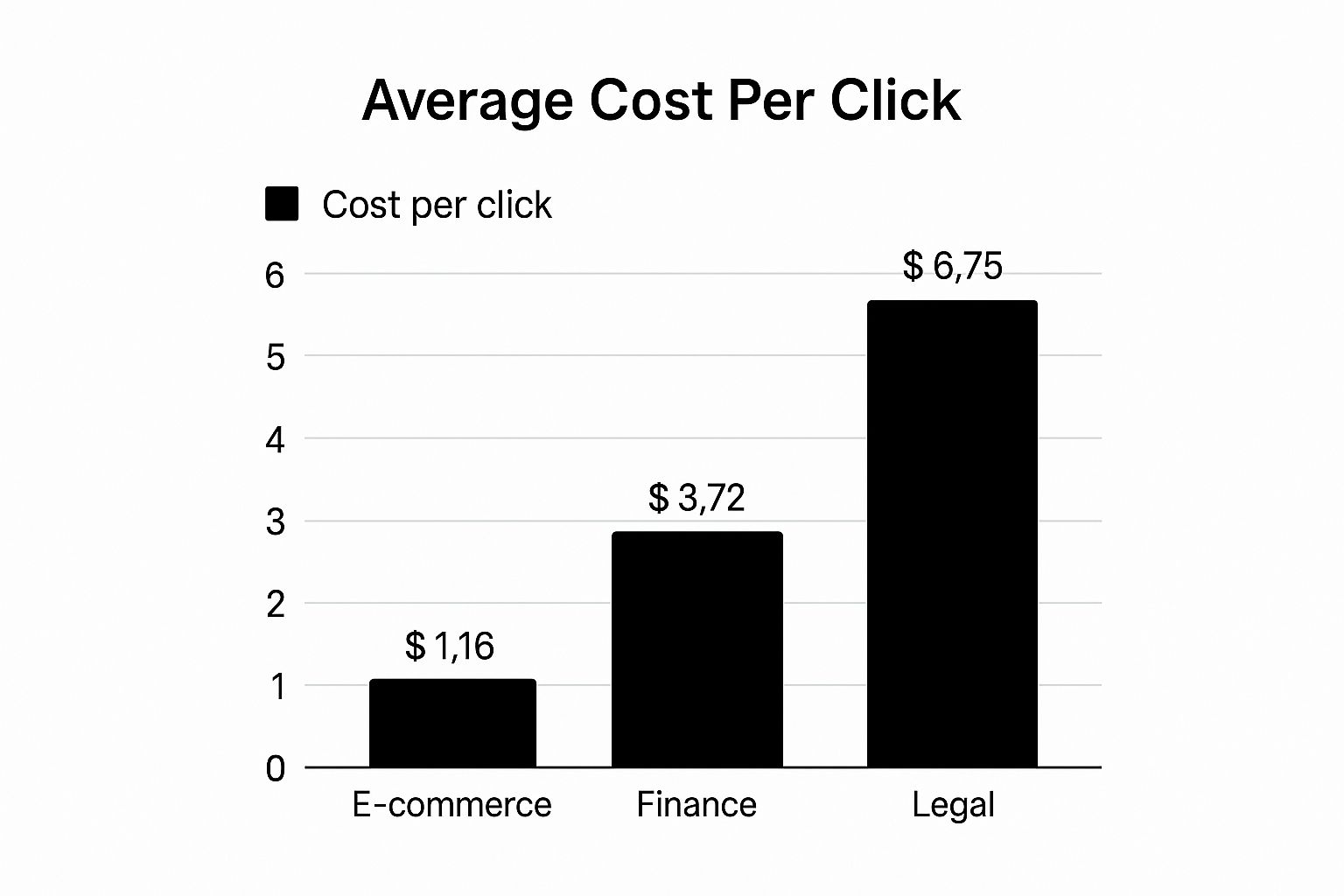
As you can see, a click in the legal field can cost nearly six times more than one in e-commerce. It’s a stark reminder of how much customer value dictates advertising spend.
To give you a clearer picture, let’s look at some UK-specific benchmarks.
UK Industry CPC Benchmarks Comparison
The table below breaks down the average Cost Per Click for various industries across the UK, highlighting the massive gap between high and low-competition sectors.
| Industry Sector | Average CPC Range (UK) | Competition Level |
|---|---|---|
| Legal Services | £6.00 – £15.00+ | Very High |
| Financial Services | £5.00 – £12.00 | Very High |
| Home Repair & Services | £4.00 – £9.00 | High |
| E-commerce & Retail | £1.00 – £3.50 | Medium |
| Travel & Hospitality | £0.80 – £2.50 | Medium |
| Arts & Entertainment | £0.50 – £2.00 | Low |
These figures show that while a solicitor might be paying upwards of £15 for a single click, a local theatre could be paying less than £1. This is the reality of the Google Ads auction.
Finding Your Competitive Edge
So, if you’re operating in one of these pricey industries, are you just doomed to pay top whack for every click? Not at all.
The key is to think strategically. You need to move away from the crowded main roads and start exploring the less-travelled side streets. In PPC terms, this means focusing on long-tail keywords.
Instead of getting into a bidding war over a hugely expensive term like “accountant London,” you could target more specific, lower-competition phrases. Think “small business tax advice for freelancers in Shoreditch.” Sure, this keyword gets fewer searches, but the traffic it attracts is often far more qualified and ready to convert – and the click will be significantly cheaper.
By digging into your niche and really understanding how your customers search, you can uncover these pockets of opportunity. It takes more effort upfront, but it pays off with a much healthier return on ad spend. Your goal is to find that sweet spot where competition is lower but user intent is still sky-high. That’s how you win at PPC without simply trying to outspend everyone else.
Setting a Realistic Google Ads Budget for Your Business

Alright, we’ve covered the moving parts that push your Google PPC costs up or down. Now it’s time to get practical and talk numbers. Deciding on a budget can feel a bit like sticking a pin on a map, but a successful campaign never starts with a random figure and a bit of hope.
The best way to approach this is to flip the question on its head.
Instead of asking, “how much should I spend?”, you need to be asking, “what result do I actually need?” Whether you’re chasing leads, driving e-commerce sales, or just getting your name out there, your end goal is the only sensible place to start building your budget.
Start With Your Goal in Mind
Let’s say you’re a local plumber. You don’t just want clicks; you want phone calls from people with a burst pipe at 2 a.m. That’s the real goal.
You know from experience that for every five qualified calls you get, you convert one into a paying customer. You also know that the average job brings in about £400 in profit.
With these two bits of information, you can figure out your target Cost Per Acquisition (CPA). In simple terms, this is the maximum you can afford to pay to land one new customer and still make a profit.
To keep the business healthy, you decide you’re happy to spend up to £100 to get that £400 job. This £100 is your target CPA, and it’s the anchor for the rest of our calculations.
A Simple Formula for Your Starting Budget
So, how do we turn that £100 CPA into a monthly budget? You just need one more number: your estimated conversion rate. This is simply the percentage of people who click your ad and then do the thing you want them to do (like call you or fill out a form).
For a service business, a 5% conversion rate is a decent industry benchmark to start with. This means that out of every 100 clicks on your ad, you should expect five to turn into genuine leads.
Now for some simple maths:
- Work out your target Cost Per Click (CPC): Take your target CPA (£100) and multiply it by your conversion rate (5%). That gives you a £5 Target CPC. This is the absolute most you should pay for a single click to stay profitable.
- Figure out how many clicks you need: If you convert at 5%, you’ll need 20 clicks to get one conversion (1 / 0.05). If your monthly goal is 10 new customers, you’ll need 200 clicks (10 customers x 20 clicks each).
- Calculate your monthly budget: Multiply your required clicks (200) by your target CPC (£5). And there you have it: a £1,000 monthly budget.
This goal-first approach changes your budget from a blind gamble into a proper business investment. If you want to go even deeper into the numbers, our guide on how much to spend on Google PPC has more detailed formulas.
Invest in Data, Not Just Clicks
Treat the first couple of months of any new Google Ads campaign as a ‘data-gathering’ phase. The main goal isn’t instant profit, but learning. This is your chance to discover which keywords actually convert, what ad copy people respond to, and which audiences are your best bet.
The Crucial Data Gathering Phase
Look, it’s very rare for a new campaign to be a roaring success from day one. You need to feed the Google machine enough data for its algorithm to start making smart choices. This initial period is an investment in the long-term health of your campaign. Think of it as market research.
- How long should it last? Give it at least 30 to 90 days of consistent spending to gather any meaningful data.
- What’s a sufficient budget? You need to aim for at least 100-200 clicks per month. Any less than that and you’ll be waiting forever to learn anything useful.
- What are you looking for? You’re not just chasing sales at this point. You’re finding out your actual CPCs, discovering your true conversion rates, and building up a list of negative keywords to stop wasting money.
If you view this initial spend as a research and development cost rather than a direct sales expense, you’re on the right track. The insights you pay for now will be paid back tenfold later as you build a lean, optimised, and profitable campaign for the future.
Actionable Strategies to Reduce Your PPC Spend
Once your campaigns are live and kicking, your job isn’t done. In fact, it’s just beginning. Your focus has to shift from setup to constant, active optimisation. Just letting your budget run wild without keeping a close eye on it is a surefire way to burn through cash.
But here’s the good news: you have a massive amount of control over how efficiently every single pound is spent. Thinking about “how much does Google PPC cost” isn’t just about setting a budget and forgetting it. It’s about making every pound work harder for you.
By putting a few core strategies into practice, you can plug the leaks in your spending, boost your campaign performance, and make your budget stretch much, much further. This is how you take a campaign from being just ‘good’ to being genuinely great and incredibly cost-effective.
Master Your Keyword Match Types
One of the fastest ways to haemorrhage money in Google Ads is by showing up for completely irrelevant searches. This is where mastering your keyword match types becomes your first line of defence. Think of them as the targeting controls for your keywords.
- Broad Match: This is the default setting, and honestly, it’s the riskiest. It gives Google the maximum possible freedom to show your ad for searches it thinks are related. This often leads to totally irrelevant clicks that do nothing but drain your budget.
- Phrase Match: A much safer, more controlled option. Your ad will only pop up when a search includes your keyword phrase in the correct order, though other words can appear before or after it.
- Exact Match: This is the most restrictive and, quite often, the most cost-effective match type. Your ad will only show for searches that are an exact match or a very, very close variation of your keyword.
Kicking off your campaigns with more restrictive types like phrase and exact match gives you far greater control from the get-go. It ensures you’re only paying for clicks from people who are searching for precisely what you offer, which instantly cuts out wasted spend.
How Much Does Google PPC Cost: Build a Robust Negative Keyword List
While match types tell Google what you do want to target, negative keywords tell it what you don’t. This is, without a doubt, one of the most powerful cost-saving tools in your entire Google Ads account.
A negative keyword list is simply a running tally of terms you actively block your ads from appearing for. For instance, a company selling high-end “wooden coffee tables” would want to add terms like “cheap,” “free,” and “second-hand” to its negative list. This one simple action stops you from wasting your budget on clicks from bargain hunters who were never going to buy from you anyway.
You should be constantly reviewing your ‘Search Terms’ report within Google Ads. This goldmine of a report shows you the actual, real-life queries people typed before clicking your ad. If you spot anything irrelevant, add it to your negative keyword list immediately. It’s an ongoing process of refinement that pays dividends.
Write Compelling Ad Copy That Converts
Your ad copy does so much more than just describe your product; it’s a vital tool for managing your Google PPC cost. Great ad copy boosts your Click-Through Rate (CTR), which is a massive component of your Quality Score. And as we’ve already learned, a higher Quality Score directly leads to a lower Cost Per Click (CPC).
Good ad copy also pre-qualifies your audience. By being specific about what you offer and your price point, you can gently deter the casual browsers and attract only the serious buyers.
For example, an ad that reads “Luxury Leather Sofas from £2,000” is far better at filtering traffic than a vague one that just says “Great Sofas for Sale.” The first ad speaks directly to the right customer and discourages clicks from people with a much lower budget.
Optimise Your Landing Page Experience
Your cost-saving efforts can’t just stop at the click. A huge part of mastering your PPC costs is making sure the traffic you’ve paid for actually converts. When you optimise your website’s conversion rate, you squeeze more value from every single click, effectively driving down your cost per acquisition.
The landing page experience is another crucial factor in your Quality Score. Google wants to see that the page you’re sending people to is relevant, trustworthy, and provides a brilliant user experience.
Make sure your landing page:
- Directly reflects the ad copy: The headline on your page should closely match the headline in your ad. No surprises.
- Loads quickly: Slow-loading pages are a killer. They frustrate users and will absolutely hammer your Quality Score.
- Is mobile-friendly: The majority of searches happen on mobile these days. A seamless mobile experience is completely non-negotiable.
- Has a clear call-to-action (CTA): Make it painfully obvious what you want the user to do next. Don’t make them think.
For a deeper dive into practical techniques, check out our essential PPC optimisation tips for maximising your ROI.
Use Ad Scheduling to Your Advantage
Finally, ask yourself: does your business really need to be advertising 24/7? For many, the answer is a clear “no.” Ad scheduling is a fantastic feature that lets you show your ads only during the days and hours that are most profitable for you.
By digging into your campaign data, you can pinpoint your peak performance times. Maybe you discover that leads coming in on a Sunday evening are much higher quality, or that most of your sales happen between 9 am and 5 pm on weekdays.
You can then tell Google to bid more aggressively during these golden hours and pull back or even pause your ads during quiet periods. This ensures your budget is always focused where it will have the biggest impact.
So, What’s the Real Story on PPC Costs?

At the end of the day, asking “how much does Google PPC cost?” is a bit like asking “how long is a piece of string?”. There’s no single price tag. Instead, it’s a dynamic figure that you get to control. The big secret? A smart, strategic approach will always beat a huge, clueless budget. Success isn’t about outspending your competitors; it’s about out-thinking them every step of the way.
Your journey to getting your ad spend under control starts with nailing the basics. First, get your head around how the ad auction actually works. You’ll quickly see that Google doesn’t just hand the top spot to the highest bidder. It heavily favours relevance and quality, which gives every business a fair shot at winning.
This is where your dedication to constant improvement becomes your secret weapon.
Your Blueprint for Smarter PPC Spending
Getting a grip on your budget really boils down to putting your energy where it matters most. Stop seeing your ad spend as some scary, uncontrollable cost. Think of it as a strategic investment you can tweak and refine for the best possible returns.
To get there, make these actions your top priority:
- Obsess over Quality Score: Honestly, this is the most powerful lever you can pull to lower your costs. A higher score gets you better ad positions for less money. It’s that simple.
- Budget with a Goal in Mind: Ditch the guesswork. Work out your starting budget based on what you’re willing to pay for a new customer and what you want to achieve.
- Never Stop Optimising: PPC is not a “set it and forget it” channel. You need to be constantly refining your keywords, tweaking your ad copy, and improving your landing pages to cut out the waste.
When you embrace these principles, you shift your entire mindset. You’re no longer just paying for clicks; you’re investing in real, tangible growth for your business. Every pound you spend becomes a calculated move, designed to bring back a measurable return.
Coming at Google Ads with this strategic framework gives you the confidence to manage your costs effectively. It turns the platform from an intimidating expense into a predictable—and highly profitable—marketing channel. When you get it right, your PPC spend can deliver truly exceptional results and drive your business forward.
Frequently Asked Questions About How Much Does Google PPC Cost
Even after breaking down all the moving parts, a few practical questions always pop up when you’re about to put your money on the line. Figuring out how much Google PPC costs isn’t just about the setup; it’s about timelines, budget realities, and knowing when to call in the pros. Let’s tackle the big ones.
How Long Until I See Results From PPC?
This is the million-dollar question, isn’t it? The honest answer is you won’t see a profitable return on day one. It’s best to think of the first 30-90 days as your data-gathering phase.
During this critical window, your main goal isn’t profit—it’s learning. You’re essentially feeding the Google algorithm a crash course on your business, helping it figure out what works and what doesn’t.
This initial investment is where you find out:
- Which keywords actually lead to a sale, not just a click.
- The ad copy that genuinely grabs your audience’s attention.
- What your true average Cost Per Click (CPC) and Cost Per Acquisition (CPA) look like in the real world.
Patience here is everything. Pulling the plug too early means you’re making big decisions with barely any data, which is a surefire way to waste money later on.
Can I Run Google Ads With Just £100 a Month?
Technically, yes. But it’s crucial to have realistic expectations. With a £100 per month budget, you’re massively restricting the amount of data you can collect. If your average click costs £2, that budget only gets you 50 clicks for the entire month. That’s less than two clicks a day.
With such a tiny amount of traffic, it becomes nearly impossible to properly test different ads, keywords, or landing pages. You just won’t have enough information to make smart, data-driven decisions, and your campaign will likely grind to a halt.
For a micro-budget to stand any chance, you have to be laser-focused. We’re talking about targeting a tiny geographic area, using only hyper-specific ‘exact match’ keywords, and having a landing page that converts like a dream. It’s a tough mountain to climb.
Is a PPC Management Service Worth the Cost?
Deciding whether to hire a PPC agency usually boils down to a simple trade-off: your time versus your money. Effectively managing a Google Ads account is a proper skill. It demands constant attention, deep analysis, and knowing when to make strategic tweaks.
You should seriously consider hiring an expert if:
- You simply don’t have the hours to dedicate to daily campaign management.
- You’re not an expert in keyword research, bid management, and analytics.
- Your campaigns are getting complex or your monthly spend is growing, making mistakes more expensive.
While there’s a management fee, a good agency should deliver a return that makes their cost look like a bargain. They do this through better efficiency, cutting out wasted spend, and ultimately, getting you much better results.
Trying to navigate the maze of Google Ads can feel like a full-time job in itself. At PPC Geeks, we take the guesswork out of the equation, building data-driven strategies that deliver real results so you can get back to running your business. Discover how our expert team can maximise your ROI today.


