
Google Shopping for Building Products: How to Avoid Low-Margin Traffic Now

If you’re selling building products on Google Shopping, you need to get ruthless about filtering out unprofitable clicks before they drain your budget. This isn’t about generic PPC tactics; it’s about building a profit-first strategy that segments products by margin, uses negative keywords to fence off the bargain hunters, and structures your campaigns to push your most valuable stock.
This is exactly how you stop haemorrhaging cash on low-margin traffic and start focusing your ad spend where it counts: on high-value buyers.
Google Shopping for Building Products: Why Your Building Product Campaigns Are Attracting Bad Traffic
Let’s be honest, selling building materials online is a different beast entirely. You’re not just shifting simple commodities. You’re dealing with complex specs, a mix of customers from weekend DIYers to seasoned contractors, and often, high-value purchases that people properly think about.
It’s this very complexity that causes standard, out-of-the-box Google Shopping strategies to fall flat on their face.
If your campaigns feel like they’re just spinning their wheels, trust me, you’re not alone. We see it all the time: suppliers getting plenty of clicks but ending up with depressingly low average order values. Your budget gets eaten alive by clicks on low-margin gear like screws and fixings, while your high-profit products—like bespoke doors or specialist timber—barely get a look-in.
That’s the classic calling card of a low-margin traffic problem.
Identifying the Symptoms
The issue usually boils down to a flat campaign structure that treats a £5 box of nails the same as a £500 vanity unit. When every product is on a level playing field, Google’s algorithm naturally drifts toward the items with broad search appeal. Unsurprisingly, these are often the cheapest and least profitable ones.
This creates a vicious cycle of wasted spend and a poor Return on Ad Spend (ROAS) on the very product lines that should be driving your growth. It’s a common reason why most Google Ads fail for building product suppliers.
The market is packed. With the UK e-commerce market projected to hit £286 billion by 2025, the competition is fierce. The massive surge in mobile shopping is a double-edged sword; it brings huge volume but often attracts casual browsers and price-shoppers, not serious buyers, which just waters down your traffic quality even further.
At its heart, the problem is a total misalignment between your business goal (profit) and your campaign’s default goal (clicks). Without specific instructions, Google’s automation will optimise for engagement, not for your margin, leaving you with a costly stream of traffic that doesn’t actually make you money.
Before you can fix the leak, you need to find it. The table below will help you quickly diagnose if your campaigns are suffering.
Diagnosing Your Low-Margin Traffic Problem (Google Shopping for Building Products)
Use this quick-reference table to see if your Google Shopping campaigns are suffering from inefficient, profit-draining traffic.
| Symptom | What It Looks Like in Your Account | Immediate Impact on Your Business |
|---|---|---|
| High Click Volume, Low AOV | Your click and impression numbers look healthy, but your Average Order Value (AOV) is stubbornly low. | You’re paying for clicks that lead to small, low-profit sales, eroding your overall profitability. |
| Poor ROAS on Top Products | The Return on Ad Spend for your most profitable product categories is well below target. | Your marketing budget isn’t working hard enough where it matters most, capping your growth potential. |
| Budget Drained by Cheap Items | Your spend reports show that a huge chunk of your budget is going to low-cost, low-margin SKUs. | There’s little to no budget left for promoting the high-margin products that actually drive your business forward. |
| Lots of “Tyre-Kicker” Queries | Your search query reports are full of generic, non-commercial terms like “cheap,” “discount,” or “free delivery.” | You’re attracting bargain hunters, not trade professionals or serious buyers ready to make a significant purchase. |
Recognising these symptoms is the first crucial step. By understanding why your current setup is attracting the wrong crowd, you can start building a smarter, profit-driven approach that turns things around.
Google Shopping for Building Products: Build a Profit-Aware Product Feed
Your Google Shopping product feed is so much more than a simple catalogue of what you sell. Think of it as the engine powering your entire campaign. It dictates which products show up, who sees them, and, most importantly, how profitable your advertising actually is. To stop attracting low-margin traffic, you need to turn your feed from a passive list into an active, profit-filtering machine.
This goes way beyond just tweaking a few product titles. It’s a fundamental shift in how you present your inventory to Google. The real goal is to bake your business intelligence—specifically, your profit margins—directly into the data itself. This is what lets you build campaigns that automatically chase high-value sales instead of low-value clicks.
The most powerful tool in your arsenal for this is the custom label. Google gives you five of them (custom_label_0 through custom_label_4), and they are your secret weapon for segmenting your building products in a way that actually matters to your bottom line.
Segmenting Your Inventory with Custom Labels
You have to stop treating every SKU the same. A bespoke oak staircase is worlds apart from a bag of plasterboard screws, and your feed needs to reflect that reality. By applying custom labels based on profit margin, you create clear tiers that will directly inform your bidding strategy later on.
A common and seriously effective approach is to create three distinct margin tiers. We’ve seen this work time and time again:
- High-Profit Heroes: These are your absolute best products, carrying a margin of 40% or more. Think specialist tools, high-end fixtures, or those custom-ordered materials that bring in the real money.
- Mid-Margin Stable: This category is for your reliable, everyday sellers. They’ve got healthy margins, typically between 20% and 40%. This could be quality timber, branded paint, or standard plumbing fittings.
- Low-Margin Decoy: These are your items with margins dipping below 20%. You might need them to offer a complete catalogue, but they often attract price-shoppers and just drain your budget. This tier usually includes commodity items like fixings, basic aggregates, or discounted clearance stock.
By labelling every single product in your feed with one of these tiers, you’re no longer flying blind. You’ve finally given Google the context it needs to understand which products genuinely drive your business forward. For a deeper dive into the technical setup, check out our complete guide on optimising your Google Shopping product feed.
Automating Margin Labels with Feed Rules (Google Shopping for Building Products)
Let’s be realistic: manually assigning these labels to thousands of SKUs is a non-starter. The solution is automation, which you can handle directly within Google Merchant Center or through a third-party feed management tool like Channable or Feedonomics.
The process boils down to using feed rules to automatically apply your custom labels based on your cost data. The first step is getting a cost_of_goods_sold attribute into your feed. If your ecommerce platform doesn’t add it by default, you can easily bring it in via a supplemental feed.
Once you have your cost and price data talking to each other, you can create a rule.
Example Rule in Google Merchant Center:
- Head to Products > Feeds and click on your primary feed.
- Go to the Feed rules tab and hit ‘create a new rule’.
- Set the condition: IF
priceandcost_of_goods_soldboth have values.- Set the action: Set
custom_label_0to “high-profit-hero” IF(price - cost_of_goods_sold) / priceis greater than0.4.- Simply add more rules for your “mid-margin-stable” and “low-margin-decoy” tiers.
This simple setup automatically enriches your feed with crucial profit data. Just like that, your feed transforms from a static list into a dynamic tool for smarter campaign management.
Strategic Exclusion of Unprofitable Products
Sometimes, certain products just aren’t worth advertising online. Period. These are the SKUs that consistently hoover up clicks but never convert, or have margins so razor-thin that even a single click pushes the sale into the red. A truly profit-aware feed strategy also means making the tough call to exclude these budget sinks entirely.
Don’t be afraid to pull the plug on products that consistently lose you money. This might be an entire category of low-cost accessories or specific SKUs that have historically poor performance.
You’ve got a few ways to do this:
- Using the
excluded_destinationAttribute: Add this attribute to specific products right in your feed to stop them from showing in ‘Shopping ads‘. - Merchant Center Filters: Create rules within your feed to exclude products based on criteria like price, brand, or even a custom label you create called ‘exclude’.
- Campaign Product Group Exclusions: Inside your Google Ads campaign, you can navigate to your product groups and simply exclude entire categories or individual items with a click.
Making these deliberate, data-backed decisions is what this strategy is all about. By enriching your feed with margin data and strategically trimming the fat, you stop wasting money on unprofitable traffic. This frees up your budget, allowing you to pour that spend back onto your ‘high-profit-heroes’ and finally build a Google Shopping operation that drives real, sustainable growth.
Google Shopping for Building Products: Structure Your Campaigns for Profit, Not Just Clicks
Once your product feed is humming with profit-margin data, it’s time to put that intelligence to work. The next step is building a campaign structure that actively defends your bottom line. A flat, one-size-fits-all campaign is a guaranteed way to burn cash in the building products sector. It’s a fast track to your budget getting eaten up by low-margin items before your high-value products even get a look-in.
To sidestep this common pitfall, you need to ditch the simple setup and get a bit more strategic with segmentation. The goal here is to create a hierarchy that tells Google exactly which products to push and how much you’re willing to pay for a click on each one. This is how you stop chasing clicks and start investing in genuinely profitable traffic.
The Margin-Based Priority Structure
One of the most powerful ways to do this is with a margin-based priority structure. This is a clever technique that uses a combination of campaign priorities and shared negative keyword lists to funnel traffic exactly where you want it to go. It makes sure that searches are routed to the most appropriate campaign based on the potential profit of the product.
Think of it like a waterfall. Broad, generic searches get caught at the top by a low-priority campaign with rock-bottom bids, protecting your budget. As a search gets more specific—indicating someone is much closer to buying—it flows down to campaigns with higher bids reserved for your most profitable products.
Here’s how you can build this out:
- High-Margin Campaign (Priority: Low): This campaign is exclusively for your ‘high-profit-hero’ products. You can get aggressive with your bids here because you know every conversion is worth a lot to the business.
- Mid-Margin Campaign (Priority: Medium): This is home to your ‘mid-margin-stable’ products. Bids are more moderate, reflecting their solid but not stellar profitability.
- Low-Margin Campaign (Priority: High): This campaign often acts as a catch-all for your ‘low-margin-decoy’ items, and sometimes all your products. It gets the highest priority setting but has the lowest bids.
I know, it sounds a bit backwards. But the magic is in the interplay between campaign priorities and negative keywords. You’ll apply a shared negative keyword list (full of specific, high-intent product names and SKUs) to your medium and high-priority campaigns. This pushes that super-valuable traffic away from them and down to the low-priority campaign, where your star products and high bids are waiting.
This diagram shows how your product list gets filtered into margin tiers in your feed—the essential groundwork for this campaign structure.
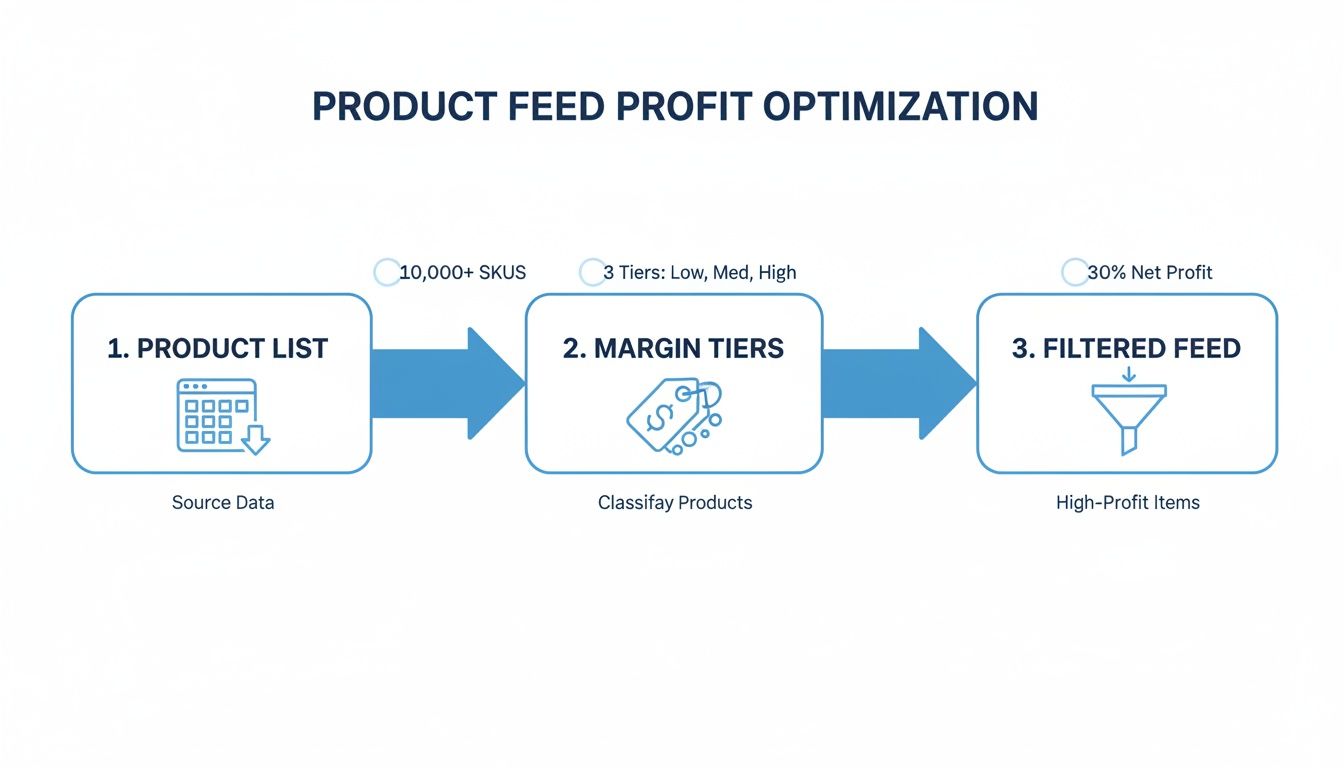
Classifying your products this way from the start is what makes it possible to build a campaign hierarchy that actually aligns your ad spend with your business goals.
Granular Control with SKU-Level Bidding (Google Shopping for Building Products)
If you’re running Standard Shopping campaigns, you can take this margin-based structure to another level with SKU-level bidding. By breaking down your ad groups to the individual item ID, you get the ultimate control over your spend.
This approach lets you set a unique bid for every single product in your catalogue. Got a specific type of premium composite decking with a fantastic conversion rate and margin? Bid aggressively on it. At the same time, if a generic pack of screws is just eating clicks with zero return, you can drop its bid to the absolute minimum.
Managing thousands of individual bids might sound like a nightmare, but it’s more manageable than you think if you focus on the outliers. You don’t need to tweak every SKU every day. Just focus on your top 20% of spenders and your bottom 20% of performers to make the biggest impact.
The key takeaway is this: you must actively manage where your budget flows. By structuring campaigns around profit tiers and bidding at a granular level, you transform Google Shopping from a passive sales channel into a precision-guided profit driver.
The UK market really drives home why this level of control is so vital. Google Shopping’s influence is huge, with around 1.2 billion searches happening on the platform every month. But here’s the stark reality for building product retailers: only 1.91% of users who click through to a product page will actually buy something. That incredibly low conversion rate proves that traffic quality is infinitely more important than sheer volume. It forces you to get strategic to avoid low-margin traffic and focus only on searches with real commercial intent. You can find more on these UK Google Shopping statistics and what they mean for your business.
Applying Profit Tiers in Performance Max
So what if you’re using Performance Max (PMax)? The principles are the same, but the execution is different. You lose direct control over campaign priorities and manual bidding, which makes your margin-based custom labels even more important.
Within PMax, you can use these labels to segment your products into different listing groups which can then be assigned to different asset groups. This is your main lever for steering the AI.
For example, you can create an asset group just for your ‘high-profit-hero’ products. This lets you pair your most valuable stock with:
- Targeted Creative: Use images and videos that show off the premium quality and unique selling points of these high-margin items.
- Specific Ad Copy: Write headlines and descriptions that speak directly to a professional or high-value audience, helping to filter out the bargain hunters.
- Refined Audience Signals: Give the algorithm signals that align with your ideal customer for these products. Think remarketing lists of past high-value buyers or custom segments based on trade-specific websites.
By doing this, you’re giving the PMax algorithm clear, strong signals about which products are most important to your business. The AI will then learn to prioritise showing these items to the most relevant audiences, basically optimising for profit on your behalf. Without this segmentation, PMax treats all products as equal, which, as we’ve already established, is a direct path to eroding your margins.
Google Shopping for Building Products: Use Negative Keywords to Filter Out Unwanted Shoppers
Getting the right customers to see your Google Shopping ads is only half the battle. The other, equally important half is actively pushing away the wrong ones—the tyre-kickers, the info-gatherers, and the bargain-hunters who will click all day long without ever hitting ‘add to basket’. This is where a sharp negative keyword strategy becomes your best line of defence.
Without one, you’re basically leaving the door wide open for your budget to get eaten up by irrelevant searches. In the building products game, that means paying for clicks from DIY enthusiasts looking for tutorials when you only sell to the trade, or someone searching for a specific brand of tile adhesive you don’t even stock.
Just think about the sheer volume of non-commercial searches out there. In 2025, search intent on Google is overwhelmingly informational, making up a massive 52.65% of all queries, while purely commercial searches account for a tiny 14.51%. This data, from these Google search trends on Semrush.com, highlights a huge challenge for building product suppliers. A huge chunk of your traffic likely has no intention of buying right now, making it critical to filter them out before they cost you a penny.
Mining Your Search Query Reports
Your Search Query Report (SQR) inside Google Ads is an absolute goldmine. It shows you the exact phrases people typed into Google right before clicking on your product ads. If you’re serious about dodging low-margin traffic, digging into this report regularly is non-negotiable.
What you’re hunting for are patterns. Are there certain words or phrases that consistently bring in clicks but zero conversions? These are your prime candidates for negative keywords.
Keep an eye out for terms like:
- Informational Qualifiers: Words like ‘how to’, ‘install’, ‘guide’, ‘ideas’, and ‘reviews’. These are massive red flags that the user is still in the research phase, not the buying phase.
- Price-Focused Language: Terms such as ‘cheap’, ‘discount’, ‘free delivery’, ‘second hand’, or ‘alternative’. These pull in bargain hunters who are never going to convert on your higher-margin products.
- Irrelevant Modifiers: Words like ‘jobs’, ‘careers’, ‘sample’, ‘course’, or ‘near me’ if you’re a national online-only retailer.
By methodically finding and excluding these terms, you start to sculpt your traffic, making sure your budget is reserved for shoppers with genuine commercial intent.
Building Tiered Negative Keyword Lists (Google Shopping for Building Products)
Just randomly adding negatives here and there won’t cut it. To really get control and stay flexible, you need a structured, tiered system for your negative keyword lists. This lets you apply broad exclusions across the board while making surgical tweaks at the campaign level.
A well-organised negative keyword strategy acts like a series of filters, each one refining your traffic to be more profitable than the last. It’s the difference between casting a wide, leaky net and using a precision-guided fishing spear.
Here’s a practical, three-tiered structure that works:
- Universal Account-Level List: This is your master list. It contains all the terms you never want to show up for, no matter the campaign. Think universal negatives like ‘free’, ‘jobs’, ‘scam’, and any competitor brands that are completely incompatible with what you sell.
- Campaign-Specific Lists: These lists are tailored to the specific goals of each campaign. For example, in a campaign pushing high-end kitchen worktops to trade customers, you’d add a list that filters out DIY-related terms like ‘DIY’, ‘how to fit’, or ‘kitchen makeover ideas’.
- Ad Group-Level Negatives: This is where you get super granular. If you have an ad group for a specific brand of power tool, you could add other tool brands as negatives to stop wasting money on brand-loyal searchers you’ll never convert.
This tiered approach gives you the power to proactively shield your margins across your entire account. For a deeper dive, our guide on mastering negative keywords in Google Ads is a great next step. By putting this filtering system in place, you take back control and make sure your ads are being shown to shoppers who are ready to buy, not just browse.
Google Shopping for Building Products: Dialling in Your Pricing, Shipping, and Conversion Values

Controlling traffic before the click is a huge piece of the profitability puzzle, but it’s not the whole story. The entire transaction, from the price a customer sees to the delivery cost they pay, has a direct and immediate impact on your actual margin.
There are three levers here that are too often overlooked: pricing, shipping, and conversion value. Getting these right can be the difference between turning clicks into profitable sales or just spinning your wheels. They don’t just influence a customer’s decision to buy; they feed Google’s bidding algorithms the high-quality data needed to chase the orders you actually want.
Strategic Pricing: It’s Not a Race to the Bottom
In the building products game, competing on price alone is a surefire way to lose. There will always be a competitor willing to slash their margins even thinner than yours. The smarter play is strategic pricing, which is all about communicating the real value you offer in a crowded market.
Don’t be afraid to price your premium, high-service products at a level that reflects their quality. If you’re offering expert advice, rapid specialist delivery, or a genuinely superior product, your price tag should signal that. For many trade customers, reliability and availability are far more important than saving a few quid on a bulk order. Your pricing in Google Shopping needs to be a direct extension of this strategy.
Master Your Shipping Setup in Merchant Center (Google Shopping for Building Products)
Shipping is a massive hurdle for building products. We’re not talking about small parcels here; you’re dealing with pallets of bricks, oversized timber lengths, and heavy bags of aggregate. Unclear or uncompetitive shipping costs are one of the biggest reasons for abandoned carts.
Your shipping setup in Google Merchant Center has to be crystal clear, accurate, and competitive. This isn’t just a box-ticking exercise; it’s a powerful conversion tool. It’s a key part of optimising your feed, and you can learn more about its impact in our deep dive into the Google Merchant Center feed.
Here are a few practical strategies I’ve seen work time and again:
- Weight-Based Rates: This is non-negotiable. Set up shipping rules based on the total order weight to accurately charge for heavy goods.
- Pallet Delivery Options: Create specific shipping services for pallet deliveries. Clearly state the costs and lead times for those bulk orders.
- Free Shipping Thresholds: This is a classic for a reason. Offer free delivery on orders over a certain value, say £250. It’s a great way to encourage larger basket sizes, which boosts your average order value and helps offset the delivery cost with higher overall profit.
By clearly defining your shipping rules, you don’t just improve the customer experience; you also prevent that dreaded “sticker shock” when a buyer sees an unexpectedly high delivery charge at checkout. This protects your conversion rate and stops you from wasting ad spend on clicks that were never going to convert.
How Shipping Strategies Impact Your Bottom Line
Choosing the right shipping model can drastically affect your average order value (AOV) and net margin. Here’s a quick breakdown of how different approaches stack up for building product sellers.
| Shipping Strategy | Pros | Cons | Best Suited For… |
|---|---|---|---|
| Flat Rate Shipping | Simple for customers to understand; predictable costs for you. | Can be unprofitable for heavy or long-distance orders. | Businesses selling products with similar weights and dimensions. |
| Calculated Rates | Highly accurate; you never lose money on shipping. | Can appear complex or expensive, potentially deterring some buyers. | Retailers with a wide variety of product sizes and weights. |
| Free Shipping Threshold | Excellent for increasing AOV; strong marketing incentive. | Can eat into margins if the threshold is set too low. | Businesses wanting to encourage larger, more profitable orders. |
| Local Pickup/Click & Collect | Eliminates shipping costs; drives foot traffic to trade counters. | Limited to customers within a certain geographical radius. | Suppliers with physical branches or warehouses accessible to the public. |
Ultimately, the best strategy often involves a mix of these options to give customers flexibility while protecting your own bottom line.
Go Beyond Revenue with Profit-Based Conversion Values (Google Shopping for Building Products)
This is where things get really interesting. Standard conversion tracking tells Google the revenue of a sale, but it has no idea if that £100 sale made you £40 profit or just £4. For any Smart Bidding strategy, this is a massive blind spot.
By implementing profit-based conversion tracking, you essentially teach the algorithm what a truly valuable sale looks like to your business. Instead of optimising for raw revenue, it starts optimising for actual profit. This is the single most powerful way to ensure your Google Shopping campaigns are laser-focused on your bottom line.
You can tackle this in a couple of ways:
- Fixed-Value Profit: If your margins are fairly consistent, you can pass back a fixed percentage of the revenue as the conversion value. Simple, but effective.
- Dynamic Profit Value: For pinpoint accuracy, use your ‘cost_of_goods_sold’ data to dynamically calculate the profit for each individual transaction and send that specific value back to Google Ads.
This single change can completely re-align your campaigns. It forces your ad spend to funnel towards the products and customers that generate the most real profit, effectively filtering out low-margin traffic right at the bidding level.
Got Questions About Selling Building Products on Google Shopping? We’ve Got Answers
When you’re deep in the weeds of Google Shopping, trying to make these margin-based strategies actually work, you’re bound to hit a few snags. It’s one thing to talk theory, but another to apply it. Here are some of the most common questions we get from PPC managers and ecommerce owners in the building supplies trade, answered straight.
How Do I Actually Get Profit Margin Data into My Product Feed?
This is usually the first hurdle. The cleanest way to handle this is by adding a cost_of_goods_sold attribute directly into your main product feed. If your ecommerce platform doesn’t support this out of the box, don’t worry – a simple supplemental feed is your best friend here. A basic Google Sheet uploaded to Merchant Center can easily map cost data to your existing SKUs.
Once you’ve got both price and cost in Merchant Center, you can either use a feed management tool or just set up a rule directly within Google. The formula is straightforward: (price - cost_of_goods_sold) / price. That’s it. This gives you a clear margin percentage for every single product.
With that calculation running, you can set up another rule to automatically slap on custom labels. For example, you could tag products like this:
high-marginfor anything over 40%.mid-marginfor products sitting between 20% and 40%.low-marginfor everything under 20%.
Should I Just Cut Out All My Low-Margin Products Completely?
Hold on a second. It’s tempting to just axe all the low-margin stuff, but that’s rarely the smartest play. Think about it – some of those items are your “tripwire” products. A customer might land on your site for a low-profit bag of screws but end up chucking high-margin power tools and a few lengths of timber into their basket at the same time.
It’s not about elimination; it’s about control.
The goal is to demote, not delete. Stick your low-margin products in a low-priority, low-bid campaign. This stops them from guzzling the budget meant for your star players but keeps them in the game for super-specific searches where they can still contribute to a bigger average order value.
This tactic lets you mop up all kinds of customer intent without wrecking the profitability of your whole account.
Do These Margin Strategies Even Work with Performance Max?
Yes, they do – and honestly, they’re more important than ever with Performance Max (PMax). Since PMax takes away a lot of your direct control over bidding and priorities, the data you feed it becomes your main way of steering the ship.
Those custom labels you set up for margin? They’re pure gold for PMax. You can use these labels to segment your products into different listing groups. From there, you can assign these distinct groups to separate asset groups.
This is where the magic happens. You get to align your best products with assets designed specifically for them:
- High-Margin Asset Group: Match your top-tier products with ad copy aimed at trade professionals, high-quality project imagery, and audience signals built from your list of past high-value customers.
- Low-Margin Asset Group: Use more general ad copy and broader audience signals. You’re essentially telling the algorithm to go after these sales, but not with the same aggressive focus you’re giving your most profitable items.
When you structure your campaigns this way, you’re giving the PMax AI crystal-clear signals about which products actually make you money. It encourages the system to optimise for profit, not just for any old click or conversion.
At PPC Geeks, we build data-driven PPC strategies that protect your margins and drive sustainable growth. Stop letting low-profit traffic drain your budget. Get your free, in-depth PPC audit today and discover how to build a Google Shopping machine that works for your bottom line.
Author

Search Blog
Free PPC Audit
Subscribe to our Newsletter

The Voices of Our Success: Your Words, Our Pride
Don't just take our word for it. With over 100+ five-star reviews, we let our work-and our satisfied clients-speak for us.

"We have been working with PPC Geeks for around 6 months and have found Mark and the team to be very impressive. Having worked with a few companies in this and similar sectors, I rate PPC Geeks as the strongest I have come across. They have taken time to understand our business, our market and competitors and supported us to devise a strategy to generate business. I value the expertise Mark and his team provide and trust them to make the best recommendations for the long-term."
~ Just Go, Alasdair Anderson
