




So, you’re asking the big question: how much does Google Ads actually cost? The honest answer is, there’s no single price tag. Your spend could be anything from as little as £5 a day to several thousand pounds, all depending on your industry, your goals, and how sharp your campaign management is.
Your Quick Guide to Google Ads Costs

Think of Google Ads less like buying a product off the shelf and more like a fast-paced auction where you’re bidding for a potential customer’s attention. The best part? You’re in total control of your budget and only pay when someone actually does something, like clicking your ad. This pay-per-click model makes it a level playing field for everyone, from the local startup to the national powerhouse.
The core of what you pay boils down to a key metric: Cost Per Click (CPC). This is simply the fee you pay every single time a user clicks on your ad. Getting your head around CPC is the first real step to mastering your ad spend.
Initial Cost Benchmarks in the UK
To get our bearings, let’s look at some typical figures for UK businesses. Remember, these numbers can swing wildly from one industry to another, but they give you a solid starting point for your budget planning.
Here’s a quick snapshot of what you might expect when you first dip your toes into the world of Google Ads in the UK.
Google Ads UK Average Cost Snapshot
This table pulls together the key metrics to give you a ballpark idea of the initial investment needed for a small to medium-sized business.
| Metric | Average UK Cost | Description |
|---|---|---|
| Average CPC (Search) | £1 – £4 | The typical amount you’ll pay for a single click on a search ad. Bear in mind, super competitive industries will see much higher CPCs. |
| Daily Budget (SME) | £10 – £50 | A common starting point for small and medium businesses to begin gathering data and see what works. |
| Monthly Spend (SME) | £300 – £1,500+ | A realistic monthly budget range for a focused campaign. You can always scale this up as you start seeing results. |
This gives you a foundational understanding of the costs involved. Now, let’s dig into what actually influences these numbers and, more importantly, how you can strategically manage them to get the best possible bang for your buck.
How Much Does Google Ads Cost? Understanding the Google Ads Auction
To get a real grip on how much Google Ads costs, you need a peek behind the curtain at its core engine: the ad auction. It’s a common misconception that the highest bidder automatically wins the top spot. The reality is far more interesting. Think of it as a lightning-fast evaluation where Google rewards relevance and quality, not just who has the deepest pockets.
Every single time someone types a search query into Google, an auction kicks off between all the advertisers bidding on those keywords. But Google doesn’t just look at who’s willing to pay the most. It also weighs up the quality of each ad. This clever system is precisely why a small local business can sometimes outrank a huge national competitor, even with a much smaller budget.
This image breaks down the three main pillars that determine your final Google Ads cost.
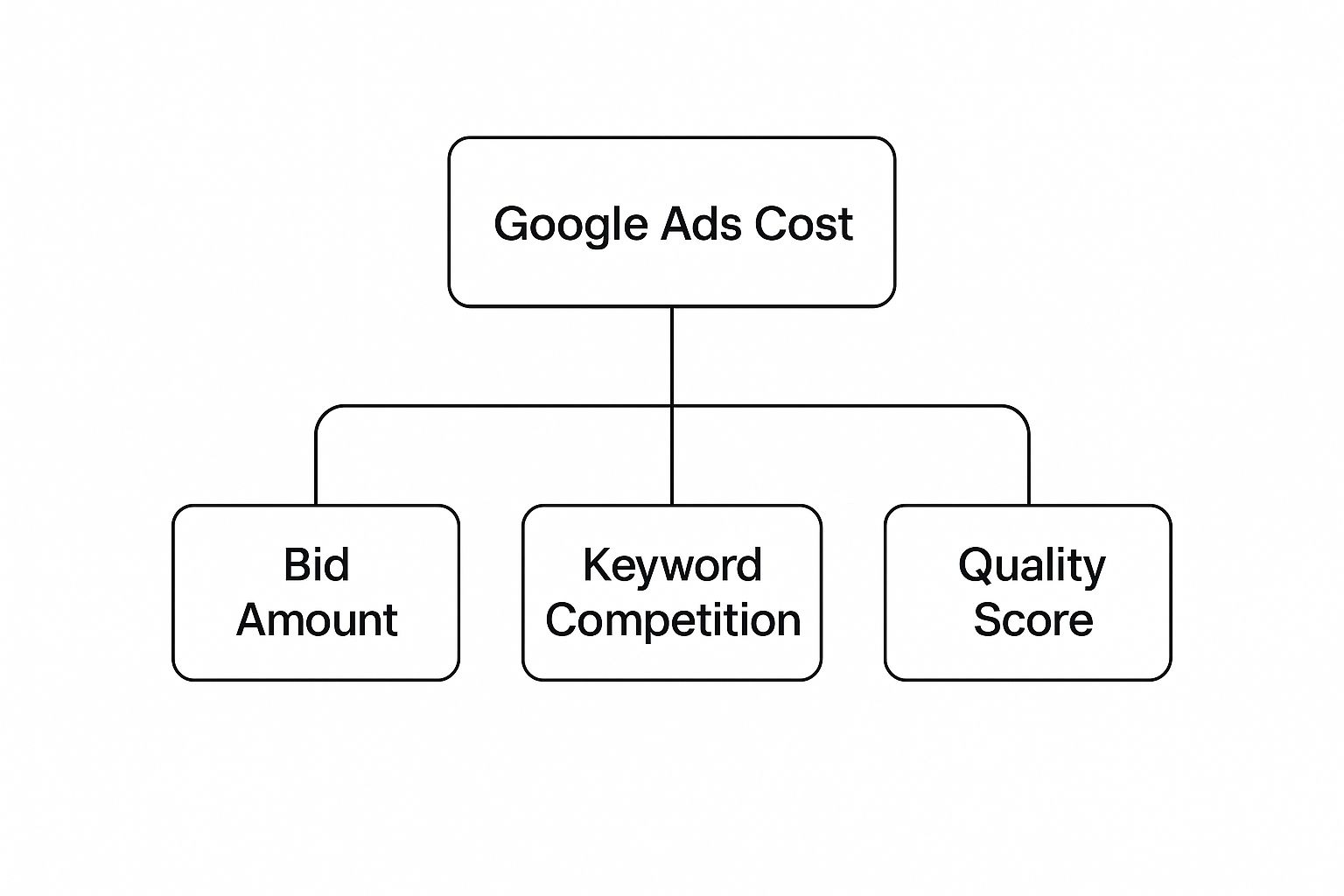
As you can see, your bid is just one piece of the puzzle. Keyword competition and your Quality Score are just as vital in the final calculation.
What Is Ad Rank?
The winner of the auction is decided by something called Ad Rank. It’s a simple but powerful calculation that dictates your ad’s position on the search results page. A higher Ad Rank means a better position, which, you guessed it, usually leads to more clicks.
The formula is beautifully straightforward:
Ad Rank = Your Maximum Bid x Your Quality Score
This means an advertiser with a lower bid but a much higher Quality Score can actually beat someone with a high bid and a poor Quality Score. It’s Google’s way of making sure its users see the most relevant and helpful ads, which creates a better experience for everyone involved.
The Power of Quality Score
Quality Score is Google’s rating of the overall quality and relevance of your keywords and ads. It’s scored on a scale from 1 to 10, and you’re aiming for that perfect 10. Think of it as your reputation at the auction; a better reputation gets you better treatment and, crucially, lower prices.
A high Quality Score is the secret weapon for getting your Google Ads costs under control. It directly impacts your Ad Rank and can seriously lower your actual cost-per-click (CPC). In fact, a higher Quality Score means you could pay less than competitors who are positioned below you on the page. For a more detailed look at this, our friends at PPC Geeks have a complete breakdown of the factors that influence Google AdWords PPC costs.
Google calculates your Quality Score based on three main ingredients:
- Expected Click-Through Rate (CTR): This is Google’s prediction of how likely people are to click your ad when it shows up. It’s heavily influenced by how well your ads have performed in the past. A compelling ad that really speaks to the search query will naturally get more clicks.
- Ad Relevance: This measures how well your ad’s message matches the keywords you’re bidding on. If someone searches for “men’s running shoes,” an ad featuring that exact phrase is far more relevant than a generic one for a “shoe shop.” Simple, but so important.
- Landing Page Experience: This part looks at how relevant and user-friendly your landing page is for the person who clicks your ad. The page needs to load quickly, be easy to get around (especially on mobile), and actually deliver on what your ad promised.
How Much Does Google Ads Cost? Key Factors That Drive Your Ad Spend
So, why can a single click for a London law firm cost a small fortune, while one for a local bakery costs mere pence? The answer isn’t just one thing. It’s a combination of powerful variables that directly control your Google Ads budget. Getting to grips with these levers is the first real step towards mastering how much you spend.
At its heart, your ad spend boils down to two things: competition and perceived value. The more advertisers are fighting for the same audience, and the higher the potential lifetime value of a new customer, the more you can expect to pay for each interaction. It’s the fundamental principle that drives pricing across the entire platform.
Industry and Keyword Competition
Your industry is probably the single biggest factor dictating your ad costs. A crowded market full of high-value customers naturally creates a more intense auction, pushing bid prices sky-high.
Think of it this way: a single new client for a nationwide law firm could be worth tens of thousands of pounds. In that context, bidding £7 or more for a click is a perfectly calculated business decision. A plumber in Manchester, while still needing those valuable leads, operates in a different financial league. Their ideal cost-per-click will be much lower because the value of each job is different.
This dynamic is reflected right across the board. The average CPC for Google Ads in the UK is about £3.33, but that number hides some massive variations. Highly competitive fields like legal services can see CPCs soar to £7.27, whereas industries like arts and entertainment enjoy much lower average costs of around £1.22.
To give you a clearer picture, here’s a look at how different industries stack up when comparing Search and Display ad costs in the UK.
UK Industry CPC Benchmarks Search vs Display
| Industry | Average Search CPC | Average Display CPC |
|---|---|---|
| High-Cost Industries | ||
| Legal | £7.27 | £0.95 |
| Insurance | £6.50 | £0.80 |
| Finance | £5.80 | £0.75 |
| Low-Cost Industries | ||
| Arts & Entertainment | £1.22 | £0.35 |
| Travel & Tourism | £1.55 | £0.40 |
| Real Estate | £2.10 | £0.55 |
As you can see, the difference between a click on the Search Network versus the Display Network is huge, and the industry you’re in has a massive say on the final price you’ll pay.
The keywords you target are the battleground where all this competition plays out. Broad, high-volume terms like “solicitor London” are fiercely contested and expensive. In contrast, more specific, long-tail keywords like “commercial property solicitor in Islington” will almost always have less competition and lower costs.
Targeting and Ad Scheduling
Where and when your ads appear has a massive impact on your budget. These two factors give you incredible control, letting you focus your money where it’s most likely to deliver a return.
Geographic Targeting
It sounds obvious, but targeting the entire UK is far more expensive than focusing on a specific city. A nationwide campaign for a furniture retailer will burn through its budget much faster than one for a local bakery targeting customers within a 5-mile radius.
- Nationwide: High cost, broad reach. Perfect for e-commerce or national service providers.
- City-Specific: Medium cost, focused reach. Ideal for businesses serving a metro area, like a restaurant or a local consultant.
- Hyper-Local: Low cost, highly specific reach. Great for businesses like hairdressers or cafes that rely on local footfall.
Ad Scheduling
Does your business only operate from 9 am to 5 pm, Monday to Friday? If so, running ads 24/7 is a surefire way to waste money on clicks that come in when nobody’s there to answer the phone or reply to an enquiry.
Ad scheduling, or ‘dayparting’, lets you switch your campaigns on and off at specific times and on certain days. This simple tweak ensures your budget is only spent during your peak business hours when a click is most likely to turn into a genuine lead or sale. Understanding why PPC is so expensive often comes down to dialling in details just like this.
Seasonality and Device Targeting
Finally, external trends and user behaviour add another layer of complexity to your ad costs. If you can recognise these patterns, you can adapt your strategy and budget for maximum efficiency.
Seasonal demand can make costs fluctuate wildly. For instance, the keyword “Christmas gift ideas” will see its CPC skyrocket between October and December. In the same way, a company selling garden furniture will find their ad costs are much higher in the spring than in the middle of winter.
Device targeting is also crucial. If you dig into your data and find that mobile users are converting at a much higher rate, you can adjust your bids to prioritise showing your ads on smartphones. On the flip side, if your product requires detailed comparison best done on a desktop, you can push more budget towards that device. By analysing your performance data, you can channel your spend towards the most profitable platforms and make every pound work that much harder.
How Much Does Google Ads Cost? How to Set a Realistic Google Ads Budget
Figuring out the right budget for your Google Ads campaigns is a bit of an art, mixing ambition with cold, hard analysis. Moving from theory to practice, there are a few solid methods you can use to land on a number that actually helps you hit your business goals. A well-planned budget stops you from making classic mistakes, like spending too little to get any useful data or throwing too much money at a campaign without a clear strategy.
The trick is to tie your ad spend directly to what you want to achieve. Forget picking a number out of thin air; your budget should be a calculated investment designed to bring in a specific return.
Start Small and Scale with Data
One of the smartest ways to get started, especially if you’re new to the Google Ads game, is to begin with a small, controlled budget. Think of this initial spend as a research project. You’re gathering crucial data before you start dropping serious cash.
Kick things off with a daily budget you’re comfortable with—something like £10 to £50 per day. This is usually enough to start seeing some initial performance metrics without putting your business at major financial risk. At this stage, your main goal isn’t to rake in massive profits, but to learn.
You’ll quickly uncover vital intel, like:
- Which keywords are actually driving clicks and conversions.
- The average Cost Per Click (CPC) in your specific corner of the market.
- What time of day or which devices are performing best.
After a few weeks of this, you’ll have real data to look at. You can see what’s working and confidently start scaling up your budget. This data-first approach means that when you do increase your spend, every extra pound is going towards the most effective parts of your campaign, pushing your potential return as high as it can go.
Calculate Your Budget Based on Business Goals
For a more advanced approach, you can work backwards from your revenue targets. This method connects your advertising spend directly to your financial objectives, giving you a rock-solid justification for your budget.
First, you need to figure out your target Cost Per Acquisition (CPA). This is the absolute maximum you’re willing to pay to get one new customer. To work this out, you need to know your customer’s lifetime value (LTV) and your profit margins.
Let’s say you run an e-commerce store. The average customer order is £100 and you have a 25% profit margin, which means you make £25 profit on each sale. To stay in the black, your CPA has to be less than £25. Let’s be safe and set a target CPA of £15.
Next, you need your website’s conversion rate. If your landing page turns 2% of visitors into customers, you can calculate your maximum CPC:
Maximum CPC = Target CPA x Conversion Rate
Maximum CPC = £15 x 0.02 = £0.30
This tells you that you can afford to pay up to £0.30 per click and still hit your profit goals. If your goal is to bring in 100 new customers a month, your budget calculation is simple:
Monthly Budget = Target Customers x Target CPA
Monthly Budget = 100 x £15 = £1,500
This formula-based method turns budgeting from a guessing game into a strategic business calculation. To make sure your Google Ads budget fits with your overall financial picture, it’s always a good idea to consult a comprehensive guide to budgeting for small business success.
Use Tools for Forecasting and Research
To add another layer of confidence to your planning, you can lean on forecasting tools like Google’s Keyword Planner. This free tool gives you estimated click volumes and average CPCs for the keywords you’re targeting, helping you ground your budget in reality.
It’s amazing how much these costs can vary between industries. A 2025 industry overview for the UK shows that search ad CPCs for legal services hover around £8.94, while the automotive sector is closer to £1.72. Knowing these benchmarks is key to setting realistic expectations and forecasting your budget accurately.
By blending a data-driven scaling strategy, goal-based calculations, and insights from forecasting tools, you can build a budget that’s both robust and realistic. And if you’re thinking about bringing in the pros, understanding how much it costs to hire a PPC agency is a valuable part of the planning process too.
Smart Strategies to Control and Optimise Your Spend

Simply setting a budget isn’t the finish line; it’s the starting block. To really get ahead with Google Ads, you need to be actively managing your spend, making every pound work as hard as it possibly can. This is about shifting your mindset from just spending money to investing it wisely through constant optimisation.
Think of your budget as the fuel in a high-performance engine. Without precise tuning, you’ll just burn through it inefficiently. Smart strategies are that tuning process, ensuring you get maximum performance and distance from every single drop.
Refine Your Targeting with Negative Keywords
One of the quickest ways to stop haemorrhaging money is by telling Google what searches you don’t want your ads to show up for. This is exactly what negative keywords are for. They stop your ads from appearing for irrelevant queries that might sound similar but have a completely different intent behind them.
For instance, a company selling high-end “designer glasses” definitely doesn’t want to pay for clicks from people searching for “free wine glasses.” By adding “free” and “wine” to their negative keyword list, they instantly filter out that irrelevant traffic and wasted spend.
Proactively managing your negative keyword list is not a one-and-done job. You should be regularly digging into your Search Terms Report to find and block new, irrelevant queries that are eating into your budget.
Master Your Bidding and Scheduling
Your bidding strategy and your ad schedule are two of the most powerful levers you can pull to control costs. Instead of a set-and-forget approach, you should be dynamically managing both based on cold, hard performance data.
Recent analysis of the UK market really drives this point home. A huge study of over 16,000 campaigns found that while the average CPC shot up by nearly 13%, conversion rates also climbed by almost 7%. This tells us that even as costs rise, smarter targeting and optimisation can deliver better results to offset the expense. For a deeper dive into these trends, you can read the full report on rising Google Ads costs and conversion trends on searchengineland.com.
Actionable Bidding and Scheduling Tactics
- Use Ad Scheduling: If you know your customers are most likely to convert between 9 am and 5 pm on weekdays, why on earth would you run ads at 3 am on a Sunday? Use ad scheduling to focus your budget on your most profitable hours and days.
- Leverage Smart Bidding: Let Google’s machine learning do the heavy lifting. Strategies like Maximise Conversions or Target CPA (Cost Per Acquisition) automatically adjust your bids in real-time to hit your specific goals, squeezing more value out of your budget.
- Implement Location Bid Adjustments: If you notice that customers in Manchester convert at a much higher rate than those in London, apply a positive bid adjustment. This tells Google to show your ads more prominently to users in Manchester, putting your money where the results are.
Continuously Test and Improve Your Ads
Complacency is the absolute enemy of a healthy ROI. The most successful advertisers are the ones who are constantly testing and refining their campaigns to figure out what truly clicks with their audience. This means A/B testing different elements of your ads and landing pages.
You can test things like:
- Headlines: Try out different calls to action, mention pricing, or shout about your unique selling points.
- Descriptions: Experiment with different tones of voice, features, and benefits.
- Landing Pages: Test variations of your landing page layout, copy, and calls to action to see what drives more conversions.
Every successful test, no matter how small it seems, helps improve your Quality Score. A better Quality Score not only boosts your ad position but also directly lowers your cost-per-click, making your budget stretch that much further. To get a handle on your finances, try using our AdWords budget calculator to forecast potential spend and returns.
Common Questions About Google Ads Costs
Even after you get your head around the mechanics of Google Ads, the practical questions start popping up. How much does this actually cost for a business my size? What results can I realistically expect? Let’s tackle some of the most common questions we hear from UK businesses.
This is where we get into the “what ifs” and “how longs”. Getting straight answers here is vital for setting the right expectations and making sure paid search fits neatly into your wider marketing plan.
Can I Use Google Ads with a Very Small Budget?
Absolutely. One of the best things about Google Ads is its flexibility, which makes it a brilliant tool even if you’re working with a tight budget. You can easily set a daily budget as low as £5 or £10 just to get things moving.
Of course, a smaller budget means fewer clicks and impressions, but it’s a fantastic way to dip your toes in the water. It lets you test the platform, gather some early data on which keywords work, and get a feel for what your audience responds to before you commit to a bigger investment. The key to making a small budget work is precision – you need to be laser-focused with your keywords, location, and ad scheduling to make every single pound count.
How Long Does It Take to See Results?
You’ll start seeing traffic and clicks almost as soon as your campaign is approved and goes live. But hold on – there’s a big difference between that initial flurry of activity and getting meaningful results like qualified leads and actual sales.
Patience is absolutely crucial here. You should plan to let your campaigns run for at least one to three months to gather enough meaningful performance data. This is your learning phase, where you’ll be A/B testing ads, tweaking landing pages, and refining your strategy. Making big decisions based on a few days’ worth of data is a classic mistake that often leads to poor outcomes.
Is Google Ads Worth It If I Already Do SEO?
Yes, without a doubt. For the vast majority of businesses, Google Ads and Search Engine Optimisation (SEO) aren’t an either/or choice. They’re powerful allies that work together to give you maximum visibility on the search results page.
Think of it like this:
- SEO is your long game. It’s all about building organic authority and visibility over time, which eventually brings in “free” traffic once you start ranking.
- Google Ads gives you immediate visibility. It can put your business right at the top of the search results from day one. This is perfect for running promotions, launching a new product, or just bridging the gap while your SEO efforts ramp up.
When you run both, you can dominate the search page. You can even use the keyword data from your ads to inform and supercharge your SEO strategy, ensuring you have a rock-solid, consistent presence online.
Ready to take control of your ad spend and get the best possible return on your investment? The team at PPC Geeks offers a free, in-depth audit to pinpoint wasted spend and uncover hidden growth opportunities in your account. Get your free Google Ads audit today and see how our expert, UK-based team can help you smash your business goals.


