




Cost of Advertising on Google AdWords: When people ask “how much does Google Ads cost?”, there’s never a single, fixed price. The simple truth is that you are in control of your spend.
On average, a UK business might see a Cost Per Click (CPC) somewhere in the ballpark of £1 to £7. But honestly, that number can swing wildly depending on your industry and just how fierce the competition is.
Decoding Your Real Google Ads Spend
Trying to pin down the actual cost of advertising on Google is less like walking into a shop with price tags and more like stepping into a bustling auction house.
Cost of Advertising on Google AdWords: Every single time someone searches for a term you’re targeting, you’re instantly thrown into an auction against other businesses vying for that same attention. The winner gets their ad shown, but the final price isn’t just about who has the deepest pockets.
Your final costs are shaped by a handful of dynamic factors, which is great news because it means you have a surprising amount of influence over how efficiently your budget gets used.
Core Pricing Models
There are two main ways you’ll pay for your ads, and they serve completely different purposes:
- Pay-Per-Click (PPC): This is the most common model you’ll encounter. As the name suggests, you only pay when someone actually clicks on your ad. It’s the go-to for driving traffic to your site and getting direct leads or sales.
- Cost-Per-Mille (CPM): With this model, you pay for every 1,000 times your ad is shown (impressions), whether anyone clicks or not. This is usually the playground for big brands running awareness campaigns where just getting eyeballs on the brand is the main goal.
Figuring out which model aligns with your goals is the first crucial step. If you need sales, you’re on Team PPC. If you just want everyone to know your name, CPM might be your better bet. To make sure you’re measuring the right results for either model, check out our guide on how to set up effective Google Ads conversion tracking.
UK Google Ads Cost Metrics at a Glance
So, what can UK businesses actually expect to pay? Here’s a quick look at some average cost metrics to give you a clearer picture.
| Metric | Average Cost (GBP) | Primary Use Case |
|---|---|---|
| Cost Per Click (CPC) | £1 – £7 | Driving traffic, generating leads/sales |
| Cost Per Mille (CPM) | £63.60 (Display Network) | Brand awareness and visibility |
| Cost Per Conversion (CPA) | £26.06 | Acquiring a specific customer action (sale, form fill) |
These figures give you a realistic baseline. The £63.60 CPM on the Google Display Network shows the price of pure visibility, while the average £26.06 Cost Per Conversion highlights the typical investment needed to turn a click into a tangible lead or sale. Remember, these are just averages—your own results will depend entirely on your industry, strategy, and execution.
How the Google Ads Auction Actually Works
Ever wondered why having the biggest budget doesn’t guarantee the top spot on Google? It’s because Google Ads isn’t a simple auction where the highest bidder wins. It’s more like a talent show where your performance matters just as much as your entry fee.
This unique system is designed to make sure users see relevant, high-quality ads, not just those from companies with the deepest pockets. Getting your head around this process is the first major step towards mastering the cost of advertising on Google Adwords and making your budget work harder for you.
Every time someone types a search query, Google instantly runs an auction among all the advertisers bidding on those keywords. To pick a winner, Google uses a crucial formula called Ad Rank.
Ad Rank: The Secret Formula
Ad Rank is the score that decides your ad’s position on the search results page. It’s a surprisingly simple multiplication:
Ad Rank = Your Maximum Bid x Your Quality Score
Your bid is straightforward enough—it’s the most you’re willing to pay for a single click on your ad. But the Quality Score is where the real magic happens. This is Google’s rating of the overall quality and relevance of your keywords, your ads, and your landing page.
A higher Quality Score can propel you to a better Ad Rank even if your bid is lower than a competitor’s. Imagine two advertisers are fighting for the top spot. Advertiser A bids £4 but has a measly Quality Score of 3 (giving them an Ad Rank of 12). Meanwhile, Advertiser B only bids £2 but has an impressive Quality Score of 8 (giving them an Ad Rank of 16).
In this scenario, Advertiser B snags the better position and pays less for each click.
This is the fundamental principle of the Google Ads auction: Google rewards quality. By creating a better experience for the user, you’re rewarded with lower costs and higher ad placements.
This infographic breaks down the main factors that combine to influence your overall ad spend.
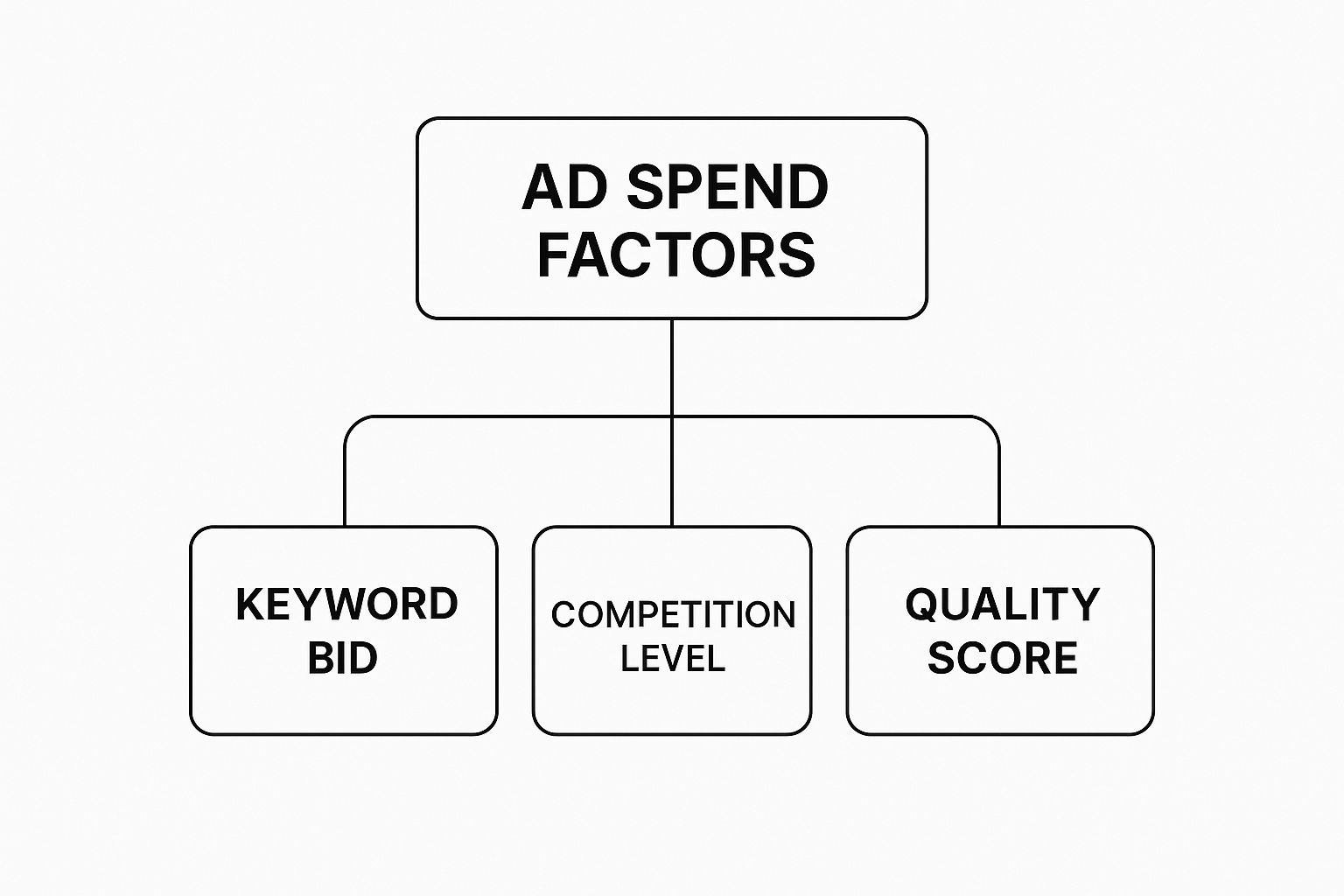
As you can see, your Quality Score is just as important as your bid and the level of competition. It has a direct, powerful impact on what you end up paying.
The Three Pillars of Quality Score
Your Quality Score isn’t just some random number; it’s calculated based on three core components. Improving these is the absolute key to cutting your ad spend without sacrificing performance. To dive deeper into the mechanics, you can learn more about how Google Ads work in our detailed guide.
1. Expected Click-Through Rate (CTR)
This is Google’s prediction of how likely people are to click your ad when it’s shown. It’s based on your account’s historical performance. A higher expected CTR tells Google that your ad is a great match for what the user is searching for. You can boost this by writing compelling, relevant ad copy that speaks directly to the searcher’s needs.
2. Ad Relevance
This metric measures how closely your ad’s message aligns with the keywords you’re bidding on. If someone searches for “men’s running shoes,” your ad should be talking about running shoes, not just generic “footwear.” The more specific and relevant your ad copy is to the keyword, the higher your ad relevance score will be, which in turn lifts your Quality Score.
3. Landing Page Experience
This part is all about what happens after the click. Google wants to send users to pages that are relevant, trustworthy, and easy to use. A high-quality landing page should feel like a natural continuation of the ad. If your ad promises a “50% off sale on running shoes,” your landing page had better feature that offer loud and clear. Things like page load speed, mobile-friendliness, and clear content all contribute to a positive landing page experience and a better Quality Score.
By focusing on these three pillars, you actively take control of your advertising costs. Instead of just throwing more money at your bids, you can strategically improve your quality to win better positions for less, achieving a much more efficient return on your investment.
Key Factors That Drive Your Google Ads Costs

Ever wondered why one business pays pennies for a click while another shells out pounds? It’s a common question. The truth is, the cost of advertising on Google Ads isn’t a fixed price menu. It’s a dynamic, constantly shifting figure that hinges on a whole mix of factors.
Getting your head around these variables is the first step to mastering your budget and getting a real edge over the competition.
Think of it like buying a house. The final price tag depends on the neighbourhood, the size of the property, and how many other people are trying to buy it. Google Ads is no different. Your costs are shaped by where you’re advertising, who you’re trying to reach, and how many other businesses are after that same digital real estate.
Industry and Competition Levels
The single biggest driver of your ad costs is, without a doubt, your industry. Some sectors are just fiercely competitive, creating a constant bidding war that pushes up the price for every single click. If you’re in a high-value field where one new customer can be worth thousands, you can bet you’ll be paying more.
Take legal services, insurance, or financial advice – these are consistently among the most expensive keywords. It makes sense when you think about it. The potential return is enormous. Paying £20 for a single click feels like a bargain if it lands a new client worth £5,000.
On the flip side, industries with smaller transaction values, like a local artisan bakery or an independent bookshop, usually see much less aggressive competition and, as a result, enjoy much lower costs per click.
A UK-focused breakdown shows this really clearly. Legal services, a notoriously tough sector here in the UK, saw an average Cost-Per-Click (CPC) of £7.24 on Search Ads, but that dropped to just £0.58 for Display Ads. It just goes to show how much of a premium those high-intent Search Ads command, as they’re the ones pulling in the highest quality leads. If you want to dig deeper, you can find more insights into UK Google Ads costs.
Keyword Choice and Intent
Cost of Advertising on Google AdWords: Not all keywords are created equal. The specific terms you choose to bid on have a direct and immediate impact on how much you spend. We can roughly split them into two camps:
- Broad Keywords: Think short, general terms like “solicitors” or “running shoes.” They get tons of searches but are often hyper-competitive and pricey. The user’s intent is also a bit of a mystery – are they just browsing, or are they ready to pull out their wallet?
- Long-Tail Keywords: These are longer, more specific phrases like “family law solicitor in Manchester” or “buy women’s trail running shoes size 6.” The search volume is lower, but they signal a much stronger intent to buy. Because of this, they’re often less competitive and cheaper, which usually means a much better return for you.
Honestly, focusing on long-tail keywords is one of the smartest ways to make a smaller budget stretch further. You end up attracting more qualified traffic for a fraction of the price.
Location and Geographic Targeting
Where your customers are physically located makes a huge difference to your costs. Trying to advertise to an entire country is always going to be more expensive than zeroing in on a specific city or a handful of postcodes. Competition levels also swing wildly from one region to another.
Let’s say you’re a divorce solicitor. Bidding on “divorce solicitor” in Central London will be eye-wateringly expensive. You’re up against a high concentration of competitors all fighting over affluent clients. But bid on that exact same keyword for a smaller town like Harrogate, and the cost will be dramatically lower.
This is why getting your geographic targeting right is so important. By showing your ads only to people in the areas you actually serve, you stop wasting money on clicks that will never convert and can compete much more effectively in your local patch.
Pro Tip: Google Ads lets you tweak your bids based on location. If you know that customers from a particular city or even a specific neighbourhood are more valuable to your business, you can bid more aggressively for searches coming from that area. It’s a great way to maximise your visibility where it really counts.
How to Forecast Your Budget and Set Realistic Goals
Diving into Google Ads without a clear plan is a bit like setting off on a road trip with no map and half a tank of petrol. You’ll definitely end up somewhere, but it’s probably not where you wanted to be. Forecasting your budget isn’t just about pulling numbers out of thin air; it’s about using real data to figure out what’s achievable and get a handle on the potential cost of advertising on Google AdWords before you spend a single pound.
This whole process turns your ad spend from a simple expense into a proper, calculated investment. It all starts with defining what success actually looks like for you. Is it getting more leads? Driving sales on your website? Or maybe just getting the phone to ring more often? Once you know your destination, you can start working backwards to plot the most cost-effective route to get there.
The foundation of any solid Google Ads forecast is good old-fashioned keyword research. You absolutely have to know what your potential customers are typing into Google and, just as importantly, what it might cost to show up for those searches.
Using Google Keyword Planner for Realistic Estimates
This is where Google’s own Keyword Planner comes in. It’s a brilliant, free tool that’s indispensable for this job. It gives you historical data on how many people are searching for certain terms and, crucially, provides estimated bid ranges for those keywords. This shows you what other advertisers are already paying for a click, which is vital for building a budget grounded in reality, not just wishful thinking.
Here’s a peek at what you’ll see inside the Keyword Planner when you’re digging for new keywords and forecasting data.
You can pop your target keywords into the tool and see projections for clicks, impressions, and average costs based on different budget levels. By getting a feel for the competitive landscape around your most important search terms, you can sidestep any nasty surprises after your campaigns go live.
A Practical Forecasting Example for a UK Business
Cost of Advertising on Google AdWords: Let’s walk through a simple, made-up scenario for a UK business. We’ll call them “London Bespoke Tailors,” and their goal is to generate 10 new leads every month.
- Define a Clear Goal: The main objective is straightforward – get potential customers to fill out a “Book a Fitting” form on their website.
- Estimate Key Metrics: After a bit of industry research and a look at the Keyword Planner, they reckon their website conversion rate will be about 5%. This means for every 20 people who click their ad, they can expect one to fill out the form. They also find that the average Cost Per Click (CPC) for terms like “bespoke tailor London” is hovering around £4.00.
- Calculate Target Cost Per Acquisition (CPA): Now for the maths. To get one lead (with a 5% conversion rate), they’ll need 20 clicks. At £4.00 a click, their estimated CPA is:
20 Clicks x £4.00 per Click = £80 per Lead
- Work Backwards to Set the Monthly Budget: Their goal is 10 leads a month. With a target CPA of £80, figuring out the monthly budget is simple:
10 Leads x £80 per Lead = £800 Monthly Budget
- Determine the Daily Budget: To make sure the budget is spread evenly across the month, they divide their total by 30.4 (the average number of days in a month):
£800 / 30.4 = ~£26.30 Daily Budget
This quick calculation gives London Bespoke Tailors a realistic starting point. They can launch their campaign with a £26.30 daily budget, feeling confident that it’s directly tied to their business goals. If you want to speed up this process, you can always use tools like an AdWords budget calculator to help with the numbers.
Just remember, this is a forecast, not a guarantee. The smartest approach is to start with a modest, controlled budget like this to test the waters. Once you start collecting your own real performance data, you can make intelligent tweaks and scale up your investment with confidence, making sure every pound you spend is working hard to bring you a profitable return.
UK Industry Benchmarks: What to Expect to Pay (Cost of Advertising on Google AdWords)
Trying to understand the typical cost of advertising on Google Ads without any context is a bit like trying to guess the price of a house without knowing its location. You need benchmarks. To really get a feel for whether your campaign costs are in the right ballpark, you have to look at what similar businesses in your sector are paying.
The simple truth is that costs can swing wildly from one industry to another. A single click for a solicitor in a major city is going to cost a whole lot more than a click for a local artisan bakery. It all comes down to competition and the potential lifetime value of the customer you’re trying to win.
Recent data shows a pretty clear upward trend in ad costs for UK businesses. The average cost-per-click (CPC) has climbed to around £4.25, which is a 12.88% jump year-over-year. The good news? Performance has also improved, with average conversion rates rising by 6.84% to 7.52%. Some sectors have felt the pinch more than others; industries like Beauty & Personal Care have seen CPCs shoot up by a massive 60% due to fierce competition. You can read more about these rising Google Ads costs and conversion trends to get the full picture.
Comparing Search and Display Network Costs
It’s also really important to know the difference between the ad networks, because their costs reflect what the user is doing. The Google Search Network—where people are actively typing in what they need—is usually more expensive, but it tends to deliver much better leads.
On the other hand, the Display Network, which shows your ads to people based on their interests and what they’ve been browsing, typically has a much lower CPC. A professional services firm in the UK, for example, might pay top pound for a click on Search but far less for a visual ad on the Display Network.
A higher CPC isn’t always a bad sign. If those expensive clicks are turning into high-value customers, then it’s a smart investment. The aim isn’t just to find the cheapest clicks, but the most profitable ones.
Average Google Ads CPC by UK Industry
To give you a clearer idea of what this looks like in practice, here are some average CPC benchmarks across key UK sectors. This table really shows how the level of competition directly impacts what you can expect to pay for a single click.
| Industry | Average Search CPC (GBP) | Average Display CPC (GBP) | Notes on Competitiveness |
|---|---|---|---|
| Legal Services | £7.00 – £9.50 | £0.50 – £0.75 | Extremely high due to the high value of a single client. |
| Home Improvement | £6.00 – £8.50 | £0.45 – £0.70 | Very competitive, especially for emergency services like plumbing. |
| Beauty & Personal Care | £4.50 – £6.50 | £0.30 – £0.55 | Rapidly increasing competition, particularly in the ecommerce space. |
| Real Estate | £2.00 – £3.00 | £0.60 – £0.85 | Moderately competitive, with local targeting being a key cost factor. |
| Restaurants & Food | £1.50 – £2.50 | £0.25 – £0.40 | Lower CPCs but often requires high volume to be profitable. |
Think of these figures as a guide, not a hard-and-fast rule. Your own costs will ultimately be shaped by your specific targeting, the keywords you choose, and, most importantly, your Quality Score. Use these benchmarks to get a sense of where you stand and whether your campaign costs are in line with the rest of your industry.
Practical Strategies to Reduce Your Ad Spend
Knowing the theory behind Google Ads costs is one thing, but putting that knowledge into action is where you’ll see real savings. Reducing your ad spend isn’t about randomly slashing your budget; it’s about making every pound work smarter for you.
With a few targeted adjustments, you can start plugging the leaks in your spending, boost your campaign’s efficiency, and get much better results without just throwing more money at the problem. Let’s get tactical.
Master Your Keyword Targeting
The foundation of any cost-effective campaign is getting the right message in front of the right people. This starts and ends with your keywords. If you get this bit wrong, you’ll burn through your budget on clicks that have zero chance of ever converting.
One of the most powerful tools you have is your negative keyword list. These are the terms you specifically tell Google not to show your ads for. By constantly adding to this list, you stop your ads from appearing in irrelevant searches, saving you a fortune on wasted clicks.
Let’s take an example. Imagine a plumber in Bristol who offers emergency repair services. Their ads might be showing up for searches like:
- “plumbing training courses Bristol”
- “free plumbing advice videos”
- “plumbing jobs in Bristol”
None of these people are looking to hire a plumber right now. By adding “training,” “courses,” “free,” “advice,” and “jobs” as negative keywords, the plumber immediately stops paying for these useless clicks. To really get a handle on this, you can learn more about how to use negative keywords in Google Ads to tighten up your targeting.
Cost of Advertising on Google AdWords: Relentlessly Improve Your Quality Score
As we’ve mentioned, a high Quality Score is your secret weapon for paying less and ranking higher. Think of it as Google’s way of rewarding you for providing a great user experience. Consistently working on its three core pillars is a non-negotiable strategy for making your budget go further.
A higher Quality Score directly lowers your cost-per-click. An advertiser with a Quality Score of 8 can pay nearly 40% less per click than a competitor with a score of 5, even for the same ad position.
Here’s a simple checklist to keep your score in top shape:
- Write Compelling Ad Copy: Make sure your ad text is a perfect match for your keywords. If someone searches for “men’s leather boots,” your headline had better mention “Men’s Leather Boots,” not something generic like “Men’s Footwear.”
- Optimise Your Landing Pages: The page a user lands on after clicking your ad must deliver on the ad’s promise. It needs to be fast, mobile-friendly, and make it ridiculously easy for the visitor to take that next step.
- Use Ad Groups Effectively: Organise your keywords into tight, thematic ad groups. This allows you to write super-specific ads that match the searcher’s intent perfectly, which in turn boosts relevance and click-through rates.
Be Smart with Scheduling and Bidding
You don’t have to run your ads 24/7. Ad scheduling lets you show your ads only during the times and days when your customers are most likely to convert. Dig into your performance data to find those peak hours and focus your budget where it counts.
On top of that, it’s time to move beyond manual bidding if you haven’t already. Google’s Smart Bidding strategies use machine learning to automatically optimise for conversions in real-time. Strategies like Target CPA (Cost Per Acquisition) or Maximise Conversions can help you hit your goals more efficiently, taking a lot of the guesswork out of setting the right bids.
Frequently Asked Questions on Cost of Advertising on Google AdWords
When you’re trying to get your head around the money side of Google Ads, it’s natural to have a few questions. Especially when you’re just starting out. Getting a grip on the cost of advertising on Google is absolutely vital for setting a budget that makes sense and actually hitting your targets.
Let’s walk through some of the most common questions we hear from UK business owners, with clear, straight-up advice to help you feel more confident in your ad strategy.
How Much Should a Small UK Business Budget for Google Ads?
There’s no magic number here, but a sensible starting point for a small UK business is somewhere in the £300 to £1,000 per month ballpark. This amount is usually enough to start gathering some meaningful data on what’s working, without you having to commit to a massive spend right out of the gate.
The trick is to start small and controlled. Measure everything, and only when you can see a clear, positive return on your investment should you think about increasing the spend. Your perfect budget will always come down to a mix of things: how competitive your industry is, what you’re trying to achieve, and what your profit margins look like.
Can I Run Google Ads Campaigns for Free?
In a word, no. You can’t run paid advertising campaigns on Google Ads without paying. It’s a classic pay-to-play platform where you’re bidding against others for those top ad spots.
However, Google does often hand out promotional credits to new advertisers to give them a nudge. You’ll see offers like, “Spend £400, get £400 in ad credit.” This can effectively double your initial budget and soften the startup costs. This is completely different from Search Engine Optimisation (SEO), which is all about earning unpaid, organic traffic from search results.
It’s crucial to see Google Ads as an investment, not just another expense. When it’s managed the right way, the whole point is for every pound you put in to bring back a profitable return, turning that initial cost into a real engine for growth.
Why Is My Cost Per Click So High?
A high Cost-Per-Click (CPC) is definitely frustrating, but it almost always boils down to a few common issues. Nailing down the cause is the first step to getting those costs under control.
Here are the three usual suspects:
- Fierce Competition: If you’re in a high-stakes industry like law, finance, or home improvements, you’re up against a lot of other businesses fighting for the exact same keywords. This naturally pushes the auction prices up.
- A Low Quality Score: This is a big one. If Google’s algorithm looks at your ads, keywords, and landing page and decides they aren’t a great match for what the user is searching for, it will charge you more per click to make up for it.
- An Overly Aggressive Bidding Strategy: It’s possible your campaign settings are just geared towards grabbing the top ad position no matter the cost, instead of focusing on what’s efficient or actually driving conversions.
To bring your CPC down, your main focus should be on boosting your Quality Score. After that, look at targeting more specific, long-tail keywords that tend to have less competition.
Feeling a bit lost in the maze of Google Ads? The expert team at PPC Geeks can light the way. We build data-driven strategies designed to get you more traffic, leads, and sales while cutting out the wasted spend. Get your free, in-depth PPC audit today!


