




Google AdWords PPC Cost: This is one of the first questions we always get asked, and the honest answer is: there’s no single magic number.
For Google Ads in the UK, a small local business might start with a £500 monthly budget, while a national brand in a competitive space could easily be spending over £100,000.
The right amount for you boils down to your industry, your numbers, your goals, and just how aggressively you want to chase growth.
Google AdWords PPC Cost: How Much Should You Budget for Google Ads in the UK?
Figuring out your Google Ads budget is a bit like fuelling up a car for a long drive. How much fuel you need depends entirely on the car (your industry), how far you want to go (your business goals), and how much traffic is on the road (your market competition). A local florist just dipping their toes in the water will have a very different fuel tank to a national law firm aiming to dominate the search results.
Your budget directly sets the pace and reach of your campaigns. Think of a smaller budget as the scenic route – you’ll still get there, but progress will be slower. A larger budget is like jumping on the motorway; you cover more ground, gather data much faster, and reach your destination a lot quicker. There isn’t a right or wrong answer, just what’s right for your journey.
Understanding Realistic Spending Tiers
To put some real figures on this, businesses in the UK tend to fall into a few common spending brackets. In the digital marketing world here, it’s pretty standard to see new campaigns start somewhere between £500 and £2,000 per month. Mid-range budgets for more established businesses often sit between £2,000 and £10,000, and high-stakes sectors like finance can blow past £100,000 a month without blinking.
For a wider view on setting up your digital marketing spend, this strategic guide to online advertising for small businesses is a really useful resource.
The most important thing to remember is that your budget isn’t just a cost. It’s an investment in data and growth. Your first few months of spending are all about learning what works, giving you the insights you need to scale up profitably.
To give you a clearer idea of where to start, we’ve broken down what different budget levels can achieve. If you want to dive even deeper, check out our full guide on how much Google Ads costs per month for a small business.
Typical Monthly Google Ads Budget Tiers in the UK
To help you find your footing, this table lays out the common monthly budget ranges we see for UK businesses, from those just starting out to those in highly competitive fields.
| Budget Tier | Typical Monthly Spend (GBP) | Best Suited For |
|---|---|---|
| Entry-Level | £500 – £2,000 | Small local businesses, testing new markets, or very niche services with low competition. |
| Growth-Focused | £2,001 – £7,500 | Established SMEs, ecommerce stores scaling up, or businesses in moderately competitive sectors. |
| Aggressive Scale | £7,501 – £20,000+ | National brands, high-competition industries (e.g., finance, legal), and rapid market share acquisition. |
Finding the right tier is all about matching your budget to your ambition. Start where you’re comfortable, gather that all-important data, and then you can make informed decisions about when it’s time to step on the accelerator.
Google AdWords PPC Cost: The Engine Driving Your Ad Spend
To get a real grip on your Google Ads PPC cost, you first need to understand the powerful engine that runs the whole show. Think of the Google Ads auction as bidding for the best shelf space in a massive, digital supermarket. It’s not just about who throws the most money at it; it’s a sophisticated process where relevance and quality are king. Your final cost is decided by a few key components all working together.
Every single time someone searches for a keyword you’re targeting, Google kicks off a lightning-fast auction to decide which ads to show and in what order. This isn’t your typical highest-bid-wins affair. Instead, it’s a delicate dance between what you’re willing to pay and how good Google thinks your ad actually is.
The Core Components of Ad Cost
Three fundamental pieces drive the auction and ultimately set your price for each click. Getting your head around how they interact is the first step towards controlling your ad spend and boosting your return on investment.
These three core parts are:
- Your Bid: This is simply the maximum amount you’re willing to pay for a single click on your ad. You set this at the keyword or ad group level, telling Google your upper limit.
- Your Quality Score: This is a huge one. It’s essentially Google’s “credibility score” for your ad, rated from 1 to 10. It looks at the quality and relevance of your keywords, your ad copy, and your landing page.
- Your Ad Rank: This is the final score that determines your ad’s position on the search results page. It’s calculated by multiplying your maximum bid by your Quality Score.
In simple terms, Ad Rank is what gets you into the game, but Quality Score is the secret weapon that helps you win without breaking the bank. A higher Quality Score can land you better ad positions at a lower cost per click.
This diagram shows how your budget, bids, and Quality Score are all linked, ultimately influencing your final Google Ads PPC cost.
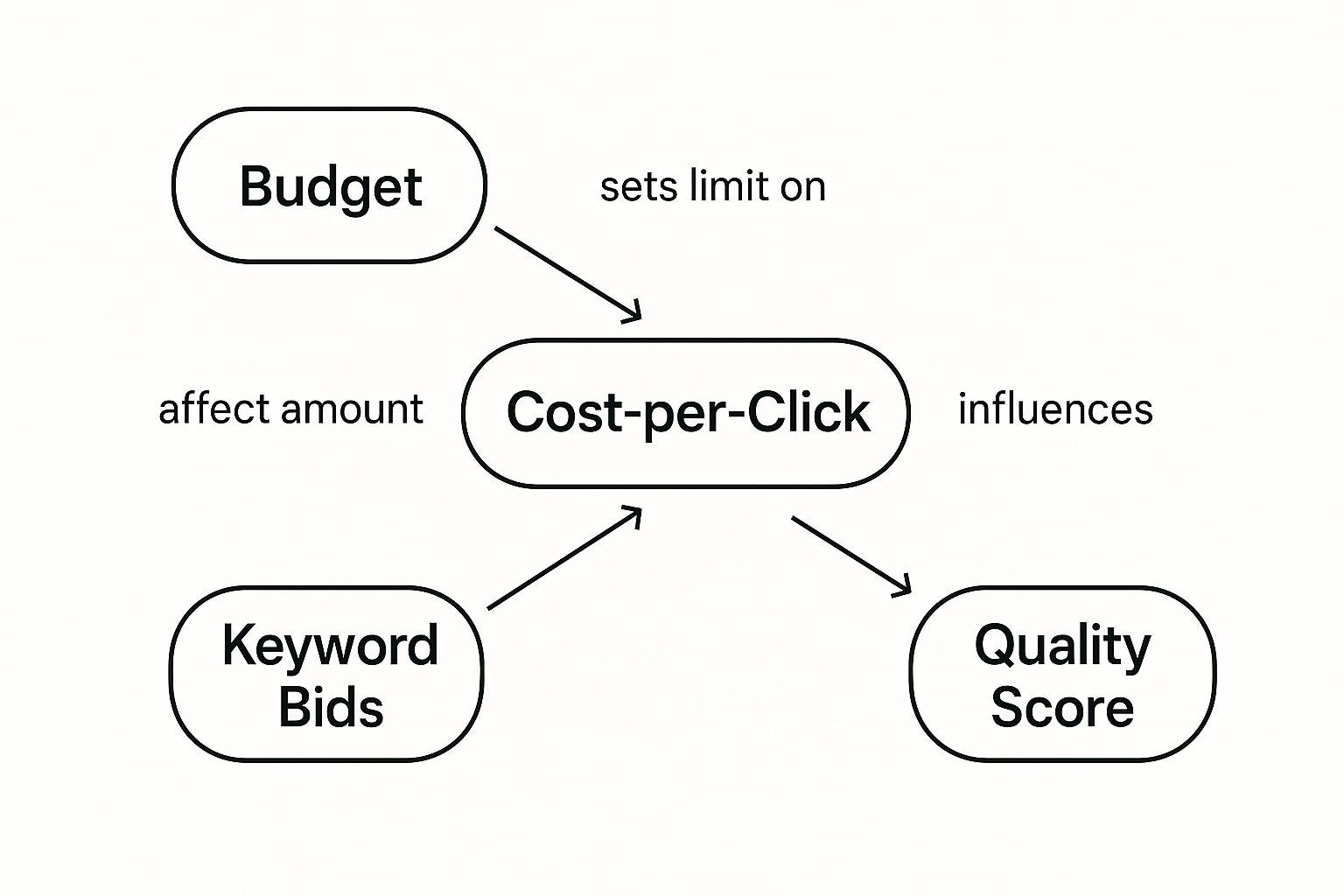
As you can see, while your bids directly affect your costs, it’s the Quality Score that acts as a powerful multiplier, with the potential to seriously slash your expenses.
How Quality Score Lowers Your Spend
Let’s break it down with an example. Imagine two advertisers, Company A and Company B, are both bidding on the keyword “eco-friendly cleaning supplies”.
- Company A has a brilliant Quality Score of 9/10. Its ad is super relevant, and the landing page is a dream to use. It places a bid of £2.00.
- Company B has a poor Quality Score of 4/10. Its ad is generic, and the landing page is slow and confusing. To compensate, it bids a much higher £3.50.
Now, let’s see how their Ad Rank stacks up:
- Company A’s Ad Rank: 9 (QS) x £2.00 (Bid) = 18
- Company B’s Ad Rank: 4 (QS) x £3.50 (Bid) = 14
Look at that. Even though Company A bid much less, it still achieved a higher Ad Rank. This means it will grab a better ad position and, crucially, will probably pay less per click than Company B. Google actively rewards advertisers who give users a great experience, and that reward comes in the form of lower costs and better visibility.
This is exactly why focusing on improving your Quality Score is one of the single most effective things you can do to manage your Google Ads budget.
Moving Beyond Clicks to Measure Real Value (Google AdWords PPC Cost)

It’s easy to get fixated on what you pay for a single click. It’s a classic pitfall. Think of a shop owner obsessing over footfall—counting every person who walks through the door—but completely ignoring how many people actually buy something. To get a real grip on your Google Ads PPC cost, you need to look past simple clicks and start measuring what truly matters to your business.
This means shifting your focus from a single metric to two powerful ones that tell a much bigger story: Cost Per Click (CPC) and Cost Per Acquisition (CPA).
Getting your head around both is essential if you want to move from just managing expenses to actively driving profitable growth. One tells you the price of entry; the other tells you the price of victory.
Defining Your Key Metrics
First off, let’s get a clear handle on what these two terms actually mean in practice. They might sound similar, but they measure fundamentally different outcomes for your business.
- Cost Per Click (CPC): This is the most straightforward cost. It’s simply the price you pay to Google each time someone clicks on your ad. Think of it as the cost of generating interest at the very top of your sales funnel.
- Cost Per Acquisition (CPA): This is the true cost of success. CPA measures the average amount you spend to get a customer to complete a valuable action, whether that’s making a purchase, filling out a form, or signing up for your newsletter.
In the UK, the average CPC for Google Ads often lands somewhere between £0.75 and £1.50. Be warned, though—this can shoot up in hyper-competitive sectors like finance, where clicks can easily cost over £5. For new advertisers, Google often suggests a starting daily budget of £10 to £50. You can find more detailed statistics on these initial costs and how they are benchmarked across industries.
CPA = Total Ad Spend ÷ Total Number of Conversions
This simple formula is one of the most important in digital advertising. It completely reframes the question from, “How much did that click cost?” to, “How much did it cost to get that new customer?”
A Real-World Plumber Example
Let’s make this tangible. Imagine a local plumber in Manchester running a Google Ads campaign for the keyword “emergency plumber Manchester”.
They set a budget and their ads go live. In one week, they get 100 clicks. Their average CPC is £2.50, which means they’ve spent £250 so far (£2.50 x 100 clicks). If they only look at the CPC, they might think that’s pretty steep.
But here’s where it gets interesting. Out of those 100 website visitors, 5 of them called the plumber and booked a job. Each job brings in an average profit of £200. These bookings are their “acquisitions”.
Now, let’s calculate their CPA. They spent £250 to get 5 new customers.
- CPA = £250 ÷ 5 customers = £50 per customer
Suddenly, the picture changes entirely. The plumber spent £50 to acquire a new customer who generated £200 in profit. That’s a fantastic return. That initial £2.50 CPC now seems almost trivial when the final outcome is so profitable.
This is exactly why focusing on CPA is vital for understanding the true value and efficiency of your Google Ads PPC cost. It connects your ad spend directly to your bottom line.
Google AdWords PPC Cost: Hidden Factors That Shape Your Final Bill
Your final Google Ads PPC cost isn’t cooked up in a vacuum. While your bids and Quality Score are definitely the engine, there are a bunch of outside forces—think of them as the weather and road conditions on your journey—that can seriously influence what you end up paying. Getting a handle on these variables is the key to predicting cost swings and building an ad strategy that can take a punch.
These factors can either send your costs through the roof or, for the savvy advertiser, open up opportunities to find value where others just see a big bill. It’s all a game of awareness and quick adaptation. Knowing the lie of the land gives you a serious edge.
It’s a bit like buying a house. A flat in central London is naturally going to cost a heck of a lot more than an identical one in a sleepy village. The same logic applies to Google Ads. Your targeting choices and the market you’re playing in directly shape the price you pay for every single click.
Industry and Competition Levels
The first and, frankly, most significant factor is your industry. Trying to bid on keywords in fiercely competitive sectors like legal services, insurance, or finance is notoriously expensive. It’s simple supply and demand. You’ve got more businesses scrapping for the same, limited ad space, which pushes the price up for everyone.
For instance, a law firm bidding on “personal injury solicitor” is going up against hundreds of other firms. That’s a bidding war, and it means a high cost per click. On the other hand, a niche online shop selling handmade pottery might find its keywords have hardly any competition, making them much, much cheaper. This competitive pressure is what sets your baseline costs.
The intensity of your industry’s competition sets the stage for your entire Google Ads budget. In high-stakes fields, even a small improvement in efficiency can lead to substantial savings.
This is where truly understanding bidding mechanics becomes non-negotiable. If you want to get into the nitty-gritty, our detailed guide on the average Google Ads cost per click breaks it down even further.
Seasonality and Market Trends
Just like a shop on the high street, online demand ebbs and flows with the seasons. A florist, for example, will see a massive spike in searches and competition around Valentine’s Day and Mother’s Day. This flood of demand means higher click costs as more advertisers pile into the auction.
Recognising these patterns is absolutely vital for smart budget management. You need to be ready to ramp up your ad spend during peak seasons to capture all that interest, but you also need to know when to pull back as the buzz dies down.
Other seasonal factors to watch out for include:
- Holidays: Christmas, Black Friday, and Easter create huge surges in consumer spending and, you guessed it, ad competition.
- Weather: A sudden heatwave can send searches for “air conditioning units” soaring, while the first frost triggers a rush for “winter tyres.”
- Events: Big sporting events or major cultural moments can temporarily throw search behaviour and costs into a spin.
Geotargeting and Device Type
Where you aim your ads has a direct impact on your bill. Targeting densely populated, affluent areas like London or Manchester is almost always going to be more expensive than targeting smaller towns or rural spots. Why? More potential customers, but also way more businesses fighting for their eyeballs.
Finally, don’t forget about the device. A click from someone on their mobile, perhaps on the move, might have a completely different intent—and therefore a different value and cost—than a click from someone doing deep research on a desktop at home. Digging into your performance by device lets you tweak your bids and spend your budget more intelligently, ensuring you pay the right price for the right kind of interaction.
Smart Strategies to Control Your Ad Budget
Getting to grips with the factors that drive your google adwords ppc cost is one thing. Now it’s time to actually take the wheel and steer your budget towards real efficiency and better results. By putting a few smart, practical tactics into play, you can squeeze more value out of every single pound you spend.
These strategies aren’t just complex theories; they’re hands-on tools that put you firmly in control of your account’s performance. From telling Google what you don’t want, to fine-tuning when and where your ads appear, each technique helps to plug the leaks in your budget and pump up your return on investment.
Master Your Keywords with Negatives (Reducing Your Google AdWords PPC Cost)
One of the most powerful—and surprisingly overlooked—ways to control your costs is by using negative keywords. Think of them as your ad campaign’s bouncer, creating a do-not-show list for your ads. You’re essentially telling Google which specific search terms are completely off-limits.
Imagine you sell premium leather boots. You certainly don’t want to be paying for clicks from people searching for “cheap leather boots” or “leather boot repair”. By adding “cheap” and “repair” as negative keywords, you instantly stop haemorrhaging money on irrelevant traffic that was never going to convert anyway.
This simple action has a massive impact. It sharpens your targeting, boosts your click-through rate, and most importantly, makes sure your budget is spent reaching your ideal customers, not just anyone. Making a habit of regularly checking your search terms report to unearth new negative keywords is a vital, ongoing task for any serious advertiser.
Use Ad Scheduling to Your Advantage
Your customers probably don’t shop 24/7, so why should your ads run around the clock? Ad scheduling is a brilliant feature that lets you specify the exact days and hours your ads are eligible to show. It’s an incredibly effective way to focus your spend on the periods when you’re most likely to see a return.
Dive into your conversion data to pinpoint when you get the most leads or sales.
- Does your B2B company get most of its enquiries during business hours, Monday to Friday?
- Does your e-commerce store see a sales frenzy on weekend evenings?
By funnelling your budget into these peak times, you dramatically increase the chances of your ads being seen by users when they are most primed to convert. This stops you from wasting money on clicks during low-intent periods, like 3 AM on a Tuesday morning.
This level of control is absolutely essential, especially for businesses with specific opening hours or those trying to stand out in a crowded market. For businesses in major cities, understanding these daily patterns is crucial. You can learn more about expert PPC services for London-based businesses that specialise in this kind of granular, performance-driven optimisation.
A/B Test Your Way to a Higher Quality Score
As we’ve already covered, your Quality Score is your secret weapon for lowering your google adwords ppc cost. One of the absolute best ways to improve it is through continuous A/B testing of your ad copy. This simply means creating two or more versions of an ad to see which one performs better in the wild.
You can test different headlines, descriptions, or calls-to-action to find the perfect combination that truly resonates with your audience. A more compelling ad naturally gets more clicks, which directly boosts your click-through rate (CTR)—a massive component of your Quality Score.
A higher CTR is a powerful signal to Google that your ad is highly relevant to what people are searching for. Google rewards this relevance with a better Quality Score, which in turn leads to a higher Ad Rank and, most importantly, a lower cost per click. It’s a fantastic feedback loop: better ads lead to better scores, which lead to lower costs. This constant cycle of refinement is right at the heart of effective campaign management.
Common Questions About Google AdWords PPC Cost
Even after getting to grips with how the auction works, there are always a few lingering questions about the Google AdWords PPC cost. It’s completely normal. Let’s tackle some of the most common queries we hear from clients, giving you the straight-up answers you need to feel confident.
Think of this as your final checklist before you press ‘go’ on your campaigns.
Is There a Minimum Spend on Google Ads?
This is a big one. People often worry that Google will demand a hefty budget right out of the gate. The simple answer is no, there is no mandatory minimum spend. You could, in theory, set a daily budget of just £1. But—and this is a big but—doing so would be like trying to learn about an entire city by only visiting one street. You just wouldn’t give Google’s algorithm enough data to learn or optimise your campaigns properly.
While there’s no official floor, any decent agency will tell you that you need a starting point that allows for some meaningful data collection. For a small, local campaign, that might be around £10-£20 per day. Anything less, and you’ll struggle to gather enough clicks to make smart decisions about what’s working and what’s a waste of money.
How Long Until I See Results from Google Ads?
Everyone wants to know how quickly they’ll see a return. The truth is, while you can start seeing traffic and clicks almost immediately after your campaign is approved, “results” in the form of profitable sales or leads take a bit more time. Patience is your best friend here.
- First 1-2 Weeks: This is the learning phase. Data starts trickling in, but it’s far too early to jump to any conclusions. Your account is essentially finding its feet.
- First Month: By now, you should have enough data to start making your first round of optimisations. This is when you’ll be busy adding negative keywords to cut out wasted spend and tweaking your ad copy.
- First 90 Days: This is the real make-or-break window. By the three-month mark, you should have a clear idea of your initial return on investment and a solid base to start scaling up the parts of your campaign that are performing well.
It’s all a process of continuous improvement. Google’s platform is constantly learning from the data you feed it, and the tweaks you make will compound over time. The role of artificial intelligence in this is huge, and you can learn more about how Google uses AI to improve the user experience in our dedicated article.
Google AdWords PPC Cost: What Is a Good Cost Per Acquisition in the UK?
This is the ultimate “how long is a piece of string?” question. A “good” Cost Per Acquisition (CPA) is simply one that is profitable for your business. That said, looking at industry averages can give you a useful benchmark to aim for.
Generally speaking, you can expect the average CPA for PPC campaigns in the UK to be around £32-£40. This figure can swing wildly depending on your industry. For example, if you’re in a hyper-competitive sector like financial services, you might see CPAs climbing to £44 or even higher. For more details on these industry benchmarks, you can discover more insights about PPC benchmarks on promodo.com.
The best way to define your target CPA is to work backwards from your customer lifetime value. If a new customer is worth £500 to your business over time, a CPA of £50 is excellent. If they are worth £60, that same CPA is a loss-maker.
At the end of the day, your own profit margins are the only benchmark that truly matters. Dig into your numbers, figure out the absolute maximum you can afford to pay for a new customer while staying in the black, and make that your number one goal.
Ready to take control of your Google Ads spend and drive real results? At PPC Geeks, we create data-driven strategies that reduce wasted budget and maximise your return on investment. Get a free, in-depth PPC audit today and see how our UK-based experts can help you grow. Learn more at https://ppcgeeks.co.uk/.


