




How Does Google Ads Work? At its heart, Google Ads runs like a gigantic, lightning-fast auction. Every single time someone hits ‘search’, an auction happens. But here’s the twist: it’s not just about who has the deepest pockets.
The whole system is a clever balancing act between an advertiser’s bid and their Quality Score—Google’s rating of how relevant and useful your ad is to the searcher. A high Quality Score can actually help a business with a smaller budget outrank a big-spending competitor. It’s a real game-changer.
How Does Google Ads Work? Understanding the Google Ads Auction
To get your head around Google Ads, you first need to grasp the pay-per-click auction. Forget the image of a stuffy room with a fast-talking auctioneer. This is an invisible, instantaneous process that fires off billions of times a day, every time someone looks for something on Google.
It’s this auction engine that decides which ads get shown, in what order, and what each click will ultimately cost. For a broader look at the whole model, our guide on what is PPC advertising provides some great extra context. This setup makes sure users see ads that are actually helpful, while businesses get a fair shot at reaching them. It’s a win-win, all powered by a seriously smart algorithm.
Before we dive deeper, let’s break down the essential pieces of the puzzle. The table below summarises the core components that make the entire Google Ads system tick.
Core Components of the Google Ads System (How Does Google Ads Work?)
A summary of the essential elements that power Google Ads, explaining the role each one plays in the advertising process.
| Component | Role and Function |
|---|---|
| Advertiser’s Bid | This is the maximum amount you’re willing to pay for a single click on your ad (your Max CPC). |
| Quality Score | Google’s 1-10 rating of your ad’s overall quality, based on click-through rate, relevance, and landing page experience. |
| Ad Rank | The crucial value that determines your ad’s position on the page. It’s calculated by multiplying your Max Bid by your Quality Score. |
Understanding these three elements is fundamental. They interact with each other in every single auction to determine the final outcome.
The Key Players in the Auction
How Does Google Ads Work? Every auction boils down to a few core ingredients working in perfect harmony. Think of it as a simple formula where each part is vital for the end result. The main things you need to know are:
- The Advertiser’s Bid: Simply, this is the most you’re prepared to pay for a click on your ad. It’s often called your Max CPC (Cost Per Click).
- Quality Score: This is Google’s seal of approval. It’s a rating of your ad’s quality and relevance, which is influenced by things like your expected click-through rate, how well your ad matches the search query, and the user’s experience on your landing page.
- Ad Rank: This is the score that actually decides where your ad appears. The calculation is straightforward: your maximum bid multiplied by your Quality Score.
The single most important thing to remember is this: the highest bidder doesn’t always win. A strong Quality Score is a powerful multiplier, letting advertisers with great, relevant ads secure top spots for less money.
How Ad Rank Determines Your Success
Let’s make this real. Imagine two local bakeries are competing for the keyword “artisan bread delivery”.
Bakery A bids a hefty £4 per click but has a poor, irrelevant ad, giving them a low Quality Score of 3/10. Their Ad Rank is 12 (4 x 3).
Bakery B is a bit more conservative, bidding only £2.50. But their ad is fantastic, the landing page is perfect, and they’ve earned an excellent Quality Score of 8/10. Their Ad Rank is 20 (2.50 x 8).
Even though they bid less, Bakery B will win the higher ad position. Their superior Ad Rank proves to Google that they offer a better, more relevant experience for the user. This is the core principle that allows businesses of all sizes to compete and succeed on Google Ads.
How Does Google Ads Work? Decoding the Google Ads Auction
Every time someone hits ‘search’ on Google, an incredibly fast and complex auction kicks off behind the scenes. Forget the traditional auctioneer with a gavel; this is a lightning-fast process that decides which ads appear, in what order, and what they’ll cost. Getting your head around this auction is the first massive step to mastering Google Ads.
The whole system is built to reward advertisers who give users the best experience, not just the ones with the deepest pockets. It all boils down to a critical score called Ad Rank, which determines your ad’s position on the results page.
The Ad Rank Formula Explained
At its heart, Ad Rank is calculated with a surprisingly simple formula. It’s a balancing act between two crucial factors: how much you’re willing to pay and how good your ad actually is.
Ad Rank = Maximum Bid x Quality Score
Your Maximum Bid (or Max. CPC) is the absolute highest amount you’ve told Google you’ll pay for a single click. Your Quality Score is Google’s rating of your ad, keywords, and landing page on a scale of 1 to 10. We’ll dig into that more in the next section.
This infographic gives a great visual breakdown of how it all fits together.
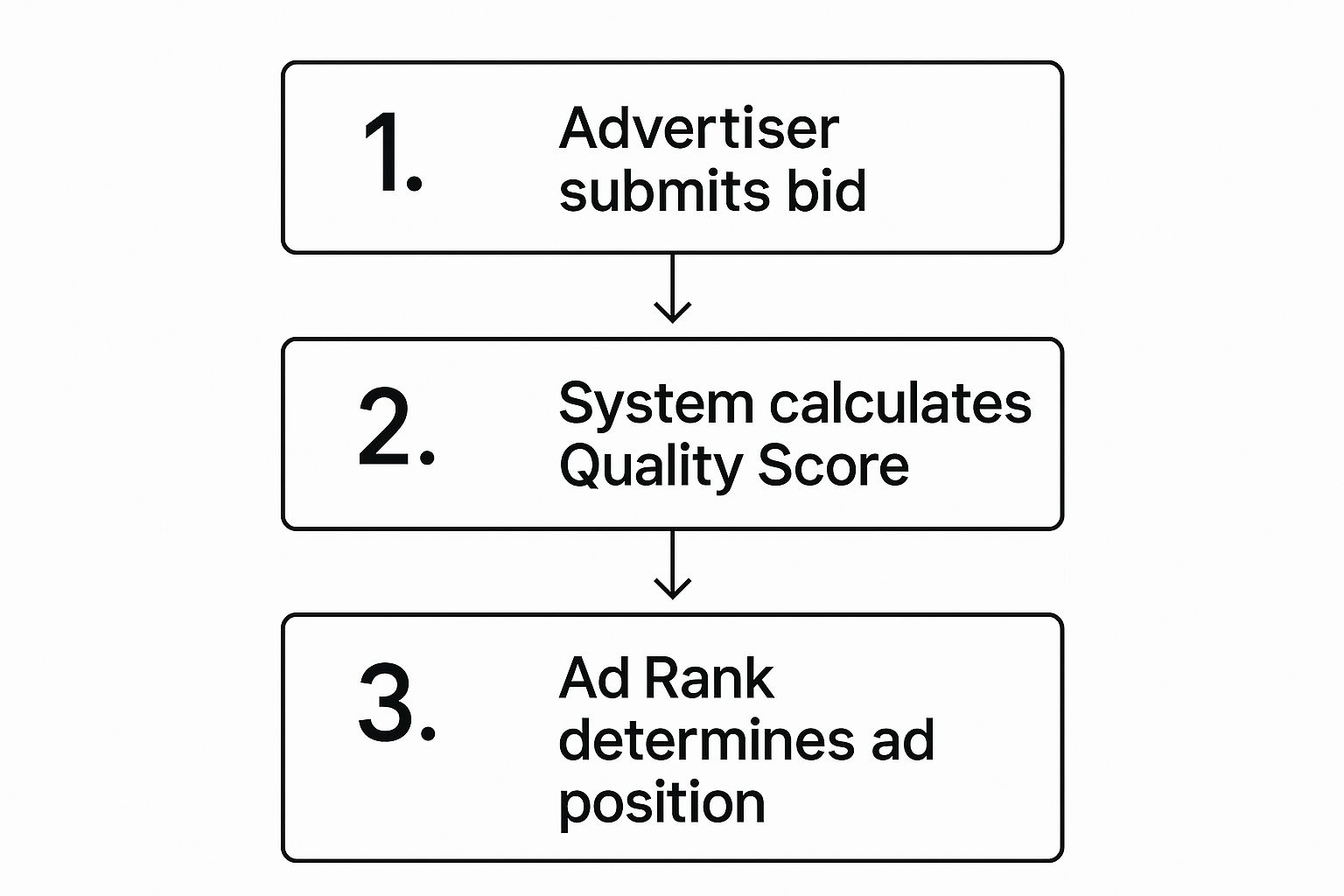
As you can see, the process flows from your bid and Google’s quality checks right through to the final Ad Rank, which ultimately decides where your ad shows up.
A Real-World Auction Example
Let’s see this in action. Imagine two UK businesses are fighting it out for the keyword “birthday cakes London”:
- Supermarket Giant: A huge, well-known chain with a massive marketing budget. They go in strong with a £5.00 bid per click. The problem? Their ad is generic, and it just links to their main grocery homepage. This earns them a poor Quality Score of 2/10.
- Local Artisan Bakery: A small, independent bakery in Chelsea working with a tighter budget. They can only afford a maximum bid of £3.00. But their ad is spot on—it’s highly relevant, shows off their stunning cakes, and clicks through to a perfectly optimised “London Birthday Cakes” page. Google loves this and rewards them with an amazing Quality Score of 9/10.
Now, let’s do the maths and calculate their Ad Rank:
- Supermarket Giant’s Ad Rank: £5.00 (Bid) x 2 (QS) = 10
- Local Bakery’s Ad Rank: £3.00 (Bid) x 9 (QS) = 27
Even though they bid £2.00 less per click, the local artisan bakery wins a higher ad position because its Ad Rank is miles better. This is the perfect example of the incredible power of a high Quality Score. It’s Google’s way of levelling the playing field, making sure that relevance matters just as much as budget.
How Your Actual Cost Per Click Is Calculated
How Does Google Ads Work? Here’s the best part: winning the auction doesn’t mean you pay your maximum bid. The price you actually pay is figured out by looking at the Ad Rank of the advertiser directly below you, dividing it by your Quality Score, and then adding a penny. This formula is designed to reward high-quality ads with lower costs.
It looks like this:
Your Actual CPC = (Ad Rank of the ad below you / Your Quality Score) + £0.01
Going back to our bakery example, if the Supermarket Giant (with an Ad Rank of 10) was in the position right below them, the local bakery’s actual cost for that click would be much less than their £3.00 maximum bid. This mechanism is fundamental; a high Quality Score doesn’t just boost your ranking, it directly cuts your costs. To get a deeper insight into managing these expenses, you can learn more about the factors influencing Google Ads cost per click in our detailed guide.
Mastering Your Quality Score: How Does Google Ads Work?

Think of Quality Score as Google’s official report card for your ads. It’s a simple score from 1 to 10 that acts as a diagnostic tool, giving you a clear sense of how well your ads actually meet a searcher’s needs.
But it’s much more than just a number. It’s one of the most powerful levers you can pull to secure better ad positions and, crucially, lower your costs.
A high Quality Score signals to Google that your ad is genuinely relevant and helpful. As a reward for creating that positive user experience, Google gives you a discount on your cost-per-click and a handy boost in the auction. This is exactly how a small UK business with a well-crafted ad can outrank a huge competitor running a lazy campaign with a massive budget.
The Three Pillars of a High Quality Score
Your Quality Score isn’t some arbitrary figure plucked from thin air; it’s calculated using three core components. To improve your overall score, you need to get to grips with each one. Mastering them is the secret to creating ads that Google—and your customers—will love.
The three pillars are:
- Expected Click-Through Rate (CTR): This is Google’s prediction of how likely someone is to click your ad when it appears for a specific keyword.
- Ad Relevance: This measures how tightly your ad’s message matches the keywords you’re bidding on in that ad group.
- Landing Page Experience: This evaluates how relevant, transparent, and easy to navigate your landing page is for the people who click your ad.
Each of these components gets its own rating: “Above average,” “Average,” or “Below average.” If you see “Below average” on any of them, that’s Google giving you a massive hint about where to focus your attention first.
Boosting Your Expected Click-Through Rate
How Does Google Ads Work? Your Expected CTR is all about history. Google looks at how your ads have performed in the past to predict how they’ll do in the future. To improve it, your main job is to write ad copy that’s simply irresistible to your target audience.
Create ads that speak directly to the search query. If someone is searching for “emergency plumber in Manchester,” your headline needs to reflect that exact need. A vague headline like “Plumbing Services Available” just won’t cut it and will lead to a poor CTR.
A higher CTR is a strong signal to Google that your ad is a good match for the searcher’s intent. When users consistently choose your ad over competitors, Google takes notice and rewards you with a better Quality Score.
It also helps to know what a ‘good’ CTR actually looks like. Here in the UK, the average CTR across all industries is 6.66%. But this varies wildly by sector; Arts & Entertainment can see rates as high as 13.10%, while more competitive fields like Legal Services hover closer to 5-6%. You can find more insights in these 2025 Google Ads benchmarks on Wordstream.com.
Nailing Ad Relevance and Landing Page Experience
Ad Relevance is all about creating a seamless journey from the keyword someone types to the ad they see. The easiest win here is organising your campaigns into tightly-themed ad groups. Each ad group should focus on a very specific set of keywords, which lets you write hyper-relevant ad copy.
For example, instead of a single, broad ad group for “women’s shoes,” you should create separate groups for “women’s running trainers,” “women’s leather boots,” and “women’s high heels.” This simple structure ensures your ad for running trainers isn’t shown to someone looking for boots, which instantly boosts its relevance.
Finally, your Landing Page Experience completes the user’s journey. Your landing page must deliver on the promise you made in your ad. If your ad promotes a “50% off sale on running trainers,” that offer needs to be front and centre on the page they land on.
Beyond the content, the technical bits are critical:
- Mobile-Friendliness: Your page has to be easy to use on a smartphone. No excuses.
- Fast Loading Speed: People will bounce if a page takes too long to load.
- Clear Navigation: Visitors should be able to find what they’re looking for without getting confused or frustrated.
By focusing on these three pillars, you aren’t just trying to please an algorithm. You’re actively building a better, more coherent experience for potential customers—which is the whole point of running a successful ad campaign in the first place.
How Does Google Ads Work? Choosing the Right Bidding Strategy
Once you’ve wrapped your head around the auction process and the critical role Quality Score plays, the next question is always the same: “So, how much should I actually bid?” This is where your bidding strategy comes in, and it’s about so much more than just picking a number. It’s about making your budget perfectly align with your business goals.
Think of your bidding strategy as the set of instructions you hand over to Google. You’re telling the system what you value most—whether that’s eyeballs on your brand, clicks to your site, or actual sales—and letting it bid intelligently on your behalf to get more of it. Nailing this choice is fundamental to making every pound in your budget work as hard as it possibly can.
Aligning Your Bidding with Your Business Goals
Before you even glance at the bidding options, you need absolute clarity on what you want to achieve with a campaign. Different goals demand completely different bidding approaches.
Generally speaking, your campaign goals will fall into one of three buckets:
- Awareness: The main objective is simply to get your brand name in front of as many relevant people as possible. You’re more focused on visibility and impressions than immediate clicks or sales.
- Consideration: You want to nudge people to interact with your business. Here, the focus is squarely on driving traffic to your website, making clicks your top priority.
- Conversion: This is all about getting users to take a valuable action. We’re talking about making a purchase, filling out a contact form, or picking up the phone to call you.
Each of these objectives has a corresponding menu of bidding strategies designed to deliver on that specific outcome.
Manual vs Automated Bidding
The first big fork in the road is deciding whether you want to pull the levers yourself (manual bidding) or let Google’s machine learning do the heavy lifting for you (automated bidding).
With Manual CPC (Cost-Per-Click), you’re in the driver’s seat, setting the maximum bid for every single keyword yourself. This gives you ultimate control, but it’s a demanding job that requires constant monitoring to stay competitive. It can be a great starting point for new advertisers who want to get a feel for costs before handing over the keys.
Automated bidding, on the other hand, uses Google’s immense pool of data to set bids for you in real-time, all geared towards hitting your goal. This is where most advertisers live and breathe, simply because it’s incredibly efficient and can analyse signals a human could never hope to process.
Key Takeaway: While manual bidding offers granular control, automated strategies are almost always more effective for most businesses. They use powerful machine learning to optimise for your specific goal at scale, saving you a ton of time and often delivering far better results.
Popular Automated Bidding Strategies: How Does Google Ads Work?
Once you commit to automated bidding, you’ll find several options, each tailored to a different goal. Getting to know these is vital for anyone who really wants to understand how Google Ads works under the bonnet.
When it comes to choosing the right bidding strategy for your campaign goals, it can be helpful to see the options side-by-side. Each one is designed with a specific outcome in mind, from driving traffic to maximising revenue.
Common Google Ads Bidding Strategies Compared
| Bidding Strategy | Best For (Campaign Goal) | Key Feature |
|---|---|---|
| Maximise Clicks | Driving website traffic | Aims to get the most clicks possible within your budget. |
| Maximise Conversions | Generating leads or sales | Focuses on getting the highest number of conversions for your spend. |
| Target CPA | Stable lead/sale costs | You set a target cost per conversion, and Google tries to meet it. |
| Target ROAS | Ecommerce/Revenue focus | Aims for a specific return on ad spend (e.g., £5 revenue per £1 spent). |
This table covers the most common choices, but there are more advanced options available. For a deeper dive, our complete guide to PPC bidding strategies explores every option in detail.
Ultimately, the best strategy is simply the one that mirrors what you’re trying to achieve with your advertising spend. Don’t overcomplicate it—start with your goal, then pick the tool that’s built for that specific job.
How to Structure Your First Campaign
A winning Google Ads account isn’t just about clever ad copy or outbidding the competition; it all starts with a rock-solid foundation.
Think of your account like a well-organised filing cabinet. If it’s a mess, you’ll never find anything. But with a logical structure, you have complete control and a clear view of what’s working. This section is all about building that essential structure right from day one.
Getting this hierarchy right is the key to mastering Google Ads. A tidy account directly improves your Ad Relevance, which is a massive piece of your Quality Score. Nail this, and you’re already on the path to better results for less money.
This structure is what allows you to maintain control and relevance across all your advertising efforts.
Understanding the Google Ads Hierarchy
The platform is built in layers, with each level controlling the one below it. Getting this clear in your mind is non-negotiable for success.
- The Account: This is the top dog—the entire filing cabinet. It’s linked to your unique email, password, and billing details.
- The Campaign: Think of this as a single drawer in the cabinet. Every campaign gets its own budget and specific settings that apply to all the ad groups tucked inside it.
- The Ad Group: These are the folders inside each drawer. An ad group holds a set of very similar keywords and the specific ads they trigger.
- Keywords & Ads: These are the documents in each folder. Keywords are the search terms you bid on, and the ads are what people actually see.
This layered approach is designed to give you precise control over where, when, and to whom your ads are shown.
Setting Up Your First Campaign
When you create a new campaign, you’re making the big-picture decisions that will dictate its performance. This is where you tell Google your overall strategy.
At the campaign level, you’ll define several crucial settings:
- Campaign Goal: What’s the point? Are you after sales, leads, or just more website traffic? This helps Google suggest the right features for you.
- Campaign Type: For anyone starting out, Search is the place to be. This means your ads will show up on Google’s search results pages.
- Budget: You set a daily budget, which is the average amount you’re comfortable spending each day.
- Bidding: You’ll pick a bidding strategy that matches your goal, like Maximise Clicks or Maximise Conversions.
- Location Targeting: This is absolutely vital. You can target the entire UK, or zoom in on regions like the North West, or even specific cities like Bristol or Edinburgh.
- Language: Set this to the language your customers speak.
These settings create the framework for everything else you build within that campaign.
The Power of Tightly-Themed Ad Groups
This is where so many new advertisers stumble. The single most important rule for structuring your account is to create tightly-themed ad groups. A classic mistake is to cram hundreds of keywords into one giant ad group and serve up a single, generic ad. That’s a surefire recipe for a low Quality Score and wasted cash.
Instead, each ad group should focus on one very specific theme. For example, a furniture shop shouldn’t have one ad group called “furniture”. They need separate ad groups for things like:
- “oak dining tables”
- “leather corner sofas”
- “king size bed frames”
By creating these granular ad groups, you can write hyper-relevant ad copy that speaks directly to what the searcher wants. Someone looking for “leather corner sofas” sees an ad about exactly that—not a vague ad about furniture. This perfect match is what drives a higher click-through rate and a better Ad Relevance score.
Getting this right has a massive economic impact. Around 65% of small and medium-sized UK businesses invest in pay-per-click ads, with Google Ads being their go-to platform. For these companies, a well-structured campaign can be the difference between burning money and achieving a brilliant return, with some seeing up to an 800% ROI. You can find more insights on the role of Google Ads in the UK’s digital economy on webfx.com.
Turning Data into Profitable Decisions

Getting your campaign live is a great first step, but don’t pop the champagne just yet. The real work is only just beginning. True success in Google Ads never comes from a “set it and forget it” mindset; it’s forged in the fires of constant analysis and optimisation. This is the point where your campaign stops being just an expense and starts becoming a powerful engine for growth.
Think of your live campaigns as a direct line to your market. Every click, every impression, and every conversion is a piece of feedback telling you a story about what your customers actually want. Your job is to listen to that story and use what you learn to make smarter, more profitable decisions.
Key Metrics You Must Monitor
To make any sense of your campaign’s performance, you need to zero in on a few key performance indicators (KPIs). These are the vital signs of your advertising health, showing you exactly what’s hitting the mark and what’s falling flat.
- Click-Through Rate (CTR): This is simply the percentage of people who see your ad and are compelled enough to click it. A high CTR is a strong signal that your ad copy is relevant and resonating with searchers.
- Conversion Rate: This tells you what percentage of those clicks turn into a valuable action, like a sale or a lead. This metric is where the rubber meets the road—it shows if your landing page is sealing the deal.
- Cost Per Acquisition (CPA): Also called Cost Per Conversion, this is the average you spend to gain one new customer or lead. Keeping this number comfortably below what a customer is worth to you is the fundamental goal.
It’s crucial to see how these metrics interact. A brilliant CTR means nothing if your conversion rate is zero; you’re just paying for window shoppers. Getting this data right starts with a solid setup, which you can learn all about in our guide on how to set up Google Ads conversion tracking.
Practical Optimisation Techniques
How Does Google Ads Work? With your data flowing in, you can start making targeted improvements. Optimisation isn’t a one-off task; it’s an ongoing process of trimming the fat and doubling down on what actually works. It’s how you squeeze every last drop of value from your budget.
Two of the most powerful and straightforward techniques are adding negative keywords and A/B testing your ad copy. These simple moves can have a massive impact on your results.
Negative keywords are terms you add to your campaign to prevent your ad from showing up for irrelevant searches. It’s one of the quickest ways to stop wasting money and boost the quality of your traffic.
For instance, if you sell “premium leather shoes,” you’d want to add “cheap” and “repair” as negative keywords. This stops your budget from being wasted on people looking for a bargain or a service you don’t offer.
Likewise, A/B testing is about running two slightly different versions of an ad to see which one performs better. You might test a different headline or call-to-action to discover the exact message that connects with your audience.
In the UK, Google is the undisputed king, holding around 93.51% of the search engine market. With average click-through rates between 4-6% and conversion rates typically falling between 3-5%, UK businesses have clear benchmarks to aim for. This makes a data-led approach absolutely essential to stay ahead of the competition.
A Few Common Google Ads Questions
Even when you’ve got your head around the auction, there are always a few niggling questions that pop up. Let’s tackle some of the most common ones we hear from businesses just starting out on their Google Ads journey.
Getting these cleared up from the get-go helps set the right expectations and turns all that theory into practical, real-world action.
How Long Until Google Ads Starts Working?
Technically, you can see traffic hitting your site within hours of a campaign going live. But seeing traffic and getting a positive return on your investment are two very different things.
Be prepared for an initial ‘learning phase’ that can last anywhere from a few weeks to a couple of months. During this time, you’re not just spending money; you’re buying crucial data. This data is what you’ll use to refine your bids, tweak your keywords, and sharpen your ad copy. Real, sustainable results are born from this ongoing process of optimisation.
Can I Use Google Ads with a Small Budget?
Absolutely. This is one of the platform’s biggest strengths, especially for small businesses. You can set a daily budget as low as a few pounds if you want.
Of course, a smaller budget means you’ll gather data more slowly and your reach will be limited. But it’s a brilliant way to dip your toe in the water, learn the ropes, and prove that your strategy has legs before you commit to a bigger investment.
Should I Just Bid More to Get the Top Spot?
It’s tempting, but it’s rarely the best strategy. That number one position is always the most expensive, and it definitely doesn’t guarantee the best ROI. In fact, we often find that positions 2-4 deliver a much healthier balance of traffic and cost.
Remember, your Ad Rank (Bid x Quality Score) is what really decides your placement, not just how much you’re willing to pay. A competitor with a brilliant Quality Score can easily outrank you even with a lower bid.
Feeling confident about how Google Ads works is one thing, but managing a campaign that delivers consistent results takes time, experience, and a whole lot of data. The team at PPC Geeks lives and breathes this stuff, creating data-driven strategies that boost traffic, leads, and sales while cutting out wasted spend. If you want to reclaim your time and get more from your budget, see what our award-winning PPC agency can do for you. Find out more at https://ppcgeeks.co.uk/.


