




Tracking your PPC return on investment isn’t just about clicks and forms. For trade suppliers, the real win is connecting those initial ad clicks all the way through to approved credit accounts. It’s a process that needs to bridge the gap between your digital marketing, your website, your CRM, and your sales team.
How Trade Suppliers Should Track PPC ROI: The Real Cost of Untracked B2B Conversions
Let’s be honest. For most trade suppliers, the journey from a Google Ad click to a new credit account is a complete black box. You see the clicks coming in, and maybe you even see the enquiry forms being filled out on your website, but then the trail goes cold.
This tracking gap means you’re almost certainly pouring money into your ad campaigns without knowing which ones—which keywords, which ads, which audiences—are actually bringing in the valuable, long-term trade customers that grow your business.
The financial drain here is significant. Without proper end-to-end visibility, you simply can’t tell the difference between a click that leads to a £50,000-a-year account and one that comes from a time-wasting DIY enthusiast. Both get logged as a “conversion” in Google Ads, completely skewing your data and leading you to make some terrible optimisation decisions.
Why Surface-Level Metrics Don’t Cut It
Standard lead tracking just wasn’t built for the trade world. Imagine you’re a building supplier running a campaign for “bulk plasterboard delivery.” The campaign generates dozens of form fills, and inside your Google Ads account, it looks like you’re smashing it.
But what’s really happening?
- Most leads are unqualified: A good chunk are probably from homeowners doing a bit of DIY, not the trade professionals you actually want.
- No link to the sales team: Your sales reps have no clue which ad or keyword brought in that specific enquiry, making it impossible to give credit where it’s due.
- Optimisation becomes a guessing game: You might end up boosting the budget for a campaign that generates lots of low-quality leads, while slashing spend on the one that delivers fewer, but much higher-value, accounts.
This problem gets even worse when you factor in wasted spend from junk traffic. In 2025, UK businesses are projected to lose a staggering £186 million to PPC click fraud. Research from PPC Shield revealed that a massive 40% of PPC campaigns were hit by invalid clicks, wasting an average of 22% of their ad budgets. It’s a stark reminder that robust tracking is your first line of defence.
The real danger of poor tracking isn’t just the ad spend you waste; it’s the missed opportunity. If you don’t know your true cost per approved account, you can’t scale your most profitable campaigns with any real confidence.
Bridging the Digital-to-Offline Gap (How Trade Suppliers Should Track PPC ROI)
The whole challenge boils down to connecting the customer’s digital journey with your offline approval process. A tradesperson clicks an ad, fills out a credit account application, and then the whole thing moves into your internal systems—emails, phone calls with the sales team, and credit checks.
Unless you have a system in place to link that final “account approved” milestone back to the original ad click, you’re flying blind. This is a common struggle and a massive reason why many Google Ads fail for building product suppliers. This guide gives you the framework to fix it, showing you exactly how to build a closed-loop system that ties your ad spend directly to your bottom line.
To get this right, you need a clear, structured framework. The table below outlines the essential stages for tracking a PPC lead from the initial ad click all the way through to an approved, revenue-generating credit account.
Core Components of an End-to-End Tracking Framework
| Tracking Stage | Objective | Key Tools & Techniques |
|---|---|---|
| 1. Goal & Value Planning | Define what a credit account is worth and set clear KPIs. | LTV calculations, historical sales data, business objectives. |
| 2. Campaign Tagging | Ensure every click carries identifiable data through the journey. | UTM parameters, Google Ads auto-tagging, value tracking. |
| 3. On-Site Tracking | Capture the initial conversion and its associated click data. | Google Tag Manager, conversion goals, hidden form fields. |
| 4. CRM Integration | Pass lead data from your website into your sales pipeline. | CRM workflows (e.g., HubSpot, Salesforce), API integrations. |
| 5. Offline Conversion Import | Send approved account data back to the ad platforms. | Google Ads Offline Conversion Import, CRM data export. |
| 6. Attribution & Reporting | Analyse the full customer journey and calculate true ROI. | Data-Driven Attribution, custom dashboards (e.g., Looker Studio). |
Each of these stages is a critical link in the chain. Get one wrong, and the whole system falls apart. In the following sections, we’ll break down exactly how to implement each one.
How Trade Suppliers Should Track PPC ROI: Building a Solid Tracking Foundation
If you want to track your PPC ROI properly, you need to think of every click as carrying a digital passport that details its origin. Without a solid data foundation, you’re just guessing. This all starts with a rigorous, consistent approach to campaign tagging, making sure that from the moment a prospect clicks your ad, their entire journey is mappable.
This isn’t just some technical box-ticking exercise; it’s a strategic necessity. With ad costs constantly on the rise and squeezing margins, meticulous measurement is non-negotiable. It’s a tough market out there—recent data shows that 38% of UK marketing professionals have seen their cost-per-click (CPC) shoot up over the last year. As you can read in these 2025 UK Digital Marketing Statistics, this trend makes full-funnel attribution absolutely essential for survival.
Standardising Your UTM Parameters
Urchin Tracking Modules, or UTM parameters, are the little snippets of text you add to your URLs. They’re what tell your analytics platforms exactly where a visitor came from. One of the most common pitfalls I see is inconsistent tagging. It completely muddies your data, making it impossible to tell a click from a Google Search ad apart from one on a Facebook campaign.
The solution? A standardised system. Every single ad you run, no matter the platform, must follow the exact same naming convention. This is the only way to get clean, organised data that you can actually use to make smart decisions.
Let’s say you’re running a Google Ads campaign for contractors looking for bulk plasterboard. A properly tagged URL would look something like this:
- Campaign Source:
utm_source=google(This identifies the platform) - Campaign Medium:
utm_medium=cpc(This specifies it’s a paid click) - Campaign Name:
utm_campaign=uk_plasterboard_bulk_q3(A clear description of the specific campaign) - Campaign Term:
utm_term={keyword}(This dynamically pulls in the search term that triggered the ad)
This simple structure instantly tells your analytics that a user came from a paid Google search click, was part of your Q3 plasterboard campaign, and searched for a specific keyword. Consistency here is everything. Get this right, and you’re halfway there.
Implementing On-Site Conversion Tracking (How Trade Suppliers Should Track PPC ROI)
Once a tagged click lands on your site, the next job is to capture the actions that signal genuine interest. This is where Google Tag Manager (GTM) becomes your best friend. It lets you deploy all the tracking codes—or “tags”—you need without having to constantly bother your web developers. For a deeper dive, have a look at our guide on mastering tracking in Google Ads for more DIY tips.
Your main goal here is to track the micro-conversions that happen before a full credit application is submitted. These are the small but significant steps a high-intent prospect takes on their way to becoming a proper customer.
For a trade supplier, the key micro-conversions you should be tracking are:
- Credit Application PDF Download: A massive indicator that someone is actively considering opening an account.
- Online Enquiry Form Submission: Captures leads who’d rather your sales team reached out to them.
- ‘Find a Branch’ Page View: Shows a user is looking for a physical location to do business with you.
- Click-to-Call on Mobile: Directly connects an interested prospect with your team right there and then.
Using GTM, you create triggers that “listen” for these specific actions. For instance, you can set a trigger to fire every time a user clicks the “Download Application” button.
By tracking these preliminary actions, you get a clear view of the top of your conversion funnel. You can start to see which campaigns are driving the most qualified interest, long before any offline paperwork is even filled out, let alone processed.
This is what the Google Tag Manager interface looks like. It’s where you’d set up these specific tags and triggers to monitor what users are doing on your website.
Each tag is set up to fire when its trigger conditions are met, sending that precious conversion data straight to Google Analytics and Google Ads. This setup turns your website from a simple online brochure into an active part of your lead qualification process. With this groundwork in place, you’re ready for the next step: getting this data into your CRM.
How Trade Suppliers Should Track PPC ROI: Connecting Online Leads to Offline Sales Data
This is where the magic happens—and where most trade suppliers lose the data trail. The journey from a website form submission to an approved credit account is the absolute linchpin for proving your PPC ROI. It’s the moment you connect a promising digital click with a real, tangible business outcome.
Frankly, without a rock-solid process here, every step you’ve taken—from crafting the perfect ad to standardising your UTMs—is pretty much pointless. The goal is simple: make sure the unique ID from the ad click sticks to that lead all the way through your internal sales and admin process.
Capturing the Google Click ID
The most critical piece of the puzzle you need to grab is the Google Click ID (GCLID). Think of it as a digital fingerprint. It’s a unique parameter that Google Ads automatically tacks onto your URL whenever someone clicks your ad, directly linking that specific click to whatever they do next.
Your main job is to capture this GCLID the second a potential customer fills out an enquiry form or downloads a credit application on your site. The most common way to do this is by adding a hidden field to your website forms.
- When a user lands on your page with a GCLID in the URL, a simple script grabs that value.
- The script then quietly populates the hidden field in your form with the GCLID.
- When the user hits ‘submit,’ this GCLID is sent along with their name and company details straight into your CRM.
Just like that, your sales team now has the exact identifier needed to trace that lead all the way back to the specific ad and keyword that brought them in.
By embedding the GCLID into every single lead record, you create an unbreakable chain of data. This turns a simple name and email into a lead with a full PPC history, primed and ready for offline tracking.
Building a CRM Workflow for Credit Applications (How Trade Suppliers Should Track PPC ROI)
Once that lead, complete with its GCLID, lands in your CRM—whether it’s Salesforce, HubSpot, or something you’ve built in-house—your internal team takes the baton. But their process needs to be tight to keep the data clean. The aim is to update the lead’s status as it moves through the approval pipeline.
This isn’t just about tidy record-keeping; it’s a crucial part of tracking PPC performance. You need a clear, non-negotiable set of stages that everyone on the team follows, every single time.
A typical workflow for a trade supplier might look something like this:
- New Enquiry: Fresh out of the oven. The lead has just arrived from the website form.
- Contact Made: A sales rep has reached out and qualified them as a genuine prospect.
- Application Submitted: The prospect has filled out and sent back the credit account form.
- Credit Check in Progress: Your finance team is now doing their due diligence.
- Credit Account Approved: The finish line. The lead is now officially a customer.
- Rejected/Unsuitable: It wasn’t a good fit, and the lead didn’t meet the criteria.
Each stage is a meaningful step forward. For a deeper dive into setting up these stages, our guide on how to build a B2B lead engine with PPC has some great practical tips.
Assigning Monetary Value to Approved Accounts
The final piece of this internal puzzle is assigning a hard value to that “Credit Account Approved” status. This is how you translate a real-world win into a number that Google Ads can actually understand and optimise towards. This isn’t about plucking a figure out of thin air; it’s an informed business calculation.
There are a few ways you can work this out:
- Average First Year Value: What’s the average revenue or profit you make from a new trade account in its first 12 months?
- Customer Lifetime Value (LTV): If you want to get more advanced, estimate the total profit an average new account will generate over its entire relationship with you.
- Fixed Value Proxy: To get started, you can use a conservative, fixed value for every new account—say, £1,000. You can always refine this later as you collect more data.
Once you’ve settled on a value—let’s run with £1,000 for this example—you configure it in your CRM. Now, every time a lead’s status flips to “Credit Account Approved,” it’s automatically stamped with this value, alongside its GCLID and the approval date.
This simple step transforms a routine CRM update into powerful business intelligence. You now have a clean, organised dataset with the three critical elements needed for the next stage: the unique click identifier, the conversion itself (the approved account), and its actual monetary worth.
How Trade Suppliers Should Track PPC ROI: Closing the Loop with Offline Conversion Imports
Right, your CRM is now the single source of truth for your PPC campaigns. It knows exactly which clicks blossomed into genuine, approved credit accounts. The final piece of the puzzle is feeding this invaluable intelligence back into ad platforms like Google Ads and Microsoft Ads.
This isn’t just about neat record-keeping. It’s about actively teaching the ad algorithms what a real win looks like for your business.
By doing this, you close the loop between your online ad spend and your offline results. Instead of just optimising for form fills—which we know don’t always convert—you start training your campaigns to hunt for prospects who look and act just like your best, already-approved customers. This is the shift from just generating leads to strategically acquiring high-value trade accounts.
The process, from that initial click to a verified account, is what gives you the data you need for this feedback loop.
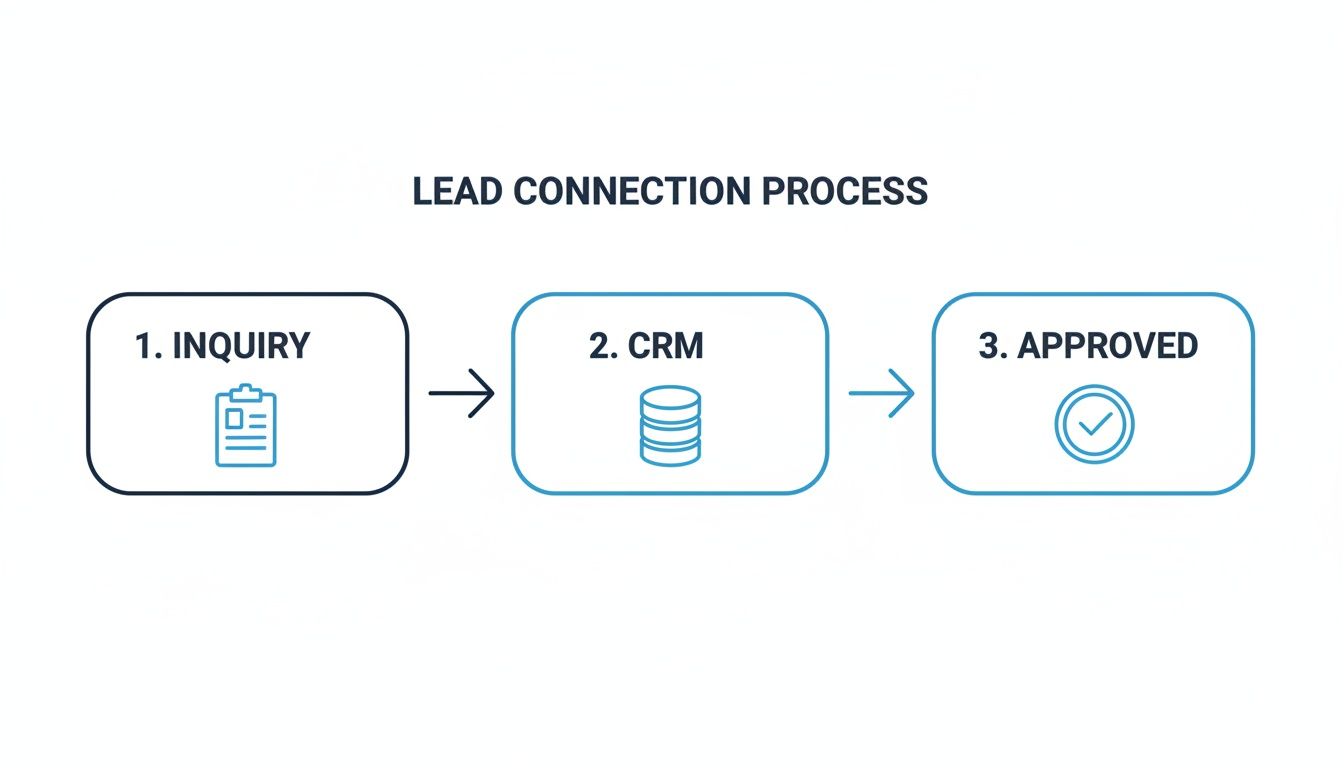
This simple flow shows how we capture, process, and finally validate the lead data—forming the bedrock of your offline conversion file.
Preparing Your Data for Import
The main way we create this feedback loop is through Offline Conversion Imports. It sounds technical, but the idea is simple. You’re exporting a specific file from your CRM and uploading it straight into your ad platform. You’re basically telling Google, “Hey, remember that click with this unique ID? It turned into a £1,000 customer last Tuesday.”
Getting the file format right is absolutely crucial. The ad platforms need very specific data points to match the offline event back to the original ad click.
Your export file, which is usually a CSV or spreadsheet, must have these core columns:
- Google Click ID (GCLID): This is the unique identifier you’ve been capturing in your CRM. It’s the non-negotiable field that connects everything.
- Conversion Name: This has to match the name of the conversion action you set up in Google Ads (e.g., “Credit Account Approved“). Consistency is key.
- Conversion Time: The exact date and time the account was approved, not when the initial enquiry came in. It needs a specific format (e.g., MM/dd/yyyy HH:mm:ss).
- Conversion Value: The monetary value you assigned to an approved account in the previous step.
- Conversion Currency: The currency of that value (e.g., GBP).
A common mistake I see is getting the timestamp wrong. Using the application submission date instead of the final approval date can confuse the ad platform’s learning algorithms, as it misrepresents the true length of your sales cycle.
A Practical Spreadsheet Example (How Trade Suppliers Should Track PPC ROI)
To make this foolproof, you need to structure your data precisely. Here’s a sample template showing how your CSV file should be laid out before you upload it. A clean structure like this minimises errors and makes the import process a breeze.
Offline Conversion Import CSV Template
This table provides a clean, simple format that gives Google Ads everything it needs to connect the dots.
| Google Click ID | Conversion Name | Conversion Time | Conversion Value | Conversion Currency |
|---|---|---|---|---|
| EAIaIQobChMI… | Credit Account Approved | 11/07/2024 14:32:15 | 1000 | GBP |
| Cj0KCQjw… | Credit Account Approved | 11/07/2024 16:51:03 | 1000 | GBP |
| Gl अभि … | Credit Account Approved | 12/07/2024 10:11:47 | 1000 | GBP |
Once your data is organised like this, you’re ready for the final step.
Uploading Your Conversions to Google Ads
With your file correctly formatted, all that’s left is the upload itself. The process inside the Google Ads interface is actually quite user-friendly.
You’ll navigate to the ‘Conversions‘ section within the ‘Goals‘ menu. From there, you’ll see an ‘Uploads‘ option on the left-hand side, where you can schedule recurring uploads or just do a one-off import.
Follow the on-screen prompts, select your file, and map your columns to the corresponding fields Google Ads asks for. It’s pretty straightforward.
Once you’ve uploaded it, the platform gets to work matching the GCLIDs to the clicks in its database. Within a few hours, your “Credit Account Approved” conversions will start popping up in your campaign reports, attributed to the correct keywords, ads, and audiences. This is the powerful technique that lets you track PPC ROI from click to credit account with precision, enabling machine learning to find more customers just like your best ones.
How Trade Suppliers Should Track PPC ROI: Calculating True ROI with the Right Attribution Model
Once your CRM is feeding real business outcomes back into your ad platforms, the whole game changes. You can finally stop obsessing over surface-level metrics like Cost Per Acquisition (CPA) for a simple form fill and start calculating your true Return On Investment (ROI). This is the moment you finally connect your ad spend directly to actual revenue.
Calculating ROI for your PPC efforts becomes a surprisingly straightforward exercise when you have the right data flowing. It’s no longer a vague estimate but a concrete calculation based on real-world results. You can now answer the ultimate question: for every pound we put into ads, how much are we really getting back in new credit accounts?
From Ad Spend to Actual Return
At its heart, the formula for your PPC ROI is dead simple. You just take the total value generated from your new, approved credit accounts, subtract what you spent on ads, and then divide that by the ad cost.
Here’s what it looks like:
ROI = (Revenue from New Accounts – Total Ad Spend) ÷ Total Ad Spend × 100
Let’s run through a quick example. Say you spent £5,000 on Google Ads in a quarter. Because you’ve got your offline conversion tracking sorted, you know that spend directly generated 15 new credit accounts. If you’ve worked out that the average first-year value of each new account is £1,000, your total revenue is £15,000.
Plugging that into the formula:
(£15,000 – £5,000) ÷ £5,000 × 100 = 200% ROI
What does this mean? For every £1 you invested in PPC, you generated £2 in profit. A single figure like that is infinitely more powerful in a boardroom than any report filled with clicks and impressions.
Why Last-Click Attribution Fails for Trade Suppliers (How Trade Suppliers Should Track PPC ROI)
Now that you can calculate a proper ROI, you need to be sure you’re giving credit to the right touchpoints along the customer journey. This is where attribution modelling comes in. The default setting in most ad platforms is Last Click, which gives 100% of the credit for a conversion to the very last ad a customer clicked before signing up.
For a trade supplier with a long, considered B2B sales cycle, this model is dangerously misleading. A contractor might first find you through a generic search for “timber merchants,” visit your site a few more times via a remarketing campaign, and then finally apply for an account by clicking on one of your branded search ads a week later. Last-click attribution completely ignores the vital role those earlier ads played in building awareness and trust.
Sticking with last-click attribution is like giving all the credit for a goal to the striker who tapped the ball in, ignoring the midfielder who made the crucial pass and the defender who started the whole attack. You end up undervaluing the teamwork that actually led to the win.
Choosing a Smarter Attribution Model
To get a more accurate picture, you need a model that distributes credit more intelligently across the entire journey. Here are the main alternatives to Last Click:
- Linear: This model is the diplomat. It gives equal credit to every single touchpoint in the conversion path. It’s a simple, fair way to acknowledge that every interaction played a part.
- Time Decay: This model gives more credit to the touchpoints that happened closer to the final conversion. It’s useful if you believe the final clicks were more influential in pushing the customer over the line.
- Data-Driven: This is the most sophisticated option by far. It uses your account’s specific conversion data and machine learning to figure out how much credit each touchpoint truly deserves. It’s the gold standard for accounts with enough conversion data.
For most trade suppliers, the Data-Driven model is the ultimate goal. It adapts to your unique customer behaviour, providing the most accurate insights possible. To get into the nitty-gritty of each approach, check out our detailed guide on what attribution modelling is and how to pick the right one for your business. Making this switch ensures you value every stage of the journey, which empowers you to make far smarter budget decisions.
How Trade Suppliers Should Track PPC ROI: Turning Your New Tracking Data into Actionable Insight
Right, so you’ve done the hard work and connected everything up. Collecting all this data is a great first step, but using it to make smarter, faster decisions is the real prize here. The whole point of linking your offline sales to your online ads is to finally move beyond vanity metrics and start optimising your campaigns based on what actually grows your business—approved credit accounts.
This shift in thinking allows you to see with absolute clarity which keywords, ads, and campaigns are genuinely profitable, and which are just good at generating tyre-kickers. Armed with this knowledge, you can steer your budget with confidence, making sure every pound works as hard as possible to bring in high-value trade customers.
Refining Campaigns with Real-World Data
Your ‘Credit Account Approved’ conversion data is a powerful new lens to look at your entire PPC strategy through. Honestly, it often throws up some surprising truths about what you thought was working.
Take a keyword like “cheap plasterboard sheets.” On paper, it might look fantastic, driving dozens of form fills every month. In the old world, you’d pat yourself on the back and maybe even chuck more money at it. But now, with your proper tracking in place, you discover that 95% of those leads are from DIY enthusiasts and are instantly rejected. It’s generating noise, but zero actual business.
This is the kind of insight that completely changes the game. It’s no longer about chasing the highest number of cheap leads; it’s about pinpointing the keywords that consistently deliver approved credit accounts, even if they cost a bit more per click.
Here are a few practical things you can do straight away:
- Cut the Waste: Get rid of keywords that bring in plenty of initial enquiries but have a near-zero approval rate. Pause them or slash the bids.
- Double Down on Winners: Find the campaigns and ad groups delivering the highest number of approved accounts. Give them more budget to work with.
- Optimise Ad Copy: Look at the approved accounts. Are they mostly electricians? Plumbers? Use that intel to tailor your ad copy and speak directly to those valuable trades.
Building a Meaningful Reporting Dashboard (How Trade Suppliers Should Track PPC ROI)
To make any sense of this new stream of data, you need to see the entire funnel in one place. A custom dashboard in a tool like Looker Studio is perfect for this, giving you an at-a-glance report that focuses only on the metrics that truly matter.
Your dashboard should tell a clear story, from the initial ad spend right through to the final business impact. It’s time to ditch those cluttered, confusing reports and focus on tracking the full journey from click to credit account.
Here are the essential metrics to get on there:
- Total Ad Spend: The total cost of your campaigns.
- Website Enquiries (Form Fills): The top-of-funnel interest.
- Credit Accounts Approved: The bottom-of-funnel business win.
- Cost per Approved Account: Ad Spend ÷ Approved Accounts. This is your real CPA.
- Lead-to-Approval Rate %: (Approved Accounts ÷ Website Enquiries) × 100.
- True Return On Ad Spend (ROAS): The ultimate measure of whether this is all worth it.
Your Questions Answered
How Long Does It Take to See Results?
Setting up the technical side of offline conversion tracking can be pretty quick, often just a few days. But the real magic happens once you’ve collected enough data for the ad platform algorithms to learn from your approved account data.
Don’t expect overnight success. In my experience, you’ll likely start seeing noticeable improvements in lead quality and overall campaign performance within four to six weeks. Of course, this all hinges on how many conversions you’re getting through the door.
What If My CRM Doesn’t Integrate Natively?
No direct integration? No worries, it’s a common hurdle. The manual CSV upload method is a surprisingly powerful and reliable way to get the job done. As long as your CRM can grab and store the Google Click ID (GCLID) and you can export your lead data, you’ve got everything you need to close that tracking loop.
If you’re looking for a more hands-off, automated workflow, third-party tools like Zapier can be a lifesaver. They often act as a bridge, connecting platforms that don’t naturally talk to each other.


