
How Much Does Google AdWords Cost in the UK?

How Much Does Google AdWords Cost? Right, let’s get straight to it: there’s no simple price list for Google Ads. The cost is something you’re completely in control of, and it’s shaped by your industry, the keywords you target, and how good your ads are. In the UK, you could be paying anything from less than £1 to over £7 for just one click.
How Much Do Google Ads Really Cost in the UK?

Asking “how much do Google Ads cost?” is a bit like asking “how much is a car?” The answer is always, “well, it depends.” Are you looking for a basic runaround to get you from A to B, or are you after a high-performance machine? Your Google Ads budget can be just as flexible, whether that’s £100 a month or £10,000. It’s built to scale with your business.
But it’s not just about who has the biggest budget. Google’s system is cleverer than that. Think of it as an auction, but one where being smart and relevant counts just as much as how much you’re willing to bid. This means a well-crafted, relevant ad can actually secure a better spot for less money than a competitor who’s just throwing cash at the problem.
To give you a clearer picture, here’s a quick summary of what different businesses might expect to spend in the UK.
Estimated UK Google Ads Cost at a Glance
| Business Size | Typical Monthly Budget | Average Cost Per Click (CPC) Range |
|---|---|---|
| Small Local Business | £500 – £2,500 | £1.00 – £3.50 |
| Growing SME | £2,500 – £10,000 | £2.00 – £5.00 |
| National Competitor | £10,000+ | £3.00 – £7.00+ |
These figures are just a guide, of course. The real costs will always come down to the specifics of your campaign and industry.
How Much Does Google AdWords Cost? The Main Factors That Influence Your Spend
A few core things will always have a direct say in how much you end up spending. Getting your head around these is the first real step to building a campaign that doesn’t just spend money but makes it.
- Your Industry: This is a big one. A click for a keyword like “personal injury solicitor” will cost a fortune compared to “handmade dog collars.” It all comes down to the potential value of a new customer.
- Keyword Choices: Broad, popular keywords are always more expensive. Getting specific with “long-tail” keywords (like “emergency plumber in south Manchester”) is usually cheaper and tends to pull in people who are much closer to buying.
- Location, Location, Location: Targeting the entire UK will naturally cost more than focusing on a single city. Local businesses can save a packet by keeping their targeting tight.
- Ad Quality (Your Quality Score): This is Google’s rating of how relevant and useful your ad is to the user. A high Quality Score is your secret weapon—it leads to lower costs and better ad positions.
The most important thing to remember is that you are firmly in the driver’s seat. You set the daily budget, you choose your bids, and you control the targeting. This complete control over your monthly spend means no nasty surprises.
When setting your budget, it’s all about realistic expectations. Some businesses might find their sweet spot with CPCs around the £1 to £3 mark in less crowded niches. However, if you’re in a high-stakes sector like finance or legal, it’s not uncommon to see costs pushing past £7 per click.
Ultimately, knowing these variables is half the battle. For many companies, especially when you’re just starting out, getting to grips with the nuances of small business advertising costs is the key to turning a profit.
How the Google Ads Auction Really Works
To really get to grips with how much a Google Adword cost can fluctuate, you have to peek behind the curtain at the Google Ads auction. Lots of people think it’s just a case of the highest bidder nabbing the top spot. It’s actually a lot cleverer than that.
Think of it less like a traditional auction and more like a casting call. The director doesn’t just pick the actor who’ll work for the lowest pay; they pick the best actor for the part. Google does the same thing, prioritising the best, most relevant ad for the user.
How Much Does Google AdWords Cost? This is brilliant news for small businesses. It means you can go toe-to-toe with the big players without needing a bottomless budget.
This whole process unfolds in a split second, every single time someone hits ‘search’. Google figures out which ads to show, and in what order, using a critical formula called Ad Rank.
Understanding Ad Rank and Quality Score
Ad Rank is the score Google gives your ad during the auction. It’s worked out by multiplying your maximum bid (the most you’re willing to pay for a click) by your Quality Score.
Ad Rank = Maximum Bid x Quality Score
This simple formula is the key to the entire system. A higher Ad Rank means a better ad position. Notice how it’s not just about how much you bid? Your Quality Score is just as important.
So, what exactly is this all-important Quality Score? It’s Google’s rating of the overall quality and relevance of your ads, keywords, and landing pages, marked on a scale of 1 to 10. A high Quality Score is a massive signal to Google that your ad is genuinely useful to the person searching.
Google looks at three main things to work it out:
- Expected Click-Through Rate (CTR): Based on past performance, how likely is it that someone will actually click your ad when they see it?
- Ad Relevance: Does your ad’s message line up with the keyword someone searched for?
- Landing Page Experience: Once someone clicks, is your landing page helpful, relevant, and easy to use?
A high Quality Score is the hallmark of a healthy, well-oiled campaign. You can get the full rundown on improving your campaign’s performance by mastering your Google Ads Quality Score in our in-depth guide.
How Quality Score Lowers Your Costs
Now, this is where it gets really interesting. Because Quality Score makes up half of the Ad Rank formula, a high score can actually win you a better ad position for less money.
Let’s imagine two businesses, a bakery and a cafe, are bidding against each other for the top spot.
| Advertiser | Max Bid | Quality Score | Ad Rank (Bid x QS) |
|---|---|---|---|
| Bakery | £4.00 | 4/10 | 16 |
| Cafe | £2.50 | 8/10 | 20 |
Even though the Bakery is willing to pay way more for each click, the Cafe wins the higher ad position. Why? Because their much better Quality Score gives them a stronger Ad Rank.
This is Google’s way of rewarding advertisers who create a great experience for searchers. By focusing on making relevant ads and genuinely helpful landing pages, you don’t just serve your customers better—you get rewarded with better ad placements at a lower cost. It’s the core principle that makes Google Ads a level playing field.
The Key Factors That Determine Your Ad Spend
How Much Does Google AdWords Cost? Now you know how the auction works, let’s get into the nitty-gritty of what actually controls your bill. Think of your Google Ads cost less as a fixed price and more as a dynamic figure shaped by the strategic choices you make.
There are a few key levers you can pull to manage your budget effectively. From the industry you’re in to the specific keywords you chase, every element plays a part. Getting your head around these variables is the first step to building a campaign that’s both powerful and profitable.
The Impact of Industry Competition
One of the single biggest factors dictating your ad spend is your industry. It’s a simple case of supply and demand. Some sectors are just way more competitive than others, which naturally drives up the price you’ll pay for a single click.
For example, a click for a keyword like “divorce solicitor” is eye-wateringly expensive compared to one for “artisan coffee.” Why? The potential value of one new client for a solicitor could be thousands of pounds. This high-value return means law firms are willing to bid much, much more for that click, creating an intense and costly auction.
On the other hand, the profit margin on a bag of coffee is tiny in comparison, so coffee shops simply can’t afford to be as aggressive with their bids. Your industry’s economics really set the baseline for what you should expect to pay.
How Much Does Google AdWords Cost: Your Choice of Keywords
Beyond the broad strokes of your industry, the specific keywords you target have a direct and immediate impact on your costs. Not all keywords are created equal; their price is determined by competition and, crucially, user intent.
- Broad Keywords: Think of terms like “shoes” or “insurance.” They’re incredibly general. While they get a massive amount of searches, they often attract people who are just window shopping. Competition is fierce, making them expensive to bid on.
- Long-Tail Keywords: These are much longer, more specific phrases like “buy waterproof hiking boots for men” or “compare car insurance for new drivers under 25.” The search volume is lower, but the user’s intent is crystal clear—they’re much further down the buying journey. This specificity usually means less competition and, as a result, a lower cost per click (CPC).
Focusing on long-tail keywords is a brilliant strategy for getting better results without needing a massive budget. You end up attracting more qualified traffic for less money.
Geographic and Device Targeting
Where you show your ads is another critical lever for controlling your Google Ads cost. If you’re a local business in Manchester, targeting the entire UK is a guaranteed way to burn through your budget with nothing to show for it.
By narrowing your focus to specific cities, postcodes, or even a tight radius around your shop, you cut out all the irrelevant clicks from people you can’t serve. This concentrates your budget where it matters most, making every pound work harder. The same logic applies to devices; if you notice mobile users convert at a much higher rate, you can adjust your bids to prioritise them.
Key Takeaway: Your ad spend is a direct result of your targeting decisions. The more precise you are with your keywords, location, and audience, the more control you have over your costs.
The Power of Your Quality Score
This is a big one. Perhaps the single most important factor you have direct control over is your Quality Score. As we’ve mentioned, this is Google’s rating of how relevant and high-quality your ads, keywords, and landing page are. It’s the ultimate tool for getting a discount on your ad spend.
A high Quality Score signals to Google that your ad is a fantastic match for what the user is looking for. In return, Google rewards you with a better Ad Rank and—this is the important part—a lower cost per click. An advertiser with a Quality Score of 8/10 can actually secure a better ad position for less money than a competitor with a score of 4/10, even if that competitor is bidding more.
Improving your Quality Score by creating super-relevant ads and a seamless landing page experience isn’t just good practice—it’s the most effective cost-saving measure you have.
Recent UK benchmarks really bring this to life. While the average click-through rate has climbed to 6.42%, showing users are engaging more, the average cost per click (CPC) has also crept up to around $4.66. In hyper-competitive fields like legal services, this can soar to nearly $9 per click. You can dig into more detailed insights on the latest Google Ads performance statistics to see how these trends shift. This data just goes to show that as competition heats up, optimising for a higher Quality Score becomes absolutely essential to keep your costs from spiralling out of control.
Average Cost Per Click Across UK Industries
Right, let’s move from the ‘how it works’ to the ‘how much it actually costs’ in the real world. We know your industry, keywords, and Quality Score are the core ingredients, but seeing the average cost per click (CPC) across different UK sectors gives you a vital benchmark. It helps you figure out where your business fits in and what a realistic starting budget might look like.
Some industries are simply more expensive playgrounds than others. This isn’t random; it’s a direct reflection of what a new customer is worth over their lifetime. A single click that lands a new legal client could be worth thousands of pounds, so it’s no surprise law firms are prepared to bid aggressively. On the other hand, a click for a local coffee shop has a much lower immediate return, leading to a less competitive—and cheaper—auction.
Why Some Clicks Cost More Than Others
Getting your head around this difference in cost is crucial. Think of the price you pay for a click as a barometer of its potential value. High CPCs usually point to high commercial intent and a valuable action at the end of the line, like a sale or a high-value lead.
Let’s break down the main reasons for these price gaps:
- Customer Lifetime Value (LTV): Industries like finance, insurance, and legal services have an incredibly high LTV. Nailing just one new client can justify a hefty initial ad spend, which pushes up click prices for everyone in that space.
- Competition Levels: It’s simple supply and demand. The more businesses bidding on the same keywords, the higher the cost. Popular sectors packed with advertisers will always have more expensive clicks.
- Profit Margins: Sectors with tighter profit margins, like hospitality or retail, simply can’t afford to sustain high CPCs. Their bidding strategies have to be much more conservative to make sure they see a positive return.
This image gives you a quick comparison of average cost-per-click estimates from three major industry tools.
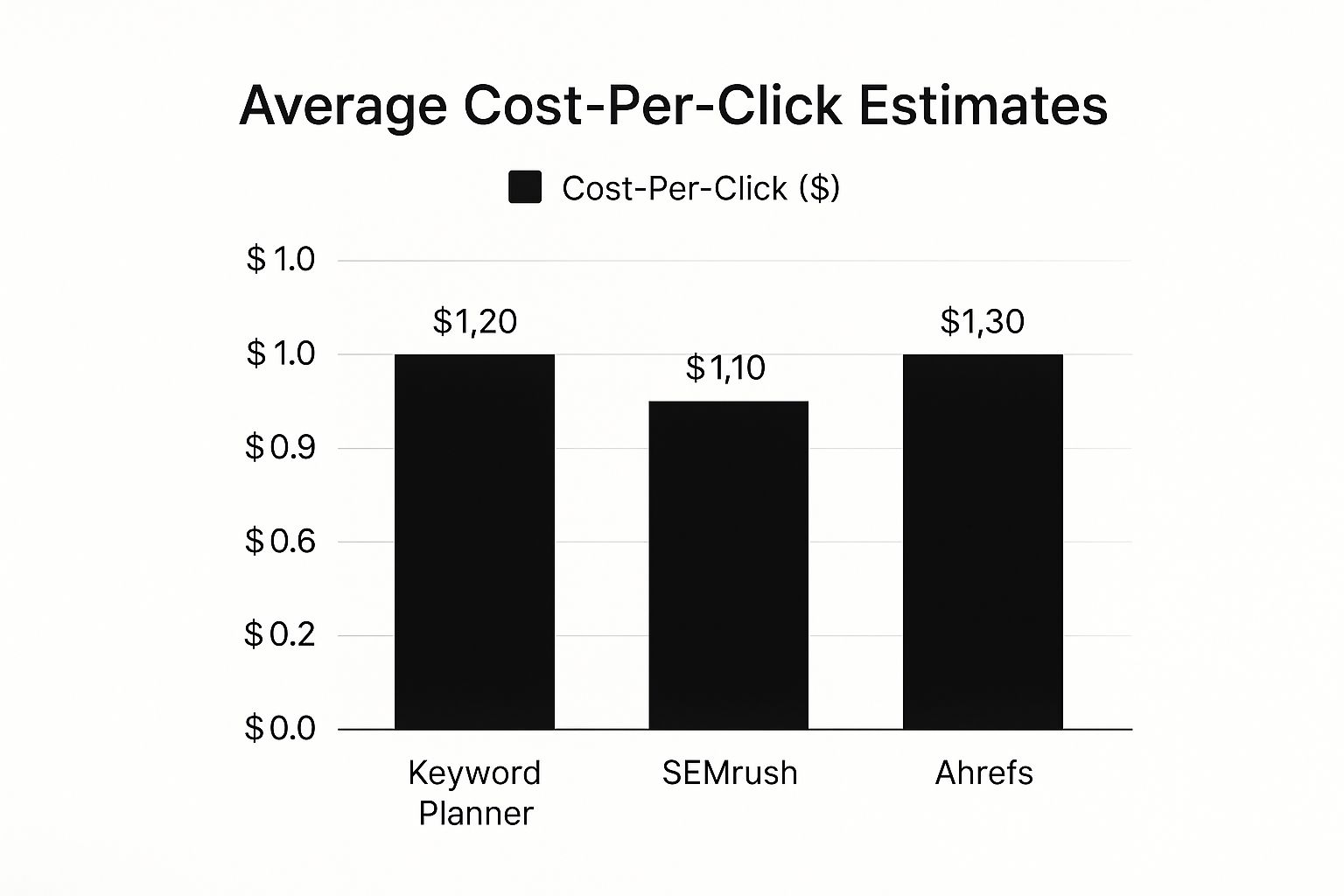
As you can see, different platforms might give slightly varied estimates, but they all point to a similar CPC range. This really hammers home the importance of using a few different data points when you’re doing your research.
Benchmarking Your Potential Ad Spend
How Much Does Google AdWords Cost: To give you a practical sense of these costs, here in the UK, the average CPC for Google Ads is around £3.33. But that figure can be wildly misleading. For instance, the legal sector is notoriously pricey, with average CPCs soaring as high as £7.27 per click. In contrast, sectors like arts & entertainment or real estate often get away with much lower costs, averaging around £1.22.
Key Insight: Don’t get put off by high industry averages. They’re just benchmarks. Your actual cost per click will come down to your specific strategy, keyword choices, and ad quality.
To make this even more tangible, here’s a breakdown of estimated CPC ranges for various UK industries. You can use this table to get a rough idea of where your business might sit and to help with your initial budget planning. For a deeper dive into these numbers, our guide on the finer points of Google Ads cost per click offers some great extra context.
Average Google Ads CPC by UK Industry
Here’s a look at the estimated Cost Per Click (CPC) for different business sectors across the UK. Use this as a guide to see what you might expect to pay.
| Industry Sector | Average CPC (Low End) | Average CPC (High End) |
|---|---|---|
| Legal | £5.10 | £7.27 |
| Insurance | £4.50 | £6.50 |
| Finance | £4.00 | £6.00 |
| Marketing & Advertising | £3.50 | £5.50 |
| Home & Garden | £2.80 | £4.50 |
| Automotive | £2.20 | £4.00 |
| Health & Fitness | £2.00 | £3.80 |
| B2B Services | £1.90 | £3.50 |
| Technology | £1.80 | £3.30 |
| Retail | £1.50 | £2.90 |
| Travel & Tourism | £1.30 | £2.50 |
| Real Estate | £1.20 | £2.30 |
| Arts & Entertainment | £0.90 | £1.80 |
Remember, these figures are not set in stone. A well-optimised campaign that targets long-tail keywords and boasts a high Quality Score can often land you a CPC well below the industry average, giving you a massive competitive advantage.
How to Set a Realistic Google Ads Budget

Alright, let’s get down to brass tacks. Moving from theory to action is what separates the winners from the losers in Google Ads. So, how do you set a budget that actually makes sense? Instead of just pulling a random figure out of thin air, we’re going to work backwards from what you want to achieve.
This goal-first approach is a game-changer. It turns your ad spend from a fuzzy, uncertain expense into a calculated investment with a clear purpose. Forget about guesswork; we’re going to build your budget using real numbers.
How Much Does Google AdWords Cost: Start With Your Business Goals
Before you even think about spending a single penny, you need a crystal-clear picture of what success looks like. What tangible result do you really want from your advertising?
For most businesses, it boils down to one of these:
- Generating Leads: Getting potential customers to fill out a form, call you up, or subscribe to your newsletter.
- Driving Sales: Pushing people directly to buy products from your online shop.
- Increasing Brand Awareness: Just getting your name in front of as many relevant eyeballs as possible, even if they don’t click straight away.
Leads and sales are where the money is, and they’re the easiest to measure. They give you a straightforward return on investment (ROI) that you can track and build a budget around.
The Reverse-Engineering Formula for Your Budget
Once your goal is locked in, you can use a simple formula to figure out your ideal starting budget. It all comes down to knowing two things: the value of a new customer and your website’s ability to turn visitors into paying customers.
Let’s walk through a real-world example for a lead generation campaign. Imagine you’re a local plumber, and you know that, on average, a new customer is worth £500 in revenue. That’s your starting point.
Next up, you need to know your website’s conversion rate. This is just the percentage of ad visitors who actually do what you want them to (like filling out that “Get a Quote” form). Let’s say you know that for every 20 visitors from your ads, one becomes a solid lead. That gives you a conversion rate of 5%.
With these two numbers, you can work out exactly how much you can afford to pay for each lead.
Maximum Cost Per Lead = Customer Value (£500) x Website Conversion Rate (5%) = £25
This simple calculation tells you that you can spend up to £25 to get a new lead and still make a profit. This number is your golden ticket: your target Cost Per Acquisition (CPA).
From CPA Target to Daily Budget
Now that you have your target CPA, building a daily budget is easy. The next question is simple: how many leads do you want each month? If you’re aiming for 40 new leads a month, the maths looks like this:
- Monthly Budget: 40 Leads x £25 Target CPA = £1,000
- Daily Budget: £1,000 / 30.4 (the average number of days in a month) = £32.89 per day
And just like that, you’ve got a data-backed starting budget of roughly £33 per day. This isn’t a number plucked from thin air; it’s a strategic figure tied directly to your revenue goals and your website’s actual performance.
This method gives you an incredibly powerful framework. If your actual CPA creeps higher than your target, you know it’s time to get in there and optimise. If it’s lower, you can confidently ramp up your budget to bring in even more business.
To make this even easier, you can plug your numbers into a dedicated AdWords budget calculator to help refine your estimates. This kind of strategic planning is the foundation for understanding what a Google Adword should really cost your specific business.
How Much Does Google AdWords Cost? Practical Ways to Slash Your Google Ads Costs
Knowing how Google Ads costs work is one thing, but actually cutting them is where you see the real results. The good news? You don’t need a bottomless budget to win. With a few smart, targeted tweaks, you can lower your ad spend while actually improving your campaign performance. It’s a win-win.
Think of it like trimming the fat. Every pound spent on an irrelevant click is a pound down the drain. The goal is to make your budget as lean and effective as possible, making sure every click has the best chance of turning into a customer. Let’s get into the tactics that will help you spend smarter, not harder.
Master the Art of Negative Keywords
One of the fastest ways to stop wasting money is by getting good at negative keywords. These are simply terms you tell Google not to show your ads for. They act as a bouncer for your campaigns, stopping you from paying for clicks from people who were never going to buy from you anyway.
For example, a company selling high-end “designer leather sofas” would want to block searches like:
- free
- cheap
- used
- how to clean
- repair
Adding these ensures your budget is spent on people with real buying intent, not someone looking for a freebie or a DIY guide. Make it a habit to regularly check your search terms report for new negative keywords to add—it’s a non-negotiable task for any savvy advertiser.
Relentlessly Improve Your Quality Score: How Much Does Google AdWords Cost
As we’ve covered, your Quality Score is the single most powerful lever you can pull to reduce how much a Google Adword cost actually is. A higher score means Google sees your ads as super relevant and gives you a discount, rewarding you with better ad positions for less money. Improving it should be an obsession.
A higher Quality Score directly translates into a lower cost per click (CPC). It’s Google’s way of giving you a discount for creating a great user experience.
To boost your score, focus on creating tightly-themed ad groups. This means your keywords, ad copy, and landing page need to be perfectly in sync. Your ad text should speak directly to the searcher’s query, and the landing page must deliver exactly what the ad promised. No surprises.
Get More Clicks for Free with Ad Extensions
Ad extensions are a brilliant, free way to make your ads bigger, more informative, and more enticing—all without touching your bid. They bolt extra bits of useful information onto your ad, like your phone number, location, or links to specific pages on your site.
These extensions make your ad take up more space on the results page, which naturally boosts your click-through rate (CTR). Since a higher CTR is a key ingredient of your Quality Score, using extensions is a sneaky way to help lower your costs, too.
Embrace Smart Bidding and Automation
Stop fighting Google’s machine learning and start using it to your advantage. Smart Bidding strategies like Target CPA (Cost Per Acquisition) or Target ROAS (Return On Ad Spend) let Google’s AI automatically optimise your bids in real-time to get you more conversions.
Instead of setting bids manually, you just tell Google what you want to achieve. Its algorithm then adjusts bids for every single auction to hit that goal. This automated approach is incredibly efficient at sniffing out cost-effective clicks that are most likely to convert, saving you a massive amount of time and money.
Continuously A/B Test Your Ad Copy
Finally, never assume your first ad is your best. A/B testing, or split testing, is where you run two slightly different versions of an ad to see which one performs better. You could test different headlines, descriptions, or calls to action.
Even tiny changes can lead to huge improvements in your CTR and conversion rates. By constantly testing and refining your message, you make sure you’re always running the most effective ad possible, squeezing maximum value from every single click.
Got Questions About Google Ads Costs? We’ve Got Answers.
Even after you get your head around the auction and how budgeting works, a few specific questions always pop up before you’re ready to hit ‘go’. Here are some straightforward, practical answers to the queries we hear most often, designed to give you the confidence to manage your ad spend like a pro.
Can I Really Run Google Ads for Just £5 a Day?
How Much Does Google AdWords Cost? You absolutely can. Google Ads is built to be flexible, meaning you can set whatever daily budget you’re comfortable with. Kicking things off with £5 a day is a brilliant way to test the waters, especially if you’re a local business just trying to figure out what a Google Adword might cost you.
But, and it’s a big but, you need to keep your expectations in check. In some of the more competitive UK industries where a single click can cost over £2, that budget might only get you one or two clicks a day. It’s perfect for learning the ropes, but you’ll almost certainly need to scale it up to gather enough data to start optimising and see a real impact on your bottom line.
How Long Until I See Results?
You’ll start seeing traffic from clicks almost as soon as your campaign is approved and live. That part is instant. But seeing the results that really matter—leads, sales, and actual business growth—takes a bit more patience.
Think of the first two to four weeks as a ‘learning phase’. Google’s algorithm is busy gathering data, trying to figure out who the perfect audience is for your ads. Most advertisers should brace for one to three months of testing, learning, and tweaking before they can properly measure the campaign’s true return on investment.
This period isn’t wasted time; it’s crucial for collecting the insights you need to make smart, cost-saving optimisations down the line.
Is Hiring a Google Ads Agency Actually Worth the Money?
For a lot of businesses, the answer is a resounding yes. While there’s a management fee involved, a good agency can often save you much more than they cost. They do this by expertly trimming wasted spend from your campaigns and dialling in on what works to improve your return.
They bring a depth of knowledge in keyword research, bid management, and conversion tracking that’s genuinely tough to master on your own. If you don’t have the time or the in-house expertise to be in your account every day, an agency is your best defence against costly mistakes. They’ll help answer the “how much does a Google Adword cost” question with a clear, profit-focused strategy.
Ready to get an expert pair of eyes on your campaigns? The team at PPC Geeks can give you a free, in-depth audit to show you exactly where you can cut wasted spend and boost your returns. Find out how our tailored strategies can help your business grow by visiting us at https://ppcgeeks.co.uk.
Author

Search Blog
Free PPC Audit
Subscribe to our Newsletter

The Voices of Our Success: Your Words, Our Pride
Don't just take our word for it. With over 100+ five-star reviews, we let our work-and our satisfied clients-speak for us.

"We have been working with PPC Geeks for around 6 months and have found Mark and the team to be very impressive. Having worked with a few companies in this and similar sectors, I rate PPC Geeks as the strongest I have come across. They have taken time to understand our business, our market and competitors and supported us to devise a strategy to generate business. I value the expertise Mark and his team provide and trust them to make the best recommendations for the long-term."
~ Just Go, Alasdair Anderson
