




The Real Cost of Poor Conversion Tracking in Trade-Based PPC Campaigns: The real cost of shoddy conversion tracking in PPC campaigns for tradespeople goes way beyond just a bit of wasted ad spend. It kicks off a nasty ripple effect of flawed data that poisons your budget decisions, sabotages any smart bidding you’re trying to do, and hides what your customers are really doing.
Ultimately, it leads to a serious amount of lost revenue and puts a hard stop on your growth.
The Real Cost of Poor Conversion Tracking: The Hidden Leak Draining Your PPC Budget
Think of your PPC campaign like a high-pressure plumbing system, and your ad budget is the water flowing through it. Every single click is meant to end up somewhere valuable—a qualified lead, a new job booked, or an emergency call-out.
Poor conversion tracking is the hidden leak in that system. It’s silently draining your budget with every click that doesn’t get measured properly.
For trades businesses like plumbers, electricians, and builders, this isn’t some minor drip. It’s a gusher of wasted cash and missed opportunities. In a market this competitive, ‘near enough’ tracking is a surefire way to fail. Without solid data, you’re not just guessing where your money’s going; you’re actively making bad decisions based on rubbish information.
A Problem of Scale in a Growing Market
This measurement gap gets exponentially more expensive as your campaign budgets get bigger and the competition gets fiercer. The UK’s search advertising market hit a staggering £16.9 billion in 2024, and search now makes up 47% of all digital ad spend in the UK.
For any trades business chucking money at this channel without rock-solid conversion tracking, that financial leak could mean thousands of pounds a month in returns you can’t account for. That makes measuring your real ROI and allocating your budget properly a complete impossibility. You can read more about the potential financial pitfalls and how to perform a comprehensive Google Ads audit to protect your investment.
More Than Just Wasted Spend (The Real Cost of Poor Conversion Tracking)
The fallout is especially bad for trades, where the customer journey can be a bit complicated. A customer might see an ad, browse your services, and then pick up the phone for an emergency repair. Without tracking that captures every touchpoint—from clicks to calls to contact forms—you might wrongly decide that a keyword that’s actually bringing in great jobs is a total dud.
The core issue is that you start optimising your campaigns based on half-truths. You slash the budget for what you think isn’t working and double down on what looks successful, when the reality could be the complete opposite.
This fundamental misunderstanding creates a few layers of financial damage that just get worse over time:
- Direct Budget Waste: Money is spent on clicks that generate great leads, but because those leads aren’t tracked, the campaigns get paused or the funding gets pulled.
- Misguided Strategy: Dodgy reports lead to poor strategic decisions, shifting your focus away from the channels that are actually bringing in your most profitable work.
- Stunted Growth: When you can’t prove the ROI on your marketing, you can’t justify increasing the budget. This traps your business in a cycle of inefficient, low-impact spending.
Before we dive into how to fix this, let’s break down exactly what these direct and indirect costs look like for a typical trades business.
Quick Look At The Hidden Costs of Poor Tracking
It’s easy to think of “wasted ad spend” as the only cost, but the reality is far more complex. Faulty tracking creates a domino effect, impacting everything from your strategic decisions to the performance of your automated bidding systems. The table below summarises the financial damage you might not even realise you’re taking on.
| Cost Category | Description | Example Impact For a Trades Business |
|---|---|---|
| Direct Ad Spend Waste | Money spent on ads that do generate untracked leads, but are paused because they appear to be underperforming. | A plumber spends £500 on a keyword that brings in three high-value boiler installation calls. Because the calls aren’t tracked, the keyword is paused, and those future leads are lost. |
| Budget Misallocation | Shifting budget away from genuinely profitable channels towards ones that only look good on paper due to flawed data. | An electrician moves £1,000/month from a campaign driving untracked emergency call-outs to one generating tracked, but low-value, quote requests. |
| Poor Bidding & Automation | Automated bidding strategies (like Target CPA) make bad decisions because they are optimising towards incorrect conversion data. | A roofer’s automated bidding system ignores users likely to make valuable phone calls, instead over-bidding on clicks that lead to minor form fills, driving up the cost-per-lead. |
| Lost Customer Insights | Inability to understand the full customer journey, from the first ad click to the final job booking, obscuring your most valuable pathways. | A builder can’t see that their most profitable extension projects start with a generic “local builders” search before converting through a brand search two days later. |
| Inaccurate Reporting & ROI | Reports that show poor performance, making it impossible to justify marketing spend or secure a larger budget for growth. | A marketing manager can’t prove their campaigns are profitable, so the business owner refuses to increase the ad budget, capping the company’s growth potential. |
These aren’t just abstract problems; they represent real money walking out the door every single day. The good news is that with a clear plan, you can plug these leaks and get a true picture of your marketing performance.
The Real Cost of Poor Conversion Tracking: Unpacking The Five Layers Of Financial Damage
The real cost of shoddy conversion tracking isn’t a single, isolated problem. Think of it more like a domino effect – a compounding issue that creates five distinct layers of financial and strategic damage, each one making the last even worse. A simple tracking mistake can quickly spiral, completely undermining your entire PPC effort.
It all kicks off with the most obvious and direct hit to your wallet.
1. Direct and Wasted Ad Spend
The first layer of damage is the cash you burn on keywords and campaigns that are actually working but look like they’re failing. For a trade business, many of your most valuable leads come from a good old-fashioned phone call—a customer with a burst pipe isn’t wasting time filling out a contact form.
If your phone call tracking is a mess, your reports will show your “emergency plumbing repair” campaign getting clicks but zero conversions. Based on this flawed data, the logical next step is to pause the campaign. Just like that, you’ve cut off a stream of high-value, untracked jobs and pushed that budget over to a less effective, but trackable, campaign. This is the simplest, most direct cost of getting your tracking wrong.
This flowchart shows how your initial budget can quickly leak into wasted spend and lost leads when your tracking fails.
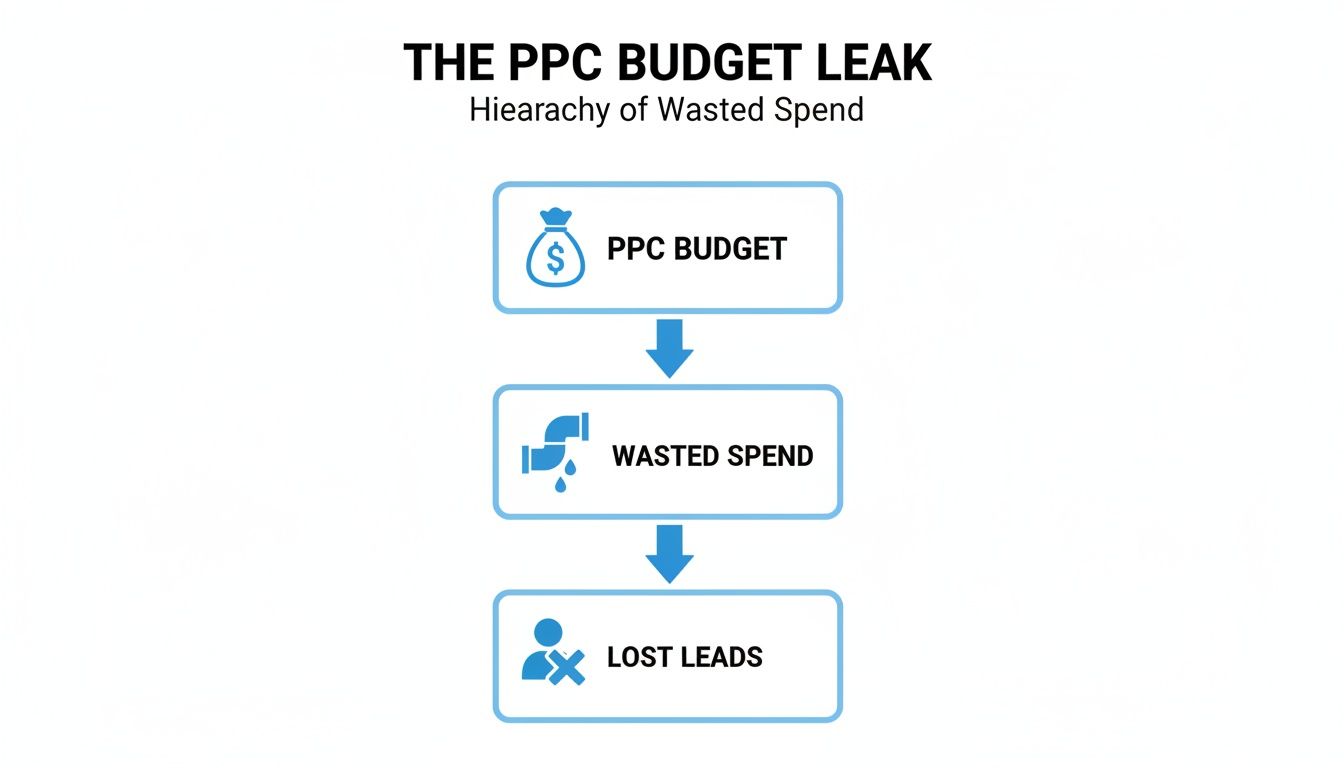
This highlights a critical chain reaction where your initial PPC investment gets eaten away by untracked conversions, leading directly to lost business.
2. Misguided Budget Allocation (The Real Cost of Poor Conversion Tracking)
This brings us straight to the second layer of damage: bad data causing you to misallocate your entire budget. You start starving your true top-performing campaigns while funnelling money into ones that only look good on a spreadsheet.
Imagine an electrician running two campaigns: one for “commercial electrical safety certificates” that generates trackable form fills, and another for “24/7 emergency electrician” that drives untracked phone calls. The reports show the certificate campaign is a star performer, so you shift more budget its way, completely unaware that the emergency campaign is bringing in far more profitable work.
3. Crippled Bidding Automation
The third layer is where modern PPC platforms turn against you. Automated strategies like Google’s Smart Bidding are incredibly powerful, but they are entirely dependent on accurate conversion data to learn and get better. They need a steady diet of good data to make smart decisions.
When you feed these algorithms incomplete or incorrect data, you guarantee poor results. The system will devalue your best keywords and audiences because it can’t see the conversions they generate, leading it to bid down on your winners and overspend on your losers.
4. Lost Customer Insights (The Real Cost of Poor Conversion Tracking)
Fourth, you lose priceless customer insights. You can’t build an accurate picture of your ideal customer if you don’t really know what makes them pick up the phone or fill out a form. Proper tracking tells you which ad copy resonates, which keywords signal urgent intent, and which landing pages convince visitors to act.
Without this data, you’re left guessing. You can’t understand the full journey they take from seeing an ad to booking a job, which stops you from being able to properly refine your messaging and targeting. This knowledge gap is a huge, though often overlooked, cost.
5. Fictional Performance Reports
Finally, all these problems culminate in the fifth layer: your performance reports become works of fiction. They might paint a picture of failure where there’s actually success, or the other way around.
This makes it impossible to accurately calculate your return on investment (ROI), justify your marketing spend, or make confident strategic decisions about scaling your business. When you can’t trust your numbers, you can’t effectively manage your growth. You’re just trapped in a cycle of inefficient spending based on pure guesswork.
The Real Cost of Poor Conversion Tracking: How To Find Tracking Leaks In Your Campaigns
Discovering your conversion tracking is broken usually happens long after a serious chunk of your budget has been torched. For most trade businesses, a tracking leak isn’t a dramatic flood; it’s a slow, silent drip that eats away at your profits month after month. Spotting the trouble early is the key to plugging the hole before it does any real financial damage.
The good news is you don’t need to be a data wizard to run a quick health check. There are some very clear red flags that your tracking is compromised. Learning to spot these warning signs is the first step toward taking back control of your ad spend and making sure your data is telling you the real story.
Spotting The Telltale Signs Of Trouble
Often, the first clue that something’s wrong comes from weird inconsistencies in your performance reports. Your gut might be telling you that enquiries are down, but your PPC dashboard might not be showing the same thing.
Keep your eyes peeled for these classic symptoms of dodgy conversion tracking:
- Unrealistic Conversion Rates: If you’re seeing a suspiciously high conversion rate, say 50%, you might be accidentally counting every single page visit as a lead. On the flip side, a rate that’s practically zero despite a healthy number of clicks suggests your genuine leads aren’t being recorded at all.
- Data Discrepancies: Do the conversion numbers in your Google Ads account look miles apart from the goal completions in Google Analytics for the same week? Small differences are normal, but massive, consistent gaps point to a fundamental breakdown on one of the platforms.
- Sudden Lead Drop-Off: If your ad spend and click numbers are holding steady but the phone’s gone quiet and your inbox is empty, that’s a huge red flag. This often happens right after a website update breaks the tracking code on your ‘thank you’ pages or contact forms.
Think of these indicators as your early warning system. When you spot one, it’s time to roll up your sleeves and dig a bit deeper with a more structured audit.
Your Initial Tracking Health Check (The Real Cost of Poor Conversion Tracking)
A basic audit doesn’t have to be a massive headache. By methodically checking a few key areas, you can quickly find out where your data is disappearing. It’s like checking the pipes for obvious leaks yourself before you call in the plumber.
The goal of a preliminary audit is simple: prove that the most critical customer actions on your website are actually being seen and recorded by your ad platforms. If they aren’t, every other metric in your account becomes completely unreliable.
Start by working through the checklist below. Go to your own website and act like a customer—fill out a form, click on a phone number—and watch what happens behind the scenes. For a bit more context on how these checks fit into a wider strategy, have a read about the simple actions to ensure your data measurements are driving real decisions.
Your PPC Conversion Tracking Audit Checklist
This table is your step-by-step guide to running a self-audit. It covers the most common points of failure for trade-based businesses and helps you pinpoint specific problems quickly.
| Audit Area | What to Check | Common Red Flag |
|---|---|---|
| On-Page Tags | Use the free Google Tag Assistant extension for Chrome. Visit your key pages (homepage, service pages, contact page) and see if your Google Ads and Analytics tags are present and showing a green or blue status. | A red tag status means there’s an error. No tags detected at all means your entire tracking foundation is missing. |
| Form Submissions | Fill out a contact or quote request form on your website. After you hit submit, check that you land on a dedicated ‘thank you’ page and use Tag Assistant to confirm the conversion tag fires on that specific page. | You get sent back to the homepage, or no tag fires on the confirmation page. This means your form leads aren’t being counted. |
| On-Site Call Tracking | If you use dynamic number insertion (where the phone number on your site changes for PPC visitors), check if the number swaps correctly when you visit from a Google Ad. Make a test call to ensure it connects and gets recorded. | The phone number doesn’t change for ad traffic, or your test call doesn’t show up in your Google Ads conversion data within 24 hours. |
| Ad Extension Call Tracking | Look at your call extensions in Google Ads. Make sure they are set up to use a Google Forwarding Number. This is essential for tracking calls made directly from the search results page, before someone even visits your site. | The extension just shows your standard business number. This gives you zero visibility on calls that don’t come from a website click. |
| Cross-Domain Issues | If your booking or payment process happens on another website (like a separate scheduling tool), you must have cross-domain tracking set up. Otherwise, the user’s journey breaks, and the conversion gets lost in translation. | Google Analytics shows a high number of ‘self-referrals’ from the third-party domain, which is a classic sign the two sites aren’t linked correctly. |
Going through this checklist will give you a much clearer picture of your tracking health. If you’ve found red flags in any of these areas, you’ve successfully located the leaks. The next job is to figure out just how much money those leaks are costing you.
Calculating The Real Cost Of Your Lost Leads
Knowing your conversion tracking has leaks is one thing, but to get anyone to care, you need to put a number on it. Abstract concepts like “lost leads” don’t drive change. Hard figures showing pounds and pence walking out the door? That gets attention.
This is where we move from theory to the real world. By applying a couple of simple formulas to your own business data, you can translate those invisible tracking errors into a tangible, financial cost. Don’t worry, this isn’t about complex data science; it’s just about using basic business metrics to see the true price of flying blind.
Let’s walk through a realistic scenario to show you exactly how it works.
A Plumber’s Leaky PPC Funnel
Picture a local plumbing company, “Pipes & Drains Ltd,” that spends £2,000 a month on Google Ads. Their campaigns are generating clicks, and the reports show they’re getting 70 form submissions each month, which they diligently track as conversions.
But here’s the problem: they know the phone also rings with enquiries from their website. They just have no call tracking in place.
After a quick look, they reckon about 30% of their total leads come from untracked phone calls that started on their PPC landing pages. That’s an extra 30 potential jobs a month that their Google Ads account knows absolutely nothing about.
This is the hidden cost right here. The system is completely blind to a huge chunk of its own success.
Calculating The Value Of Untracked Leads (The Real Cost of Poor Conversion Tracking)
To figure out the real cost of these missed opportunities, we first need to understand what a single lead is actually worth to the business. We can do this with a dead simple calculation.
1. Calculate Your Average Lead Value
Pipes & Drains Ltd knows their average job is worth £300. They also know they typically convert 1 in 4 leads into a paying customer, which is a 25% lead-to-sale rate.
The formula is: Lead Value = Average Job Value x Lead-to-Sale Rate
So, for them, it’s: £300 x 0.25 = £75 per lead.
2. Calculate The Total Value Of Lost Leads
Now, we just apply this value to all those untracked leads. They estimate they’re missing 30 phone call leads every single month.
The formula for this is: Lost Monthly Revenue = Untracked Leads x Lead Value
In their case: 30 untracked leads x £75 = £2,250 per month.
That’s £2,250 in potential monthly revenue that is completely invisible to their PPC optimisation. Over a year, this adds up to a staggering £27,000 in untracked value, all because they weren’t measuring phone calls.
This calculation is absolutely crucial. It proves that the campaigns they thought were duds could actually be their most profitable ones. If you need a more detailed breakdown, our guide can help you nail down your cost per lead calculation.
Quantifying The Wasted Ad Spend
The damage doesn’t stop there. The lack of data means they’re actively making bad decisions about where their budget goes. Because the system can’t see the valuable phone call conversions, it starts to incorrectly optimise away from the keywords that generate them.
Let’s say £800 of their £2,000 monthly budget is spent on keywords like “emergency plumber near me” that mostly drive phone calls. In Google Ads, these keywords look terrible, showing a really high Cost Per Acquisition (CPA) because only the odd form fill gets tracked against them.
Looking at this flawed data, the marketing manager might decide to slash the budget for these keywords by 50%. That means reallocating £400 to other keywords that generate more trackable (but ultimately lower value) form fills.
This £400 is now officially wasted ad spend. It’s been moved away from a highly profitable channel and pushed towards a less effective one, actively tanking the campaign’s overall ROI. By putting a real number on the cost of lost leads, you give yourself the power to prevent these kinds of costly mistakes and build a rock-solid case for investing in a proper tracking setup.
The Real Cost of Poor Conversion Tracking: Your Step-By-Step Plan To Fix Tracking Leaks
Once you’ve sniffed out the tracking leaks and put a real number on the damage, it’s time to fix them for good. Building a robust tracking system isn’t just about plugging holes; it’s about pouring a solid foundation that gives you a true picture of your campaign performance and fuels smarter decisions.
This is your practical, step-by-step plan to move from guesswork to genuine insight. We’ll kick off with the fundamentals every trade-based business needs, then move on to more advanced solutions to future-proof your data collection.
Start With a Solid Foundation
Before you even think about complex solutions, you have to get the basics right. A messy setup is the root cause of most tracking problems. By simply organising your tags and defining what success actually looks like, you can solve a huge percentage of common data issues.
First up, centralise your tracking codes. Instead of manually jamming individual snippets of code into your website for Google Ads, Analytics, and everything else, use Google Tag Manager (GTM). Think of GTM as a toolbox for all your tracking tags; you install one GTM container snippet on your site, and then manage every other tag from its user-friendly interface.
This approach pays off in a few key ways:
- Simplicity: No more begging a developer to edit your website’s code every time you want to add or change a tracking tag.
- Control: It lets you set up precise rules, or “triggers,” for when each tag should fire, like only on a ‘thank you’ page after a form is submitted.
- Speed: Managing tags through GTM can actually help your site load faster compared to having multiple scripts hard-coded all over the place.
Define Meaningful Conversion Actions (The Real Cost of Poor Conversion Tracking)
With GTM in place, you need to tell Google Ads exactly what a valuable lead looks like for your business. Not all conversions are created equal. For a trades business, a “request an emergency call-out” form is leagues more valuable than a simple “contact us” enquiry.
Jump into your Google Ads account and set up distinct conversion actions for each specific goal. This allows you to assign different values to each type of lead, which gives your bidding algorithms much richer, more useful data to work with.
For example, you could set up:
- “Quote Request Form Fill” (High Value)
- “Emergency Call-Out Form Fill” (Very High Value)
- “General Enquiry Form Fill” (Medium Value)
- “PPC-Driven Phone Call” (High Value)
By separating these actions, you shift from just counting leads to understanding their quality. This is a critical step in fixing poor conversion tracking in trade-based PPC, as it aligns your reporting directly with your actual business objectives. Our guide to mastering tracking in Google Ads dives deeper into setting these up correctly.
Implement Advanced Tracking Solutions
With a solid foundation, you can now bring in the heavy hitters to combat data loss from modern privacy features and ad blockers. Traditional browser-based tracking is becoming less reliable by the day, but server-side solutions can help you reclaim that lost data.
Server-Side Tracking
Think of standard tracking as sending a letter directly from the customer’s computer to Google. If the customer has an ad blocker (the postman is on strike), the letter just never arrives.
Server-side tracking changes the game. The customer’s browser sends the data to your website’s server first. Your server then securely forwards that information to Google. Because this all happens server-to-server, it’s far less likely to be blocked.
Implementing server-side tracking through Google Tag Manager is the single most effective way to improve data accuracy. It creates a more durable and reliable data stream that is less affected by browser restrictions, giving you a much clearer view of campaign performance.
Enhanced Conversions
Another powerful tool in the arsenal is Enhanced Conversions. This feature lets you send securely hashed customer data (like an email address from a form fill) along with your conversion tag. Google can then use this scrambled data to match conversions back to users who were signed into their Google account when they clicked your ad, even if traditional cookies are blocked.
This helps fill in the gaps, giving you a more complete and accurate attribution picture. It’s particularly brilliant at capturing conversions that happen across different devices.
Establish a Quality Assurance Process (The Real Cost of Poor Conversion Tracking)
Finally, tracking is not a “set it and forget it” job. Things break. Regular checks are essential to make sure everything is still working as it should. Website updates, new plugins, or platform changes can all inadvertently wreck your setup.
Create a simple monthly checklist to test your key conversion points:
- Test All Forms: Fill out every single contact and quote form on your site.
- Verify Tag Firing: Use Google Tag Assistant to confirm that conversion tags fire on all your ‘thank you’ pages.
- Check Call Tracking: Make a test call from a PPC ad to ensure it gets recorded as a conversion in Google Ads.
- Review Data: Keep an eye out for any sudden, unexplained drops or spikes in your conversion data.
By following this plan, you can systematically plug the leaks in your PPC funnel. This proactive approach ensures your data stays clean, reliable, and ready to guide your campaigns toward profitable growth.
Got Questions About Your PPC Tracking? Let’s Unpack Them.
Diving into the technical side of PPC can feel like you’re trying to read a foreign language, especially when you have that gut feeling something’s off but don’t know where to start looking. We get it. Business owners and marketing managers often come to us with the same pressing questions about how to spot and fix the conversion tracking problems that are quietly draining their budgets.
This section is all about giving you clear, no-nonsense answers to those common queries. We’ll break down the jargon into simple, actionable advice so you understand not just what’s broken, but why a solid tracking setup is so critical. Think of this as your field guide to either tackling these issues yourself or, at the very least, having a much more productive chat with your marketing agency.
What’s the First Thing I Should Check if My Tracking Is Wrong?
Before you go down any rabbit holes, start with the most obvious place: the ‘Conversions’ section inside your Google Ads account. Head over there and look at the ‘Status’ column for your main conversion actions—things like form submissions or phone calls. If you see statuses like ‘Inactive,’ ‘No recent conversions,’ or ‘Tag inactive,’ that’s a massive red flag. Your data collection is broken, full stop.
Next, get yourself the free Google Tag Assistant extension for your Chrome browser. It’s an indispensable tool. Go to your own website and walk through the exact steps a customer would take to convert, like filling out your contact form. Tag Assistant will show you in real-time whether your Google Ads and Analytics tags are actually firing on crucial pages, especially the ‘thank you’ page. If the tags don’t show up or are flagged with errors, you’ve found your smoking gun.
One final, simple sanity check is to put your Google Ads conversion numbers side-by-side with your Google Analytics goal completions for the same date range. A few minor differences here and there are perfectly normal. But if you’re seeing huge, consistent gaps between the two, you can be sure there’s a leak somewhere in your tracking system that needs plugging—fast.
How Does Poor Tracking Affect Google’s Smart Bidding? (The Real Cost of Poor Conversion Tracking)
Google’s Smart Bidding strategies, like Target CPA and Maximise Conversions, are incredibly powerful bits of machine learning. But here’s the catch: they are completely, utterly reliant on a steady stream of accurate conversion data to do their job properly. They work by sifting through your past conversion data to predict which clicks are most likely to turn into leads, adjusting your bids on the fly.
So, what happens if your tracking is garbage? Imagine it’s only catching half of your phone call leads. You’re essentially feeding the algorithm poison.
The system will look at your best keywords, ad groups, and audiences—the ones actually driving calls—and wrongly conclude they aren’t performing. Because it can’t “see” all the valuable leads they generate, it will slash the bids for your top performers and shift your budget towards campaigns that only look good on paper.
In short, poor tracking turns Google’s automation against you. It actively makes dumb, expensive decisions with your money, completely undermining the very technology that’s supposed to be making you more efficient.
Can I Still Track Conversions With Privacy Rules and Ad Blockers?
Yes, you absolutely can, but it means you need to modernise your setup. The old-school way of tracking just won’t cut it anymore. Stricter privacy rules like GDPR, those ubiquitous cookie consent banners, and the massive rise in ad blockers all throw a spanner in the works for standard client-side tracking, which depends on scripts running in a user’s browser.
The most reliable fix for this is to implement server-side tracking using Google Tag Manager. It sounds complex, but the concept is simple. Instead of a visitor’s browser sending data straight to Google (where it can be blocked), it sends the information to your own web server first. Your server then passes that data securely on to Google’s servers. This whole process is way more robust and far less likely to be blocked by browsers or privacy tools.
On top of that, you should be using Google’s Enhanced Conversions. This feature lets you send securely hashed (basically, scrambled for privacy) customer data, like an email address from a form fill, along with the conversion signal. This helps Google connect the dots and match conversions back to ad clicks even when traditional cookies are blocked, giving you a much more accurate picture. Frankly, these technologies aren’t just ‘nice-to-haves’ anymore; they’re essential for anyone who’s serious about reliable measurement.
At PPC Geeks, we specialise in building resilient tracking systems that give you a true picture of your campaign performance. If you’re tired of guessing where your leads are coming from, get in touch for a free, in-depth PPC audit and let our UK-based experts plug the leaks in your advertising funnel for good.


