




Your Guide to Amazon PPC Advertising: If you’re selling on Amazon, you’ve probably heard the term Amazon PPC. But what does it actually mean, and why should you care? Think of it this way: Amazon is the world’s biggest shopping centre. Getting a good organic ranking is like having a shop somewhere inside, but paying for PPC is like renting a massive billboard right at the main entrance, pointing a huge arrow directly at your products.
Simply put, you’re paying to jump the queue. It’s a direct line to shoppers at the very moment they’re searching for something you sell.
What Is Amazon PPC Advertising And Why It Matters
Let’s break it down. Amazon PPC (Pay-Per-Click) is an advertising model where sellers bid on keywords. When a shopper searches for that keyword, the winning bidders’ ads appear in prime positions, like at the top of the search results. The best part? You only pay when someone actually clicks on your ad.
It’s a powerful way to get your products in front of people who are ready to buy, cutting through the noise of millions of other listings.
The Flywheel Effect of PPC
Here’s the thing many sellers miss: PPC isn’t just about getting a quick sale today. It’s about building momentum for tomorrow. A well-run PPC campaign kicks off what’s known as the “flywheel effect,” a cycle that builds on itself to create long-term growth.
It works like this:
- Ads Get You Seen: Your ads put your products right under the noses of more shoppers.
- More Visibility = More Sales: More eyes on your listings naturally lead to more clicks and, ultimately, more sales.
- Sales Boost Organic Rank: Amazon’s A9 algorithm loves sales. It sees this activity as a sign that your product is popular and relevant, so it starts ranking you higher in the unpaid search results.
- Higher Rank = More Free Sales: As your organic rank climbs, you start getting more “free” traffic and sales, which tells the algorithm to keep ranking you well.
This cycle means your ad spend isn’t just a cost; it’s an investment that builds lasting authority for your products. You’re using paid ads to fuel your organic success.
A Non-Negotiable Tool for Growth (Amazon PPC Advertising)
For any serious UK seller, getting to grips with Amazon PPC isn’t just a good idea—it’s essential. Whether you’re launching a brand-new product, trying to shift more of an established best-seller, or fending off competitors, PPC is your go-to tool.
And the numbers back it up. The average Amazon PPC conversion rate for UK sellers is a staggering 10.33%. To put that in perspective, the typical e-commerce conversion rate elsewhere on the web is just 1.33%. That data shows that for every 100 people who click your Amazon ad, more than 10 are likely to buy. It’s proof that people on Amazon aren’t just browsing; they’re there to shop. You can explore more about these performance metrics to see just how effective the platform is.
This is what your home base looks like inside Amazon Seller Central. It’s the command centre for all your advertising campaigns.
From here, you’ll dive into the Advertising Campaign Manager to build, manage, and tweak all your PPC efforts. Getting comfortable with this ecosystem is the first step to turning your ad spend into serious, profitable growth.
Choosing The Right Amazon PPC Advertising Type
Jumping into Amazon PPC feels a bit like opening a pro toolbox. You’ve got several specialised tools, and each one is designed for a very specific job. Choosing the right one is your first, and most important, step toward building a campaign that actually works. Each ad type serves a completely unique purpose in your overall strategy.
The big three are Sponsored Products, Sponsored Brands, and Sponsored Display. It’s tempting to see them as interchangeable, but that’s a mistake. Instead, think of them as a crack sales team with distinct roles. One is your frontline salesperson, another is your brand ambassador, and the last is your persistent follow-up expert who never lets a lead go cold.
This diagram breaks down how PPC efforts kickstart a powerful cycle. Your ads drive visibility and sales, which in turn gives your organic ranking a massive boost over time.
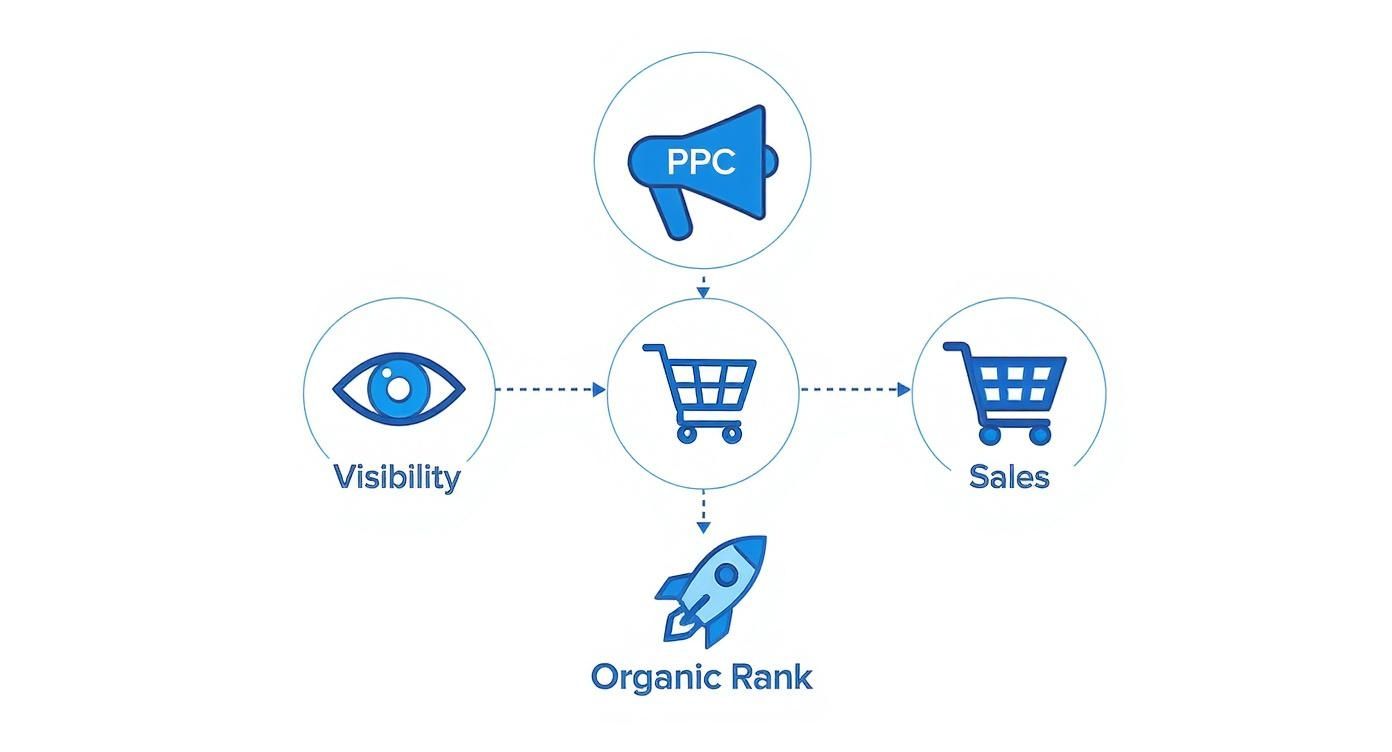
The key takeaway here? Paid advertising is the fuel that directly powers the growth of your unpaid, organic presence on Amazon. They work hand-in-hand.
Sponsored Products: The Sales Workhorse
Sponsored Product ads are the bread and butter of Amazon PPC advertising. These are the individual product listings you see popping up right inside search results and even on your competitors’ product pages. Their goal is brilliantly simple: drive sales. Now.
Think of Sponsored Products as your digital shelf-stacker, putting your item directly in a shopper’s line of sight the very moment they’re looking for something like it. They are pure performance, designed to turn a search into a sale as quickly and efficiently as possible. Because they blend so seamlessly with organic results, they’re incredibly effective at grabbing high-intent traffic.
Sponsored Brands: The Brand Megaphone (Amazon PPC Advertising)
While Sponsored Products focus on one item at a time, Sponsored Brands let you tell a much bigger story. These ads usually appear as a banner right at the top of the search results page, featuring your logo, a custom headline, and a collection of your products.
This is your brand-building tool. It’s perfect for getting your name out there and showing off a range of what you offer. For instance, if you sell kitchen gear, you could run a Sponsored Brand ad with the headline “Upgrade Your Morning Brew” and showcase your coffee grinder, french press, and favourite mugs all at once. It helps shoppers connect with your brand, not just a single product.
By using Sponsored Brands, you move beyond just selling a product and start building a recognisable identity. This is vital for creating long-term customer loyalty and encouraging repeat purchases.
These ads also give you more creative freedom, including video options, which can massively increase engagement and help you stand out from the crowd.
Sponsored Display: The Retargeting Expert
Sponsored Display ads are your long-range tool, capable of reaching shoppers both on and off Amazon. Their superpower is retargeting—the ability to re-engage customers who’ve looked at your product but, for whatever reason, didn’t buy.
Imagine a shopper lands on your product page, gets distracted, and wanders off. A Sponsored Display ad can follow them, popping up on other websites and apps they visit, gently reminding them of what they were looking at. This keeps your product top-of-mind and nudges potential customers back to complete their purchase. It’s a hugely effective way to recover potentially lost sales.
To give you a better idea of how these ad types stack up, here’s a quick comparison:
Amazon Ad Type Comparison (Amazon PPC Advertising)
| Ad Type | Primary Goal | Typical Placements | Best For |
|---|---|---|---|
| Sponsored Products | Drive immediate sales | Search results, product detail pages | Converting high-intent shoppers and boosting individual product visibility. |
| Sponsored Brands | Build brand awareness | Top of search results, within search results | Showcasing a product line, launching new items, and establishing brand identity. |
| Sponsored Display | Re-engage shoppers | On and off Amazon (third-party sites/apps) | Retargeting customers who viewed your products but didn’t buy; recovering lost sales. |
Ultimately, choosing the right ad type comes down to what you’re trying to achieve right now. Are you chasing immediate sales? Building long-term brand recognition? Or bringing back shoppers who got away? A truly solid Amazon PPC advertising strategy will almost always use a mix of all three to cover the entire customer journey from discovery to purchase and beyond. For a deeper look into this ad type, learn more about how Amazon Sponsored Display ads can boost your strategy in our guide.
Amazon PPC Advertising: How To Launch Your First Campaign
Alright, let’s move from theory to action. This is where the real learning kicks in. Launching your first Amazon PPC campaign might feel a bit intimidating, but honestly, it’s more straightforward than you think. It’s less like trying to fly a spaceship and more like plotting a course on a map—get the initial coordinates right, and you’re well on your way.
Your journey begins in the Advertising section of your Amazon Seller Central account. Find and click “Create campaign,” then pick your ad type. For your very first go, Sponsored Products is the perfect place to start. It’s the most direct route to getting eyeballs on a specific product and driving sales.
The screen you’ll see looks something like this—it’s your command centre for getting the campaign off the ground.

This is your launchpad. Everything you define here will shape how your ad performs once it’s live.
Structuring Your Campaign for Clarity
Before you dive into the nitty-gritty, you need a solid naming system. It sounds trivial, I know, but trust me, this will save you from massive headaches down the line. A simple, consistent naming structure makes everything easier to analyse as you start to scale up.
A great format to follow is:
[Product] – [Targeting Type] – [Match Type]
For example, if you’re selling a leather dog lead and running an automatic campaign, you’d name it:
Leather Dog Lead - AUTO
And for your manual campaigns on the same product? It would look like this:
Leather Dog Lead - MANUAL - BroadLeather Dog Lead - MANUAL - Exact
This simple bit of organisation means you can tell what a campaign is doing with just a quick glance. No more digging around.
Choosing Your Targeting Strategy (Amazon PPC Advertising)
Next up is a big decision: Automatic targeting or Manual targeting. Now, this isn’t an either/or situation; the best sellers use both working together. But for your first campaign, I strongly recommend starting with an automatic one.
Think of an Automatic campaign as your reconnaissance mission. You’re sending Amazon’s algorithm out to scout the terrain and bring back intel—in this case, the exact search terms real customers are using to buy products like yours.
With automatic targeting, Amazon scans your product listing and makes educated guesses about which keywords and competitor products are a good fit. It’s a low-effort way to uncover how people actually search. Let it run for a couple of weeks, then dive into the search term report to see which phrases brought in the sales. You then “harvest” these winners and plug them into a new, tightly controlled manual campaign.
Setting a Sensible Budget and Bid
The final piece of the puzzle is your budget. Amazon will ask for a daily budget—the most you’re willing to spend each day for that specific campaign.
- Daily Budget: When you’re just starting out, a modest budget of £10 to £20 per day is plenty. It’s enough to gather that crucial initial data without breaking the bank. You can always bump it up later once you’ve confirmed the campaign is making you money.
- Bidding Strategy: Amazon gives you a few bidding options. For beginners, the safest bet is “Dynamic bids – down only”. With this setting, Amazon automatically lowers your bid if it thinks a click is unlikely to lead to a sale. It’s a brilliant way to protect your ad spend from being wasted on tyre-kickers.
By kicking things off with a clearly named automatic campaign and a conservative budget, you’re not just launching an ad—you’re building a powerful data-gathering machine. The goal on day one isn’t to hit record sales; it’s to lay a solid foundation for a profitable, long-term Amazon PPC advertising strategy.
Amazon PPC Advertising: Mastering Keywords And Targeting
Welcome to the engine room of your Amazon PPC success. Getting your keyword and targeting strategy right is what separates the campaigns that just burn cash from the ones that bring in consistent, profitable sales. Honestly, this is the most critical step in building a campaign that actually performs.
Think of it like this: your keywords are different types of fishing nets. Each net is designed to catch a different kind of fish—or in this case, a different kind of shopper. Using the right net in the right place is the difference between coming home with a valuable catch and an empty boat.
Understanding Keyword Match Types
Amazon gives you three main “nets” to work with for your keyword targeting. Understanding how each one works is crucial for controlling your ad spend and making sure you’re reaching the right people.
- Broad Match: This is your widest, cast-it-all net. If you target “running shoes” with broad match, your ad could pop up for searches like “men’s trainers,” “lightweight jogging footwear,” or even “marathon gear.” It’s brilliant for discovering new search terms you hadn’t thought of, but you have to watch it like a hawk because it can attract a lot of irrelevant clicks.
- Phrase Match: This net is a bit more refined. Your ad shows up when a shopper’s search includes your exact keyword phrase, in the right order, but they can add words before or after it. For “running shoes,” your ad might show for “blue running shoes for men” or “best running shoes on sale,” but it wouldn’t appear for “shoes for running.”
- Exact Match: This is your precision spear. Your ad only appears when someone types in your exact keyword, give or take a tiny variation like a plural. Targeting “running shoes” with exact match means your ad is triggered only for that specific search. This gives you maximum control and usually delivers the highest conversion rates.
Your strategy should really use all three. Start with Broad and Phrase match in a “research” campaign to see what shoppers are actually searching for. Once you find high-converting search terms, move them over to an Exact match campaign to target them aggressively and profitably.
Unearthing High-Converting Keywords (Amazon PPC Advertising)
So, where do you find these golden keywords? The best ones often come from putting yourself in your customer’s shoes and digging into the data Amazon itself provides.
- Amazon Search Bar Autocomplete: This is a simple but powerful trick. Start typing your main product keyword into the Amazon search bar and just watch what suggestions appear. These are real, common searches that customers are making right now.
- Competitor Listings: Go and have a good nosey around the titles, bullet points, and descriptions of the best-selling products in your category. Their listings are often packed with valuable, high-intent keywords that you can add to your own campaigns.
- Your Automatic Campaign Data: Like we’ve mentioned, the search term report from your automatic campaign is an absolute goldmine. It shows you the exact phrases that have already led to clicks and, more importantly, sales for your product.
A solid keyword list is your foundation, but it’s not a ‘set it and forget it’ job; it needs constant refining. This process is deeply tied to your product’s overall visibility on Amazon. A strong PPC keyword strategy will almost always give your organic results a significant boost, too. You can learn more about how these two work hand-in-hand in our comprehensive guide to Amazon SEO optimisation.
The Power of Negative Keywords
Telling Amazon what to target is only half the battle. You also need to tell it what not to target. Negative keywords are terms you add to your campaign to stop your ad from showing up for irrelevant searches. Think of them as a filter, protecting your budget from wasted clicks.
For example, if you sell premium leather dog leads, you’d probably want to add “cheap,” “nylon,” and “retractable” as negative keywords. This stops you from paying for clicks from shoppers who are looking for a completely different type of product.
Beyond Keywords: Product Targeting (Amazon PPC Advertising)
Finally, don’t forget that you can target more than just keywords. Product Targeting lets you place your ads directly on your competitors’ product detail pages. This is a powerful, aggressive strategy for grabbing market share.
You can target specific ASINs (Amazon Standard Identification Numbers) or even entire product categories. This puts your ad right in front of shoppers who are literally one click away from buying from a rival, giving you the perfect chance to present your product as a better alternative and steal the sale.
Amazon PPC Advertising: Smart Bidding And Budgeting Strategies
Once your campaigns are up and running, the real work begins. The focus shifts from setup to strategy, fine-tuning the financial engine of your Amazon PPC advertising. It’s all about intelligent bidding and smart budget management, making sure every pound you spend works as hard as it possibly can. This is where you turn clicks into profit, not just traffic.
Think of your budget as the fuel in a car and your bidding strategy as the driver. A reckless driver will burn through fuel with very little to show for it. A skilled driver, on the other hand, can make that same tank last for a much longer, more productive journey. Your goal is to be that skilled driver.
Calculating Your Break-Even ACoS
Before you can bid intelligently, you have to know your numbers. The single most important metric for profitability is your break-even Advertising Cost of Sale (ACoS). This figure tells you the absolute maximum percentage of a sale you can spend on ads before you start losing money.
Calculating it is pretty straightforward:
Break-Even ACoS = Pre-Ad Profit Margin (%)
Let’s say your product sells for £30. After all the costs—manufacturing, shipping, Amazon fees—you’re left with £9 in profit. That means your profit margin is 30%. So, your break-even ACoS is 30%. Any campaign running at an ACoS below this number is putting money back in your pocket.
Knowing this number completely changes your approach. You stop guessing what a “good” ACoS might be and start knowing exactly what your campaigns need to achieve for your specific products to be successful.
Choosing the Right Bidding Strategy (Amazon PPC Advertising)
Amazon gives you a few bidding strategies to play with, and each one is suited for different goals. Getting to grips with them is key to staying in control while letting Amazon’s algorithm do some of the heavy lifting for you.
- Dynamic Bids – Down Only: This is the safest bet for beginners. Amazon will automatically lower your bid for clicks it thinks are less likely to convert into a sale, which helps protect you from wasteful spending.
- Dynamic Bids – Up and Down: This one’s a more aggressive choice. Amazon can increase your bid (by up to 100%!) for placements it believes are highly likely to convert. It’s best used on campaigns you’ve already proven are profitable.
- Fixed Bids: This strategy puts you in the driver’s seat with full manual control. Amazon will use your exact bid every single time, without making any adjustments. This is for experienced sellers who trust their own data more than the algorithm.
The smartest way to go is to match the bidding strategy to how mature your campaign is. Start new, unproven campaigns with “Down Only” to keep risk low. Once a campaign is consistently bringing in profit, you can consider switching to “Up and Down” to really push its potential.
Leveraging AI for Smarter Bidding
Manually adjusting bids across hundreds of keywords is a recipe for disaster; it’s almost impossible to do well. This is where automation becomes your best friend. UK sellers are increasingly turning to AI-powered bid automation to keep a competitive edge. Amazon’s own tools can analyse real-time data to tweak bids, making sure your ads are shown to the most relevant shoppers at the best times, all without you having to check in constantly. It’s a game-changer for efficiency as competition and ad costs continue to rise.
By setting clear rules based on your target ACoS, you can let the system handle the moment-to-moment tweaks. This frees you up to focus on the bigger picture. This mix of human oversight and machine efficiency is at the heart of modern PPC management. To sharpen your approach even further, check out these additional valuable Amazon PPC tips to help you stay ahead of the pack.
Amazon PPC Advertising: How To Analyse And Optimise Your Campaigns
Right, you’ve launched your campaign. Pop the kettle on, but don’t put your feet up just yet. Getting your ads live is just the first step. The real magic in Amazon PPC advertising happens when you start turning all that raw data into smart, decisive actions. This isn’t about guesswork; it’s about building a simple, repeatable routine to fine-tune your campaigns until they’re lean, mean, money-making machines.
Think of yourself as a gardener. You don’t just chuck some seeds in the ground and hope for the best. You’re out there regularly, pulling up the weeds, giving the thriving plants a bit more water, and pruning back anything that’s not pulling its weight. Campaign optimisation is exactly the same principle.
Focusing on the Metrics That Matter
It’s ridiculously easy to get lost in a sea of data inside Seller Central. To keep your head straight, just anchor your analysis on a few key metrics that tell you the most important parts of the story.
- Advertising Cost of Sale (ACoS): This is your north star, plain and simple. It pits your ad spend against the sales it brought in, telling you in black and white if your campaigns are actually profitable.
- Click-Through Rate (CTR): This tells you how well your ad is grabbing attention. A high CTR means your product’s main image and title are doing their job and making shoppers click amidst all the noise.
- Conversion Rate (CVR): Once they click, are they buying? This metric tells you how effectively your product page turns visitors into customers. A low CVR might mean the problem isn’t your ad, but your price, reviews, or listing content.
These three work together to give you a full health check on your campaigns, from the first glance to the final sale.
Your Weekly Optimisation Checklist (Amazon PPC Advertising)
Proper optimisation isn’t a one-and-done job; it’s a habit. Carve out some time each week to run through a quick checklist. This routine is what separates the pros from the amateurs, ensuring you’re always improving performance and plugging money leaks.
- Dive into Your Search Term Report: This report is pure gold. It shows you the exact phrases customers typed into Amazon before clicking your ad.
- Harvest Your Winners: Spot any search terms that have bagged you sales at a profitable ACoS? Brilliant. Move these star players from your automatic campaign into a manual one as an exact match keyword. This lets you take full control and bid more aggressively on what you know for a fact works.
- Weed Out the Rubbish (Negative Keywords): Find those search terms that are getting clicks but zero sales, or are just completely irrelevant. Add them as negative keywords. This instantly stops your ads from showing up for those queries, saving you money from day one.
Continuous optimisation is all about making small, consistent tweaks. The aim is to gradually funnel your budget away from what’s not working and double down on the keywords and strategies that are proven winners.
Adjusting Bids Based on Performance
Your final weekly task is managing your bids. This is all about making sure your most valuable keywords get the spotlight they deserve, without you overpaying for the duds.
Look at your ACoS. If a keyword is smashing it and converting well below your target ACoS, consider nudging its bid up a bit to get more impressions and sales. On the flip side, if a keyword’s ACoS is creeping too high, drop the bid to bring it back in line. It’s a constant balancing act that ensures your ad spend is always working as hard as possible for you.
Frequently Asked Questions About Amazon PPC Advertising
Diving into the world of Amazon PPC always throws up a few common questions, especially if you’re just getting your feet wet. Let’s tackle some of the most frequent ones to give you clear, straightforward answers.
How Much Should I Spend Initially?
There’s no magic number, but a sensible starting point for a new seller in the UK is usually between £10 to £20 per day for each campaign. It’s enough to start gathering some initial performance data without taking a massive financial risk.
The trick is to start small and keep a very close eye on your Advertising Cost of Sale (ACoS). Once you see which keywords and campaigns are actually making you money, you can confidently start dialling up the budget. Think of your first few weeks as a learning exercise, not just a race for immediate sales.
How Long Until I See Results?
You’ll see initial data like impressions and clicks trickle in within the first 24-48 hours. But seeing meaningful results—we’re talking consistent sales and a healthy profit—can take anywhere from a few weeks to a couple of months.
That first phase is all about gathering data and letting Amazon’s algorithm figure out what works for your products. Getting to a stable, positive return on your ad spend often requires a bit of patience and consistent management over the first one to three months.
Can I Run PPC Without A Registered Brand?
Yes, you absolutely can. The most common ad type, Sponsored Products, is available to every professional seller, whether you’re brand registered or not. For most people, this is the perfect place to start.
However, if you want to unlock the more advanced ad types like Sponsored Brands and Sponsored Display, you’ll need to enrol in the Amazon Brand Registry. While you can definitely get started without it, becoming brand registered opens up some powerful tools for building your brand on the platform. If that process sounds a bit daunting, it might be worth understanding what an Amazon PPC agency does to handle these kinds of details for sellers.
Navigating Amazon PPC can be a complex and time-consuming task. At PPC Geeks, our award-winning team of UK-based experts specialises in creating data-driven campaigns that increase traffic, boost sales, and maximise your return on investment. If you’re ready to achieve measurable growth without the guesswork, get your free, in-depth PPC audit at https://ppcgeeks.co.uk/ today.


