







Key takeaways
- The Performance Max setup screen now shows two settings in the Budget step: channel prioritisation and Promo Mode.
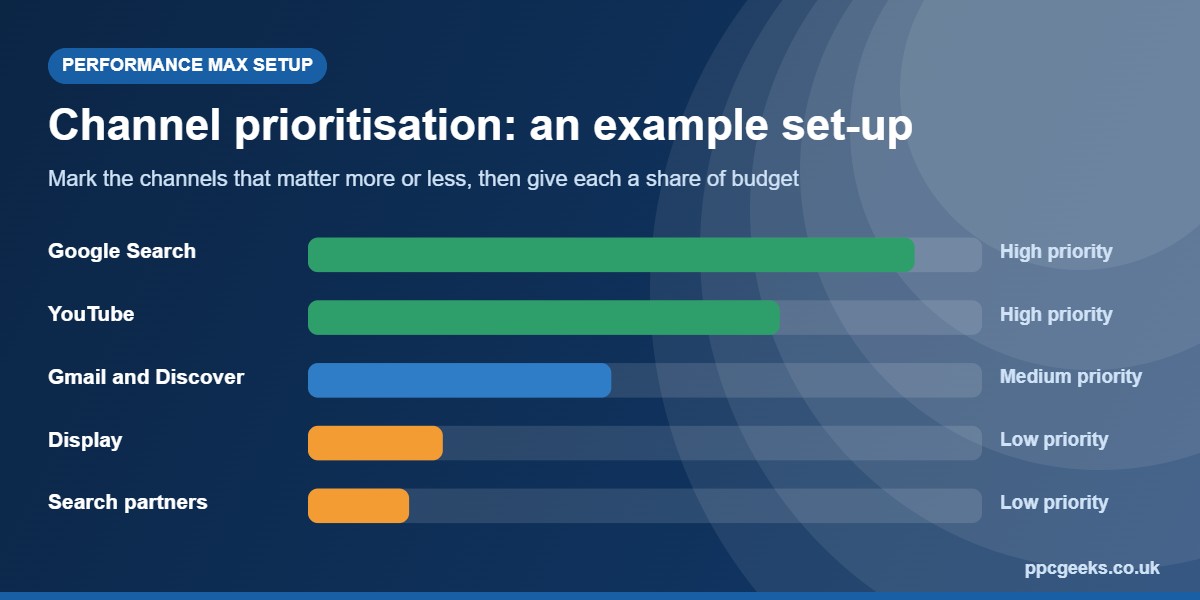
- Channel prioritisation lets you mark channels such as Search, YouTube, Display and Search partners as higher or lower priority, and give each a share of budget.
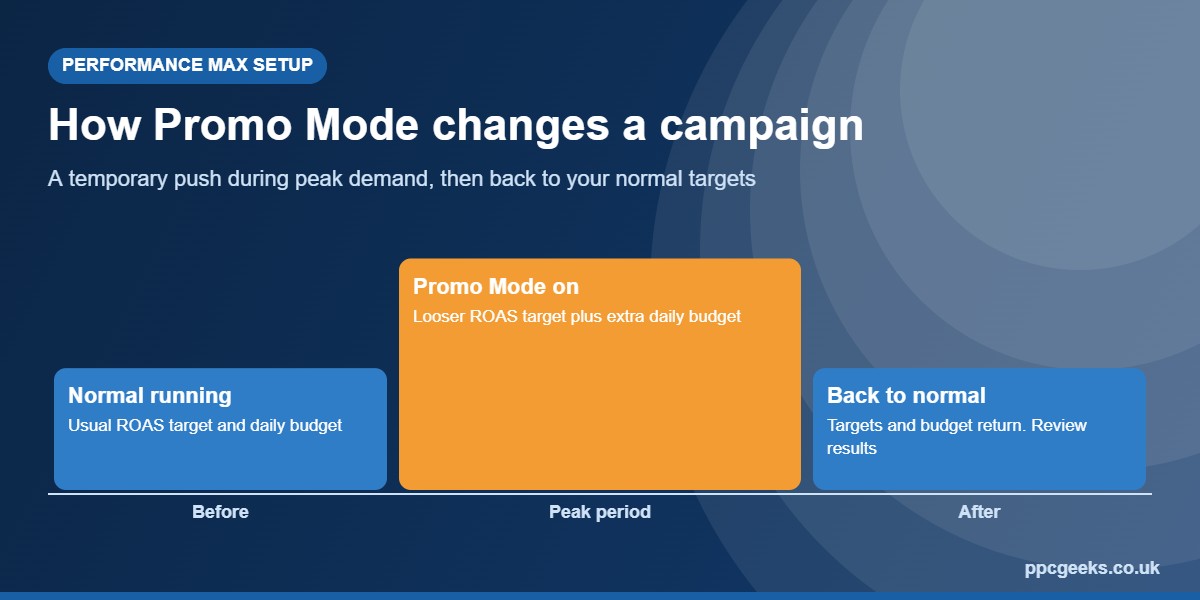
- Promo Mode lets you loosen your ROAS target for a short period and add extra daily budget on top, so the campaign can chase peak demand.
- Neither feature is brand new. However, putting them in front of every advertiser at setup means more people will switch them on, sometimes without a plan.
- Use both with clear rules: protect the channels that actually convert, set a fixed end date for any promotion and judge the results on profit, not ROAS alone.
The Performance Max setup process has picked up two settings that, until recently, sat in betas and account team conversations. When you build a new PMax campaign, the Budget submenu now offers channel prioritisation and Promo Mode. In short, you get more say over where your money goes and how hard the campaign pushes during busy periods.
Search Engine Roundtable reported the change on 18 November 2026, after PPC consultant Thomas Eccel spotted the new options and shared a screenshot on LinkedIn. Google has not published a separate announcement about the setup screen, so for now the settings may not appear in every account.
What has changed in Performance Max setup
Both features have been around for a few months, but they have lived in different places. Google first described promotion mode in June 2026 as a beta for Search and Performance Max campaigns, open to advertisers through their account team. Channel controls, meanwhile, have been arriving in stages, which we covered in our post on Google Ads channel prioritisation.
What is new is where they sit. According to Eccel’s post, both options now appear under the Budget submenu when you create a campaign. As a result, channel and seasonal decisions become part of the build itself, rather than something you go looking for later.
That matters because defaults shape behaviour. When a setting appears during setup, people tend to fill it in. So it is worth deciding now how your team will use these options, before someone ticks a box on a Friday afternoon.
Channel prioritisation in the Performance Max setup screen
Channel prioritisation lets you tell Google which parts of the PMax inventory matter more or less to your business. In the example Eccel shared, Google-owned channels were set to high priority, while Display and Search partners were set to low. You can also allocate a share of budget to each channel.
For many advertisers, this answers a long-standing complaint. PMax has always been a black box, and cheap Display or partner traffic can soak up spend while Search does the real work. Being able to push budget towards the channels that convert is therefore a genuine step forward.
That said, Google has not yet published detailed documentation on how strictly these shares are applied. Treat them as strong guidance to the system until your own reporting shows how closely spend follows them. For a deeper look at the controls, see our Performance Max channel prioritisation guide.
What Promo Mode adds to Performance Max setup
Promo Mode is designed for peak demand. According to Google’s June announcement, it lets you schedule temporary changes to your ROAS tolerance and add extra daily budget during busy periods, such as seasonal events, flash sales and product launches. It works with daily budgets, and the ROAS adjustment can also be combined with campaign total budgets.
In practice, this replaces a manual routine many teams already follow. Usually, someone lowers the ROAS target and lifts the budget before Black Friday, then tries to remember to put both back afterwards. Promo Mode builds that push, and its end point, into the campaign.
The timing is useful too. With Black Friday, Cyber Monday and Christmas trading under way, many retailers are deciding right now how hard to push. Our Black Friday Cyber Monday Google Ads budget guide covers the wider planning, and we looked at the small print in our earlier post on promotion mode.
Risks to plan around
Both settings give you more control, but they also make it easier to spend money quickly. Keep these risks in mind:
- Paying more for each sale. A looser ROAS target plus extra budget means the campaign will buy more expensive conversions. That can be the right call during a sale, but only if your margins can take it.
- Cutting channels that assist. Video and Discover placements often help sales that finish on Search. Downgrading them on last-click data alone can quietly hurt overall results.
- Learning disruption. Big swings in budget and targets can unsettle Smart Bidding. Plan changes ahead rather than reacting day to day.
- Patchy availability. Since Google has not formally announced the setup change, some accounts may not see it yet. Do not build a plan that depends on it until you can see it in your own account.
PPC Geeks’ View
These are welcome changes. Channel prioritisation finally gives advertisers a lever on where Performance Max spends, and Promo Mode turns a fiddly manual job into a setting. Still, neither replaces judgement. Both work best when you already know which channels drive profitable sales and how much extra you are willing to pay for volume in a peak week.
Promo Mode is a throttle, not a strategy. Before you switch it on, decide the dates, the extra budget and the lowest return you can live with, then check it first thing the next morning.
— Amy M, Account Executive, PPC Geeks
Budget and channel settings are among the first things we check in a Google Ads audit. They are also how our Google Ads agency team keeps Performance Max focused on the outcomes that matter to each client.
What advertisers should do next
1. Check your Performance Max setup screen before your next launch
Start a test campaign build, stop before publishing, and see whether the new options appear under Budget. Then you know what you are working with.
2. Pull channel data before you change priorities
Look at the channel performance report for existing PMax campaigns. Base any high or low priority on conversions and revenue, not clicks or impression share.
3. Write down your Promo Mode rules
Agree the start and end dates, the extra daily budget and the lowest ROAS you will accept. Share them with whoever approves spend, so there are no surprises on the invoice.
4. Protect profit, not just ROAS
ROAS ignores margin and returns. Therefore, check that a looser target still leaves a profit on the products you are pushing, especially discounted lines.
5. Review every promotion
After each Promo Mode period, compare spend, sales and new customers against the week before and the same week last year. Keep what worked and adjust the next one.
What the new Performance Max setup options mean for your campaigns
Bringing channel prioritisation and Promo Mode into Performance Max setup gives advertisers more control at the moment it is most useful: when the campaign is being built. Used well, the settings can cut wasted spend on weak placements and help you capture more demand when it peaks. Used carelessly, they can make expensive mistakes easier.
If you would like a second pair of eyes on how your PMax budget is split, or whether Promo Mode suits your peak periods, book a free Google Ads audit and we will show you where the opportunities are.
For Google’s own details, see the Google announcement on promotion mode and bidding updates.
Frequently asked questions
Where are the new settings in Performance Max setup?
They appear under the Budget submenu when you create a new Performance Max campaign. Not every account may see them yet, as Google has not announced the change formally.
What is Promo Mode in Google Ads?
Promo Mode, also called promotion mode, lets you set temporary changes to your ROAS tolerance and add extra daily budget during peak periods. Google launched it as a beta for Search and Performance Max campaigns.
Is Promo Mode the same as a seasonality adjustment?
No. A seasonality adjustment tells Smart Bidding to expect a short change in conversion rate. Promo Mode, on the other hand, changes how far the campaign can move from your ROAS target and adds budget for a set period.
Can I stop Performance Max spending on Display?
Channel prioritisation lets you mark Display as low priority and give it a smaller share of budget. Google has not said it removes Display entirely, so check your channel report after any change.
Should every Performance Max campaign use these settings?
Not necessarily. Channel prioritisation is most useful when you have clear data showing some channels underperform. Promo Mode suits short, planned peaks. If neither applies, the default settings may be fine.