







Key takeaways
- Google Ads review summaries are now officially documented in a Google Ads Help page called “About Review summaries”.
- Google’s AI gathers online reviews from across the web and turns them into short, positive-only commentary shown as part of eligible Search ads.
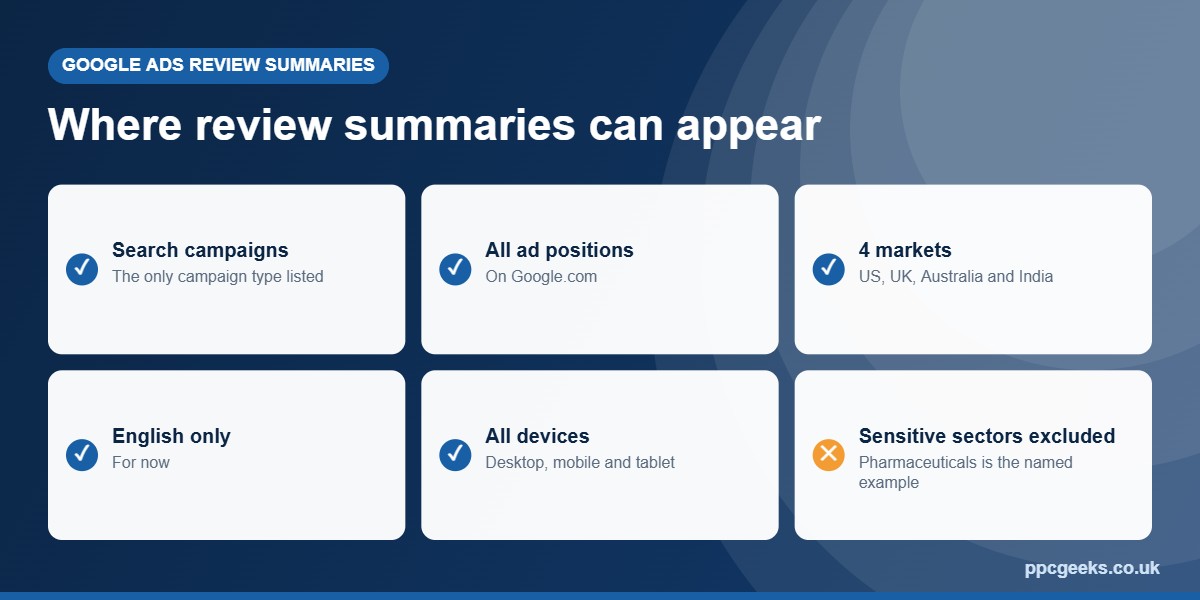
- They can appear in Search campaigns, in all ad positions on Google.com, on all devices, in the US, UK, Australia and India, in English.
- Advertisers cannot edit the summaries, and the help page does not describe an opt-out or any reporting.
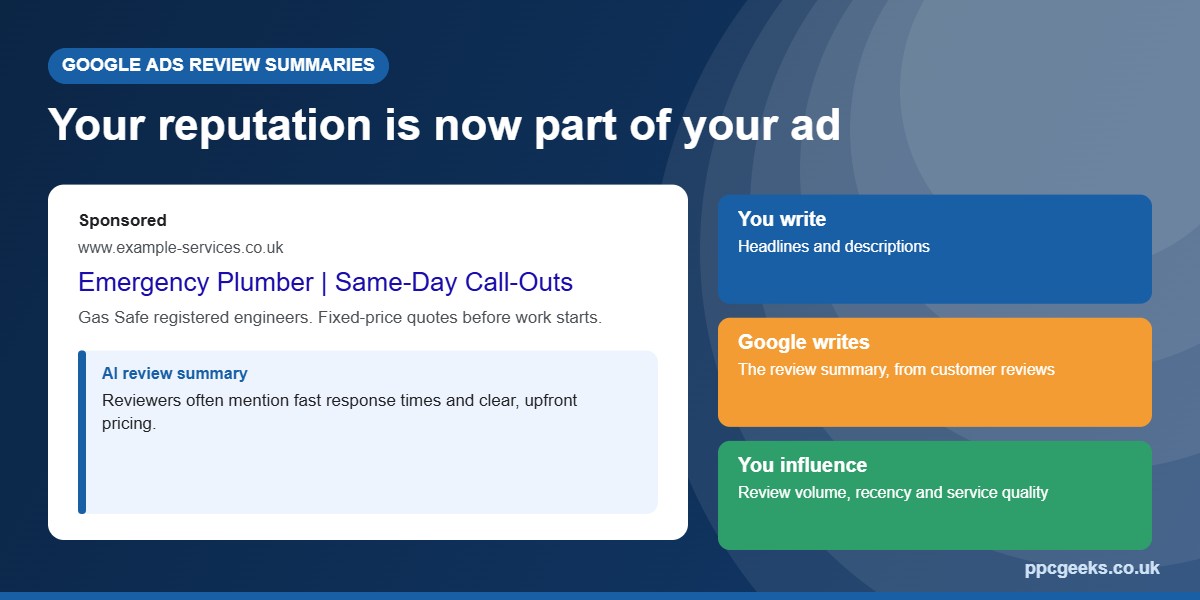
- Your online reputation is now effectively part of your ad copy, so review volume, recency and quality matter more for paid search.
Google Ads review summaries have moved from sightings and tests to official documentation. Google has published a help page that confirms its AI collects reviews from across the web and turns them into short summaries that appear directly within Search ads.
Search Engine Land reported the confirmation, after Hana Kobzová spotted the new help page and shared it on PPC News Feed in late October 2026. Advertisers have seen versions of these AI summaries in sponsored results for months, and we looked at the early tests in our post on AI review summaries in sponsored results. Now, however, there is a clear statement of how the feature works and where it applies.
What Google has confirmed about Google Ads review summaries
According to the help page, review summaries on Search are AI-powered summaries of online reviews that appear as part of your Search ads. Google’s AI aggregates reviews from across the web and turns them into short commentary that sits within the ad.
Importantly, the summaries are positive only. Google says they represent customer experiences and key insights about the business, and that it applies strong grounding requirements to keep them accurate. Google also says it only shows a summary when it predicts that doing so will improve ad performance.
Even so, there are still gaps. For example, the page does not name which review sites are used, how many reviews a business needs, how recent they must be, or what happens when most reviews are negative.
Where Google Ads review summaries can appear
The help page sets out clear eligibility rules:
- Campaign type: Search campaigns.
- Placement: all ad positions on Google.com.
- Markets and language: the US, UK, Australia and India, in English.
- Devices: all supported devices.
- Industries: all, except sensitive categories, with pharmaceuticals given as the example.
For UK advertisers, this means the feature is live in your main market now. If you run English-language Search campaigns, your ads could already be showing summaries.
What advertisers can and cannot control
However, this is where many advertisers will feel uneasy. Google says you cannot directly edit or customise a review summary, because the text represents user feedback. In addition, the help page does not say whether you can opt out. It links to general information on account-level automated assets, but it does not confirm that those controls switch review summaries off.
Similarly, the page says nothing about reporting. As a result, there is currently no documented way to see how often a summary appeared, or whether it helped click-through or conversion rates.
In short, the main way to influence Google Ads review summaries is indirect: improve the reviews they are built from.
Why Google Ads review summaries make reviews matter more
Review summaries turn customer feedback into ad copy you did not write. On the plus side, strong reviews become a free, prominent endorsement, which can build trust before someone even reaches your site. On the other hand, a thin or outdated review profile gives Google little to work with, and competitors with stronger reviews may stand out more.
This also links advertising and reputation more tightly than before. The same reviews that shape AI answers in search and chat tools now shape your paid ads, which we discussed in our post on AI tools showing wrong business information.
PPC Geeks’ View
We see this as a positive change for businesses that look after their customers, and a warning for those that have let reviews slide. Google has been adding automated, AI-written elements to ads for some time. Review summaries go a step further, because the content comes from your customers rather than your website.
Your reviews are now part of your ad copy. If you would not be happy for a prospect to read your last 20 reviews, fix that before you increase your Search budget.
— Dan T, PPC Director, PPC Geeks
Reputation is something we now consider alongside ad copy and landing pages in every Google Ads audit, and it is part of how our Google Ads agency team plans Search campaigns.
What advertisers should do next
1. Check whether Google Ads review summaries appear on your ads
To start, use the Ad Preview and Diagnosis tool in Google Ads to view your ads for your main keywords, rather than searching and clicking on them. Screenshot any summaries so you can track how they change.
2. Audit your reviews across the web
First, review your Google Business Profile, Trustpilot and any industry review sites. Look at volume, star rating, recency and the themes customers mention most.
3. Build a steady review request process
Next, ask happy customers for reviews regularly, not in one burst. A steady flow of recent reviews gives Google more current, relevant material to summarise.
4. Reply to reviews, good and bad
After all, thoughtful replies show prospects you care, and they help you spot recurring problems. Fixing those problems is the most reliable way to improve future summaries.
5. Match your ad copy to what customers praise
If reviewers often mention fast delivery or friendly support, make sure your headlines and landing pages say the same. Consistent messages build more trust.
What Google Ads review summaries mean for your campaigns
Google Ads review summaries make your reputation part of your paid search presence, whether you plan for it or not. You cannot edit them, and Google has not documented an opt-out or reporting. What you can do is manage the reviews they are built from, and make sure your ads and landing pages back up what customers are saying.
If you would like to know how your Search ads and reviews look to a potential customer, book a free Google Ads audit and we will show you where to improve.
For Google’s own details, see the Google Ads Help page, About Review summaries.
Frequently asked questions
What are Google Ads review summaries?
They are short, AI-generated summaries of online reviews that Google shows as part of eligible Search ads. Google gathers reviews from across the web and highlights positive customer experiences.
Can I turn off Google Ads review summaries?
The help page does not describe an opt-out. It also says advertisers cannot directly edit or customise the summary text, because it represents user feedback.
Where do the reviews come from?
Google says its AI aggregates online reviews from across the web. It has not published a list of the review sites it uses.
Do review summaries appear in the UK?
Yes. They are available in the US, UK, Australia and India, in English, for Search campaigns in all ad positions on Google.com.
Will negative reviews appear in my ads?
Google says review summaries are positive only. Even so, a weak review profile gives Google less positive material to draw on, so it still pays to improve your reviews.