







You've got a business to run, a limited promotional budget and a Saturday deadline approaching. You want nearby customers to find you, but launching an advert on the morning of the event won't fix an unanswered phone, an outdated listing or a booking page that doesn't work.
A useful Small Business Saturday Google Ads plan starts with those basics. Whether this is a small seasonal allocation within an established advertising account or your first local promotion, spend should follow a clear route from search to sale, appointment or qualified quote request.
Your Google Ads Timeline Before 5 December
An owner-run firm can prepare a useful campaign without building an elaborate festive promotion. The mistake is leaving the setup until customers are already searching and expecting new adverts, profile changes and tracking to work immediately.
The UK event is scheduled for Saturday 5 December 2026, according to smallbusinesssaturdayuk.com, which describes the campaign as a year-round movement supporting family businesses, local shops, online businesses, wholesalers, small manufacturers and business-service providers. The same website provides the 2026 marketing pack, including logos, social graphics, suggested posts, a poster and brand guidance.
Google Ads preparation timeline for Saturday 5 December 2026
The dates below are recommended preparation deadlines, calculated backwards from the event.
| When | Action | Check before moving on |
|---|---|---|
| Four weeks before, by 7 November 2026 | Complete and verify the Google Business Profile | Name, category, hours for 5 December, phone and website match |
| Three weeks before, by 14 November 2026 | Build the local Search campaign and location settings | Radius covers only areas you actually serve |
| Two weeks before, by 21 November 2026 | Add call assets, ad scheduling and nearby search terms | Calls reach the right number and adverts run during staffed hours |
| One week before, by 28 November 2026 | Confirm the simple offer and Saturday landing page | Page loads on mobile and names the day |
| Saturday 5 December 2026 | Check pacing, calls and conversion tracking | Budget is spending and calls are recording |
Start in early November so there's time to resolve verification problems, review adverts and inspect actual search terms. Build the customer journey before polishing promotional wording.
A consultancy could promote discovery calls, a tradesperson could advertise available appointments, and a B2B supplier could invite pre-Christmas quotation requests. None needs to pretend it's a gift shop or open premises to walk-in visitors.
Use the campaign's marketing materials consistently, but keep your own offer prominent. If preparation slips, simplify the offer rather than rush the setup.
Checking Your Business Profile First
A customer shouldn't find different opening hours on your Business Profile, advert and booking page. Treat the Google Business Profile and call assets as your first customer-facing advertising checks, even though the profile itself isn't a paid advert.
The campaign's My Small Business page says its former Small Business Finder has closed and notes that businesses now use alternatives such as Google Business Profiles. That makes an accurate listing a practical priority, not an optional extra alongside paid advertising.
Check the route from listing to enquiry
- Business identity: Use the name the business trades under and the most appropriate primary category.
- Address or service area: Describe where customers can visit or where your team works.
- Opening hours: Confirm the event-day hours, including any temporary closure.
- Phone number: Use a line someone will answer while call assets are scheduled.
- Website and booking route: Send customers to the relevant booking, quotation or service page.
The right setup changes with the business. Say a plumber serves a hypothetical 15-mile radius and needs customers to call first. Its profile should describe the genuine service area without suggesting customers can visit a private residential address.
A dental practice taking bookings only needs an obvious appointment route, not a general invitation to drop in. A B2B supplier seeking quote requests should show the information buyers need to submit a useful enquiry, rather than encourage unplanned warehouse visits.
Consistency test: Read the profile, advert and landing page consecutively. The business name, telephone number and next action should agree.
Use location assets only when the linked profile contains accurate, eligible location information. A service-area listing doesn't automatically mean there's a customer-facing address suitable for advertising.
If you close for a training afternoon, update the listing and advertising schedule before the promotion runs. Paying to send someone towards a closed business wastes more than the click.
Choosing a Campaign Type on a Small Budget
Search is the default choice for a small Saturday budget. It lets you concentrate on people actively looking for the product or service you can supply, within the places and hours you can serve.
By local Search, I mean a standard Search campaign with local targeting, not a separate campaign type called Local. The distinctions between Google Ads campaign types matter because each gives you different control over how spend reaches customers.
Campaign types compared for a small Saturday budget
| Campaign type | Best for | Location and timing control | Fit for a small Saturday budget |
|---|---|---|---|
| Local Search | Customers searching for a nearby service or product | High, with radius, location and ad schedule settings | Strong fit |
| Performance Max | Wider reach across Google channels with established conversion measurement | Geographic and scheduling controls exist, but automation chooses channels and placements | Weak fit for a small, unproven event campaign |
| Display | Awareness and reaching past visitors | Moderate, with location, schedule, placement and audience choices | Weak fit for same-day searchers |
| Shopping | Product-led ecommerce with a product feed | Feed, location and scheduling controls, depending on setup | Fits only firms with a product feed |
Performance Max isn't unsuitable for small businesses. The problem is launching a separate, short-lived campaign without dependable conversion signals and expecting useful learning before the event ends.
Display has a different limitation: someone reading a website isn't necessarily looking for your service. Cheap clicks don't solve that mismatch.
For a hypothetical £300 allocation, I would prioritise a tight serviceable radius, phrase and exact match local keywords, call assets and opening-hours scheduling. That's a planning example, not a recommended minimum spend or a forecast of results.
An ecommerce retailer with an accurate feed and a proven Shopping campaign may be better off supporting that existing setup. Likewise, an established audience can justify remarketing, but it shouldn't take money away from stronger immediate demand.
Choose the campaign that gives you useful control over customer intent, location and timing. More placements aren't automatically more opportunity.
Setting Up Local Search, Location and Call Assets
Build a campaign around what you can deliver, not every search associated with your town. A focused setup makes it easier to understand which enquiries deserve more budget and which searches should be excluded.
The practical relationship between the campaign and its assets is shown below.
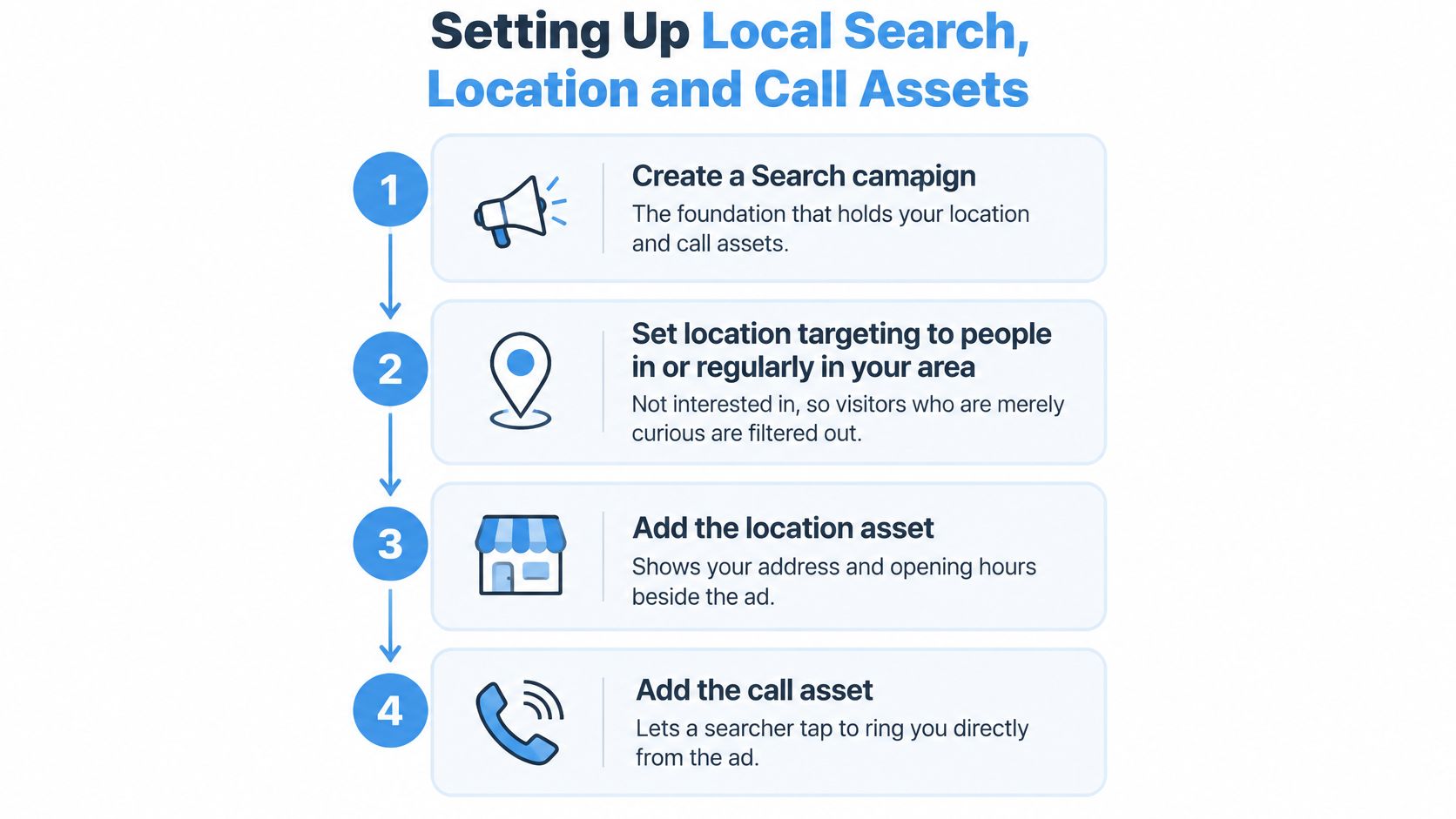
Build in this order
Create a Search campaign with presence-based targeting. Choose people in or regularly in your targeted locations rather than the broader presence-or-interest option. This reduces exposure to people researching the area from elsewhere, although location detection isn't perfect.
Set a serviceable radius or selected locations. Use the premises or operating area as the starting point, then exclude places you can't economically serve. A whole-county target makes little sense if travel time prevents you accepting those jobs.
Separate distinct services into focused ad groups. Use phrase and exact match terms, such as emergency plumber Bristol, alongside relevant local variations. I wouldn't introduce broad match into a small, unproven event campaign; phrase and exact still need search-term checks because they aren't literal-only matching.
Add the assets customers can use. Configure a call asset with the staffed number and link the correct Business Profile for eligible location assets. Assets aren't guaranteed to appear on every impression, so retain a clear contact route on the landing page.
Schedule around availability. For call-led work, run adverts when someone can answer and schedule the call asset accordingly. With manual bidding, modest schedule adjustments can favour proven busy periods; automated bidding strategies don't generally use those adjustments in the same way.
Write responsive search adverts around the actual offer. Prepare a small set of distinct messages rather than near-duplicates, using location, availability and the next action. Keep headlines within the editor's limits and preview combinations for misleading wording.
Review search terms after the initial live period. A practical first review is after roughly two days, sooner if spend is moving quickly. Add negatives for irrelevant employment, training and wrong-location searches, without blocking legitimate enquiries.
These local Google Ads techniques work best when the landing page and operational capacity match the targeting.
Healthy early signs are impressions from the intended area, relevant enquiries and search terms you'd willingly pay for again. You're checking relevance and functionality, not declaring success from a handful of clicks.
Writing a Simple Offer and Saturday Landing Page
A retailer's named Saturday gift bundle is easier to advertise than a vague invitation to support local businesses. Customers know what they'll get, and the owner can check stock, margin and collection arrangements before paying for traffic.
Keep the human reason to shop independently visible alongside the practical offer.

UK consumers spent an estimated £634 million in-store and online on Small Business Saturday in 2024, according to American Express research reported by the campaign in the Bristol Post. That's evidence of event-wide spending, not a revenue forecast for your business.
Give each offer one clear action
- Retailer: Reserve a named Saturday bundle for collection.
- Restaurant: Book an available sitting for the day.
- Service firm: Book a hypothetical complimentary introductory call or quote visit, with its duration and scope clearly stated.
- B2B supplier: Request a pre-Christmas review, explaining what information the buyer should provide.
Give the offer a genuine end time and explain capacity limits. Independence and local knowledge can support the message, but don't substitute community language for a clear proposition.
The landing page should state the day, the offer, opening hours, telephone number and one primary next step. Test it on a phone using mobile data, including the form or booking journey, rather than judging only the desktop design.
The accompanying video can sit alongside your planning, but your own offer page needs to answer the practical questions directly.
Put the day and offer in a concise headline asset and the location in another. Responsive search adverts can rearrange assets, so use pinning selectively if a particular position is essential. Avoid unverifiable claims such as being the best in town, and don't send offer traffic to a generic homepage.
How Remarketing Search Ads Differ from Standard Search
Standard Search asks who is looking for something now. Remarketing for Search adds another question: has this searcher already interacted with your business?
Think of it as recognising a returning visitor at the counter, rather than calling out to everyone walking past. You still need a relevant search, but you can use previous engagement to inform bidding or messaging.
The distinction matters when someone has browsed an offer without committing.
Start by observing existing demand
Add an eligible first-party audience segment to Search in Observation mode to inspect performance without restricting who can see the campaign. With manual CPC, you can adjust bids for that audience; with Smart Bidding, audience information can inform automated decisions rather than functioning as a straightforward manual uplift.
Useful segments include:
- Offer-page visitors: People who viewed the Saturday promotion but didn't complete the intended action.
- Incomplete enquiries: Visitors who started a form without submitting, where that interaction is measured appropriately.
- Previous customers: Customers eligible for a relevant rebooking or repeat-purchase reminder, using permitted first-party data.
Observation alone doesn't change advert wording. To show a distinct returning-visitor message, you need an appropriately structured audience-targeted campaign or ad group, with exclusions considered to avoid unnecessary overlap.
Check eligibility before allocating money
Your Google tag, analytics audiences or eligible customer data must already be collecting useful signals, with appropriate consent controls. Check the audience's current Search eligibility and size in Google Ads before building a budget around it.
These remarketing advert examples can help distinguish a meaningful follow-up message from a generic repeat advert. A booking reminder makes sense only while appointments remain available.
Budget limit: A small or ineligible audience isn't a reason to buy extra traffic just to fill a remarketing list.
Restrict Search targeting to past visitors only when the audience can support delivery and the commercial reason is clear. For a firm with few website visitors, local high-intent Search is usually the more useful priority.
Bidding, Budget and Measuring Saturday Results
For a new campaign with little conversion history, manual CPC or Maximise clicks with a maximum CPC limit can provide a controlled starting point. Neither guarantees affordable enquiries, so inspect the searches and outcomes rather than treating the bidding setting as protection against waste.
Maximise conversions and target CPA become more useful when recorded outcomes are reliable and representative. Don't discard a proven existing bidding strategy merely because there's a seasonal event, but don't expect a fresh campaign to learn your lead quality instantly either.
A worked budget example
For illustration, £300 divided across 15 days is £20 a day, covering a proposed run from 21 November to 5 December. Restrict Saturday delivery to staffed opening hours, rather than assuming a daily allocation will automatically last until closing.
Google Ads uses an average daily budget, not a strict daily spending cap. Check campaign spend early and regularly, and use suitable account controls and monitoring if the total allocation must not be exceeded.
Schedule bid adjustments alter auction participation under compatible bidding strategies; they don't reserve money for later hours. The choice between control and automation should follow your conversion evidence, as explained in these PPC bidding strategies.
Measurement signals to read after Saturday
| Measurement signal | Where to read it | What it tells you |
|---|---|---|
| Calls from call assets | Call reporting in Google Ads | Phone demand attributed to the adverts |
| Form submissions and bookings | Conversions column, with conversion actions set up | Enquiry volume and whether it matches the offer |
| Offer code redemptions | Till data or booking system log for the code | Sales associated with the Saturday offer |
| Direction requests and store visits | Conversion actions, where enabled and eligible | Footfall intent or modelled visits, not interchangeable outcomes |
| Search terms | Search terms report | Whether searches were relevant and genuinely local |
Record completed forms and bookings, not merely button clicks. For calls, distinguish a connected conversation from an accidental tap, and record whether the enquiry was qualified.
Mixed online and offline purchasing makes ecommerce revenue alone incomplete: the Independent's Small Business Saturday coverage describes spending across both channels. Use an offer code, dedicated landing page and sales records to connect enquiries with outcomes, without assuming every attributed sale was incremental.
For a practical baseline, compare equivalent weekdays across the preceding four weeks, noting changes in hours, stock and other promotions. Finish with cost per qualified enquiry and its eventual business value, allowing time for quotes and bookings to become revenue.
Confirm Your Setup Before Saturday Opens
Complete the live journey checks by your proposed final-review deadline of 28 November. An approved advert isn't proof that the phone, form or conversion action works.
Use the checklist as an operational prompt, then verify delivery with Google Ads' diagnostic tools rather than repeatedly searching for and clicking your own adverts.
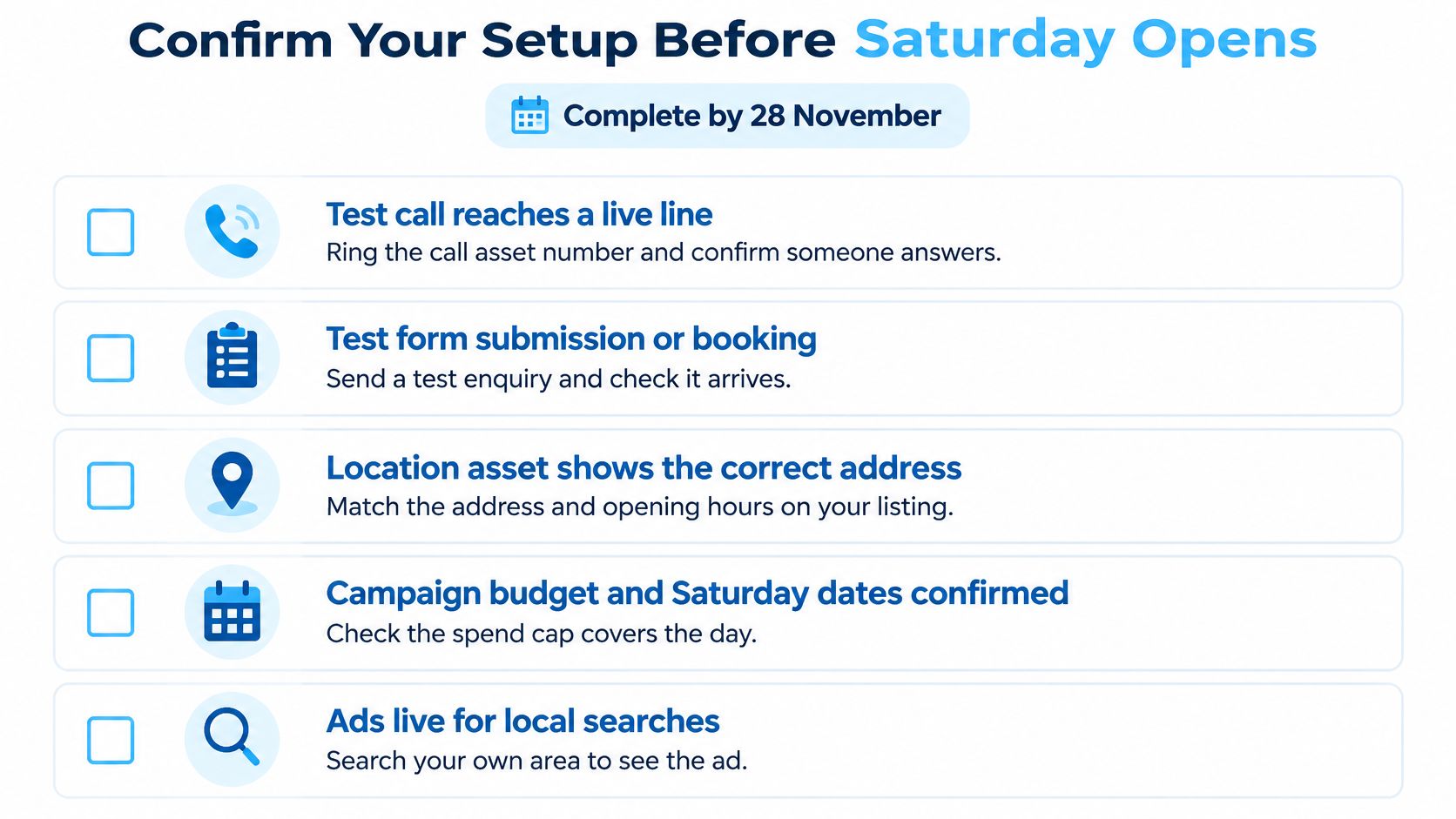
Test the customer journey
- Call connection: Confirm the asset's destination number reaches a live, staffed line. Check call reporting once genuine advert calls occur.
- Completed enquiry: Submit a test form or booking, confirm it arrives and verify the conversion action without leaving test leads in sales reporting.
- Mobile experience: Open the Saturday page on a phone and complete the intended action.
- Operating schedule: Match campaign and call-asset availability to the published opening hours.
At opening, compare actual spend with the worked example's daily allocation and check delivery status. By midday, inspect calls and form enquiries, remembering that reporting can lag and lack of enquiries doesn't automatically mean tracking has failed.
Review available search terms for irrelevant jobs, courses and wrong-place searches. Pause an unavailable offer immediately rather than continuing to collect enquiries you can't fulfil.
Review commercial outcomes on Monday
Compare Saturday with your same-weekday baseline, then calculate cost per qualified call or enquiry. Keep productive targeting, pause clear waste and allow unresolved quotations enough time to produce a meaningful outcome.
If tracking, the Business Profile or the service radius can't be confirmed before the final review, request an independent check. Our free Google Ads audit identifies wasted spend, addresses tracking and attribution gaps, and uncovers quick-win growth opportunities.
PPC Geeks offers an independent account review to help you check whether your Small Business Saturday spend can produce measurable enquiries rather than just clicks. Visit PPC Geeks to submit the free audit form, and we'll be in touch that same day.