







The form fills look healthy in Google Ads. Twelve leads since Friday, cost per conversion down, the dashboard a comfortable green. Then your sales team opens the CRM and the story changes. Two leads share a mobile number, three are called "test", one arrived from a placement nobody recognises, and the person who submitted in the middle of the night has never once answered the phone.
You're not being targeted by a criminal mastermind. Most junk in a lead-gen account comes from a handful of settings, a form with no friction, and a conversion goal that counts every submission as a win. Fixing it is a sequence rather than a switch, and the order matters, because the blunt fixes take real buyers with them.
Red Flags That Separate Spam From Real Enquiries
Pull the last 30 days of form submissions into a spreadsheet and run six checks against them. No single flag proves a lead is junk. Two flags pointing the same way is when it stops looking genuine.
| Signal | Where to check | Usually points to |
|---|---|---|
| Same phone number or email submitted more than once | CRM duplicate search and the form lead export | Repeat submissions or bot retries |
| Made-up or test-style names | CRM lead records | Automated fills, or internal testing left live |
| Free email domains on B2B forms | Lead export, email domain column | Low-effort or unqualified prospects |
| Form completed within seconds of landing | GCLID click timestamp against CRM submission time | Automated submission |
| Run of leads from one placement or network | Placements and networks reports in Google Ads | Weak inventory or Search Partners traffic |
| Leads that never became a conversation | CRM status history | Junk, duplicate or unreachable leads |
The reconciliation is the core work. Match each submission to its CRM record on timestamp, GCLID, IP address, user agent and any repeated contact details, then sort every record into one of five buckets: duplicate, automated, unreachable, unqualified, qualified. That sort tells you how much of your problem is bots, how much is bad targeting, and how much is a sales team chasing people who were never going to buy.
How much invalid traffic actually reaches a form
Invalid traffic is a measured problem, not a suspicion. DoubleVerify estimated that advanced invalid traffic reached 1.9% of measurable UK advertising activity in the year to April 2021, a 17% year-on-year increase, while IAS put post-optimisation fraud below 1% of UK desktop and mobile display impressions, according to DCMS research into online advertising. The distance between those two numbers is the useful part. Detection and exclusion cut exposure sharply, but only when someone opens the reports and acts.
A click can still be recorded when the visitor is automated, incentivised or never going to submit a legitimate enquiry. That's why a low invalid-click percentage in the platform is not evidence that your leads are clean.
The leads that are human and still worthless
Some enquiries are perfectly real and still cost you money. Google's UK lead-generation guidance acknowledges that certain leads are "tyre-kickers", low-intent prospects who consume sales time without buying, and it points toward intent scoring to separate the leads most likely to close from the ones that eat the day (Google's lead generation resources for UK businesses). That's a targeting and qualification problem, not a security one, and it needs outcome scoring in your CRM rather than another anti-bot control.
Practical rule: treat a lead as spam only when two independent signals agree. One flag on its own catches too many genuine buyers.
A free email address on a B2B form is the classic false positive. Plenty of real buyers use a personal address because they don't want a supplier landing in their work inbox. Flag it, score it, and let sales decide.
Find the Source and Cut It Off Without Pausing Everything
Before you change a setting, pull the junk leads by campaign and network for the last 30 days. You're looking for concentration: one campaign, one network, one placement, one family of search terms carrying most of the rubbish. Some invalid traffic is unavoidable background across any paid channel. Lunio's Global Invalid Traffic Report 2026 put the average invalid-traffic rate across the Google Ads ecosystem at 7.57% in 2025, from more than 2.7 billion paid clicks (MediaCat's summary of the Lunio report). What matters in your account is whether junk clusters somewhere you can switch off.
| Source | Where to check | Usual action |
|---|---|---|
| Performance Max | Campaign insights, asset group reporting and search terms where reported | Review asset group inputs and audience signals, add negatives where visible, and avoid pausing the whole campaign |
| Search Partners | Networks report, segmented by network | Turn off Search Partners on the affected campaign if junk concentrates there |
| Display and other placements | Placements report | Exclude demonstrably poor placements |
| Broad match keywords | Search terms report | Add negative keywords and tighten match types on the worst ad groups |
| Lead form assets | Lead submissions by form asset | Tighten questions and required fields on the weakest asset |
| Invalid clicks column | Campaign reports with the invalid clicks column added | Compare against CRM outcomes before claiming credit |
Two patterns you'll recognise
The first is a Search Partners share producing most of the junk while Google Search traffic stays clean. The network report makes this obvious in about a minute: segment by network, look at the lead count against the conversions, and the partner share usually carries a suspiciously high submission rate with a suspiciously low sales acceptance rate. Switching Search Partners off on that campaign is a two-click fix.
The second is a broad match term family. Variants of "free", "jobs", "courses", "how to" or "template" pull in people who never intended to buy anything. Open the search terms report, sort by spend, and read what people typed.
Two published examples show the shape of it. For Techniheat Plant Services, more than 90% of leads from Yell.com were irrelevant, and moving that spend removed the waste almost immediately. For Appeal My Rates, tightening keywords, ads and the landing page together cleared most of the irrelevant enquiries, with conversion rate up 96% and cost per conversion down 24%. Neither publishes a spam-only count, which is exactly why you should record your own junk share before and after each change.
Performance Max needs a lighter touch. Review the asset group inputs and audience signals, add account-level negatives where the reports allow, and resist pausing the campaign outright. Killing a whole campaign to solve a placement problem throws away the demand that was working. The same discipline applies when the junk is click-level rather than lead-level; our guide to filtering DIY clicks without killing your Google Ads volume covers where to draw that line.
How to Harden Forms Without Blocking Real Buyers
Form controls are the cheapest part of the fix and the easiest to get wrong, because every control that stops a bot also has a chance of stopping a buyer. The five below are the ones I'd add first, in this order.
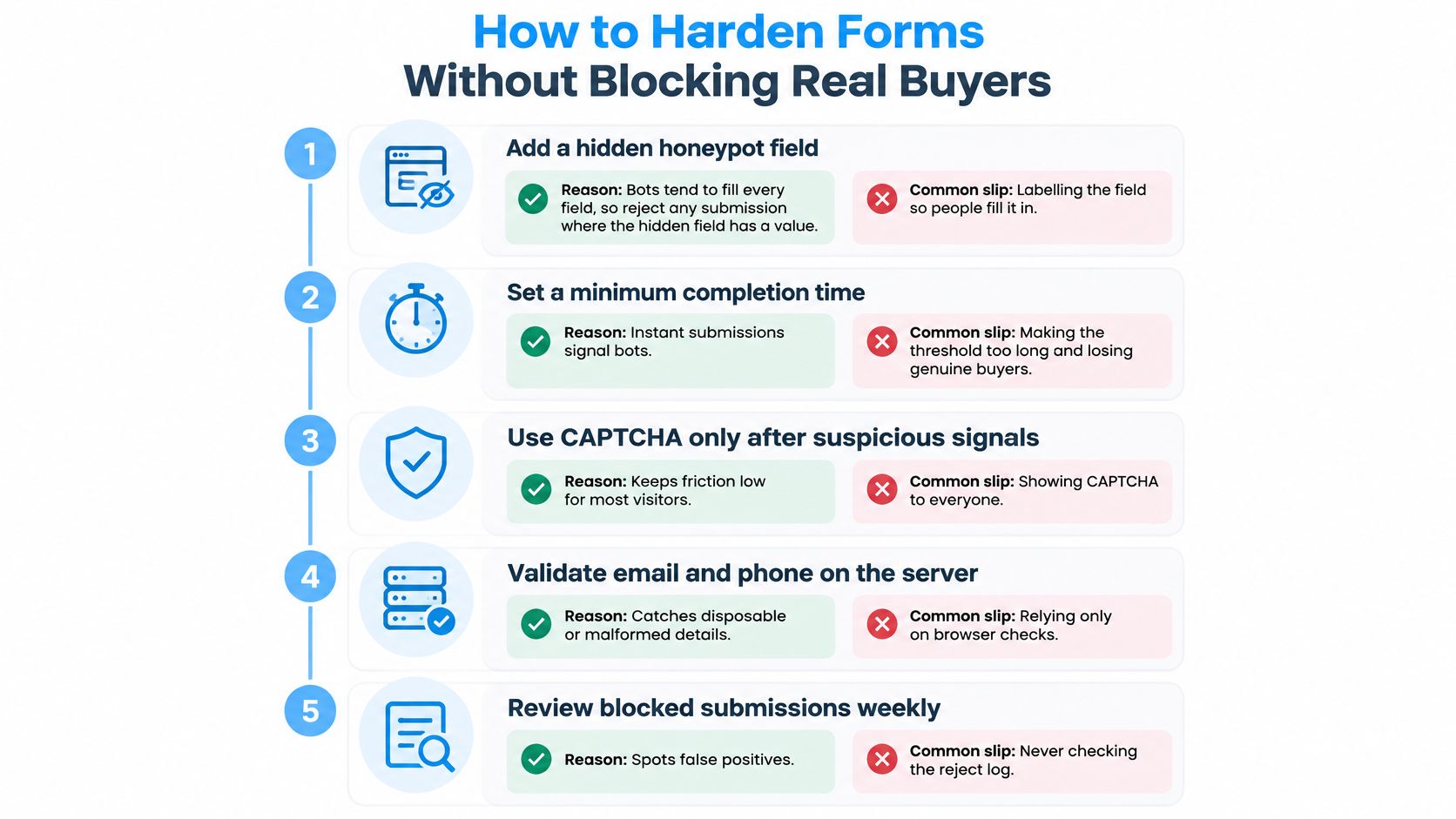
- Add a hidden honeypot field. Bots fill every field they can see, so reject any submission where the hidden field has a value. The common slip is labelling it clearly enough that a human fills it in, or adding the field in the HTML and forgetting to check it server-side.
- Add Google reCAPTCHA and validate the token on the server. A browser-only check is easy to bypass, and bots that post directly to your form endpoint never run it. The common slip is switching the widget on and never looking at the score or the verification response.
- Require only the fields you use. Name, business email, phone and one qualifying question such as service needed or budget band. Every extra required field lowers genuine completion, so add them one at a time and compare volume.
- Validate email and phone on the server. Reject disposable email domains on B2B forms, check UK phone formats, and normalise numbers so duplicates surface properly. Browser validation is a convenience for the user, not a control.
- Record time from page load to submission. Flag anything under about five seconds for review rather than blocking it automatically. Genuine users occasionally autofill and submit fast, and you want to see those records before writing a rule that rejects them.
What over-blocking costs you
A rule that bans whole IP ranges, overseas traffic or all mobile submissions will suppress real UK demand, and you won't see the loss in Google Ads. You'll see it as a quiet drop in form fills that looks like a budget or bidding problem for a month.
Review flagged submissions before you write a blocking rule. The reject log is where false positives show up, and nobody checks it unless you make it a weekly habit.
If your landing page is doing part of the work of qualifying people before they reach the form, tighten the page rather than the filter. Our notes on landing page best practices cover the copy and layout changes that cut low-intent submissions without adding friction.
Teach Bidding to Value Real Leads With Offline Conversions
If every form submission is your conversion goal, Smart Bidding will chase cheap submissions. That's not a malfunction, it's the system doing what you asked. The fix is to feed it a CRM event that carries commercial meaning: a lead accepted by sales, a qualified opportunity, or a completed sale.

Google's documentation confirms that uploaded conversions pass through a filtering process and that conversions identified as invalid or spam are discarded (Google Ads help on offline conversion imports). Deleting junk records inside the CRM teaches Google nothing, because the platform never sees the deletion. Importing qualified and converted outcomes gives it a usable downstream signal.
- Store the GCLID and a unique lead ID in the CRM from the first submission, so every later status change can be matched back to the click that produced it.
- Update the lead status when sales qualifies or rejects it, and record the disqualified reason. "Out of area", "no budget" and "wrong service" are different failures and deserve different treatment.
- Upload the outcomes to Google Ads, ideally daily, so optimisation data stays fresh and bidding learns from this week's traffic rather than last month's.
- Check the conversion action has enough recent volume before bidding leans on it. Google's guidance recommends at least 15 conversions in the previous 30 days for a conversion action, and uploading offline outcomes regularly, ideally daily, so the data doesn't go stale (Google Ads guidance on invalid traffic and lead quality). Where qualified volume is thin, optimise to a higher-funnel signal while it builds.
- Compare cost per qualified lead against cost per form for at least two weeks before judging the change. The second number will look worse. That's the point.
Three pitfalls account for most failed imports. Counting thank-you-page loads as conversions, accepting disposable email addresses at the point of entry, and failing to deduplicate repeat submissions so one enquiry becomes three conversions. Fix those before you blame the bidding model.
The mechanics of the upload, including how enhanced conversions for leads handles matching, are covered in our walkthrough of Google Ads enhanced conversions for offline leads.
When to Ask Google for Credit for Invalid Clicks
Google says advertisers aren't charged for invalid clicks or impressions once its automated systems identify them, and post-invoice adjustments are issued as credits where appropriate and possible. The credit lands on a later invoice and shows in the account's transaction history rather than coming back to your card (Google Ads help on invalid clicks).
The scale of the wider problem explains why the process exists. PPC Shield's analysis of more than 15,000 UK advertising accounts estimated that UK businesses lost £186 million to fraudulent pay-per-click clicks in 2025 (PPC Shield's UK click fraud analysis). A credit request is worth making when you have a concentrated, documented pattern with a clear date range, not a general feeling that the leads are poor.
- Export the date range you're disputing and keep the file intact.
- Document the campaign, ad group, network or placement, the timestamps, and any repeated IP or device patterns where you can lawfully capture them.
- Match the suspicious activity to the corresponding CRM submissions, so you're showing a lead problem and a click problem side by side.
- Check whether the activity concentrates in Display or partner inventory, which is where placement-level problems usually sit.
- Exclude the demonstrably poor placements and tighten targeting first, so the request covers a problem you've already begun to fix.
One distinction decides how you handle the outcome. An invalid click can be removed from your bill while a conversion attached to it stays in your reporting, so billing adjustments and lead-quality clean-up are separate jobs. A credit recovers spend. It does not clean your CRM, retrain your bidding, or stop the next wave of junk.
If the pattern looks automated rather than merely low quality, the traffic itself is worth investigating. Our piece on AI-powered click fraud in PPC campaigns sets out what the newer generation of fake traffic looks like.
Roll Out One Fix at a Time and Measure Quality
Change four things on a Monday and you'll never know which one worked, or which one halved your genuine enquiries. Work in this order and leave two weeks between steps.
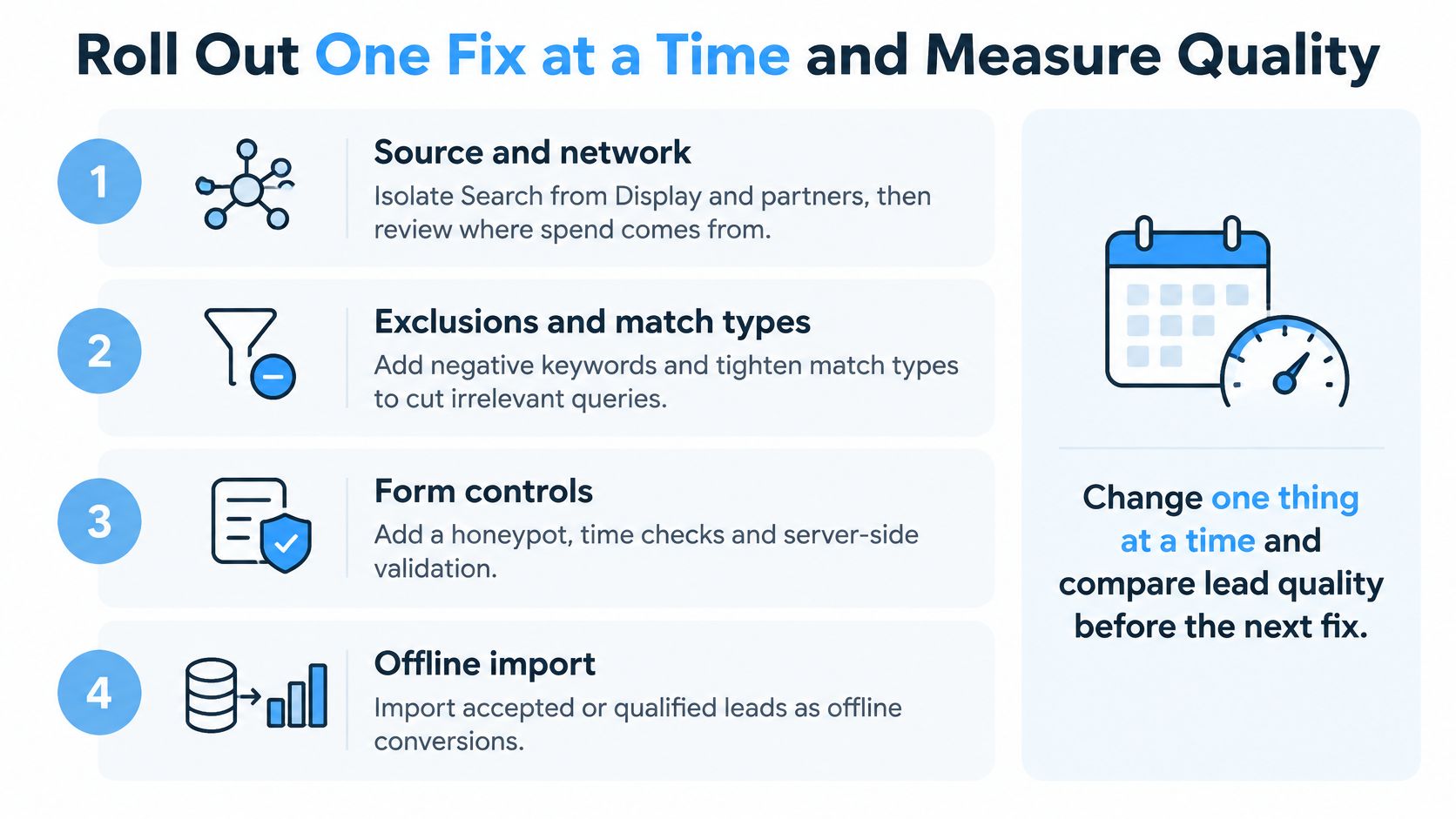
- Source and network. Isolate Search from Display and partners, then confirm where the spend and junk come from.
- Exclusions and match types. Add negative keywords and tighten match types on the ad groups carrying the worst queries.
- Form controls. Add the honeypot, the time check and server-side validation, then watch submission volume for a fortnight.
- Offline import. Start sending accepted or qualified leads back as offline conversions and let bidding relearn.
The measure that matters is cost per qualified lead and qualified volume, not cost per form. Read the result carefully. If junk falls and qualified volume holds, the change worked. If both fall together, undo the last change and look again at the form or the exclusion, because you've started turning away real demand.
Spam control succeeds when it reduces junk and protects the enquiries that become customers. Anything that only does the first half is a different problem wearing the same label.
Most accounts I look at have a gap that isn't obvious from inside the platform. Our free Google Ads audit identifies wasted spend, fixes tracking and attribution gaps and uncovers quick-win growth opportunities, and it looks specifically for the places where automation, attribution or campaign structure make performance look cleaner than it is. Most accounts we audit are leaking 20-40% of budget through poor targeting, weak conversion tracking and misused automation, and lead quality is one of the places that leak hides.
If your lead data and your dashboard are telling two different stories, that gap is worth a proper look. PPC Geeks runs Google Ads campaigns for UK lead-generation businesses, and our free audit gives you a human review of where the spend is going and which conversion signals are misleading the bidding. Visit PPC Geeks to request your audit and bring your lead-quality data with you.