







Somewhere below google / organic and (direct) in your Traffic acquisition report there's a row that reads chatgpt.com. A dozen sessions, maybe fewer. Marketing managers tend to do one of two things with it: ignore it because it's too small to matter, or screenshot it for a slide and call AI a new channel without checking what happened afterwards.
Neither is much use. That row is a floor, not a total. It counts only the visits that arrived with a referrer intact from a link an assistant served, and it says nothing about whether the person behind it became a lead. If you want to track ChatGPT traffic in GA4 in a way that survives a finance review, you need three things working together: the referrals GA4 can see, the lead events that matter commercially, and a self-reported answer from the prospect for everything GA4 can't see.
If you're spending five figures a month across Google Ads and want to know whether AI search is taking credit for demand you're paying for elsewhere, this is the measurement work to do first.
Spot ChatGPT and Other AI Referrals in GA4
Start in Reports > Acquisition > Traffic acquisition, switch the table dimension to Session source / medium, and look for chatgpt.com in the list. That report is the right starting point because its dimensions are session-scoped: Google's documentation on Traffic acquisition defines Session source / medium as the source and medium tied to a new session, which is exactly the visit-level question you're asking. User acquisition answers a different one. It's user-scoped and built to show how new users first found the property, so a second or third visit from an assistant can drop out of it entirely.
The source values vary by assistant, and the domain isn't always the one you'd assume:
| Assistant | Source value to match | What to watch for |
|---|---|---|
| ChatGPT | chatgpt.com | Also check chat.openai.com, as older links may use it |
| Perplexity | perplexity.ai | Filter on perplexity so any variant is caught |
| Microsoft Copilot | copilot.microsoft.com | Filter on copilot, as some clicks may arrive via bing.com |
| Google Gemini | gemini.google.com | Filter on gemini, as values can vary by surface |
Three habits separate a number you can trust from one you can't. Set the date range to at least 28 days, because AI referral volume in most accounts is small enough that a single week shows nothing. Include the medium column, since some sessions arrive as referral and others arrive with no medium at all. And check landing pages, not just counts, because a homepage visit tells you far less than a product or service page visit does.
ChatGPT dominates the category. SE Ranking's AI traffic research study found that ChatGPT generated 85.28% of UK AI referral traffic in 2025, which is why chatgpt.com is the row to inspect first and the other assistants are the smaller, faster-moving set. The audience behind that row is expanding quickly too: Ipsos iris data reported by CGO Media puts the UK adult ChatGPT audience at 4,425,421 visitors in June 2024 and around 12.99 million in June 2025, a rise of roughly 194%.
If the row is empty, you have two possibilities that need different responses. Either nobody is arriving from AI search yet, or they're arriving without a referrer. If the acquisition tables themselves need rebuilding, our guide to Google Analytics 4 covers the wider setup before you start filtering.
How to Build an AI Search Channel Group
By default, chatgpt.com sits inside Referral alongside directory listings, payment gateways and discount sites. Every time you want the AI figure you rebuild a filter, and GA4 drops that filter the moment you leave the report. A custom channel group fixes it permanently and shows AI search as its own channel across the property.
Google's channel groups documentation sets out the mechanics: channel groups are rule-based categories of traffic sources, the conditions support Source and Medium, and the rule editor accepts regular expressions. That's everything you need.
- Open the editor. Admin > Data display > Channel groups, then create a new group by copying the default one, so your existing channels survive intact.
- Name the group and the channel. Give the group a plain name and call the new channel AI Search, spelled out rather than abbreviated, so it's easy to find in a dimension list.
- Add the rule. New channel > Source > matches regex >
chatgpt|perplexity|copilot|gemini|openai. Google's regex engine is case-sensitive here and matches the full value, so keep the values lowercase or add capitalised alternatives deliberately. - Reorder it above Referral. Channel order matters. Referral is the catch-all, and an AI channel sitting underneath it will capture nothing at all.
- Save and set it as the default group, so AI Search appears in Traffic acquisition rather than only inside the editor. You don't get many custom channel groups per property, so spend the slot on this one.
- Test before you trust it. Return to Traffic acquisition, switch to Session custom channel group, and confirm the chatgpt.com rows land in AI Search.
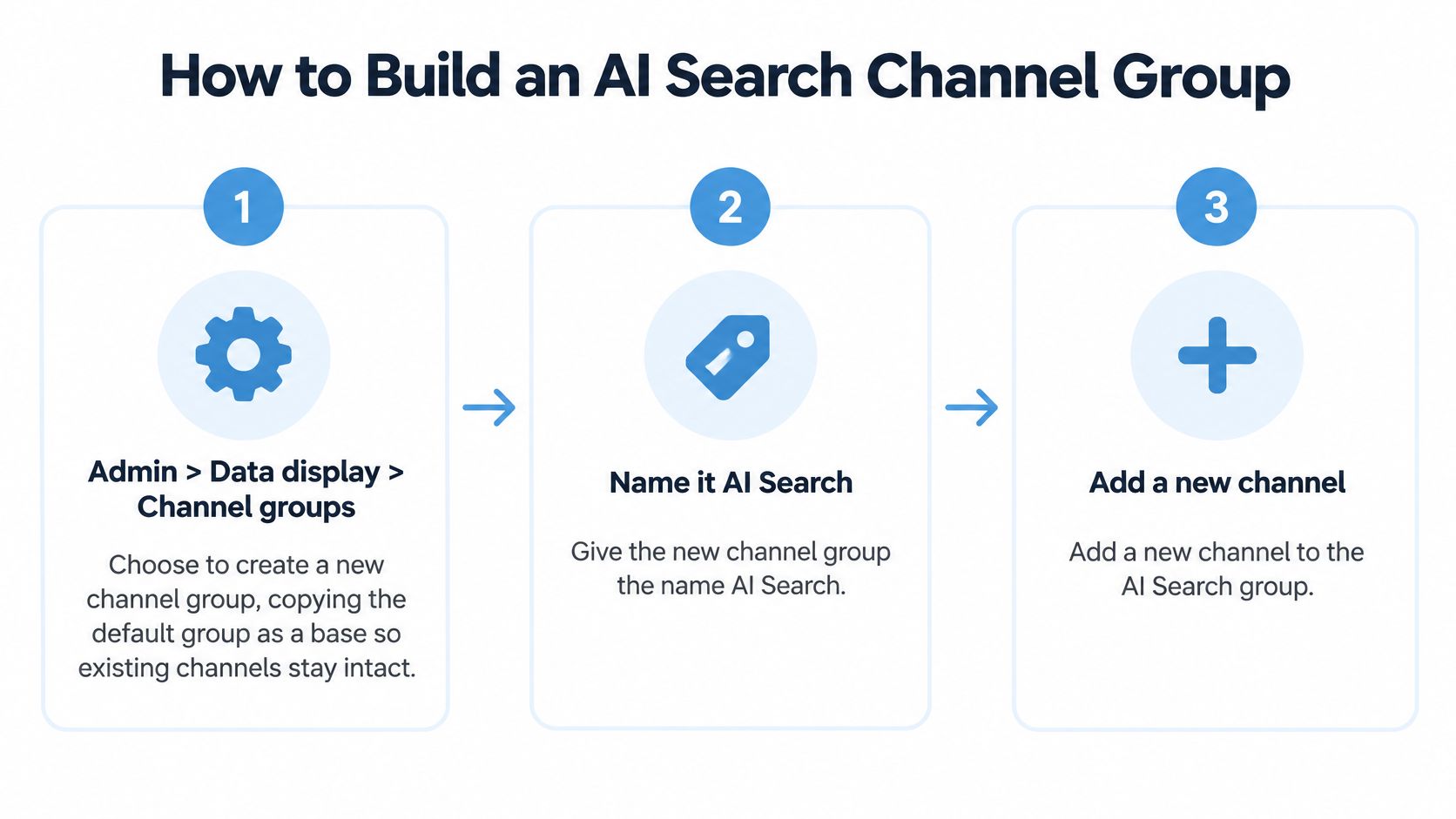
One limitation to plan around: custom channel groups can't currently be used in the Key events paths report, so keep the underlying Session source / medium dimensions available whenever you need to follow a path rather than count a channel.
Do not do this: adding chatgpt.com to Admin > Data streams > Configure tag settings > List unwanted referrals. The exclusion mechanism sets ignore_referrer=true, which strips the source from attribution entirely. Reserve exclusions for payment gateways and cross-domain services, never for an assistant you're trying to measure.
For links you control, tag them explicitly. A link you place yourself with utm_source=chatgpt&utm_medium=ai_referral and a campaign value describing the placement gives GA4 a deterministic source instead of a referrer it may never receive. If your content strategy around AI answers is still forming, our guide to generative engine optimisation covers what makes a page quotable in the first place.
Run a quarterly check that new assistant hostnames still match the regex. The list of tools people use to ask questions grows faster than most channel group rules do.
Set Lead Key Events and Compare Them by Source
Mark the lead action, not the click
Go to Admin > Data display > Events, find the event that represents a completed enquiry, and mark it as a key event. For most UK lead-generation accounts that's generate_lead, a form_submit that only fires on success, or a thank-you-page event. Google's guidance on event-scoped traffic source dimensions is clear that credit is attributed to the source of the session that triggered the key event, while source and medium for non-key events show as (not set).
A page view is not a lead. Neither is a button click. If you mark either as a key event, ChatGPT, Perplexity and Copilot will appear to generate conversions sales never received, and you'll spend the next quarter explaining a number that was wrong from the start.
Check the event fires once per completed enquiry, and check the enquiry reached your CRM. Filter test submissions out of reporting with a test flag rather than deleting them, so the audit trail survives.
Read the comparison in the right order
Back in Traffic acquisition, add the key events column and compare by Session source / medium or by the AI Search channel. Read four columns together, in this order: sessions, engagement rate, key event rate, then key events. Sessions tell you the size of the entrance, engagement rate tells you whether the page matched the question, key event rate tells you whether the traffic converts, and the raw count tells you whether any of it is material yet.
Add Landing page + query string as a secondary dimension. A 2026 roundup of UK AI search statistics reported that 58.8% of ChatGPT referral traffic landed on homepages, which is a problem when the assistant answered a specific product or service question. Check whether deep pages are reached at all, or whether every AI visit hits the front door and stalls.
A key event proves the session converted. It doesn't prove the lead was worth having, and it doesn't prove the revenue was incremental.
Save the AI Search view as an Exploration and use it as your weekly working report. If the key events are marked correctly but the numbers look flat, the gap is usually in how conversion tracking is configured rather than in the traffic itself.
Catch AI Visits That Arrive as Direct
Not every AI visit carries a referrer, and the ones that don't are the measurement problem worth solving. Three routes lose the source: someone clicks through from the ChatGPT mobile app, someone copies your URL into a different browser, or someone asks on Tuesday and types your domain into the address bar on Thursday. All three land as Direct, and none of them looks like AI in a GA4 table.
The scale of what sits behind that blind spot is why it matters. Ofcom's Adults Media Use and Attitudes report reported that 31% of UK adults had used AI tools such as ChatGPT or Gemini in 2025, up from 23% in 2023, and that ChatGPT generated 1.8 billion UK visits in the first eight months of 2025, against 368 million in the same period of 2024.
The honest counterweight is that AI referrals are still a small share of most accounts. A GA4 community thread on LLM traffic attribution cites an analysis of 101,574 websites putting AI platforms at 0.32% of visits globally in early 2026, with UK AI referral traffic at 0.1565% of total website traffic. A thin ChatGPT row is not proof of thin AI influence. It's proof that the row only counts what arrives labelled.
Test it in Realtime, then accept the limit
Ask ChatGPT a question it answers with a link to your site, click that link, and open Reports > Realtime in GA4. You should see chatgpt.com as the source within a minute or two. Record the date and result somewhere you'll find it again, because you'll be asked how you know the setup works.
What the test misses is the point. It won't capture the app click, the copied link, the person who reads your page on a phone and buys on a work laptop two days later. A useful sense check: Direct traffic to deep service or category pages, rising with no matching campaign or brand activity behind it, often means AI-influenced visits rather than genuine direct loyalty.
Add the question instead of guessing
The fix is a "How did you hear about us?" field on every enquiry form. Make it required, keep it non-leading by placing it neutrally, and use a fixed option list: Google search, ChatGPT, Perplexity, Microsoft Copilot, Google Gemini, recommendation, offline event, and Other, with optional free text for anything that doesn't fit.
Store the answer on the CRM record and pass only the category to GA4 as an event parameter on the completed lead event. Never send names, email addresses, telephone numbers or any other personal data into an event parameter.
Say a prospect asks an assistant about suppliers on a Tuesday, copies the URL to a laptop on Thursday, and enquires that afternoon. GA4 records Direct. The CRM records ChatGPT. That record is your only reliable evidence of discovery, and it costs one form field and a dropdown to collect.
For the full picture of which channel gets credit when a journey involves several touchpoints, it helps to understand how attribution modelling works before you rewrite any channel definitions.
Report AI Search Leads and Confirm the Setup
A board report can show Direct generating an enquiry while the CRM records ChatGPT as the discovery source. Keep both records visible. Reconcile four views rather than presenting one inflated AI lead total:
| Data source | What it measures | Limitation to state |
|---|---|---|
| GA4 AI Search channel | Sessions and key events from identifiable AI clicks | Misses visits where no AI referrer survives |
| GA4 key events by source | Lead events attributed to the selected source dimension | Does not establish revenue or lead quality |
| CRM self-reported field | Leads where the prospect names the assistant | Depends on recall and option wording |
| Overlap view | Enquiries recorded in both datasets | Requires reconciliation; totals need not match |
The overlap prevents double-counting. An enquiry recorded against an AI referral in GA4 and an assistant in the CRM has supporting evidence from both systems. A CRM-only AI lead may have arrived as Direct, so retain its recorded session source alongside its reported discovery source.
A GA4-only lead needs investigation. It could reflect a missing CRM record, an unanswered discovery question or an incorrectly fired event. Do not automatically count it as qualified pipeline or assume it never reached sales.
Keep counts visible when volumes are small. Report enquiries, qualified leads and closed clients separately, using the same reporting period. Explain how attribution modelling affects channel credit when paid search, Direct and AI discovery appear in the same journey.
The proportion of UK businesses with 10 or more employees using AI rose from around 12% in late 2023 to around 35% in June 2026, with large language models at 18%, according to the ONS analysis of AI in UK businesses. That context supports measuring AI discovery, but it does not establish how many enquiries it generates for your business.
Wording for the board report
Keep these statements separate:
- What GA4 identifies. Sessions and key events attributed to identifiable assistant referrals, including chatgpt.com, perplexity.ai, copilot.microsoft.com and gemini.google.com.
- What prospects say. Self-reported AI discovery, including enquiries whose GA4 session source is Direct.
- What the CRM confirms. Qualified leads and closed clients associated with those enquiries, with overlapping records counted once.
Reporting line: "We report identifiable AI referrals and self-reported AI discovery separately, reconcile overlapping enquiries monthly, and show qualified leads and closed clients from the CRM."
Avoid presenting the two measures as a statistical range: neither necessarily provides an upper or lower bound. They answer different questions about the journey.
With 59% of UK adults having used generative AI in the previous three months in 2025/2026, according to the DSIT Public Engagement Survey, self-reported discovery deserves a place in reporting. Review response options quarterly for neutral wording and consistent categories. Changes to the list can affect comparisons between reporting periods.
Pre-report checklist
- Confirm the AI Search channel group captures the intended assistant sources. In Reports > Acquisition > Traffic acquisition, select the custom channel group and check the reporting date range.
- Confirm the lead event is a key event in Admin > Data display > Events. Check that each completed enquiry triggers it once and exclude test submissions from reporting.
- Confirm the form field is required and passes only the discovery category to GA4, with no personal data in event parameters.
- Repeat the Realtime test using a live assistant link. Record the date, observed source and lead-event outcome. A missing referrer remains a measurement limitation.
- Reconcile GA4 key events against CRM leads monthly. Separate overlapping records, CRM-only AI discovery and GA4-only events, then explain discrepancies without changing totals to force agreement.
If discrepancies remain, bring the GA4 property, Google Ads conversion actions and CRM lead statuses to the PPC Geeks Google Ads audit and strategy review. Its free, expert audit examines tracking and attribution gaps, wasted spend and issues that make account performance look cleaner than it is.
Small AI referral volumes make individual discrepancies worth checking. PPC Geeks has a specialised tracking team working on clients' conversion tracking, alongside custom reports showing what is happening and why in real time. Keep the reporting focused on what makes money, with Direct-classified AI discovery visible rather than reassigned without evidence.